
MORAYELEC ME203W
MORAYELEC ME203W Ultrasonic Liquid Level Sensor User Manual
Model: ME203W | Brand: MORAYELEC
1. Introduction
The MORAYELEC ME203W is an advanced ultrasonic liquid level sensor designed for remote monitoring of liquid levels in various tanks. It integrates seamlessly with the Tuya/Smartlife application, providing real-time data and customizable alerts directly to your smartphone. This manual provides comprehensive instructions for the proper installation, operation, and maintenance of your ME203W sensor to ensure optimal performance and longevity.
2. Product Overview
2.1 Key Features
- Liquid Level Measurement Range: Accurately measures liquid levels from 0.1 to 10 meters, suitable for diverse tank sizes.
- Power Adapter: Input 100-240V AC, Output 5V DC, ensuring broad compatibility.
- App Compatibility: Works with Tuya Smart, Smart Life, Amazon Alexa, and Google Assistant for smart home integration.
- Wireless Connectivity: Connects to a 2.4GHz Wi-Fi network, with a typical range of 30-50 meters without significant obstacles.
- Durability & Reliability: IP65 waterproof rating, CE, RoHS, and Reach certifications ensure safety and robust performance.
- Remote Monitoring: Check tank levels anytime, anywhere via your smartphone.
- Customizable Alerts: Receive notifications for full or low liquid levels, with alarm thresholds configurable through the app.
- Multi-Tank Monitoring: One application can monitor up to 10 sensors simultaneously.
- Versatile Applications: Suitable for water, oil, septic tanks, mixed mediums, and chemical mediums.
- Operating Temperature: Functions reliably in temperatures ranging from -30℃ to +70℃.
2.2 Components
The MORAYELEC ME203W package typically includes:
- Ultrasonic Liquid Level Sensor Unit
- Power Adapter (100-240V AC input, 5V DC output)
- Mounting Nut and Gasket
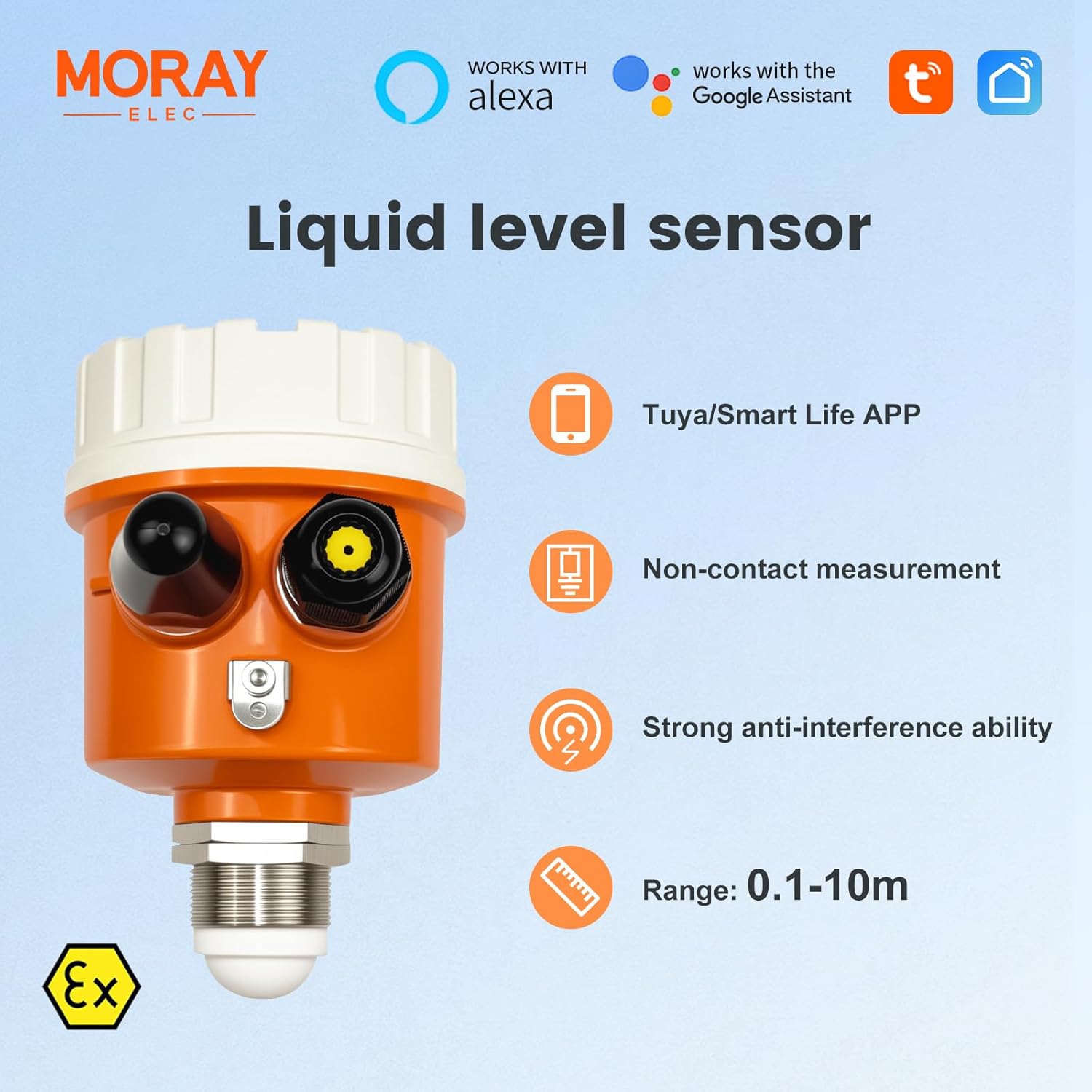
Image: A close-up view of the MORAYELEC ME203W sensor, detailing its main features: Tuya/Smart Life APP integration, non-contact measurement technology, strong anti-interference capabilities, and a measurement range of 0.1 to 10 meters.
3. Specifications
| Specification | Value |
|---|---|
| Voltage | 5 Volts (DC) |
| Control Method | Remote (via App) |
| Mounting Type | Tank Mount |
| Maximum Range | 10 Meters |
| Sensor Technology | Ultrasonic Sensor |
| Manufacturer | MORAYELEC |
| Part Number | ME203W |
| Product Dimensions | 15.01 x 15.01 x 11 cm; 848.22 g |
| Item Model Number | Tank Level Sensor |
| Wattage | 100 milliamp_hours |
| Item Package Quantity | 1 |
| Included Components | Input Power by Adapter (110-240V AC support) |
| Item Weight | 848 g |
| Colour | Orange |
| Power Source | Corded Electric |
| Compatible Devices | Smartphone, Tablet |
4. Setup and Installation
4.1 Pre-Installation Checklist
- Ensure a stable 2.4GHz Wi-Fi network is available at the sensor's installation location.
- Verify access to a 100-240V AC power outlet for the power adapter.
- Download and install the Tuya Smart or Smart Life application on your smartphone or tablet.
4.2 Physical Installation Steps
Follow these steps to physically install the sensor on your tank:
- Drill Hole: Drill a hole in the tank cover that is at least 33mm in diameter. This size is necessary to accommodate the sensor probe.
- Insert Sensor: Carefully place the sensor probe into the drilled hole in the tank cover.
- Secure Sensor: Tighten the provided mounting nut from underneath the tank cover to secure the sensor in place. Ensure a snug fit to prevent leaks.
- Vertical Alignment: Confirm that the sensor is installed vertically and perpendicular to the liquid surface for accurate readings.
- Connect Power: Connect the power adapter to the sensor and plug it into a suitable power outlet.
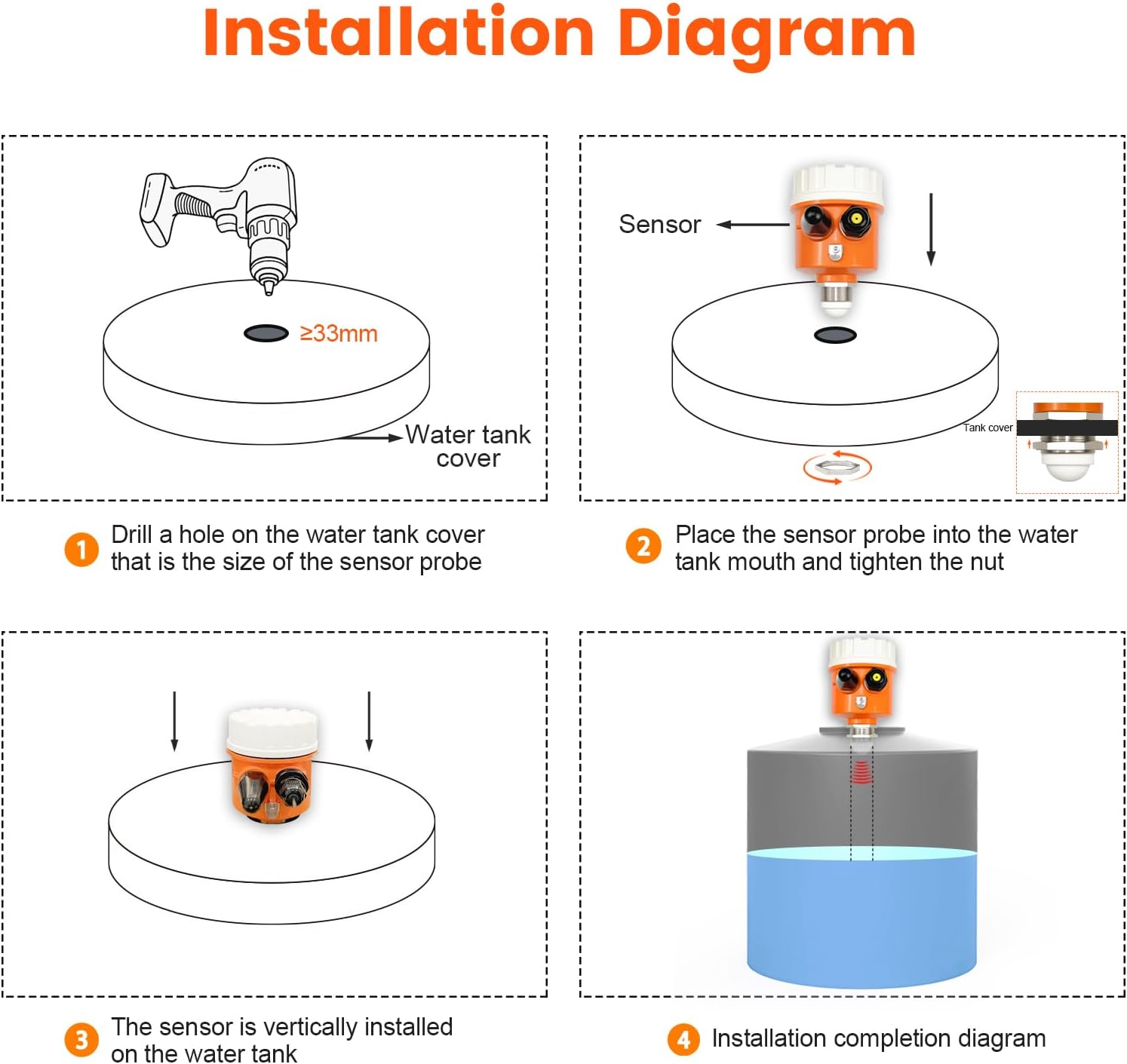
Image: A visual guide detailing the installation process: 1. Drill a hole (≥33mm) in the tank cover. 2. Place the sensor probe into the tank mouth and tighten the nut. 3. Ensure the sensor is vertically installed. 4. Diagram showing completed installation.
4.3 Important Installation Considerations
- Perpendicular Placement: Always hold the sensor perpendicular to the liquid surface. Incorrect angles can lead to inaccurate readings.
- Avoid Water Inlets: Install the sensor away from any water inlets or turbulent areas to prevent 'pseudo-echoes' that can interfere with measurements.
- Distance from Bulkheads: Ensure the sensor is not installed too close to tank bulkheads or walls. Proximity to these surfaces can cause strong pseudo-echoes and affect accuracy.

Image: Important installation guidelines are presented: The sensor must be held perpendicular to the liquid, installed away from water inlets to prevent pseudo-echoes, and positioned clear of bulkheads to avoid strong pseudo-echo interference.
5. Operating Instructions
5.1 App Connection and Pairing
- Download App: If you haven't already, download and install the 'Tuya Smart' or 'Smart Life' app from your device's app store.
- Register/Log In: Open the app and register a new account or log in with an existing one.
- Add Device: Follow the in-app instructions to add a new device. Typically, this involves selecting 'Add Device' or the '+' icon, choosing the sensor category, and following the Wi-Fi pairing prompts. Ensure your phone is connected to the same 2.4GHz Wi-Fi network.
- Confirmation: Once successfully paired, the sensor will appear in your app's device list.
5.2 Monitoring Liquid Levels
After successful pairing, you can monitor your tank's liquid level remotely:
- Real-time Data: Open the sensor's interface in the app to view current liquid level ratio, depth, status (Normal, Low, Full), temperature, and sensor power.
- Historical Data: The app provides graphs and logs to review liquid level trends over days, months, or years.

Image: This image illustrates the MORAYELEC ME203W sensor installed in a tank, wirelessly transmitting liquid level data to a smartphone application. The app shows liquid level ratio, depth, status, temperature, and sensor power.

Image: Three smartphone screens demonstrate the app's alert functions: a normal liquid level display, a 'Lower alarm' indicating low liquid, and a 'Full alarm' for a full tank. The maximum range of 10.0M is also highlighted.
5.3 Setting Alerts
The app allows you to set custom alerts for specific liquid levels:
- Navigate to the sensor's settings within the Tuya Smart or Smart Life app.
- Locate the 'Alarm Settings' or similar option.
- Set your desired thresholds for 'Low Level Alarm' and 'Full Level Alarm'.
- Ensure app notifications are enabled on your smartphone to receive timely alerts.
6. Maintenance
To ensure the continued accuracy and reliability of your MORAYELEC ME203W sensor, perform the following maintenance tasks:
- Regular Inspection: Periodically check the sensor unit for any physical damage, debris, or buildup on the sensor surface.
- Clean Sensor Surface: If necessary, gently clean the sensor's ultrasonic transducer surface with a soft, damp cloth. Avoid abrasive cleaners or tools that could scratch the surface.
- Power Connection: Verify that the power adapter connection to the sensor and the power outlet is secure.
- App Updates: Keep your Tuya Smart or Smart Life application updated to the latest version to benefit from new features and bug fixes.
- Environmental Check: Ensure the operating environment remains within the specified temperature range (-30℃ to +70℃).
7. Troubleshooting
If you encounter issues with your MORAYELEC ME203W sensor, refer to the following common problems and solutions:
7.1 No Wi-Fi Connection or Offline Status
- Check Wi-Fi Network: Ensure your Wi-Fi router is powered on and broadcasting a 2.4GHz network. The sensor does not support 5GHz Wi-Fi.
- Signal Strength: Verify the sensor is within the effective range of your Wi-Fi router (typically 30-50 meters without obstacles). Relocate the sensor or router if necessary, or consider a Wi-Fi extender.
- Restart Devices: Try restarting both the sensor (by unplugging and replugging the power adapter) and your Wi-Fi router.
- Re-pair Sensor: If the issue persists, attempt to re-pair the sensor with the app following the initial setup instructions.
7.2 Inaccurate or Erratic Readings
- Installation Position: Re-check that the sensor is installed vertically and perpendicular to the liquid surface. Refer to Section 4.3 for important installation considerations.
- Obstructions: Ensure there are no physical obstructions directly below the sensor that could interfere with the ultrasonic beam.
- Liquid Surface: Excessive turbulence or foam on the liquid surface can affect accuracy. The sensor performs best with relatively calm liquid surfaces.
- Sensor Cleanliness: Clean the sensor's transducer surface as described in the Maintenance section.
7.3 No Alerts Received
- App Notification Settings: Verify that notifications are enabled for the Tuya Smart or Smart Life app in your smartphone's operating system settings.
- Alarm Thresholds: Double-check that the low and full-level alarm thresholds are correctly configured within the app and are appropriate for your tank.
- Sensor Connectivity: Ensure the sensor is actively connected to Wi-Fi and reporting data to the app.
8. Warranty and Support
MORAYELEC provides a 1-year warranty for the ME203W Ultrasonic Liquid Level Sensor from the date of purchase. This warranty covers manufacturing defects and ensures long-term service.
For technical support, warranty claims, or any questions regarding your product, please contact MORAYELEC customer service through the retailer where you purchased the product or refer to the official MORAYELEC website for contact information.
Related documentsME203W

Ask a question about this manual
Ask about setup, troubleshooting, compatibility, parts, safety, or missing instructions. Manuals+ will review the question and use this page’s manual context to help answer it.