
DEGGE CAD08-OR-BR
DEGGE 10000mAh Compressed Air Duster User Manual
Model: CAD08-OR-BR
Brand: DEGGE
1. Introduction
Thank you for choosing the DEGGE 10000mAh Compressed Air Duster. This powerful and versatile cordless tool is designed for efficient and eco-friendly cleaning of various items, including electronics, vehicles, and household surfaces. With its high-speed turbo motor, adjustable settings, and long-lasting battery, it provides a superior alternative to traditional canned air. Please read this manual thoroughly before use to ensure safe and optimal performance of your device.
2. Safety Information
To prevent injury or damage to the device, please observe the following safety precautions:
- Do not immerse the device in water or other liquids.
- Keep the device away from open flames, heat sources, and flammable materials.
- Do not disassemble, modify, or attempt to repair the device yourself. Contact qualified personnel for service.
- Keep out of reach of children and pets.
- Use in a well-ventilated area.
- Avoid directing airflow directly at eyes, skin, or delicate internal components of electronics from close range.
- Ensure the charging cable is undamaged before use.
- Do not block the air intake or outlet during operation.
3. Package Contents
Please check the box for the following items:
- 1 x DEGGE Compressed Air Duster Unit
- 1 x USB Type-C Charging Cable
- 1 x User Manual (This document)
- 9 x Cleaning Kit Accessories (various brushes and nozzles)

Image: The DEGGE Compressed Air Duster unit shown with its various cleaning brushes and nozzles, and the charging cable.
4. Product Overview
Familiarize yourself with the key features of your DEGGE Compressed Air Duster:
- Super-Power Turbo Motor: Delivers up to 180,000 RPM for powerful airflow.
- 10,000mAh Battery: Provides extended operating time.
- 4 Adjustable Speed Settings: Allows control over airflow intensity for various tasks.
- HD Display Screen: Shows remaining battery percentage and current wind gear.
- 2 Built-in LED Lights: Illuminates dark areas for precise cleaning and can function as an emergency flashlight.
- Strong Magnetic Nozzle: Ensures stable attachment and prevents accidental detachment.
- Compact and Portable Design: Lightweight and easy to carry for both indoor and outdoor use.

Image: Illustration highlighting the powerful performance metrics of the air duster, including its 180,000 RPM motor, 200G wind pressure, and 80 M/S wind speed.

Image: A detailed view of the air duster's magnetic nozzle, designed for stable attachment, and its high-definition display screen, which clearly shows power and wind gear.
5. Setup
5.1 Charging the Device
Before first use, fully charge the air duster. Use the provided USB Type-C charging cable.
- Connect the Type-C end of the charging cable to the charging port on the air duster.
- Connect the USB-A end of the charging cable to a compatible USB power adapter (e.g., wall charger, computer USB port).
- The display screen will indicate charging status. A full charge takes approximately 2.5 hours.

Image: The air duster being charged via its Type-C port, illustrating the 10,000mAh battery capacity and the quick 2-hour charging time.
5.2 Attaching Nozzles
Select the appropriate nozzle or brush from the cleaning kit for your task. The nozzles attach magnetically to the air outlet.
- Align the nozzle with the air outlet of the duster.
- The magnetic connection will secure the nozzle in place. Ensure it is firmly attached before operation.
6. Operating Instructions
6.1 Power On/Off
To turn the device on, press and hold the power button for 2 seconds. To turn off, press and hold the power button again for 2 seconds.
6.2 Adjusting Speed Settings
The air duster features 4 adjustable speed settings. Short press the power button to cycle through the speeds:
- Gear 1: 50,000 RPM (for delicate cleaning, e.g., keyboards)
- Gear 2: 80,000 RPM (for general dusting, e.g., pet drying)
- Gear 3: 130,000 RPM (for moderate cleaning, e.g., car vents)
- Gear 4: 180,000 RPM (maximum power for heavy-duty tasks, e.g., snow clearing)

Image: Visual representation of the four adjustable speed settings, showing their application from delicate tasks like keyboard cleaning to more demanding ones such as clearing snow.
6.3 Using LED Lighting
The device has two built-in LED lights for illumination. Press the light button to cycle through modes:
- One-click: Constant Light
- Two-clicks: Flash Light
- Three-clicks: SOS Light
- Long press: Soft Light

Image: The air duster's integrated LED lights are demonstrated, showing their utility for illuminating dark spaces during cleaning and their function as a portable emergency flashlight.
6.4 Display Screen Information
The HD display screen provides real-time information:
- Battery Percentage: Indicates the remaining power.
- Wind Gear: Shows the currently selected speed setting.
6.5 Wide Applications
The DEGGE Compressed Air Duster is suitable for a variety of cleaning and drying tasks:
- Computer & Keyboard Cleaning: Effectively removes dust and debris from intricate components.
- Car Interior Cleaning: Cleans vents, dashboards, and tight spaces.
- Home Gaps Cleaning: Reaches dust in hard-to-access areas like window sills and furniture crevices.
- Pet Drying: Gentle yet powerful airflow for drying pet fur.
- Camping & Outdoor Use: Can inflate air mattresses, aid in fire-starting, and boost BBQ flames.
- Yard & Snow Clearing: Helps clear leaves and light snow from surfaces.

Image: A composite image illustrating the diverse applications of the air duster, including cleaning electronics, car interiors, household gaps, assisting with carpentry, drying pets, and inflating air cushions.
7. Maintenance
7.1 Cleaning the Device
To maintain optimal performance and extend the lifespan of your air duster:
- Ensure the device is turned off and unplugged before cleaning.
- Wipe the exterior of the duster with a soft, dry cloth.
- Use a small brush (from the cleaning kit) to gently remove any dust or debris from the air intake and outlet.
- Do not use harsh chemicals, abrasive cleaners, or immerse the device in water.
7.2 Storage
When not in use, store the air duster in a cool, dry place, away from direct sunlight and extreme temperatures. Keep it out of reach of children.
8. Troubleshooting
If you encounter issues with your DEGGE Compressed Air Duster, refer to the following common problems and solutions:
| Problem | Possible Cause | Solution |
|---|---|---|
| Device does not turn on. | Low battery; Power button not pressed correctly. | Charge the device fully; Press and hold the power button for 2 seconds. |
| Weak airflow. | Low battery; Incorrect speed setting; Blocked air intake/outlet. | Recharge the device; Cycle to a higher speed setting; Clear any obstructions from air intake/outlet. |
| LED lights not working. | Low battery; Light button not pressed correctly. | Charge the device; Press the light button to cycle through modes. |
| Nozzle falls off easily. | Nozzle not properly aligned or attached. | Ensure the nozzle is correctly aligned and firmly attached to the magnetic outlet. |
If the problem persists after trying these solutions, please contact DEGGE customer support for assistance.
9. Specifications
| Feature | Specification |
|---|---|
| Brand | DEGGE |
| Model Name | CAD08-OR-BR |
| Battery Capacity | 10,000mAh |
| Max RPM | 180,000 RPM |
| Wind Pressure | Up to 200G |
| Wind Speed | Exceeding 80 m/s |
| Charging Time | Approx. 2.5 hours (Type-C Fast Charging) |
| Runtime | Up to 60 minutes (on lowest speed setting) |
| Number of Speeds | 4 |
| Item Weight | 1.15 pounds (approx. 315g) |
| Package Dimensions | 7.87 x 5.43 x 1.93 inches |
| Form Factor | Handheld |
| Is Cordless? | Yes |
| Included Components | Charging Cable, User Manual, Cleaning Kit |
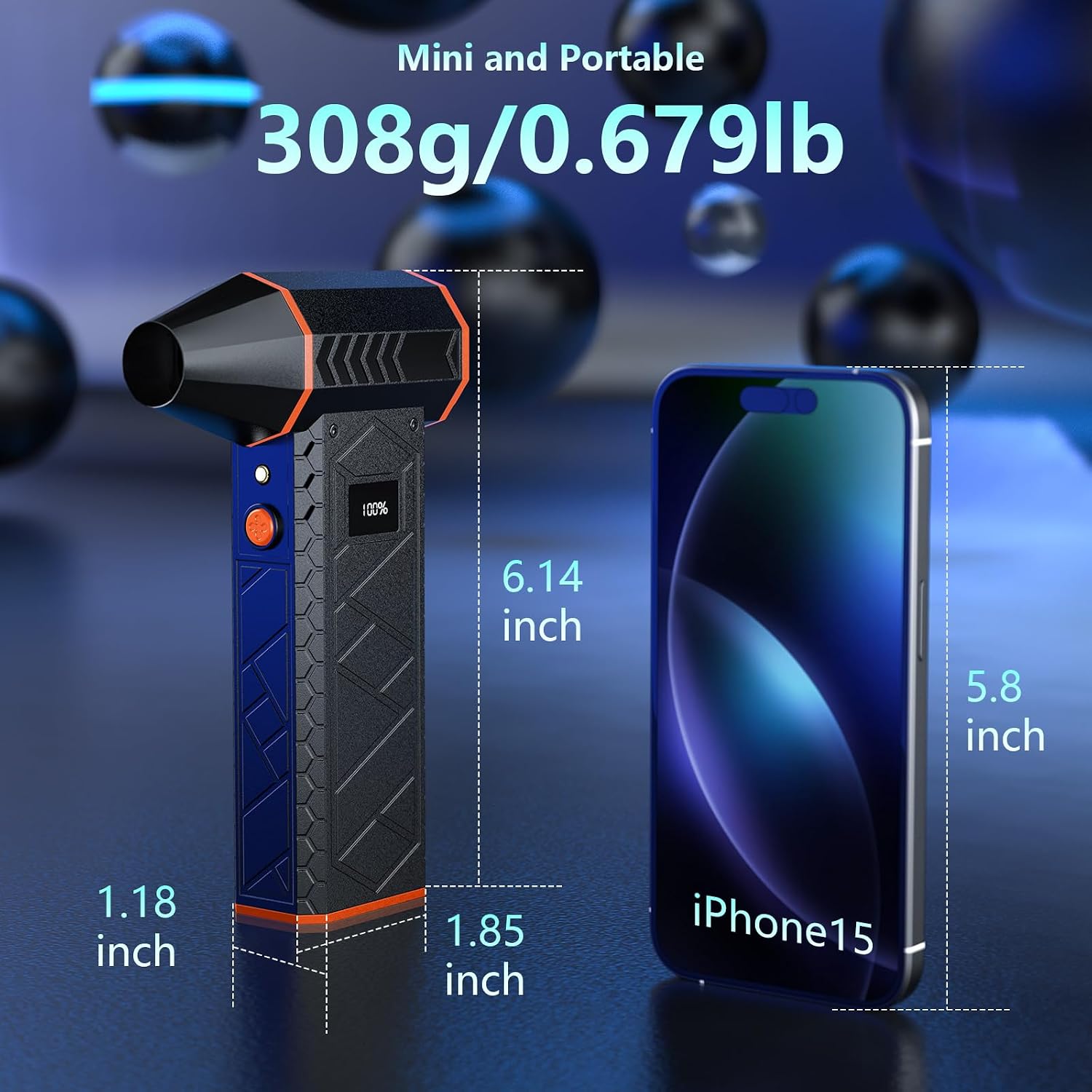
Image: The compact and portable design of the air duster is highlighted, showing its dimensions and comparing its size to a smartphone for scale.
10. Warranty and Support
For warranty information or technical support, please contact DEGGE customer service. Refer to the product packaging or the official DEGGE website for contact details. Please have your model number (CAD08-OR-BR) and purchase information ready when contacting support.
Ask a question about this manual
Ask about setup, troubleshooting, compatibility, parts, safety, or missing instructions. Manuals+ will review the question and use this page’s manual context to help answer it.