
ANRAN Q04 & F2M3
ANRAN Q04 & F2M3 Solar Security Camera System User Manual
Model: Q04 (2-pack) & F2M3
Brand: ANRAN
Introduction
This user manual provides comprehensive instructions for the installation, operation, and maintenance of your ANRAN Q04 Solar Security Cameras and ANRAN F2M3 Solar Door Light Security Camera. These devices are designed to provide reliable outdoor surveillance with the convenience of solar power, offering enhanced security for your property.

Image: Overview of the ANRAN Q04 solar security cameras and the ANRAN F2M3 solar door light security camera included in the system.
Package Contents
Please verify that all items listed below are present in your package:
- 2 x ANRAN Q04 Solar Security Cameras (with integrated solar panels)
- 1 x ANRAN F2M3 Solar Door Light Security Camera (with separate solar panel)
- Mounting Brackets and Screws for all cameras
- USB Charging Cables
- User Manual (this document)
Product Overview
Familiarize yourself with the components of your ANRAN security camera system.
ANRAN Q04 Solar Security Camera
- Integrated Solar Panel: For continuous power supply.
- Camera Lens: Captures video footage.
- PIR Sensor: Detects motion.
- Infrared LEDs/Spotlights: For night vision and color night vision.
- Microphone & Speaker: For two-way audio communication.
- Antennas: For Wi-Fi connectivity.
- Mounting Base: For secure installation.

Image: The ANRAN Q04 camera demonstrating its pan and tilt range, along with a depiction of its live view on a mobile device.
ANRAN F2M3 Solar Door Light Security Camera
- Camera Lens: Captures video footage.
- PIR Sensor: Detects motion.
- Integrated Light: 200-lumen motion-activated light.
- Microphone & Speaker: For two-way audio communication.
- Separate Solar Panel: Connects to the camera for power.
- Mounting Base: For secure installation.

Image: The ANRAN F2M3 camera highlighting its features including motion detection, integrated light, and audio capabilities.
Installation
Proper installation ensures optimal performance and longevity of your security cameras.
General Installation Tips
- Choose a location with ample direct sunlight for the solar panels.
- Ensure the camera is within range of your 2.4GHz Wi-Fi network.
- Mount cameras at a height that provides a clear view of the desired surveillance area, typically 7-10 feet (2-3 meters) above ground.
- Avoid placing cameras directly facing strong light sources or reflective surfaces.
ANRAN Q04 Camera Installation
- Select Location: Identify a suitable outdoor location that receives consistent sunlight and has good Wi-Fi signal.
- Mark Drilling Points: Use the mounting bracket as a template to mark the screw holes on the wall or surface.
- Drill Holes: Drill pilot holes at the marked points. Insert wall anchors if mounting on masonry or stucco.
- Secure Bracket: Attach the mounting bracket to the wall using the provided screws.
- Attach Camera: Securely attach the Q04 camera to the mounting bracket. Adjust the angle of the camera and its integrated solar panel for optimal sun exposure and viewing angle.

Image: A user installing the ANRAN Q04 camera, highlighting its straightforward installation process.
ANRAN F2M3 Light Camera Installation
- Select Location: Choose a location near a door or entry point, ensuring the separate solar panel can be positioned to receive maximum sunlight.
- Mount Camera: Mark and drill holes for the F2M3 camera's mounting base. Secure the base and attach the camera.
- Mount Solar Panel: Position the separate solar panel in a sunny spot, ideally within cable reach of the camera. Mark and drill holes, then secure the solar panel bracket.
- Connect Solar Panel: Connect the solar panel cable to the F2M3 camera.

Image: A user installing the ANRAN F2M3 camera, emphasizing its ease of installation and Wi-Fi connectivity.
Setup and Connectivity
Before operating your cameras, you need to set them up with the ANRAN mobile application.
1. Download the ANRAN App
Search for "ANRAN" in your mobile device's app store (App Store for iOS or Google Play Store for Android) and download the official ANRAN application.
2. Create an Account
Open the ANRAN app and follow the on-screen instructions to register a new account or log in if you already have one.
3. Add Your Camera
- Tap the "+" icon in the app to add a new device.
- Select your camera model (Q04 or F2M3) from the list.
- Power on your camera. Ensure it is in pairing mode (refer to camera's LED indicator for status).
- Connect to 2.4GHz Wi-Fi: The cameras only support 2.4GHz Wi-Fi networks. Enter your Wi-Fi network name (SSID) and password into the app.
- Scan QR Code: The app will generate a QR code. Hold your camera's lens approximately 6-8 inches (15-20 cm) in front of your phone screen until you hear a confirmation sound from the camera.
- Complete Setup: Follow any remaining prompts in the app to name your camera and finalize the setup process.
Operating Instructions
Once set up, you can control and monitor your cameras through the ANRAN app.
Live View and Playback
- From the app's home screen, tap on the desired camera to access its live view.
- Use the playback feature to review recorded events stored on the SD card (if installed) or cloud storage (subscription may be required).
Pan and Tilt Control (ANRAN Q04 Only)
The ANRAN Q04 camera offers a wide field of view with its pan and tilt capabilities.
- In live view, use the directional controls on the app interface to remotely rotate the camera 355 degrees horizontally (pan) and 90 degrees vertically (tilt).
Image: The ANRAN Q04 camera demonstrating its pan and tilt range, along with a depiction of its live view on a mobile device.
PIR Detection & Motion Activated Light (ANRAN F2M3 Only)
The F2M3 camera features intelligent motion detection and an integrated light.
- The Passive Infrared (PIR) sensor detects heat signatures, triggering recording and notifications.
- The 200-lumen light automatically activates upon motion detection, illuminating the area and deterring intruders.
- You can configure motion detection sensitivity and light activation settings within the ANRAN app.
Image: The ANRAN F2M3 camera highlighting its features including motion detection, integrated light, and audio capabilities.
Night Vision Modes (ANRAN Q04 & F2M3)
Both cameras offer multiple night vision options for clear monitoring in low-light conditions.
- Smart Mode: Automatically switches between infrared and color night vision based on detected motion or light conditions.
- Color Mode: Utilizes built-in spotlights to provide full-color video even in complete darkness.
- Infrared Mode: Uses infrared LEDs for black and white video in low light, conserving power.
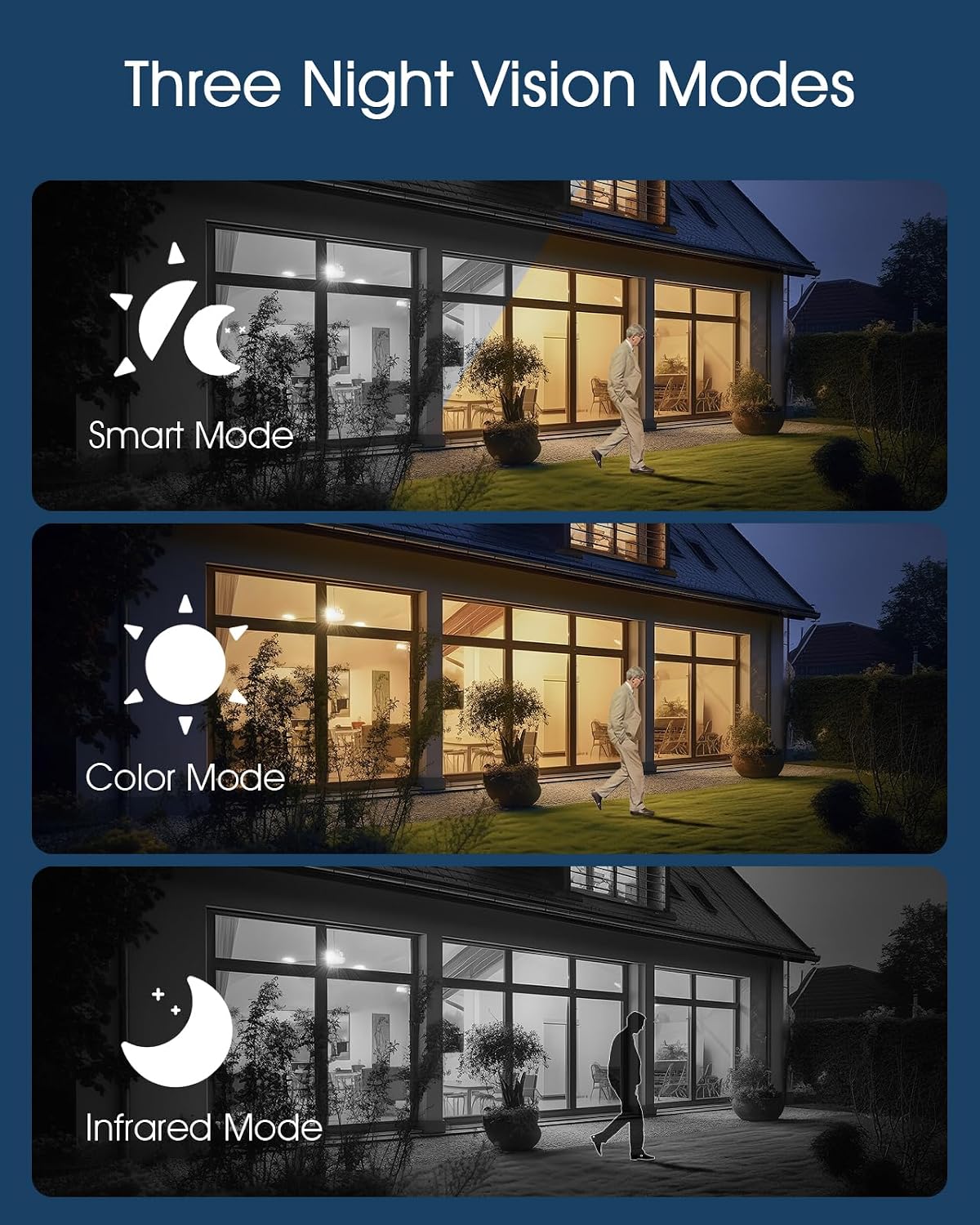
Image: Visual representation of the three night vision modes available on the cameras: Smart, Color, and Infrared.
Two-Way Audio
Communicate with visitors or deter unwanted guests using the built-in microphone and speaker.
- In live view, tap the microphone icon to speak through the camera. Tap again to end.
- The speaker allows you to hear audio from the camera's location.

Image: Demonstration of the two-way audio feature, showing communication between a user via the app and a person near the camera.
Remote Light Control (ANRAN F2M3 Only)
The ANRAN F2M3's integrated light can be controlled manually via the app.
- Access the F2M3 camera's settings in the ANRAN app to manually turn the light on or off, or adjust its brightness.

Image: Illustrates the solar charging efficiency, 360-degree lighting capability of the F2M3, and the 2K resolution of the cameras.
Maintenance
Regular maintenance ensures the optimal performance and longevity of your ANRAN security cameras.
- Cleaning Lenses and Solar Panels: Periodically wipe the camera lenses and solar panels with a soft, damp cloth to remove dust, dirt, and debris. This ensures clear video and efficient solar charging. Avoid abrasive cleaners.
- Battery Management: The solar panels are designed to keep the camera batteries charged. In periods of prolonged low sunlight, or if the camera is in a high-traffic area with frequent recordings, you may need to manually charge the camera using the provided USB cable.
- Firmware Updates: Check the ANRAN app regularly for firmware updates. Keeping your camera's firmware up-to-date ensures you have the latest features and security enhancements.
- Environmental Protection: The cameras are IP66 waterproof and dustproof, designed for outdoor use. However, extreme weather conditions (e.g., severe hail, prolonged sub-zero temperatures) may affect performance.

Image: The ANRAN Q04 camera demonstrating its IP66 waterproof and dustproof rating, suitable for various outdoor conditions.
Troubleshooting
If you encounter issues with your ANRAN security camera system, refer to the following common solutions:
| Problem | Possible Solution |
|---|---|
| Camera not connecting to Wi-Fi |
|
| Poor video quality or blurry images |
|
| Battery not charging via solar panel |
|
| Motion detection not working or too sensitive |
|
Specifications
Key technical specifications for the ANRAN Q04 and F2M3 cameras:
| Feature | ANRAN Q04 | ANRAN F2M3 |
|---|---|---|
| Resolution | 2K (3MP) | 2K (3MP) |
| Connectivity | 2.4GHz Wi-Fi | 2.4GHz Wi-Fi |
| Power Source | Integrated Solar Panel & Rechargeable Battery | Separate Solar Panel & Rechargeable Battery |
| Pan/Tilt | 355° Pan, 90° Tilt | Fixed Angle |
| Night Vision | Smart, Color, Infrared | Smart, Color, Infrared |
| Audio | Two-Way Audio | Two-Way Audio, 70db Siren |
| Light Output (F2M3 only) | N/A | 200 Lumens |
| Weather Resistance | IP66 Waterproof & Dustproof | IP66 Waterproof & Dustproof |
| Operating Temperature | -4°F to 140°F (-20°C to 60°C) | -4°F to 140°F (-20°C to 60°C) |
| ASIN | B0FDVZ77P5 | |
| Date First Available | April 11, 2025 | |
Warranty and Support
ANRAN products are designed for reliability and performance. For specific warranty details, please refer to the warranty card included with your product or visit the official ANRAN website.
For technical support, troubleshooting assistance, or any inquiries regarding your ANRAN security camera system, please contact ANRAN Customer Service through the contact information provided on the official ANRAN website or within the ANRAN mobile application.
Online Resources:
- ANRAN Official Website: www.anran-cctv.com
- ANRAN App: Check the "Help" or "About" section within the app for FAQs and support contact.
Ask a question about this manual
Ask about setup, troubleshooting, compatibility, parts, safety, or missing instructions. Manuals+ will review the question and use this page’s manual context to help answer it.