
1. Introduction and Overview
Thank you for choosing the HOMCOM Mobile Kitchen Island. This versatile kitchen cart features a foldable rubberwood countertop, integrated USB charging ports, and ample storage solutions including drawers, adjustable shelves, and a spice rack. Its mobile design with lockable wheels provides flexibility and convenience for any kitchen space.
This manual provides essential information for the safe assembly, operation, and maintenance of your new kitchen island. Please read it thoroughly before use and retain it for future reference.
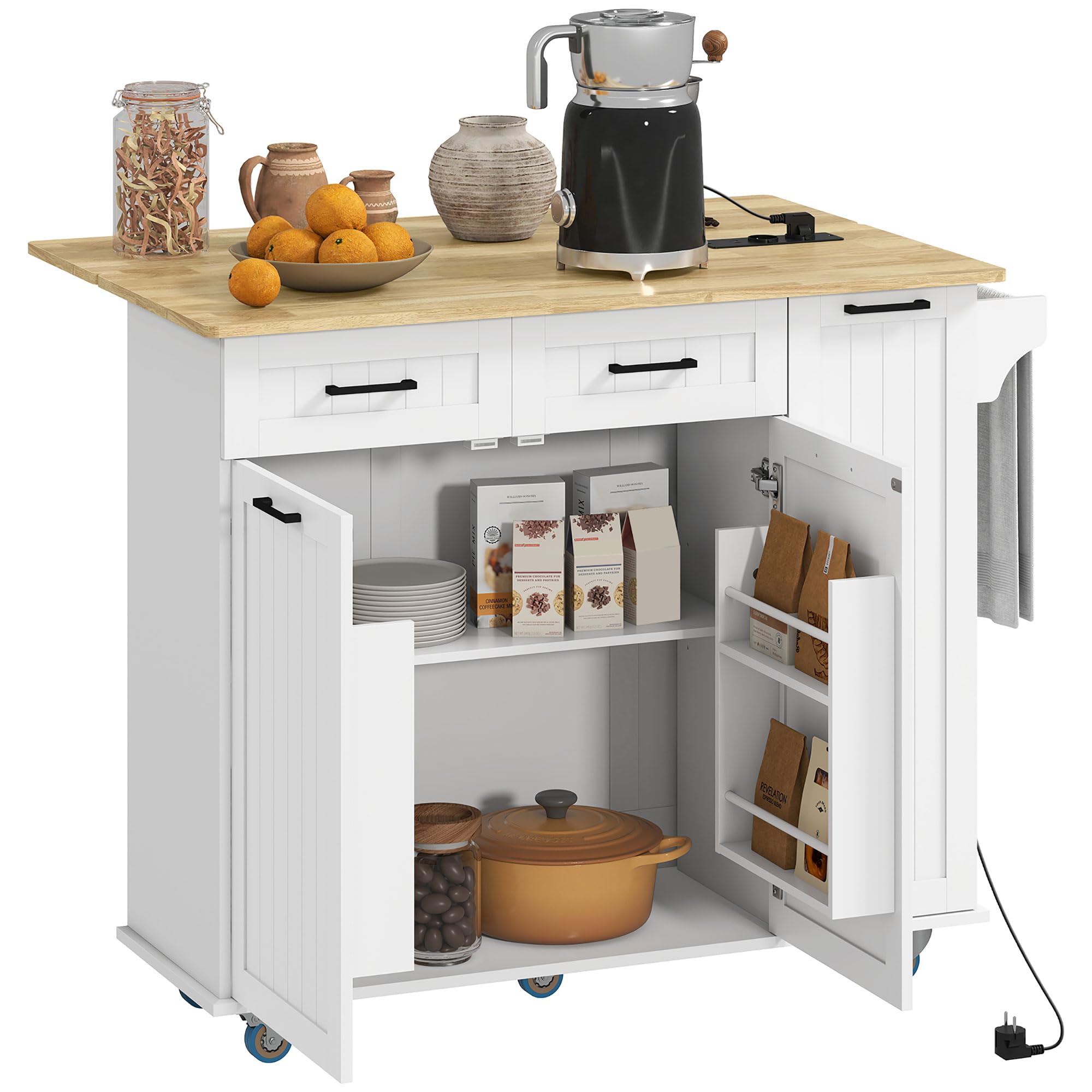
Image 1.1: The HOMCOM Mobile Kitchen Island in a kitchen setting, showcasing its storage and countertop space.
2. Safety Information
Please observe the following safety precautions to prevent injury or damage to the product:
- Always assemble the product on a clean, flat, and soft surface to avoid scratches.
- Ensure all screws and fasteners are securely tightened before use. Periodically check and re-tighten as necessary.
- Do not exceed the maximum weight capacity of 66 kg (total) and 20 kg (countertop).
- Keep children and pets away from the assembly area.
- When moving the island, ensure the foldable top is secured to prevent accidental unfolding.
- Always lock the wheels when the island is in a stationary position to prevent unintended movement.
- Do not expose the electrical outlets or USB ports to water or excessive moisture.
- Use only appropriate power cords and devices with the integrated charging station.
3. Package Contents
Before beginning assembly, verify that all parts and hardware are present. Refer to the detailed parts list included in your product packaging. If any components are missing or damaged, please contact customer support.

Image 3.1: The product is typically shipped in two packages. Ensure both are received before assembly.
4. Setup and Assembly
Assembly is required for this product. Please follow the step-by-step instructions provided in the separate assembly manual included in your package. It is recommended to have two people for assembly.
General Assembly Steps:
- Unpack all components and verify against the parts list.
- Attach the base and wheels to the main cabinet structure. Ensure two of the wheels with brakes are installed correctly.
- Assemble the cabinet body, including side panels, back panel, and internal dividers.
- Install the drawers and their slides.
- Attach the doors and adjust hinges for proper alignment.
- Install the adjustable shelves and the pull-out spice rack/storage module.
- Mount the rubberwood countertop, including the foldable extension.
- Integrate the USB charging station into the designated slot on the countertop.
- Attach the towel bar/handle.
- Perform a final check to ensure all connections are secure and the island is stable.

Image 4.1: Dimensional diagram of the kitchen island, useful for planning placement and understanding components during assembly.
5. Operating Instructions
5.1. Foldable Countertop
The kitchen island features a versatile rubberwood countertop with a foldable extension. To extend the countertop, gently lift the foldable section and secure it in place using the support mechanism. To fold it back, release the support and carefully lower the section until it rests flush with the main countertop. This allows for flexible use, expanding your workspace when needed and saving space when not in use.

Image 5.1: Demonstrates the countertop in both folded (left) and extended (right) positions, highlighting its space-saving and expansive features.
5.2. Integrated Charging Station
The island is equipped with a charging station featuring two AC outlets (220-250 V, 50/60 Hz), one USB port (5 V, 2.1 A), and one USB-C port. The power cable is 1.5 meters long. To use, simply plug the island's power cable into a wall outlet. You can then connect your small kitchen appliances, mobile devices, or other electronics directly to the integrated ports.

Image 5.2: Detail of the charging station, illustrating the available power and USB ports for convenient use.
5.3. Storage and Organization
Utilize the various storage compartments for optimal organization:
- Drawers: Ideal for cutlery, utensils, and smaller kitchen tools.
- Cabinets with Adjustable Shelves: Store larger items like pots, pans, and dishes. The shelves can be adjusted in 6.5 cm increments to accommodate different heights.
- Pull-out Spice Rack/Storage Module: Perfect for spices, oils, and other frequently used condiments, keeping them easily accessible.
- Towel Bar: Use the side bar to hang kitchen towels or as a convenient handle for moving the island.

Image 5.3: A collage demonstrating the diverse storage options, including drawers, cabinet space, and a pull-out rack.

Image 5.4: Illustrates the adjustable shelves within the cabinet, showing how they can be customized for different item heights.
5.4. Mobility and Locking Wheels
The island is equipped with five universal PU wheels, two of which have brakes. To move the island, unlock the two braked wheels and push the island to your desired location. To secure the island in place, press down on the brake levers of the two braked wheels until they are locked. The PU wheels are designed for smooth movement and to prevent damage to your flooring.

Image 5.5: Detailed view of the universal PU wheels, highlighting their 360-degree rotation and the locking feature for stability.
6. Maintenance
To ensure the longevity and appearance of your HOMCOM Mobile Kitchen Island, follow these maintenance guidelines:
- Cleaning: Wipe surfaces with a damp cloth. Avoid harsh chemicals or abrasive cleaners that could damage the finish.
- Spills: Clean up spills immediately to prevent staining, especially on the rubberwood countertop.
- Hardware: Periodically check all screws and fasteners to ensure they remain tight. Re-tighten if necessary.
- Wheels: Keep the wheels free of debris to ensure smooth movement.
- Electrical Components: Ensure the charging station and its cable are free from damage. Do not attempt to repair electrical components yourself.
7. Troubleshooting
If you encounter any issues with your kitchen island, refer to the following common troubleshooting tips:
| Problem | Possible Cause | Solution |
|---|---|---|
| Island is wobbly or unstable. | Loose fasteners; uneven floor. | Check and tighten all screws. Ensure the island is on a level surface. |
| Wheels do not roll smoothly. | Debris caught in wheels; wheels locked. | Clear any debris from the wheels. Ensure brakes are disengaged. |
| Charging ports are not working. | Island not plugged in; power outage; faulty device. | Ensure the island's power cable is securely plugged into a working wall outlet. Test with a different device. Check your home's circuit breaker. |
| Foldable top does not stay extended. | Support mechanism not engaged correctly. | Ensure the support mechanism is fully extended and locked into place. |
If the problem persists, please contact HOMCOM customer support.
8. Specifications
| Feature | Detail |
|---|---|
| Model Number | ES801-386V90WT0731 |
| Overall Dimensions (LxWxH) | 112 x 74 x 94.5 cm (44.1 x 29.1 x 37.2 inches) |
| Countertop Dimensions (Extended) | 112 x 74 cm (44.1 x 29.1 inches) |
| Countertop Dimensions (Folded) | 112 x 44 cm (44.1 x 17.3 inches) |
| Material | Engineered Wood, Rubberwood (countertop) |
| Color | White |
| Max Load Capacity (Total) | 66 kg (145.5 lbs) |
| Max Load Capacity (Countertop) | 20 kg (44.1 lbs) |
| Number of Drawers | 2 |
| Number of Doors | 2 |
| Shelves | Adjustable, 9 total (including spice rack shelves) |
| Wheels | 5 universal PU wheels (2 with brakes) |
| Charging Station | 2 AC Outlets (220-250V, 50/60Hz), 1 USB Port (5V, 2.1A), 1 USB-C Port |
| Power Cable Length | 1.5 m |
| Assembly Required | Yes |
9. Warranty and Support
For warranty information and customer support, please refer to the documentation included with your purchase or visit the official HOMCOM website. Keep your purchase receipt as proof of purchase.
If you require assistance with assembly, parts replacement, or troubleshooting beyond what is covered in this manual, please contact HOMCOM customer service directly.
Contact Information:
- Brand: HOMCOM
- Manufacturer: SPANISH AOSOM
- Website: www.aosom.es (or relevant regional website)


