
1. Introduction
The SOLEM BL-IP 4-station irrigation controller is a professional Bluetooth-enabled device designed for irrigation systems where electricity or Wi-Fi is unavailable. It operates on a 9V battery and is managed intuitively via the free MySOLEM app, available for iOS and Android. This module can manage up to 4 independent irrigation zones, functioning asynchronously, meaning irrigation schedules execute even when your mobile device is not connected. It offers advanced programming, monthly water budgeting, manual irrigation control from the app, and more. Featuring a rain sensor input and a master valve output, it ensures enhanced automation and water efficiency. Its compact design, with IP68 certification, makes it ideal for direct installation in underground valve boxes or demanding outdoor environments.
2. Product Overview
Key Features:
- Up to 4 Independent Irrigation Zones: Control up to 4 valves sequentially from your mobile device using the MySOLEM app.
- No Wi-Fi or Electricity Required: Operates with a 9V battery, making it ideal for valve boxes or remote locations without power.
- Fully Waterproof (IP68): Robust casing resistant to water, dust, and extreme conditions, ensuring secure outdoor installation.
- Short-Range Bluetooth Connectivity: Easy configuration from your mobile device (up to 10 m range).
- Rain Sensor Input and Master Valve Output: Maximizes water efficiency and control.
Components:
The SOLEM BL-IP controller consists of a compact, sealed unit with a battery compartment and wiring terminals for connecting irrigation valves, a master valve, and a rain sensor. The main unit features a status indicator and a Bluetooth pairing button.
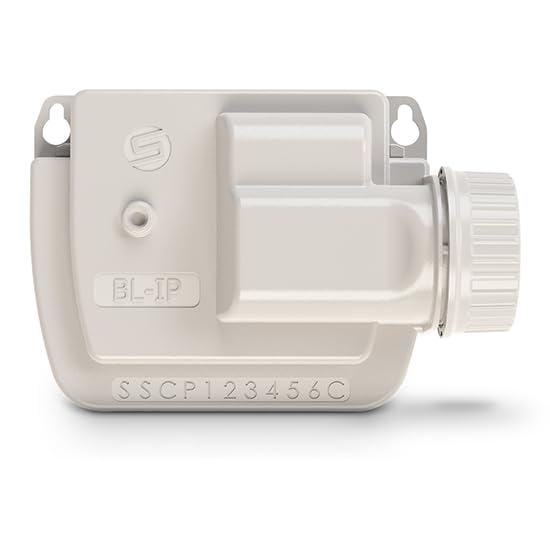
Figure 1: SOLEM BL-IP 4-Station Bluetooth Irrigation Controller. This image shows the compact, light-colored controller unit with the 'BL-IP' label, a small button, and a series of colored wires (yellow, orange, black, red) extending from its base, indicating the connection terminals for irrigation zones, master valve, and sensors. The model number 'SSCP123456C' is visible on the casing.
3. Setup
3.1 Battery Installation
- Locate the battery compartment on the controller.
- Open the compartment cover carefully.
- Insert a new 9V alkaline battery, ensuring correct polarity.
- Securely close the battery compartment cover to maintain the IP68 seal.
3.2 MySOLEM App Download
The MySOLEM app is required to configure and operate your controller.
- For iOS devices, download the MySOLEM app from the Apple App Store.
- For Android devices, download the MySOLEM app from the Google Play Store.
3.3 Bluetooth Pairing
- Ensure Bluetooth is enabled on your mobile device.
- Open the MySOLEM app.
- Follow the in-app instructions to search for and connect to your SOLEM BL-IP controller. The controller's unique identifier should appear in the app.
- Once connected, the app will display the controller's status and allow access to programming features.
4. Installation
4.1 Physical Placement
Due to its IP68 rating, the SOLEM BL-IP controller can be installed in demanding outdoor environments, including directly within underground valve boxes. Ensure the location allows for adequate Bluetooth signal range (up to 10 meters) for initial setup and adjustments.
4.2 Wiring Connections
Refer to Figure 1 for a visual guide to the wiring terminals. The controller supports up to 4 irrigation zones, a master valve, and a rain sensor.
- Common Wire (C): Connect the common wire from all irrigation valves to the terminal labeled 'C' on the controller.
- Zone Wires (1-4): Connect each irrigation zone valve wire to its corresponding numbered terminal (1, 2, 3, or 4).
- Master Valve (MV): If using a master valve, connect its control wire to the terminal labeled 'MV'.
- Rain Sensor (S): Connect the rain sensor wires to the terminals labeled 'S'. Consult your rain sensor's manual for specific wiring instructions.
Ensure all connections are secure and waterproof, especially if installing in a damp environment.
5. Operating Instructions
All operational settings and programming are managed through the MySOLEM app.
5.1 Programming Irrigation Schedules
- Open the MySOLEM app and connect to your BL-IP controller.
- Navigate to the 'Programs' or 'Schedules' section.
- Create new programs by selecting start times, watering duration for each zone, and watering days.
- The controller operates asynchronously, meaning once programmed, schedules will run even if your phone is not connected.
5.2 Manual Irrigation
You can initiate manual watering directly from the MySOLEM app.
- In the app, select the desired zone(s) for manual operation.
- Set the desired watering duration.
- Confirm to start manual irrigation.
5.3 Monthly Water Budget
The MySOLEM app allows you to adjust the monthly water budget, scaling all programmed watering durations by a percentage to adapt to seasonal changes without reprogramming individual schedules.
5.4 Rain Sensor Functionality
When a compatible rain sensor is connected and activated in the app, it will automatically suspend irrigation cycles during rainfall, conserving water and preventing overwatering.
6. Maintenance
- Battery Replacement: Replace the 9V battery annually or when the app indicates a low battery level. Always use a high-quality alkaline battery.
- Cleaning: Periodically clean the exterior of the controller with a damp cloth. Do not use harsh chemicals or abrasive cleaners.
- Connection Check: Ensure all wiring connections remain secure and free from corrosion, especially in humid environments.
7. Troubleshooting
- Controller Not Connecting via Bluetooth:
- Ensure the controller has a fresh 9V battery.
- Verify Bluetooth is enabled on your mobile device.
- Move closer to the controller (within 10 meters).
- Restart the MySOLEM app.
- Zones Not Watering:
- Check the battery level in the app.
- Verify wiring connections to the valves and common wire.
- Ensure the rain sensor is not active (if connected).
- Check the programmed schedule in the MySOLEM app.
- Manually test the zone from the app.
- Watering Continuously:
- Check for a stuck valve.
- Ensure the controller is not stuck in manual mode.
8. Specifications
| Model Number | 20SO-BL-IP4 |
| Brand | SOLEM |
| Power Source | 1 x 9V Battery |
| Number of Stations | 4 |
| Connectivity | Bluetooth (Short-range, up to 10m) |
| Waterproof Rating | IP68 |
| Dimensions (L x W x H) | 45mm x 35mm x 72mm (4.5 x 3.5 x 7.2 cm) |
| Weight | 1 kg |
| Material | ABS Plastic + Electronic Components |
| Compatibility | MySOLEM App (iOS & Android) |
| Inputs/Outputs | Rain Sensor Input, Master Valve Output |
9. Safety Information
- Always disconnect the battery before performing any wiring or maintenance.
- Ensure all wiring connections are secure and properly insulated to prevent short circuits.
- Do not attempt to open or repair the sealed unit, as this may compromise its IP68 rating and void the warranty.
- Keep the controller and battery out of reach of children.
- Dispose of used batteries according to local regulations.
10. Warranty and Support
For warranty information, technical support, or service inquiries, please contact your retailer or the manufacturer, SOLEM. Keep your purchase receipt as proof of purchase.
You can also visit the official SOLEM website for additional resources and contact information.


