
Introduction
This manual provides essential instructions for the safe and efficient operation of your CyberPower CP850PFCLCD Uninterruptible Power Supply (UPS). Please read this manual thoroughly before installation and use to ensure proper functionality and to prevent damage to the unit or connected equipment. Keep this manual for future reference.
Product Overview
The CyberPower CP850PFCLCD is a line-interactive UPS designed to provide battery backup and surge protection for electronic devices. It features Pure Sine Wave output, Automatic Voltage Regulation (AVR), and a multifunction LCD panel for real-time status monitoring.
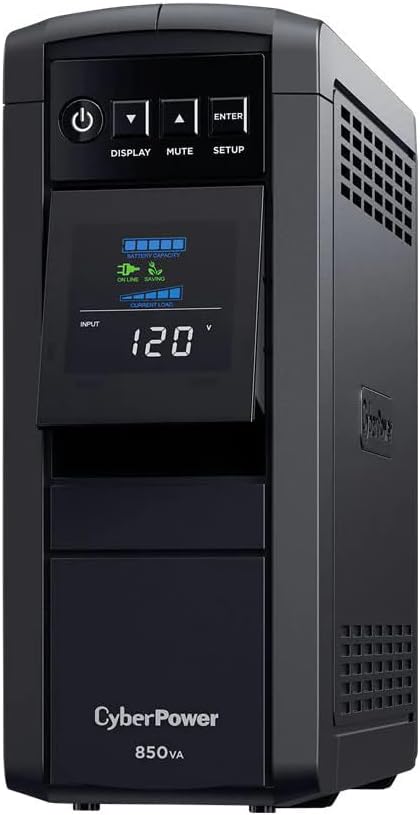
Image: Front view of the CyberPower CP850PFCLCD UPS, showing the LCD display and control buttons.
Key Features:
- 850VA/510W capacity
- Pure Sine Wave output
- Automatic Voltage Regulation (AVR)
- Multifunction LCD panel
- 10 NEMA 5-15R outlets (5 battery backup/surge, 5 surge-only)
- USB connectivity
- RJ45 dataline protection
- Overload protection and 1150 Joule surge energy rating
Safety Instructions
Please adhere to the following safety guidelines to prevent injury or damage:
- Do not expose the UPS to rain or moisture.
- Do not operate the UPS in direct sunlight or near heat sources.
- Ensure proper ventilation; do not block ventilation openings.
- Connect the UPS to a grounded AC power outlet only.
- Do not open the UPS casing; there are no user-serviceable parts inside.
- Refer to qualified service personnel for all servicing.
Setup
Unpacking
Carefully unpack the UPS and inspect it for any shipping damage. If damage is found, do not operate the unit and contact your dealer.
Placement
Place the UPS in a protected area away from excessive dust, moisture, and extreme temperatures. Ensure adequate space around the unit for proper airflow.
Initial Charging
Before initial use, connect the UPS to a standard AC outlet and allow it to charge for at least 8 hours to ensure maximum battery runtime. The unit will charge whether it is turned on or off.
Connecting Equipment

Image: Rear view of the CyberPower CP850PFCLCD UPS, highlighting the battery backup and surge-only outlets, USB, Serial, and Network ports.
- Battery Backup & Surge Protected Outlets: Connect critical equipment such as computers, monitors, and external hard drives to these outlets. These outlets provide battery power during outages and surge protection.
- Surge-Only Outlets: Connect non-critical peripherals like printers, scanners, or speakers to these outlets. These outlets provide surge protection but no battery backup.
- USB Port: Connect the included USB cable from the UPS to your computer for automatic shutdown and power management features using PowerPanel Personal software (downloadable from the manufacturer's website).
- RJ45 Ports: Connect a network cable through the "IN" and "OUT" ports to protect your network devices from surges.

Image: The CyberPower CP850PFCLCD UPS positioned within a home entertainment and gaming setup, demonstrating its compact size and integration with other devices.
Operating the UPS
Power On/Off
- To turn on the UPS, press and hold the POWER button for approximately 2 seconds.
- To turn off the UPS, press and hold the POWER button for approximately 2 seconds until you hear a beep.
LCD Display Functions
The multifunction LCD panel provides real-time information about the UPS status. Use the DISPLAY button to cycle through different screens.

Image: Close-up of the CyberPower CP850PFCLCD UPS LCD display, showing estimated run time in minutes, battery level, and load level indicators.
Information displayed may include:
- Input Voltage
- Output Voltage
- Battery Capacity
- Load Level
- Estimated Run Time
- Operating Mode (Online, On Battery, AVR)
Alarm Silence
Press the MUTE button to temporarily silence audible alarms during a power event.
AVR Functionality
The Automatic Voltage Regulation (AVR) feature automatically corrects minor power fluctuations (sags and surges) without switching to battery power, thereby extending battery life.
Maintenance
Battery Replacement
The UPS battery is designed for a service life of 3-5 years under normal operating conditions. Battery replacement should only be performed by qualified service personnel. Contact CyberPower for authorized service centers or replacement battery information.
Cleaning
Ensure the UPS is turned off and unplugged from the AC outlet before cleaning. Use a soft, dry cloth to wipe the exterior. Do not use liquid or aerosol cleaners.
Storage
If storing the UPS for an extended period, turn it off and disconnect it from the AC outlet. Recharge the battery every three months to ensure optimal battery life.
Troubleshooting
| Problem | Possible Cause | Solution |
|---|---|---|
| UPS will not turn on. | Battery is low or discharged. | Connect the UPS to an AC outlet and allow it to charge for at least 8 hours. |
| No power to outlets. | Circuit breaker tripped. | Press the circuit breaker reset button on the rear panel. |
| UPS beeps continuously. | Overload condition or on battery power. | Reduce the load on the battery backup outlets. If on battery, save work and shut down equipment. |
| "Wiring Fault" indicator is lit. | Improper wiring in the wall outlet. | Consult a qualified electrician to inspect the wall outlet wiring. |
Specifications
| Feature | Detail |
|---|---|
| Model | CP850PFCLCD |
| Capacity (VA/Watts) | 850VA / 510W |
| Input Voltage | 120V AC |
| Output Voltage | 120V AC |
| Outlets | 10 NEMA 5-15R (5 Battery Backup & Surge, 5 Surge Only) |
| Surge Energy Rating | 1150 Joules |
| Battery Type | Sealed Lead-Acid |
| Typical Recharge Time | 8 hours |
| Dimensions (H x W x D) | (Refer to product packaging or manufacturer's website for exact dimensions) |
| Weight | 14.9 Pounds |
Warranty and Support
Product Warranty
The CyberPower CP850PFCLCD UPS is covered by a 3-Year Limited Warranty. This warranty covers defects in materials and workmanship under normal use. For full warranty terms and conditions, please refer to the warranty card included with your product or visit the CyberPower website.
Connected Equipment Guarantee
This UPS includes a $250,000 Connected Equipment Guarantee. This guarantee provides protection for equipment properly connected to the UPS against damage from power surges. Specific terms and conditions apply; please refer to the guarantee documentation for details.
Technical Support
For technical assistance, product registration, or warranty claims, please contact CyberPower customer support. You can find contact information and support resources on the official CyberPower website: www.cyberpowersystems.com/support/