
1. Introduction
Thank you for purchasing the Philips DLP2557CB Mobile Power Bank. This compact and versatile power bank is designed to provide convenient charging for your Apple Watch, smartphones, and other compatible devices on the go. Please read this manual carefully before use to ensure proper operation and to maximize the product's lifespan.
2. Product Overview
The Philips DLP2557CB is a 5000mAh mobile power bank featuring multiple charging options and a compact design. It is ideal for daily use, travel, and business trips.
Key Features:
- Apple Watch Charging: Cordless 2.5W magnetic charging for Apple Watch.
- Built-in Type-C Cable: Retractable input/output Type-C cable for convenience.
- Foldable USB-C Connector: Direct plug-in charging for compatible smartphones.
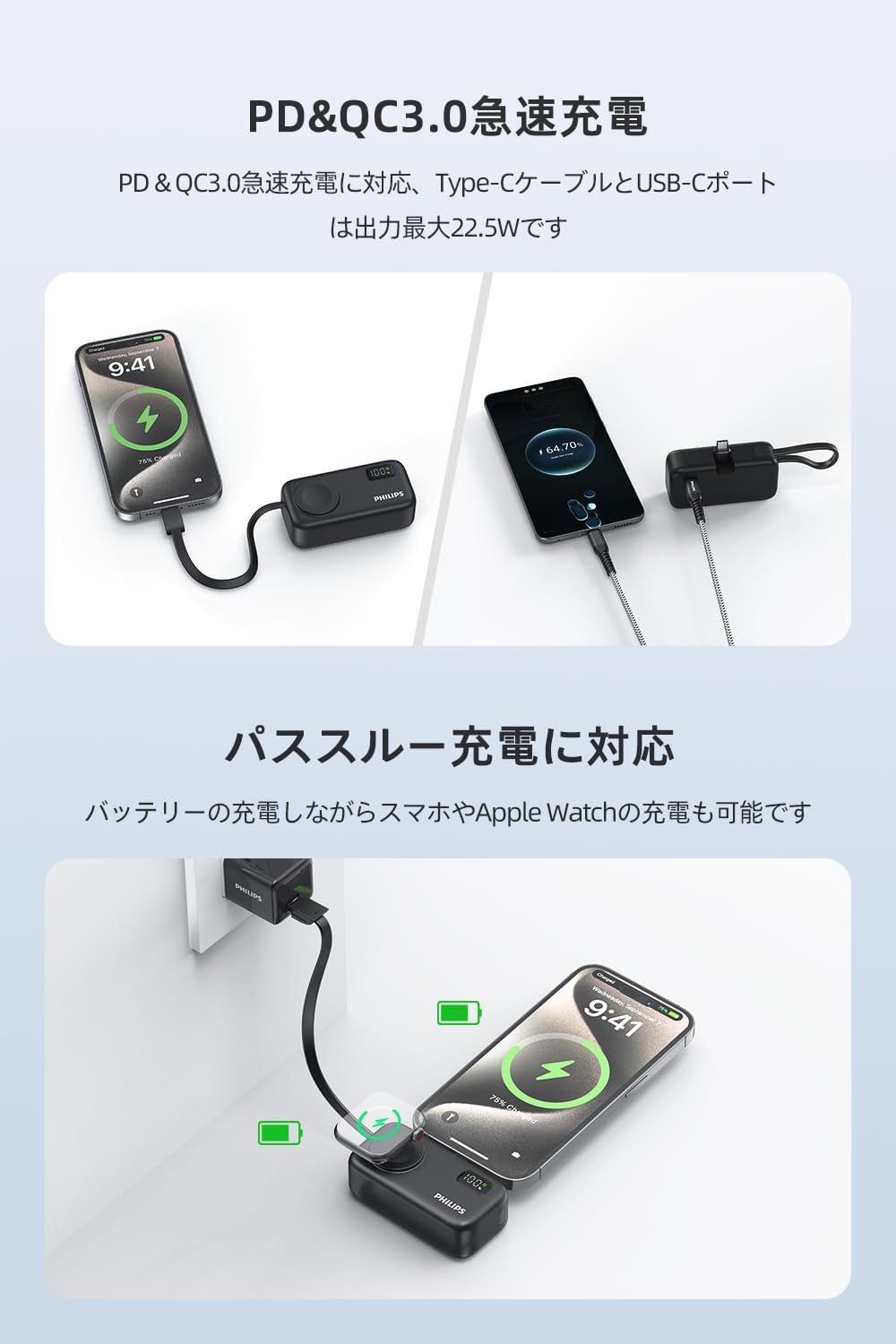
- Fast Charging: Supports PD & QC 3.0 with up to 22.5W output.
- Pass-through Function: Charge the power bank and connected devices simultaneously.
- Compact & Lightweight: Measures 7.9x2.8x3.9cm and weighs 112.5g.
- LED Display: Clear indication of battery level and fast charging status.
- Safety Protections: PSE certified with overcharge, over-discharge, overcurrent, and short-circuit protection.


3. Setup
3.1 Initial Charging of the Power Bank
Before first use, it is recommended to fully charge your Philips DLP2557CB power bank. The power bank offers two input methods for recharging:
- Via USB-C Port: Connect a USB-C charging cable to the power bank's USB-C input port and a compatible power adapter.
- Via Built-in Type-C Cable: Extend the built-in Type-C cable and connect it to a compatible power adapter.
The LED display will show the charging progress. A full charge ensures optimal performance.

3.2 Using the Built-in Type-C Cable
The power bank includes a retractable Type-C cable that functions as both an input and output cable. When extended, it supports PD & QC 3.0 fast charging. When not in use, it can be stored as a convenient strap.
Important Note:
When pulling out the cable for the first time, it might be slightly stiff. Gently loosen the connector position first, then pull it out horizontally to avoid damage.

4. Operating Instructions
4.1 Charging Your Devices
The Philips DLP2557CB offers multiple ways to charge your devices:
- Using the Foldable USB-C Connector: Simply plug the power bank's foldable USB-C connector directly into your compatible smartphone (e.g., iPhone 15/16 series) to begin charging.
- Using the Built-in Type-C Cable: Extend the built-in Type-C cable and connect it to your device's Type-C port.
- Using an External USB-C Cable: Connect your device to the power bank's USB-C output port using a separate USB-C cable.

4.2 Apple Watch Charging
The power bank supports cordless 2.5W magnetic charging for your Apple Watch.
- Press the power button on the side of the power bank to activate it.
- Place your Apple Watch onto the magnetic charging area on the power bank. Ensure it is properly aligned for charging to begin.
Note:
- For single device charging, activate the mobile battery by pressing the power button.
- When charging multiple devices simultaneously, the power bank automatically switches to a low current mode.


4.3 Pass-through Charging
The power bank supports pass-through charging, enabling simultaneous charging of your Apple Watch, smartphone, and the power bank itself. Connect the power bank to a power source, then connect your devices to the power bank.
Note:
When multiple devices are connected, the fast charging mode is automatically disabled, and the total maximum output power is 15W.

4.4 LED Display
The integrated LED display clearly shows the remaining battery percentage of the power bank and indicates the fast charging status. A green indicator light signifies active fast charging or discharging.
Note:
If your smartphone's optimized battery charging function is enabled, the green fast charging mark may turn off once the device reaches 80% charge. This is normal behavior and does not indicate a malfunction.


5. Maintenance
To ensure the longevity and optimal performance of your Philips DLP2557CB Mobile Power Bank, please follow these maintenance guidelines:
- Cleaning: Use a soft, dry cloth to clean the exterior of the power bank. Avoid using harsh chemicals or abrasive materials.
- Storage: Store the power bank in a cool, dry place away from direct sunlight and extreme temperatures.
- Battery Care: For optimal battery health, avoid fully discharging the power bank frequently. Recharge it when the battery level is low. If storing for an extended period, charge it to about 50-70% every few months.
- Avoid Physical Damage: Protect the power bank from drops, impacts, and excessive pressure.
6. Troubleshooting
If you encounter any issues with your power bank, please refer to the following common solutions:
- Device not charging:
- Ensure the power bank is sufficiently charged.
- Press the power button to activate the power bank before connecting a device, especially for Apple Watch charging.
- Check that the charging cable/connector is securely connected to both the power bank and your device.
- Try a different charging cable or device to rule out cable/device issues.
- Apple Watch charging intermittently or not staying in place:
- Ensure the Apple Watch is centered correctly on the magnetic charging area.
- Avoid moving the power bank or Apple Watch during charging to maintain a stable connection.
- Slow charging:
- If multiple devices are connected, the total output is limited to 15W, and fast charging mode is disabled. Disconnect other devices for faster charging of a single device.
- Ensure your device and cable support fast charging protocols (PD/QC 3.0).
- Smartphone case interference:
- For optimal charging via the foldable USB-C connector, ensure your smartphone case thickness does not exceed 5mm. Thicker cases may prevent proper connection.
- LED display not working:
- Press the power button briefly to check the battery level.
- If the power bank is completely discharged, the display may not light up immediately upon connecting to power. Allow some time for initial charging.
If the problem persists, please contact customer support.
7. Specifications
| Specification | Detail |
|---|---|
| Brand | PHILIPS |
| Model Number | DLP2557CB |
| Battery Capacity | 5000 mAh (Lithium Polymer) |
| Product Dimensions | 7.9 x 2.8 x 3.9 cm |
| Product Weight | 112.5 g |
| Input (Max) | 19.98W (via USB-C port or built-in Type-C cable) |
| Output (Max) | 22.5W (via USB-C port or built-in Type-C cable) |
| Apple Watch Wireless Output | 2.5W |
| Total Output (Multiple Devices) | 15W |
| Connector Type | USB Type C (foldable connector, built-in cable, port) |
| Special Features | Apple Watch charging compatible, Pocket size, Built-in cable, Fast charging, Pass-through function, LED display |
| Safety Certification | PSE Certified |
| Flight Approved | Yes (carry-on) |
| Country of Origin | China |

8. Warranty and Support
The Philips DLP2557CB Mobile Power Bank comes with a one-year warranty from the date of purchase. The package includes an instruction manual with a warranty card. Please retain your proof of purchase for warranty claims.
For any questions, technical support, or warranty inquiries, please contact Philips customer support through the retailer where you purchased the product or refer to the contact information provided in the warranty card.
Package Contents:
- 1x Philips DLP2557CB Mobile Power Bank
- 1x Instruction Manual (with Warranty Card)


