
1. Safety Instructions
For your safety and to prevent damage to the product, please adhere to the following guidelines:
- Ensure all parts are properly secured before use. Regularly check all fasteners to ensure they remain tight.
- Use caution when moving on uneven surfaces to prevent tipping. Always push the island slowly and steadily.
- Be careful around sharp edges. Handle all components with care during assembly and use.
- Do not allow children to play on, with, or around the cart. This product is not a toy.
- Do not overload shelves or drawers. Distribute weight evenly to maintain stability.
- Avoid placing hot items directly on the countertop. Use heat-resistant pads or trivets.
- Ensure the power outlet is used with compatible devices and within specified electrical limits. Do not exceed the maximum wattage.
2. Product Overview and Features
The chartustriable Extendable Kitchen Island is designed to enhance kitchen efficiency and provide versatile functionality. It features a robust construction and thoughtful design elements to maximize utility in various living spaces.
- Extendable Dining Table: The countertop extends from 48 inches to 80 inches, allowing it to function as a compact island or a full dining table for multiple people.
- Integrated Power Outlet: Equipped with 2 standard power outlets (125V/12A) and 2 USB ports (5V/2A) for convenient charging of kitchen appliances and electronic devices. The power cord measures 78.75 inches (200cm).
- Ample Storage: Includes two large storage drawers, four-door cabinets with interior shelves, and three rows of additional open shelves under the side retractable tabletop.
- Mobile Design: Features 360° swivel wheels for easy movement and 2 lockable wheels for stability when stationary.
- Durable Construction: Made from sturdy P2 engineered wood and metal, designed for long-term use.
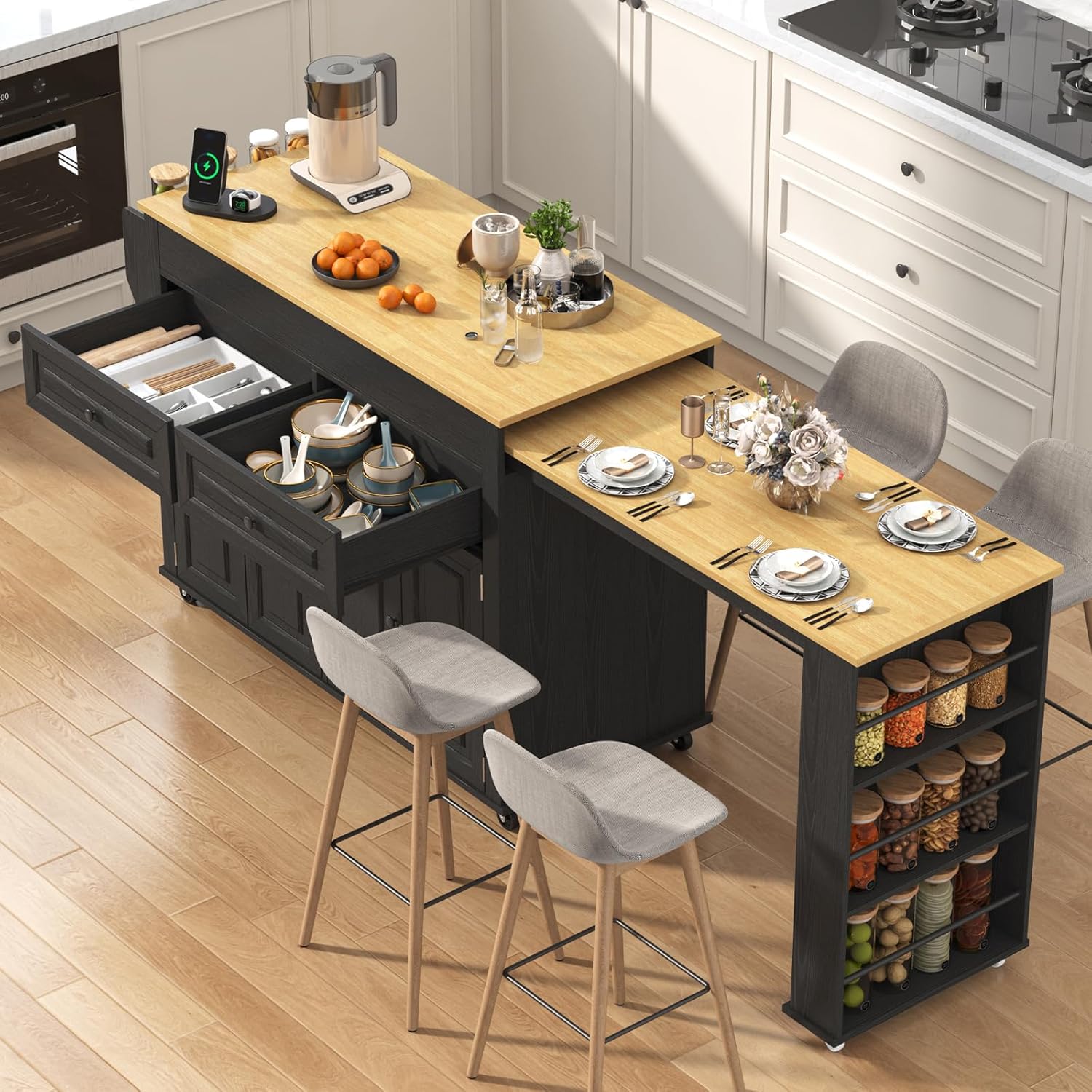
Image 1: The chartustriable Extendable Kitchen Island in its extended configuration, showcasing its versatile design and storage options.
3. Parts List
Before beginning assembly, ensure all components listed in your product packaging are present and undamaged. A detailed parts list with corresponding labels is typically included in the box. Common components include various wooden panels, drawers, cabinet doors, shelves, wheels, a power outlet unit, and assorted hardware (screws, dowels, hinges, drawer slides).
4. Assembly Instructions
For a comprehensive visual guide to assembling your kitchen island, please refer to the official installation video below. It provides step-by-step instructions for each component.
Video 1: Official installation guide for the chartustriable Extendable Kitchen Island. This video demonstrates the complete assembly process from unboxing to final setup.
General Assembly Steps:
- Preparation: Clear a spacious area for assembly. It is recommended to assemble on a soft surface like a carpet to prevent scratches. Sort all parts and hardware according to the included manual.
- Base Construction: Assemble the main frame of the island, attaching side panels and internal dividers.
- Drawer and Shelf Installation: Install drawer slides and construct the drawers. Insert fixed and adjustable shelves into the cabinet sections.
- Power Outlet Integration: Secure the power outlet unit into its designated slot on the side panel.
- Extendable Table Assembly: Attach the components for the extendable dining table mechanism.
- Door and Hardware Attachment: Install hinges and attach cabinet doors. Secure handles to drawers and doors.
- Wheel Attachment: Attach the swivel and lockable wheels to the base of the island.
- Final Top Placement: Carefully place and secure the main countertop and the extendable table top.
Refer to the numbered parts and hardware in your manual and the video for precise placement and fastening.
5. Operating Instructions
5.1 Extending and Retracting the Dining Table
- To Extend: Gently pull the extendable tabletop outwards from the main island body. Ensure it slides smoothly along its tracks until fully extended and stable.
- To Retract: Push the extendable tabletop back towards the main island body until it is fully nested and flush.

Image 2: The extendable dining table feature, shown pulled out to provide additional surface area.
5.2 Using the Power Outlet and USB Ports
- Plug your kitchen appliances or electronic devices into the standard 3-prong outlets or USB ports located on the side of the island.
- Ensure the island's main power cord is securely plugged into a wall outlet.
- Do not exceed the maximum electrical load specified for the outlets.

Image 3: Detail of the built-in charging socket, offering convenient power access.
5.3 Utilizing Storage and Mobility
- Drawers and Cabinets: Use the drawers for utensils and smaller items, and the cabinets for larger kitchenware or appliances.
- Open Shelves: The side shelves are ideal for spices, bottles, or frequently accessed items.
- Wheels: Unlock the wheels to move the island freely. Lock the wheels when the island is in its desired position to ensure stability.

Image 4: The island's interior storage, including drawers and cabinets, along with a view of the lockable wheels.
6. Maintenance
- Cleaning: Wipe surfaces with a soft, damp cloth. Avoid harsh chemicals or abrasive cleaners that may damage the finish.
- Hardware Check: Periodically inspect all screws and fasteners to ensure they are tight. Tighten as necessary to maintain structural integrity.
- Wood Care: For the engineered wood surfaces, avoid prolonged exposure to moisture or direct sunlight to prevent warping or discoloration.
- Drawer Slides: If drawers become stiff, apply a small amount of silicone lubricant to the drawer slides.
- Wheel Maintenance: Keep wheels free of debris to ensure smooth operation.
7. Troubleshooting
- Island is Wobbly: Check all assembly screws and ensure they are fully tightened. Verify that the island is on a level surface.
- Drawers are Sticking: Ensure drawer slides are correctly aligned and free of obstructions. Lubricate slides if needed.
- Wheels Not Rolling Smoothly: Check for any debris (hair, lint) caught in the wheels. Ensure lockable wheels are disengaged.
- Extendable Table is Difficult to Move: Check the tracks for obstructions. Ensure the table is pulled or pushed evenly.
- Power Outlet Not Working: Ensure the main power cord is securely plugged into a functional wall outlet. Check if the wall outlet itself is receiving power.
8. Specifications
| Product Dimensions (D x W x H) | 19.7" x 80" x 34.7" (Extended) |
| Extendable Width Range | 48" - 80.7" |
| Item Weight | 133 pounds |
| Material | Engineered Wood, Acacia Wood (Frame) |
| Color | Black |
| Power Outlet | 2 x 125V/12A, 2 x 5V/2A USB Ports |
| Power Cord Length | 78.75 inches (200cm) |
| Number of Shelves | 3 (open side shelves) + internal cabinet shelves |
| Assembly Required | Yes |

Image 5: Detailed dimensions of the kitchen island, illustrating its compact and extended configurations.
9. Warranty and Support
For warranty information, product support, or to report any issues, please refer to the documentation included with your purchase or contact the seller directly through the platform where the product was acquired. Ensure you have your purchase details and model number (DJ0877) available for faster assistance.