
1. Introduction
The BSTUOKEY HF5-MF is a state-of-the-art metal, waterproof, stand-alone door access control system featuring fingerprint, RFID card, and PIN code unlocking, integrated with Tuya App management. Its robust zinc alloy housing provides anti-explosion and anti-vandal protection, making it suitable for various environments.
2. Key Features
- Multiple Unlocking Methods: Supports PIN code, fingerprint, RFID card, and Tuya App for flexible access.
- Tuya App Management: Remotely add users (fingerprints, passwords, cards), operate the lock, and receive real-time notifications.
- Durable Construction: Made with zinc alloy housing for anti-explosion and anti-vandal resistance.
- IP68 Waterproof Rating: Designed for outdoor use, resistant to rain and harsh weather conditions.
- Advanced Fingerprint Sensor: Semiconductor fingerprint head for enhanced security, with optional storage capacity for 200 or 800 fingerprints.
- Wiegand Access Control: Can function as an independent reader or keypad, with adjustable door opening delay (1-99s, default 5s).
- Flexible Operating Modes: Includes pause mode and toggle mode for specific access control scenarios.
- Security Alarm Modes: Features disable security mode, deadlock mode, and alarm mode for enhanced protection.
- Temporary Passwords: Easily generate temporary access codes for visitors.
- OTA Online Upgrade: Supports over-the-air firmware updates for continuous functional improvements.
3. Package Contents
Verify that all items are present in your package:
- 1 x BSTUOKEY HF5-MF Door Access Control Keypad
- 1 x Instruction Manual
- 10 x IC 13.56Mhz Keyfobs
- Mounting Hardware (screws, diodes)

Image: Contents of the BSTUOKEY HF5-MF package, including the keypad, manual, and keyfobs.
Video: An unboxing demonstration of the BSTUOKEY HF5-MF access control system, showing the keypad, manual, and included accessories.
4. Specifications
| Attribute | Value |
|---|---|
| Brand | BSTUOKEY |
| Model | HF5-MF |
| Material | Zinc Alloy |
| Voltage | 12 Volts |
| Item Weight | 6.17 Pounds |
| Display Type | Touchscreen/Graphical Interface |
| Smart Home Compatibility | Tuya Smart Home Compatible |
| Waterproof Rating | IP68 |
| Included Components | Keypad, Manual, 10 IC Keyfobs |
5. Installation
5.1 Physical Installation
The HF5-MF keypad features an embedded installation design. Ensure the mounting surface is suitable and follow the provided instructions for secure placement. The robust zinc alloy body is designed for durability.

Image: Embedded installation design of the BSTUOKEY HF5-MF keypad.
5.2 Wiring Diagram
Refer to the following diagram for proper wiring connections. Ensure all connections are secure and correctly matched to avoid damage or malfunction. This device operates on 12V DC.

Image: Wiring diagram for the BSTUOKEY HF5-MF access control system.
5.3 Tuya App Connection
To connect your HF5-MF keypad to the Tuya App, ensure your device is powered on and in pairing mode. Follow the in-app instructions to add the device to your smart home system. This enables remote management and advanced features.
Video: Guide on connecting the BSTUOKEY HF5-MF access control keypad to the Tuya App for smart control.
6. Operating Instructions
6.1 Unlocking Methods
The HF5-MF offers several convenient ways to unlock your door:
- Password Unlocking: Enter your programmed PIN code on the keypad.
- Fingerprint Unlocking: Place your registered finger on the fingerprint sensor.
- RFID Card Unlocking: Present a registered RFID card to the card reading area.
- Tuya App Unlocking: Use the Tuya App on your smartphone for one-click remote unlocking.
- Temporary Password Unlocking: Utilize time-limited passwords generated via the app.
- RFID Card + Password Unlocking: For enhanced security, combine an RFID card with a PIN code.

Image: Multiple unlocking modes available with the BSTUOKEY HF5-MF keypad.
6.2 Adding Users (Fingerprint, Card, PIN)
Users can be added directly through the Tuya App. Navigate to the device settings within the app to add new fingerprints, RFID cards, or PIN codes. The app will guide you through the registration process for each type of access credential.

Image: Tuya App interface for managing access control.
6.3 Remote Control and Notifications
With the Tuya App, you can remotely operate the lock from anywhere. Administrators will receive instant notifications when anyone unlocks the device, providing real-time security alerts.
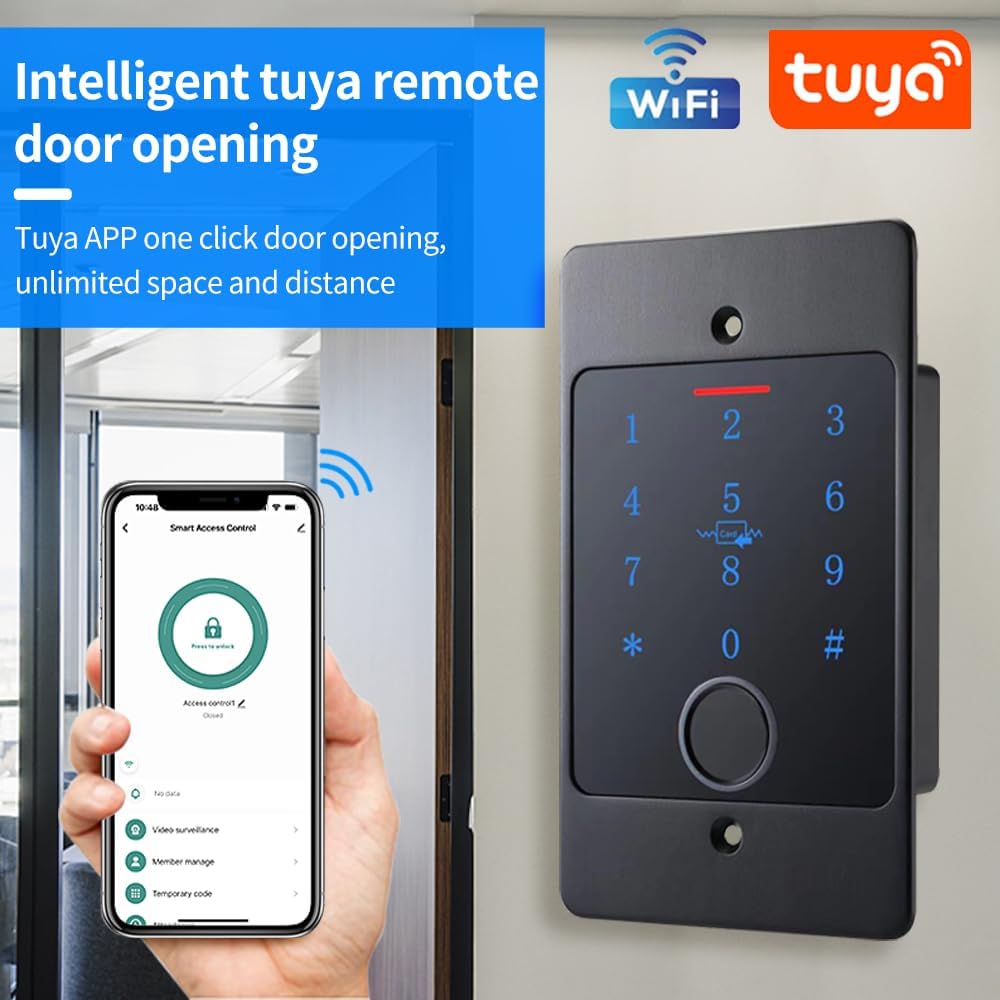
Image: Remote door opening via Tuya App.
6.4 Pause Mode and Toggle Mode
The device supports specific operating modes:
- Pause Mode: After unlocking, the door remains open until the next valid user input.
- Toggle Mode: Requires a valid card swipe or fingerprint to both open and close the door.
6.5 Security Alarm Mode Settings
Configure security alarm modes via the Tuya App:
- Disable Security Mode: Turns off all security alarms.
- Deadlock Mode (Lockout Mode): Activates a high-security lockout state.
- Alarm Mode: Enables various alarm triggers.
7. Maintenance
7.1 Cleaning
Regularly clean the keypad surface and fingerprint sensor with a soft, dry cloth. Avoid abrasive cleaners or solvents that could damage the finish or electronic components. For the fingerprint sensor, ensure it is free of dirt or moisture for optimal performance.
7.2 Firmware Updates (OTA)
The HF5-MF supports Over-The-Air (OTA) online upgrades. Periodically check the Tuya App for available firmware updates to ensure your device has the latest features and security enhancements. Follow the in-app instructions for a seamless update process.
8. Troubleshooting
If you encounter issues with your BSTUOKEY HF5-MF access control system, refer to the following common problems and solutions:
- Device Not Responding: Check power connections. Ensure the device is receiving adequate power (12V DC).
- Cannot Connect to Tuya App: Verify your Wi-Fi network is stable and the device is within range. Ensure the device is in pairing mode as per installation instructions.
- Fingerprint/Card/PIN Not Recognized: Ensure the fingerprint sensor is clean and your finger is placed correctly. For cards, ensure they are 13.56Mhz MF cards and properly registered. For PINs, double-check the entered code.
- Door Not Unlocking: Confirm that the correct access method (fingerprint, card, PIN, app) is being used and is registered. Check the wiring to the lock mechanism.
- Intermittent Operation: This could indicate unstable power supply or environmental interference. Ensure stable power and minimize electromagnetic interference.
If problems persist, consult the detailed instruction manual or contact customer support.
9. Safety Information
Please read and follow these safety guidelines to ensure safe operation and prevent damage:
- Do not attempt to disassemble or repair the device yourself. Refer all servicing to qualified personnel.
- Ensure the power supply voltage matches the device's requirements (12V DC). Incorrect voltage can cause damage.
- Keep the device away from strong magnetic fields, which can interfere with its operation.
- Avoid exposing the device to extreme temperatures or direct sunlight for prolonged periods, despite its waterproof rating.
- Always use genuine accessories and replacement parts.
- Keep the device out of reach of children to prevent accidental operation or damage.