
1. Introduction
The ZHIWHIS ZWS-908 emergency radio is a versatile portable device designed for various situations, including emergencies. This product combines a classic portable emergency radio design with innovative multi-functional features. It is a multi-functional and user-friendly radio, offering extensive radio reception capabilities and aiming to be a valuable tool for many users.
Key Features:
- Compact and Multi-functional: Integrates 9 functions: radio reception, MicroSD playback, Bluetooth 5.2 playback, flashlight, hand-crank charging, USB charging, SOS alarm, APP control, and timer.
- High-Performance Display: Features a high-resolution VA color screen that clearly displays frequency, operating mode, time, and battery level, with a backlight for easy viewing in dark environments.
- Disaster Preparedness Features: Equipped with solar charging, hand-crank power generation, USB charging, support for various battery types, high/low beam flashlight, compass, and SOS alarm for multiple emergency functions.
- APP Control: Unlike traditional emergency radios, this product offers intelligent remote control via a mobile app, allowing wireless control within a 20-meter range. Place the radio outdoors for better signal reception or control it remotely with your smartphone indoors.
- Multiple Playback Modes: In addition to multi-band radio reception, this multi-functional radio supports wireless music playback via Bluetooth connection and music playback via MicroSD card. The built-in 66mm 5W high-quality speaker delivers powerful and excellent sound despite its compact size.
- Music Spectrum Lamp: This product supports 6 EQ sound effects. In EQ mode, the music spectrum lamp turns on and flashes in sync with the music melody.
- Excellent Reception Sensitivity: With DSP digital tuner technology and a 360-degree rotatable telescopic rod antenna, it can receive stable signals across various bands: shortwave/FM/Wide FM/AM/VHF.
- Portability: This compact radio measures 190*77*104mm. Its portable design makes it ideal for outdoor activities and emergency preparedness. The carrying handle is also practical, making it convenient to move around the house.
- Alarm Clock/Timer Function: You can set a timer-on and alarm. After selecting timer-on, you can set the power-off time from 10 to 90 minutes (in 10-minute increments) or FULL (auto power-off after power-on cancellation). A sleep timer is also available, settable from 10 to 120 minutes in 10-minute increments.
- Quality Assurance / TELEC Certified: To provide customers with a worry-free shopping experience, please do not hesitate to contact us if you have any questions or dissatisfaction with the purchased product. This product is TELEC certified. (Frequency band: 2402MHz-2480MHz). Please note that similar products may not be TELEC certified.
2. Product Overview
The ZHIWHIS ZWS-908 is designed for reliability and ease of use in various situations. Below are visual guides to its components and functions.

Figure 2.1: Front view of the ZHIWHIS ZWS-908 Multi-functional Emergency Radio.
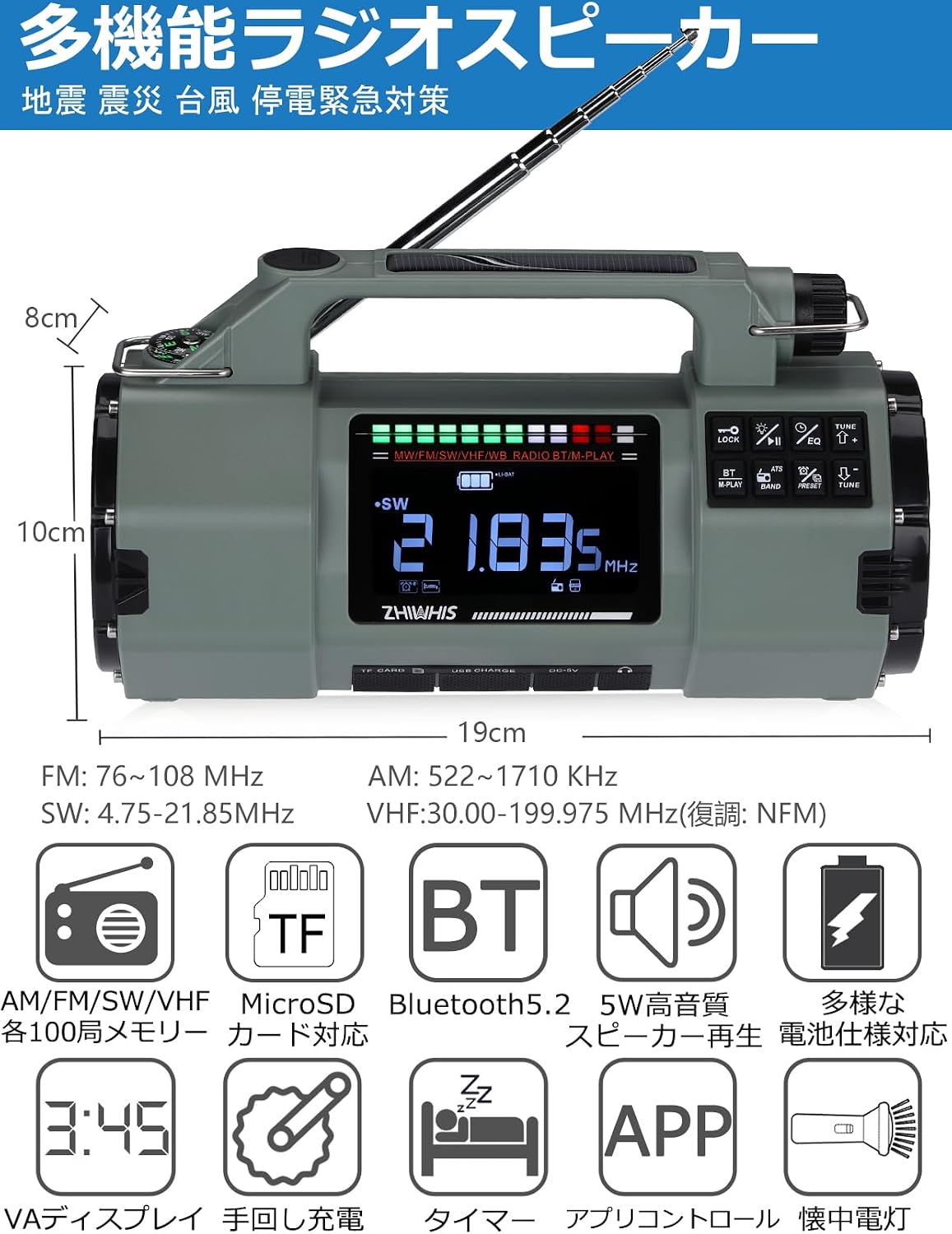
Figure 2.2: Dimensions of the ZHIWHIS ZWS-908 radio, showing its compact size.

Figure 2.3: Illustrates channel selection via dial and the mobile APP control interface. The app allows remote control and enhanced signal reception. Download the app from Apple App Store or Android APK.

Figure 2.4: Demonstrates the four power supply methods: diverse battery specifications, hand-crank charging, solar panel charging, and USB-C charging.

Figure 2.5: Highlights the powerful 5W high-quality speaker, supporting VHF/FM/AM/SW radio, MicroSD card, and Bluetooth 5.2 playback.

Figure 2.6: Shows the radio's excellent reception sensitivity across VHF/FM/AM/SW/Wide FM bands, featuring a 46cm rotatable telescopic rod antenna and built-in AM bar antenna.

Figure 2.7: Illustrates the IPX4 waterproof rating and the SOS alarm function, which emits a loud sound for emergencies.

Figure 2.8: Details the large capacity lithium battery and the LED flashlight with three brightness levels (high beam, low beam, and combined) for various lighting needs.

Figure 2.9: Shows the portable design of the ZWS-908 (190mm x 77mm x 104mm, 490g) and included accessories: USB Type-C cable, strap, screwdriver, and Japanese instruction manual with warranty.
Illustrative Videos of Similar Features:
Video 2.1: Demonstration of hand-crank, solar, and USB-C charging, along with radio and flashlight functions. (Illustrative video for similar product features)
Video 2.2: Overview of radio features, battery capacity, flashlight, and charging options. (Illustrative video for similar product features)
Video 2.3: Illustrates various charging methods and lighting functions of a multi-functional emergency radio. (Illustrative video for similar product features)
Video 2.4: Shows radio reception, flashlight modes, and charging capabilities. (Illustrative video for similar product features)
Video 2.5: Demonstrates the three types of lights available on a multi-functional emergency radio. (Illustrative video for similar product features)
Video 2.6: Provides an overview of the operation and night reception capabilities of a compact radio. (Illustrative video for similar product features)
Video 2.7: Introduces the product features of a compact radio, including its various functions. (Illustrative video for similar product features)
3. Setup
3.1 Battery Installation
The ZWS-908 supports multiple battery types for flexibility. Ensure the device is powered off before installing or replacing batteries.
- Open the battery compartment cover on the back of the unit.
- Insert 1 or 2 units of 18650 Lithium Batteries (3.7V), or 1 unit of 14500 Lithium Battery (3.7V), or 3 units of AAA Dry Batteries (1.5V) according to the polarity markings.
- Close the battery compartment cover securely.
3.2 Initial Charging
For optimal performance, fully charge the device before first use. The ZWS-908 offers several charging methods:
- USB-C Charging: Connect the provided USB Type-C cable to the radio's USB-C port and a compatible USB power adapter (not included).
- Solar Charging: Place the radio with its solar panel facing direct sunlight. The solar panel is located on the top of the unit.
- Hand-crank Charging: Extend the hand-crank handle and rotate it clockwise or counter-clockwise to generate power.
4. Operating Instructions
4.1 Power On/Off
- To power on, press and hold the Power button until the display lights up.
- To power off, press and hold the Power button again.
4.2 Radio Tuning (FM/AM/SW/VHF)
- Extend the telescopic antenna for better reception.
- Press the 'BAND' button to cycle through FM, AM, SW, and VHF bands.
- Use the tuning dial or the 'TUNE+' / 'TUNE-' buttons to find your desired station.
- The high-resolution VA display will show the current frequency.
- The radio supports 400 presets (100 per band). Refer to the full manual for detailed instructions on saving and recalling presets.
4.3 Bluetooth Playback
- Switch the radio to Bluetooth mode (refer to the mode selection button).
- On your smartphone or other Bluetooth device, search for 'ZWS-908' and pair.
- Once paired, you can play audio wirelessly through the radio's speaker.
4.4 MicroSD Playback
- Insert a MicroSD card (up to 256GB) containing MP3, WMA, WAV, APE, or FLAC audio files into the TF Card slot.
- Switch the radio to MicroSD playback mode.
- Use the playback controls (play/pause, next/previous track) to manage your music.
- Select from 4 repeat modes and 6 EQ sound effects for customized listening.
4.5 APP Control
- Download the dedicated app from the Apple App Store or Android APK (links provided in Figure 2.3).
- Ensure Bluetooth is enabled on your smartphone and the radio is in APP control mode.
- Open the app and connect to the ZWS-908.
- You can now remotely control radio functions, settings, and playback from your smartphone.
4.6 Flashlight Operation
- Press the flashlight button to turn on the LED light.
- Press the button repeatedly to cycle through strong, weak, and off modes.
4.7 SOS Alarm
- In an emergency, press the SOS button to activate a loud alarm sound and flashing light to signal for help.
4.8 Charging External Devices
- Connect your smartphone or other USB-powered device to the radio's USB output port using a compatible cable. The radio's 4000mAh battery can act as a power bank.
5. Maintenance
- Keep the device clean by wiping it with a soft, dry cloth. Avoid using harsh chemicals or abrasive cleaners.
- Store the radio in a cool, dry place away from direct sunlight and extreme temperatures.
- If not used for an extended period, fully charge the battery every 3 months to maintain battery health.
- Ensure the battery compartment is dry and free of debris.
- Avoid dropping the device or subjecting it to strong impacts.
6. Troubleshooting
| Problem | Possible Cause | Solution |
|---|---|---|
| No power | Battery depleted or incorrectly installed. | Charge the battery using USB-C, solar, or hand-crank. Check battery installation and polarity. |
| Poor radio reception | Antenna not extended, weak signal, or interference. | Fully extend and rotate the telescopic antenna. Move to an open area. Try tuning manually. |
| Bluetooth not connecting | Radio not in Bluetooth mode, device too far, or already connected to another device. | Ensure radio is in Bluetooth mode. Keep devices within 20m. Disconnect from other devices. |
| MicroSD card not playing | Card not inserted correctly, unsupported file format, or card capacity too large. | Reinsert the MicroSD card. Ensure files are MP3/WMA/WAV/APE/FLAC. Use a card up to 256GB. |
| Flashlight not working | Battery depleted or flashlight mode not selected. | Charge the battery. Press the flashlight button to cycle through modes. |
7. Specifications
| Feature | Specification |
|---|---|
| Reception Range | FM: 76.0-108MHz, AM: 522-1710KHz, SW: 4.75-21.85MHz, VHF: 30-199.975MHz (Demodulation: NFM) |
| Reception Sensitivity | FM≤10dB, AM≤90dB, SW≤30dB, VHF≤30dB |
| Signal-to-Noise Ratio | FM: 36dB, AM: 30dB, SW: 35dB, VHF: 30dB |
| Quiescent Current | ≤220uA |
| Max Current | ≤650mA |
| External Charging Output Current | 1000mA |
| Operating Voltage | 3.6V~4.2V |
| Max Power Consumption | ≤1.8W |
| Bluetooth Version | 5.2 |
| Bluetooth Reception Distance | ≤20 meters |
| Stored Stations | 400 stations (100 for each band: FM/MW/SW/VHF) |
| Speaker | Φ66mm 4Ω 5W |
| MicroSD Card Playback | MP3, WMA, WAV, APE, FLAC |
| MicroSD Card Max Capacity | 256GB |
| Stereo Separation | 32dB |
| Standard Battery (Shipment) | 2000mAh x 2 units |
| Battery Installation Options | 18650 Lithium Battery: 3.7V x 1 or 2 units; 14500 Lithium Battery: 3.7V x 1 unit; AAA Dry Battery: 1.5V x 3 units |
| Product Size | 189.6 x 77 x 103.5mm |
| Waterproof Level | IPX4 |
| Net Weight | Approx. 490g (including battery) |
8. Warranty and Support
8.1 Quality Assurance
This product is TELEC certified, ensuring compliance with technical standards. We are committed to providing a worry-free shopping experience. If you have any questions or are dissatisfied with your purchased product, please do not hesitate to contact us.
8.2 Contact Support
For support, please refer to the contact information provided in your product packaging or on the official ZHIWHIS website. When contacting support, please have your product model (ZWS-908) and purchase details ready.