
Introduction
This manual provides comprehensive instructions for the setup, operation, and maintenance of your XINFUTE HUAYU L1130+X Plus Universal TV Remote Control. This remote is designed to operate a wide range of LCD/LED televisions from various brands without complex programming.
Setup
1. Battery Installation
The remote control requires two AAA batteries (not included) for operation.
- Locate the battery compartment on the back of the remote control.
- Slide the battery cover downwards to open it.
- Insert two AAA batteries, ensuring the positive (+) and negative (-) terminals align correctly with the markings inside the compartment.
- Replace the battery cover by sliding it back into position until it clicks securely.

Image: Back view of the remote control with the battery compartment open, illustrating where to insert two AAA batteries.
2. Initial Setup (Brand Express / Auto Searching)
This universal remote control is designed to work directly with most TV models. If it does not operate your TV immediately, use one of the following methods to set it up.
Method A: Brand Express Setup
This method allows for quick setup by selecting your TV's brand.
- Turn on your TV set manually.
- On the remote control, press and hold the specific brand button corresponding to your TV (e.g., SAMSUNG, LG, SONY, SHARP, TOSHIBA, PHILIPS, HITACHI, Hisense, SKYWORTH, Telefunken, VESTEL).
- Keep pressing the brand button. The indicator light on the remote will flash, and the volume symbol will appear on your TV screen.
- Once the volume symbol appears, immediately release the brand button.
- Test the remote's functions. If it works, the setting is complete. If not, repeat the process or try Method B.

Image: Back view of the remote control, displaying the 'Brand Express' setup instructions.
Method B: Auto Searching Setup
This method automatically searches for the correct code for your TV.
- Turn on your TV set manually.
- Press and hold the SET button on the remote control for approximately 6 seconds.
- The indicator light will illuminate, indicating the remote is in auto-search mode.
- The remote will begin sending codes. Pay attention to your TV screen. When the volume symbol appears on your TV, immediately release the SET button.
- Test the remote's functions. If it works, the setting is complete. If not, repeat the process.
Operating Instructions
The remote control features a standard layout for easy navigation and control of your television.
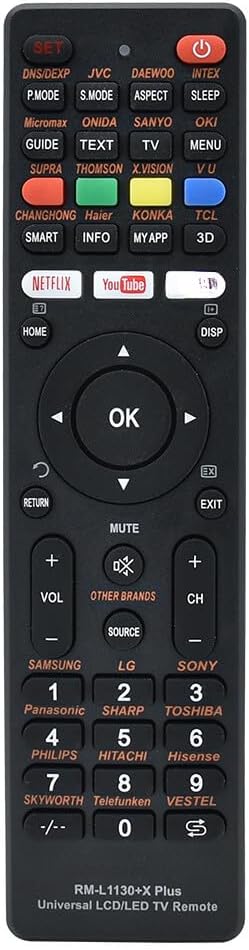
Image: Front view of the XINFUTE HUAYU L1130+X Plus Universal TV Remote Control, displaying all buttons and their labels.
Button Functions Overview
- POWER: Turns the TV on or off.
- SET: Used for auto-searching setup.
- VOL +/-: Adjusts the volume level.
- CH +/-: Changes the TV channel.
- MUTE: Mutes or unmutes the TV sound.
- SOURCE: Selects input sources (HDMI, AV, etc.).
- HOME: Accesses the TV's home menu or smart features.
- OK: Confirms selections in menus.
- Navigation Arrows (Up, Down, Left, Right): Navigates through menus and options.
- RETURN: Goes back to the previous menu or screen.
- EXIT: Exits the current menu or application.
- DISP: Displays information about the current channel or input.
- Number Buttons (0-9): Directly enters channel numbers.
- NETFLIX, YouTube, amazon: Direct access buttons for streaming services.
- SMART, INFO, MY APP, 3D: Accesses specific smart TV features or applications.
- P.MODE, S.MODE, ASPECT: Picture mode, Sound mode, Aspect ratio adjustments.
- GUIDE, TEXT, TV, MENU: Accesses TV guide, teletext, TV mode, and main menu.
- Brand Buttons (e.g., SAMSUNG, LG, SONY): Used for Brand Express setup and may function as direct brand selection.
Maintenance
Cleaning the Remote Control
To maintain the remote control's appearance and functionality:
- Wipe the surface with a soft, dry cloth.
- Do not use abrasive cleaners, solvents, or alcohol, as these can damage the surface or internal components.
Battery Care
- Replace batteries when the remote's response becomes sluggish or the indicator light does not illuminate.
- Remove batteries if the remote control will not be used for an extended period to prevent leakage.
- Dispose of used batteries according to local regulations.
Troubleshooting
If you encounter issues with your remote control, please refer to the following common solutions:
| Problem | Possible Cause | Solution |
|---|---|---|
| Remote does not work at all. |
|
|
| Remote only controls some functions. |
|
|
| Remote's range is poor. |
|
|
Specifications
- Model Number: L1130+X PLUS (RM-L1130+8)
- Brand: XINFUTE (HUAYU)
- Connectivity Technology: Infrared (IR)
- Compatible Devices: Television (LCD/LED)
- Max Number of Supported Devices: 1
- Special Feature: Ergonomic, No Programming Required (for most models)
- Power Requirement: 2 x AAA batteries (DC 3V)
- Operating Distance: More than 8 meters
- Product Dimensions: 6 x 3 x 1 inches (approximately)
- Item Weight: 2.82 ounces (approximately)
- Material: ABS Material
Warranty and Support
Warranty Information
This product comes with a one-year warranty from the date of purchase. Please retain your proof of purchase for warranty claims.
Customer Support
For any questions, issues, or support needs, please contact the manufacturer, XINFUTE. All goods are inspected before shipment. If you are not satisfied with your purchase, you may contact us within 24 hours of receipt.
Manufacturer: XINFUTE
For more information, you may visit the manufacturer's website: http://www.huayu.cc/en/