
FEZIBO B0FDQJWX2C
FEZIBO L Shaped Electric Standing Desk User Manual
Model: B0FDQJWX2C
1. Introduction
Thank you for choosing the FEZIBO L Shaped Electric Standing Desk. This manual provides essential information for the safe and efficient assembly, operation, and maintenance of your new desk. Please read these instructions thoroughly before use and retain them for future reference.

Image: The FEZIBO L Shaped Electric Standing Desk, showcasing its spacious black tabletop, integrated storage, and electric height adjustment feature, set up with dual monitors and various office accessories.
2. Safety Information
Observe the following safety precautions to prevent injury or damage to the product:
- Ensure all components are securely fastened before use.
- Do not overload the desk. The maximum weight capacity is 176 lbs (80 kg).
- Keep children and pets away from the desk during operation to prevent accidents.
- Avoid placing liquids directly on the desk surface to prevent electrical hazards.
- Do not disassemble or modify the desk's electrical components. Contact customer service for repairs.
- Ensure sufficient clearance around the desk when adjusting height to avoid collision with other objects. The desk features a built-in anti-collision system.
3. Package Contents
Your FEZIBO L Shaped Electric Standing Desk is shipped in two separate packages. Please verify that all parts listed in the assembly instructions are present before beginning assembly. Boxes may arrive separately.
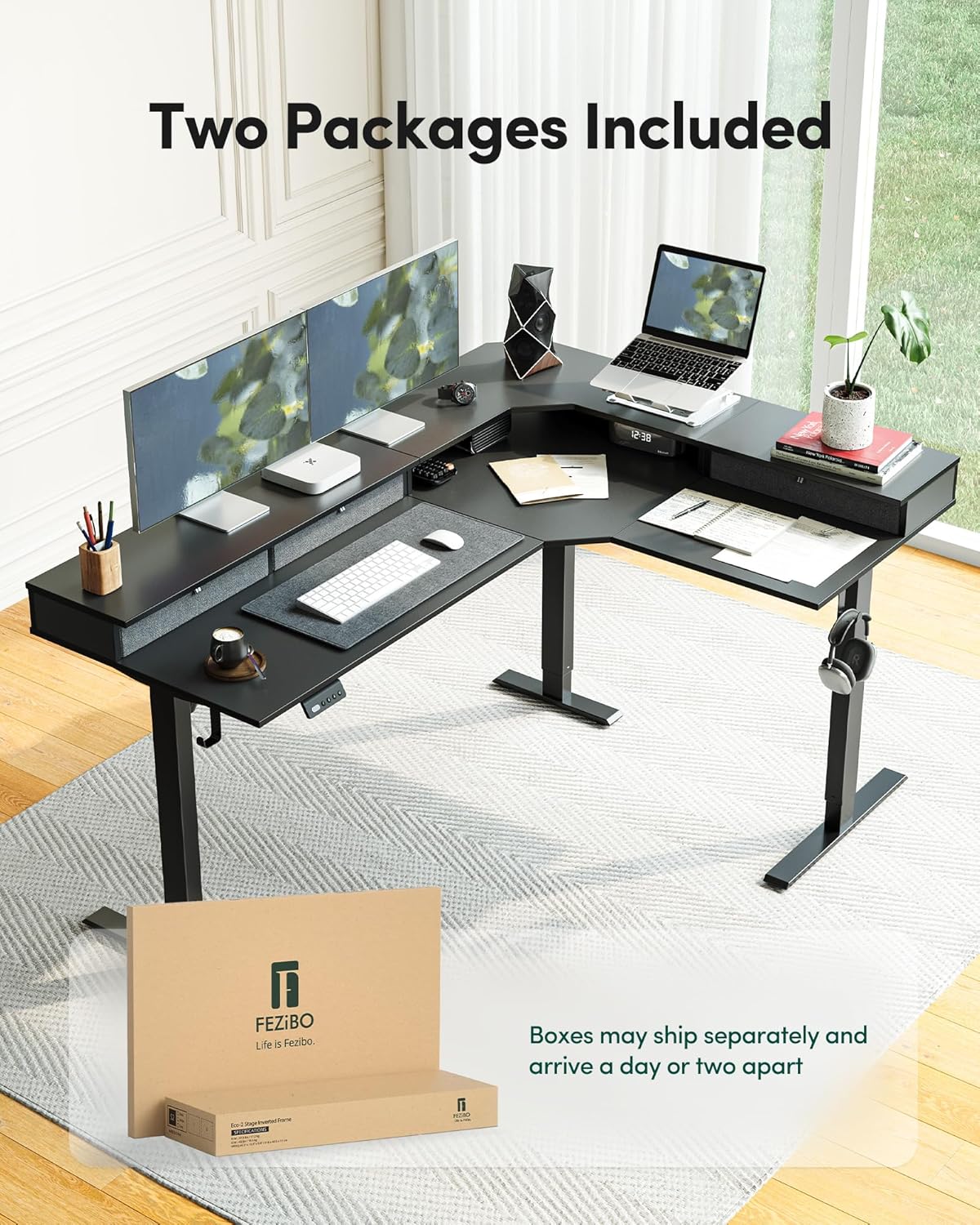
Image: Illustration showing two distinct packages, indicating that the desk components are shipped in separate boxes which may arrive at different times.
4. Assembly and Setup
Assembly is required for this product. All parts are pre-numbered for ease of identification. Refer to the detailed assembly instructions included in your package for step-by-step guidance.
4.1 Reversible L-Shaped Top Configuration
The L-shaped tabletop is designed for flexibility, allowing you to configure the longer side to either the left or right, depending on your space requirements. This feature is ideal for optimizing corner spaces in home offices or gaming rooms.

Image: A top-down diagram illustrating how the L-shaped desk can be assembled with the longer section on either the left (A) or right (B) side, providing flexibility for various room layouts.
4.2 Stable Corner Structure
The desk frame is engineered with a stable corner structure to enhance overall stability, even when fully loaded. Ensure all frame components are correctly aligned and tightened during assembly.

Image: A visual representation of the desk's underlying frame, highlighting the robust corner structure designed to provide enhanced stability for the L-shaped configuration.
5. Operating Instructions
5.1 Electric Height Adjustment
The desk features an electric height adjustment system allowing seamless transitions between sitting and standing positions. The height can be adjusted from approximately 11 inches (sitting mode) to 28.3 inches (standing mode) using the control panel.

Image: A detailed view of the desk's control panel, showing the digital height display, up/down adjustment buttons, and two programmable memory height settings.
Using Memory Height Settings:
- Adjust the desk to your desired sitting or standing height using the Up (^) or Down (v) buttons.
- Press and hold one of the preset buttons (1 or 2) until the display flashes, indicating the height has been saved.
- To recall a saved height, simply press the corresponding preset button.
5.2 Anti-Collision System
The desk is equipped with a smart anti-collision system. If the desk encounters an obstruction during height adjustment, it will automatically stop and reverse slightly to prevent damage to the desk or objects in its path.
6. Key Features
- Reversible L-Shaped Top: Offers flexible configuration for left or right-hand setups.
- Integrated Storage: Includes a sturdy shelf with three compartments for organizing office supplies.
- Electric Height Adjustment: Smooth and quiet operation with two memory presets.
- Sturdy Construction: Thick cold-rolled steel frame supports up to 176 lbs (80 kg).
- Quiet Operation: Lifts at 35mm/s with noise levels ≤45dB.

Image: A close-up view of the desk's integrated storage system, showing three compartments designed to keep office essentials organized and within easy reach.

Image: A graphic illustrating the low noise level of the desk's lifting mechanism (45dB), comparable to soft conversation, ensuring minimal disturbance during operation.
7. Maintenance
- Cleaning: Wipe the desk surface with a soft, damp cloth. Avoid abrasive cleaners or harsh chemicals.
- Inspection: Periodically check all screws and bolts to ensure they remain tight. Retighten if necessary.
- Cable Management: Ensure power cables are not pinched or strained during height adjustments.
8. Troubleshooting
| Problem | Possible Cause | Solution |
|---|---|---|
| Desk does not move. | Power cable disconnected; motor overload. | Check power connections. Unplug for 10 minutes, then plug back in. Reduce load if overloaded. |
| Uneven height adjustment. | Obstruction; uneven load. | Remove any obstructions. Redistribute weight evenly on the desk surface. |
| Anti-collision system frequently triggers. | Sensitivity setting too high; frequent minor obstructions. | Ensure clear path during adjustment. Refer to the full manual for anti-collision sensitivity adjustment if available. |
If you encounter issues not listed here or if solutions do not resolve the problem, please contact FEZIBO customer service.
9. Specifications
| Feature | Detail |
|---|---|
| Brand | FEZIBO |
| Model | B0FDQJWX2C |
| Product Dimensions | 63"D x 48"W x 28.5"H |
| Color | Black |
| Style | Modern |
| Base Material | Alloy Steel |
| Top Material Type | Wood |
| Special Feature | Cordless (referring to the control panel, not power source) |
| Assembly Required | Yes |
| Max Load Capacity | 176 lbs (80 kg) |
| Lift Speed | 35mm/s |
| Noise Level | ≤45dB |

Image: A visual diagram providing detailed measurements of the desk's various sections, including length, width, and height, along with an indication of its stability and lift speed.
10. Warranty and Customer Support
FEZIBO stands behind the quality of its products. This desk is backed by FEZIBO's customer service, which assists with installation issues and part replacements.
For warranty claims, technical support, or any questions regarding your product, please contact FEZIBO customer service through the retailer's platform or visit the official FEZIBO website.
Contact Information: Refer to your purchase documentation or the FEZIBO brand store on Amazon for the most current contact details.
Image: A graphic displaying various professional certifications such as ISED, FCC, CE, EPA, California Air Resources Board, ETL, and UL, indicating compliance with quality and safety standards.
Related documentsB0FDQJWX2C


Ask a question about this manual
Ask about setup, troubleshooting, compatibility, parts, safety, or missing instructions. Manuals+ will review the question and use this page’s manual context to help answer it.