1. Introduction
The EF ECOFLOW Trail 300 DC Portable Power Station is a compact and lightweight power solution designed for outdoor activities, travel, and emergency backup. It features a 288Wh LiFePO4 battery, providing reliable DC power for a variety of devices. This manual provides essential information for the safe and efficient use of your power station.

Image: The EF ECOFLOW Trail 300, an ultra-compact camping power station.
Key features include a 288Wh capacity, 300W total DC output, multiple charging ports, and a durable, lightweight design. It is engineered for portability and resilience in outdoor environments.
Video: An overview of the EF ECOFLOW Trail 300, demonstrating its compact size, portability, and various usage scenarios in outdoor settings, including charging devices and its robust design.
2. Safety Instructions
To ensure safe operation and prolong the lifespan of your EF ECOFLOW Trail 300, please adhere to the following safety guidelines:
- Do not disassemble, repair, or modify the unit. Incorrect reassembly may cause fire or electric shock.
- Do not place the unit near heat sources or in direct sunlight for prolonged periods.
- Avoid exposure to rain or moisture. Do not immerse the unit in water.
- Use only approved accessories and charging cables.
- Keep the unit away from children and pets.
- Operate and store the unit in a well-ventilated area.
- Do not use the unit if it has been damaged or dropped.
- Dispose of the unit and its battery in accordance with local regulations.
3. Package Contents
Upon unpacking your EF ECOFLOW Trail 300, please verify that all items are present:
- EF ECOFLOW Trail 300 DC Portable Power Station
- User Manual
Note: Charging cables and power adapters are not included and must be purchased separately. The unit supports USB-C charging (up to 140W per port) and solar charging (up to 110W max).
4. Product Overview
The EF ECOFLOW Trail 300 features a clear display and multiple output ports for versatile power delivery.

Image: Front panel of the Trail 300, illustrating the digital display and various DC output ports.
4.1. Ports and Display
- Display Screen: Shows battery percentage, input/output wattage, and estimated runtime.
- USB-C Ports (x2): 140W Power Delivery 3.1 (input/output).
- USB-A Ports (x2): 12W output.
- 12V Car Port (x1): 10A output.
- Solar Input: 10-30V for solar panel connection.

Image: Detailed view of the power station's input and output ports.
5. Setup
5.1. Initial Charging
Before first use, it is recommended to fully charge your EF ECOFLOW Trail 300. The unit supports rapid, flexible recharging through three methods:
- USB-C Charging: Use two 140W USB-C chargers for the fastest recharge (0-80% in approximately 85 minutes).
- Car Charging: Connect to a 12V car outlet (110W max).
- Solar Charging: Connect compatible solar panels (110W max).
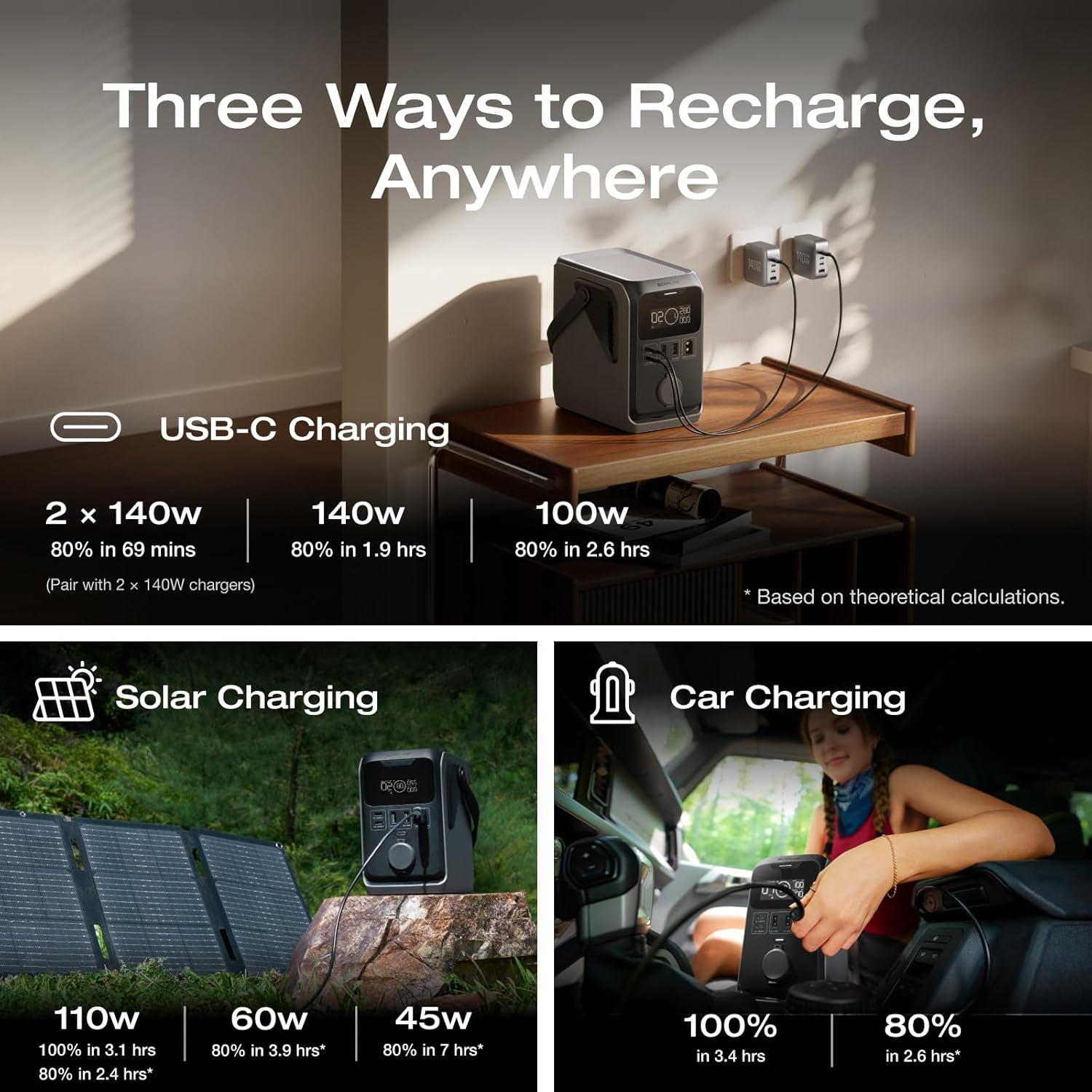
Image: Visual representation of the three available recharging options for the power station.
6. Operating Instructions
6.1. Powering On/Off
To power on the unit, press and hold the main power button until the display illuminates. To power off, press and hold the button again until the display turns off.
6.2. Charging Devices
The Trail 300 can charge up to five devices simultaneously using its DC output ports. It delivers 300W of pure DC output, with up to 140W per port, making it compatible with 90% of essential outdoor gear, including 12V electric coolers.
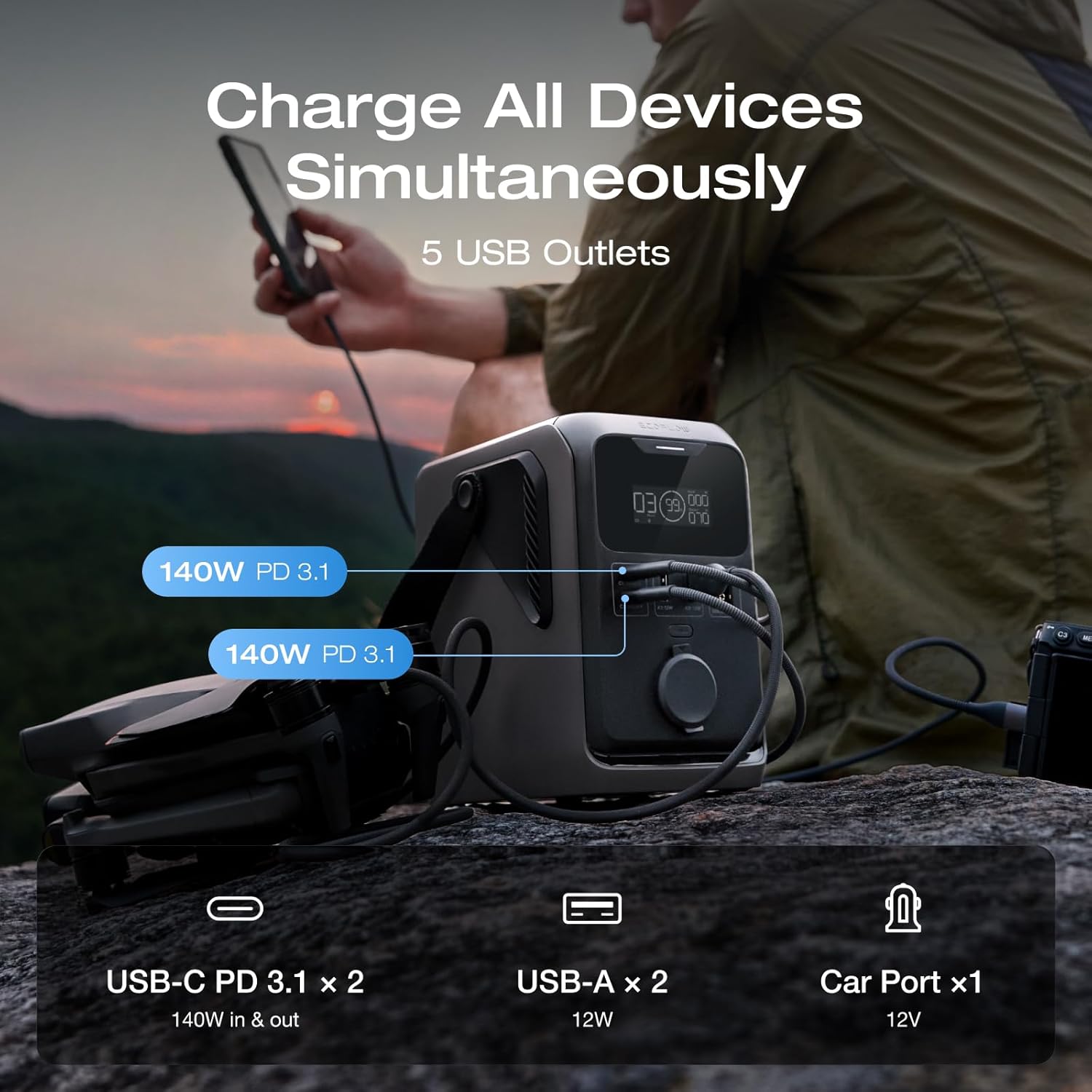
Image: The power station actively charging a drone and other devices.
Connect your devices to the appropriate USB-A, USB-C, or 12V car port. The display will show the current output wattage.
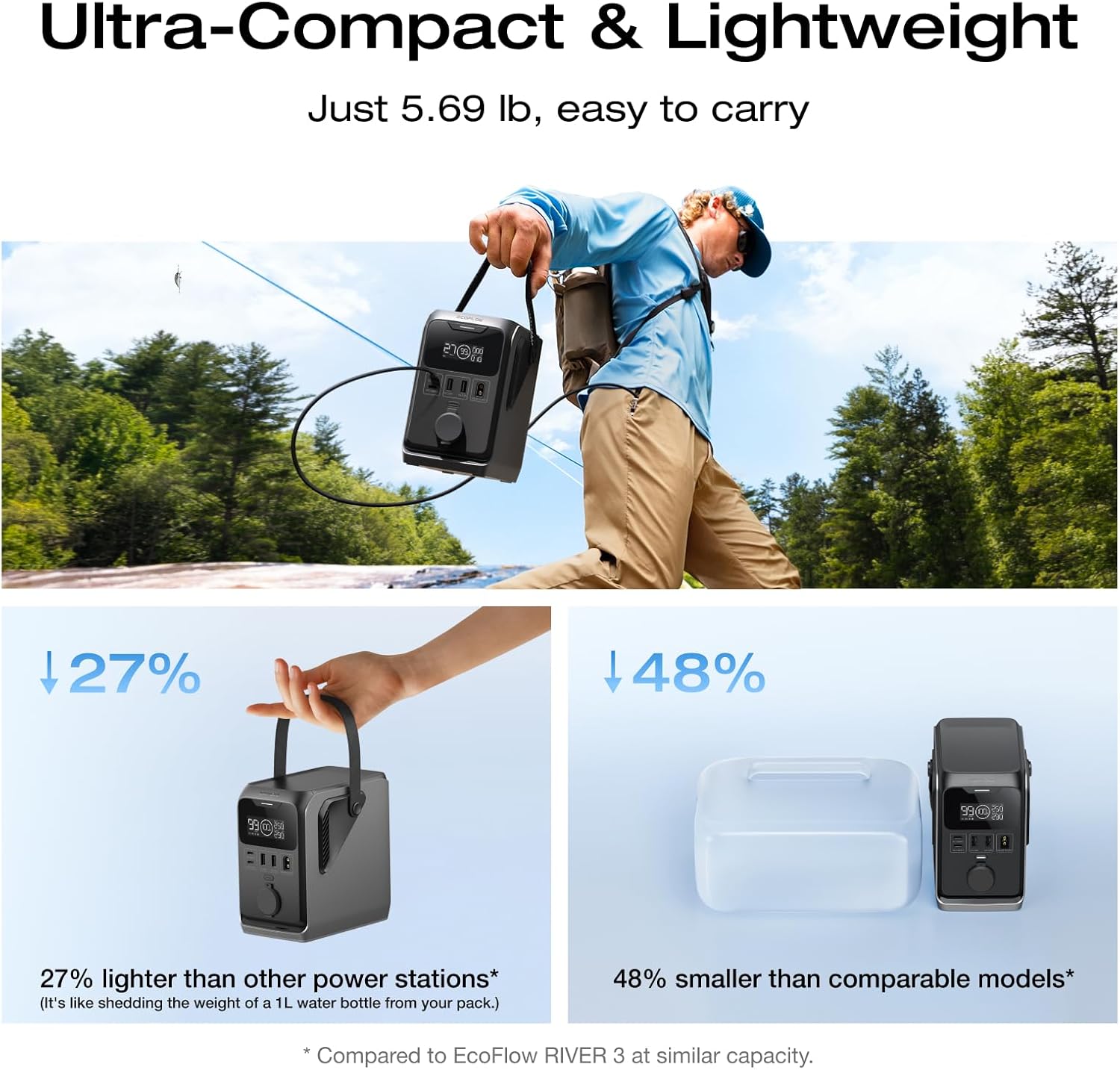
Image: The Trail 300 providing power to an electric cooler, portable Wi-Fi router, and portable projector.
7. Maintenance
Proper maintenance ensures the longevity and performance of your power station.
- Cleaning: Use a dry, soft cloth to wipe the exterior. Avoid using harsh chemicals or abrasive materials.
- Storage: Store the unit in a cool, dry place, away from direct sunlight and extreme temperatures. For long-term storage, charge the battery to approximately 50-80% every 3-6 months to prevent deep discharge.
- Battery Care: The LiFePO4 battery is designed for durability. Avoid completely draining the battery to 0% for extended periods, as this can reduce its lifespan.

Image: The Trail 300's robust construction, designed to withstand outdoor conditions.
8. Troubleshooting
If you encounter issues with your EF ECOFLOW Trail 300, refer to the following common problems and solutions:
| Problem | Possible Cause | Solution |
|---|---|---|
| Unit does not power on | Battery is completely drained or unit is faulty. | Charge the unit using a compatible charger. If it still doesn't turn on, contact support. |
| Devices not charging | Output port not activated, cable issue, or device incompatibility. | Ensure the unit is powered on. Check cable connections. Verify device power requirements are within the unit's output limits. |
| Slow charging of the unit | Low power input, high ambient temperature, or cable issue. | Use a higher wattage charger (e.g., two 140W USB-C chargers). Ensure proper ventilation. Check charging cable integrity. |
| Display not working | Unit is off, or a display malfunction. | Press the power button to ensure the unit is on. If the unit functions but the display doesn't, contact support. |
If the problem persists after attempting these solutions, please contact EF ECOFLOW customer support.
9. Specifications
Detailed technical specifications for the EF ECOFLOW Trail 300 DC Portable Power Station:
- Model: TRAIL DC (TRAIL 300)
- Capacity: 288 Watt-hours (Wh)
- Battery Type: LiFePO4
- Total DC Output: 300W (up to 140W per port)
- USB-C Output: 2 x 140W PD3.1 (input/output)
- USB-A Output: 2 x 12W
- Car Port Output: 1 x 12V (10A)
- Solar Input: 10-30V (110W max)
- Dimensions: 15.7 x 22 x 21.31 cm
- Weight: 2.58 kg
- Operating Temperature: -20°C to 60°C (-4°F to 140°F)
- Charging Temperature: 0°C to 45°C (32°F to 113°F)
10. Warranty and Support
The EF ECOFLOW Trail 300 DC Portable Power Station comes with a 5-year warranty, covering defects in materials and workmanship under normal use. For warranty claims, technical support, or further inquiries, please contact EF ECOFLOW customer service.
You can find more information and support resources on the official EF ECOFLOW website or through their Amazon store: EF ECOFLOW Amazon Store.

Image: Emphasizing the X-Guard Safety features and extended warranty for the product.


