
1. Introduction
The iDsonix X201-512GB External SSD is a high-performance portable storage device designed for fast data transfer and broad compatibility. Featuring both USB-A 3.2 Gen 2 and USB-C ports, it allows seamless connection to a wide range of devices without the need for adapters. Its robust aluminum alloy construction and 3-stage sliding design ensure durability and protection for the connectors.

Image: The iDsonix X201-512GB External SSD connected to both a laptop and a smartphone, highlighting its versatile dual USB-A and USB-C connectivity.
2. Setup
The iDsonix X201-512GB SSD is designed for plug-and-play operation, requiring no driver installation for most operating systems. Follow these steps to begin using your device:
- Connect the SSD: Slide the appropriate connector (USB-A or USB-C) out from the device using the 3-stage sliding mechanism. Plug the SSD directly into an available USB-A or USB-C port on your computer, smartphone, tablet, gaming console (e.g., PS5), or smart TV.
- Device Recognition: Your operating system should automatically detect the SSD. It will appear as a removable storage device.
- Initial Formatting (if needed): The SSD typically comes pre-formatted with exFAT for broad compatibility across Windows, macOS, and Linux. If your device does not recognize the SSD or you wish to use a different file system (e.g., NTFS for Windows, HFS+ or APFS for macOS), you may need to format it using your operating system's disk utility. Warning: Formatting will erase all data on the drive.

Image: The iDsonix X201-512GB External SSD plugged into a docking station, demonstrating its compatibility with various computer peripherals.
3. Operating
Once connected and recognized, the iDsonix X201-512GB SSD functions like any other external storage device. You can perform various data management tasks:
- Transferring Files: Drag and drop files or folders to and from the SSD, or use copy-paste functions. For optimal transfer speeds, ensure you are connected to a USB 3.2 Gen 2 compatible port.
- Backing Up Data: Copy important documents, photos, and videos to the SSD for secure storage.
- Expanding Storage: Use the SSD to expand the storage capacity of your devices, such as gaming consoles (e.g., PS5 for game storage) or smartphones.
- Media Playback: Directly play videos, music, or view photos stored on the SSD from compatible devices like smart TVs or tablets.
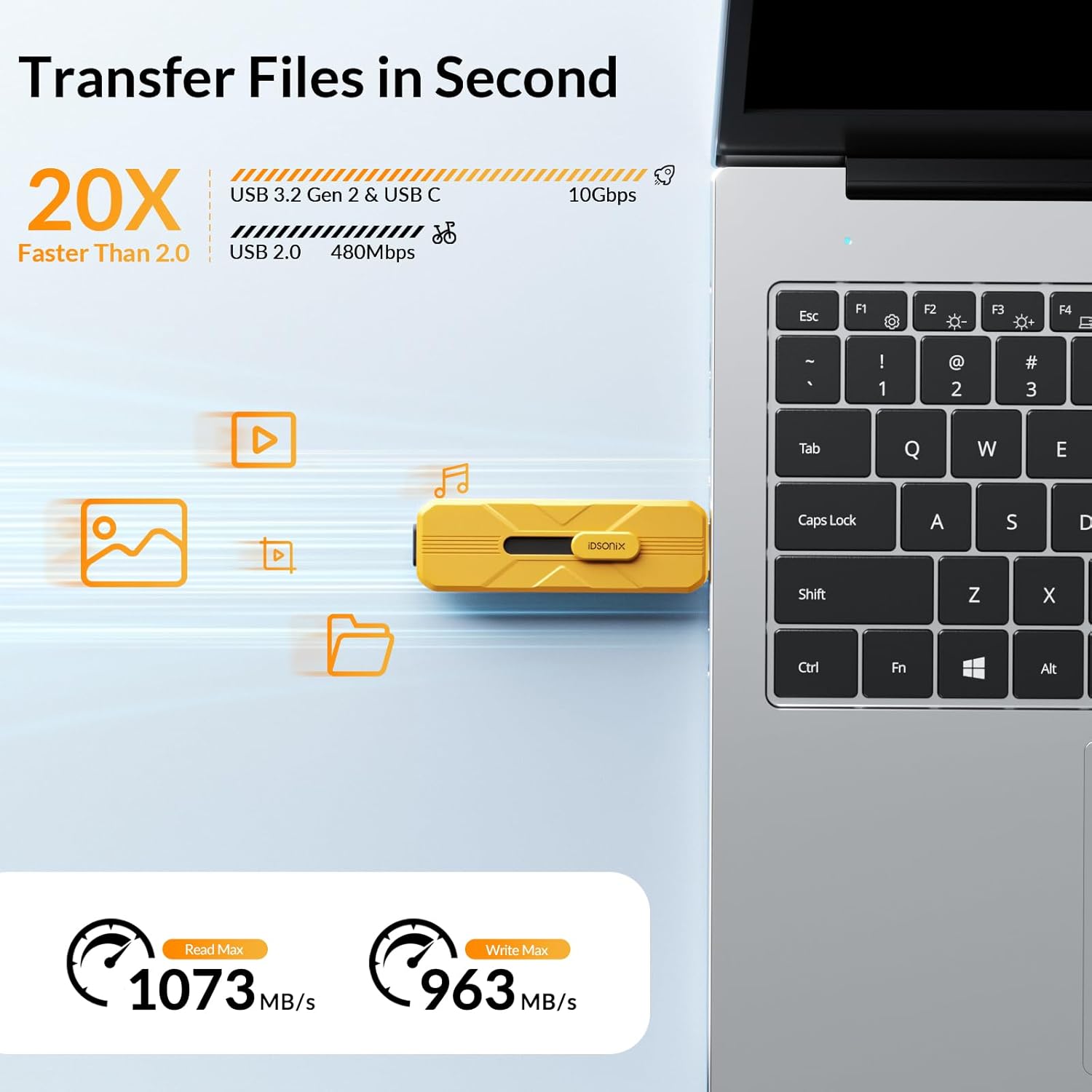
Image: A visual representation of the iDsonix X201-512GB External SSD's high-speed capabilities, indicating read speeds up to 1073MB/s and write speeds up to 963MB/s.

Image: Multiple use cases for the iDsonix X201-512GB External SSD, including file sharing, game expansion, photo storage, and video playback across different devices.
Safe Removal
Always safely eject the SSD from your device before physically disconnecting it to prevent data corruption. This can typically be done through your operating system's taskbar (Windows) or by dragging the drive icon to the Trash/Eject (macOS).
4. Maintenance
Proper care ensures the longevity and reliability of your iDsonix X201-512GB External SSD.
- Physical Protection: The SSD features a durable aluminum alloy casing and a 3-stage sliding design to protect the connectors. Avoid dropping the device or exposing it to excessive force.
- Heat Dissipation: The aluminum alloy body aids in rapid heat dissipation. While normal operation may generate some warmth, ensure the device is not covered or placed in environments with poor airflow during prolonged use.
- Data Integrity: Regularly back up critical data stored on the SSD to another location. Always follow safe removal procedures to prevent data loss or corruption.
- Cleaning: Use a soft, dry cloth to clean the exterior of the SSD. Avoid liquid cleaners or abrasive materials.

Image: The iDsonix X201-512GB External SSD on a rocky surface, highlighting its sturdy construction and 3-level slider design for port protection.
5. Troubleshooting
If you encounter issues with your iDsonix X201-512GB External SSD, consider the following:
- SSD Not Recognized:
- Ensure the SSD is fully inserted into the USB port.
- Try a different USB port on your device.
- Test the SSD on another computer or compatible device to rule out a port issue.
- Check your device's Disk Management (Windows) or Disk Utility (macOS) to see if the drive is detected but unformatted or has a partition issue.
- Slow Transfer Speeds:
- Verify that you are connected to a USB 3.2 Gen 2 (10Gbps) compatible port on your host device. Older USB 2.0 or 3.0 ports will result in slower speeds.
- Ensure your operating system and drivers are up to date.
- Large numbers of small files transfer slower than a few large files.
- Performance can vary based on host equipment, interfaces, and usage conditions.
- Data Corruption:
- Always safely eject the SSD before disconnecting.
- If data corruption occurs frequently, consider reformatting the drive (after backing up any recoverable data) and checking for firmware updates.
- Capacity Discrepancy:
- Storage device manufacturers calculate capacity using the decimal system (1GB = 1,000,000,000 bytes), while operating systems use binary (1GB ≈ 1,073,741,824 bytes). This results in a slightly lower reported usable capacity than the advertised nominal capacity. This is standard for all storage devices.
6. Specifications
| Feature | Detail |
|---|---|
| Model Number | X201-512GB |
| Digital Storage Capacity | 512 GB |
| Interface | USB 3.2 Gen 2 (USB-A and USB-C ports) |
| Read Speed (Max) | Up to 1073 MB/s |
| Write Speed (Max) | Up to 963 MB/s |
| Material | Aluminum Alloy |
| Special Features | 2 Ports (USB-C + USB-A 3.2), 3-stage sliding interface design, Backward Compatible, Plug and play, Portable |
| Compatible Devices | Dell/HP/Lenovo/Surface Laptop/MacBook/iMac/Mini PC/Computer/PC/Desktop; PS5 / Steam Deck/Gaming Console; Tablet/iPad/Camera/Smart TV; USB C Smartphone/iPhone 15 and above |
| Installation Type | External Hard Drive |
| Included Components | 512GB SSD |
| Item Weight | 3.2 ounces |

Image: An illustration of the internal TLC chip technology within the iDsonix X201-512GB External SSD, indicating its contribution to stable, fast, and reliable performance.

Image: A comprehensive diagram illustrating the universal compatibility of the iDsonix X201-512GB External SSD with a wide array of devices, categorized by USB-C and USB-A ports.
7. Warranty and Support
iDsonix provides a 3-Year Service warranty for the X201-512GB External SSD, ensuring peace of mind regarding product quality and performance.

Image: A graphic depicting a shield with the number '3', signifying the 3-Year Service warranty for the product.
For technical support, warranty claims, or further assistance, please refer to the contact information provided with your product packaging or visit the official iDsonix website.