
Introduction
This manual provides instructions for the installation, operation, and maintenance of your Aroepurt Hybrid Phone Case and Tempered Glass Screen Protectors. This product is designed to offer robust protection for your compatible smartphone model.
What's Included
- 1 x Aroepurt Hybrid Phone Case
- 2 x Tempered Glass Screen Protectors
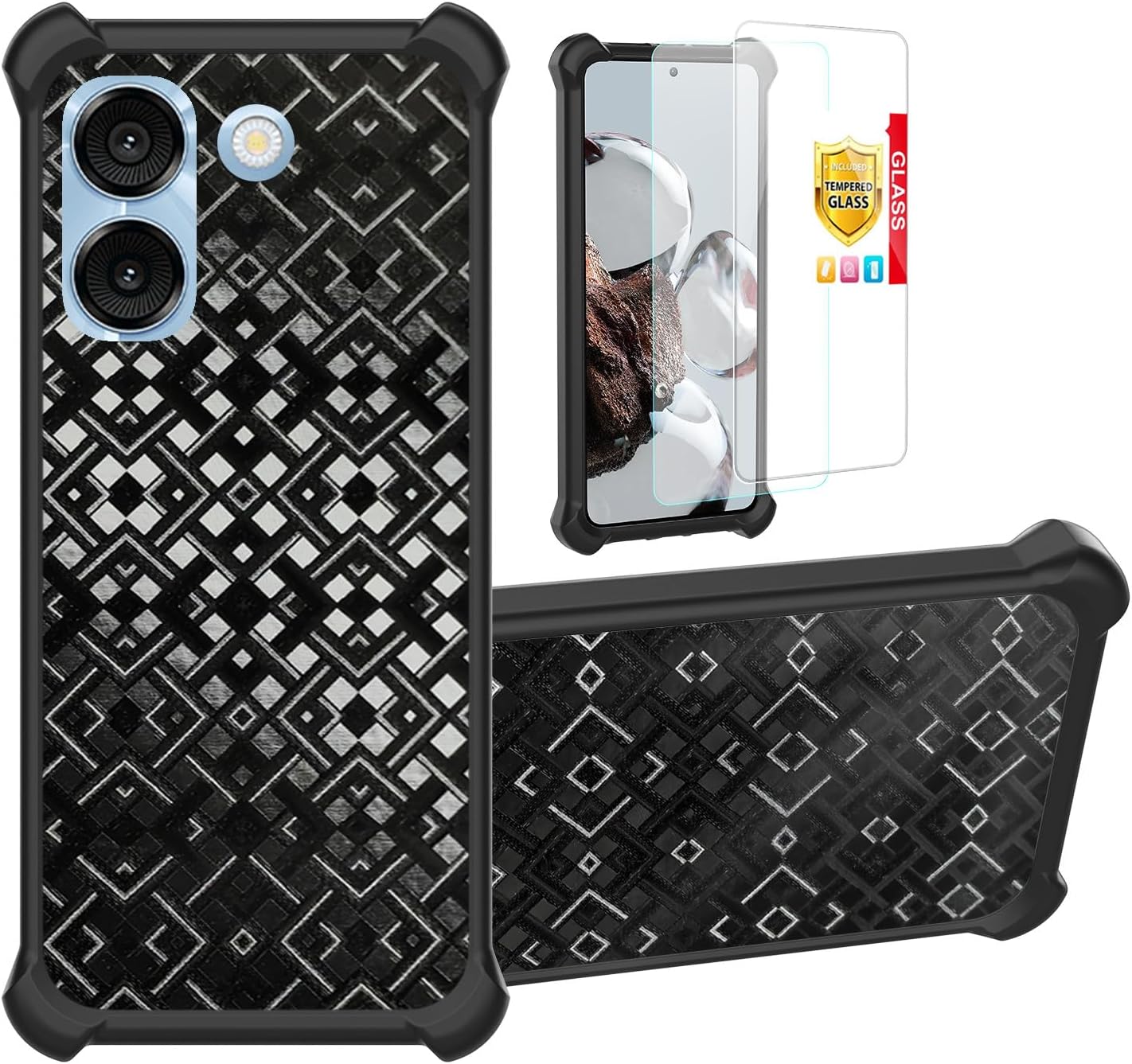
Image: Contents of the package, showing the phone case and two screen protectors.
Setup and Installation
1. Installing the Phone Case
- Ensure your phone is clean and free of dust or debris.
- Separate the hybrid case components if necessary (hard PC back panel and soft silicone frame).
- Carefully insert your phone into the soft silicone frame first, ensuring all edges are properly seated.
- Align the hard PC back panel with the silicone frame and snap it into place. Ensure all cutouts for ports, buttons, and cameras align correctly.

Image: A smartphone with the hybrid case installed, highlighting the protective design around the camera and screen.
2. Installing the Tempered Glass Screen Protector
- Clean the Screen: Use the provided cleaning wipes (if included) or a microfiber cloth to thoroughly clean your phone's screen. Ensure no dust, smudges, or fingerprints remain.
- Remove Dust: Use a dust-absorber sticker (if included) to remove any remaining dust particles.
- Peel Off Protective Film: Carefully peel off the protective film from the adhesive side of the tempered glass. Avoid touching the adhesive surface.
- Align and Apply: Align the screen protector precisely with your phone's screen, paying attention to cutouts for the speaker, camera, and home button. Gently lower the protector onto the screen.
- Remove Bubbles: Once applied, gently press down on the center of the screen protector. Any air bubbles should dissipate outwards. Use a soft cloth or squeegee (if included) to push out stubborn bubbles towards the edges.

Image: Features of the tempered glass screen protector, including 9H hardness and anti-fingerprint properties.

Image: Demonstration of the screen protector's scratch resistance against sharp objects.
Operating Instructions
Case Features:
- Shock Absorption: The hybrid design, combining a hard PC back panel with a soft silicone frame and four-corner shock airbags, provides enhanced protection against drops and impacts.
- Elevated Protection: The case design ensures that both the camera and the screen are slightly elevated when placed on a flat surface, offering additional protection against scratches.
- Fingerprint Resistance: The frosted surface of the case is designed to reduce fingerprints and smudges, maintaining a clean appearance.
- 3D Multi-Directional Shape Change: The case features a unique 3D pattern that changes appearance and reflects different colors depending on the light and viewing angle.

Image: Detail of the shockproof design with four-corner airbags.

Image: Visual representation of the 3D multi-directional pattern and its light-reflecting properties.

Image: Various angles showing the dynamic visual effects of the case's 3D design.
Maintenance
- Cleaning the Case: To clean the phone case, remove it from your device. Use a soft, damp cloth with mild soap and water. Avoid harsh chemicals or abrasive materials that could damage the finish.
- Cleaning the Screen Protector: Use a microfiber cloth to gently wipe the screen protector. For stubborn smudges, a screen cleaner specifically designed for electronics can be used.
- Avoid Extreme Conditions: Do not expose the case or screen protector to extreme temperatures or direct sunlight for prolonged periods, as this may affect material integrity.
Troubleshooting
- Case Port Alignment Issues: If the case obstructs the USB port or other openings, ensure the phone is correctly seated within the case. Verify that the case model matches your specific phone model (e.g., FOXXD S67 5G, AirVoice S67 5G, C67, A67). Incorrect model cases may lead to misalignment.
- Screen Protector Fit Issues: If the screen protector does not cover the entire screen or misaligns with the camera/sensors, re-check the product compatibility with your specific phone model. Ensure careful alignment during installation.
- Buttons Not Responding: If phone buttons (power, volume) are difficult to press or unresponsive, ensure the case is properly aligned and not pressing on the buttons. Remove and re-install the case, ensuring a snug but not overly tight fit.
- Air Bubbles Under Screen Protector: Small bubbles can often be pushed out to the edges with a soft cloth. For persistent bubbles, gently lift the nearest edge of the protector and re-apply, ensuring no dust is trapped underneath.
Specifications
| Brand | Aroepurt |
| Compatible Phone Models | FOXXD S67 5G, AirVoice S67 5G, C67, A67 |
| Material | Polyurethane (Case) |
| Form Factor | Hybrid Case |
| Color | Black |
| Special Features | Fingerprint-resistant frosted surface, Folding support, Magnetic fastening, Thickened anti-drop, Card Function |
| Item Weight | 2.46 ounces |
| Product Dimensions | 0.39 x 0.39 x 0.39 inches |
Warranty Information
Specific warranty details for this Aroepurt product are not provided in the available documentation. Please refer to the retailer's return policy or contact the manufacturer directly for warranty inquiries.
Support
For further assistance or technical support, please contact the retailer where the product was purchased. Manufacturer contact information is not available in this manual.