
1. Product Overview
The EVKRUN EUA5 Treadmill is designed for home use, offering a versatile workout experience with its 3.5 HP motor, 15% automatic incline, and a speed range of 0.6 to 8.7 MPH. It supports users up to 350 lbs and features an adjustable handlebar for comfort. This compact and quiet treadmill is suitable for various exercise needs, from slow walking to professional running training.
Key Features
- Multi-Function Treadmill: Supports walking, jogging, and running with a 3.5HP rated/4.0HP peak brushless motor and a 0.6-8.7 speed range.
- 4-Level Adjustable Handlebar: Manually adjustable handrails (Levels 1-4) to accommodate varying user heights, promoting healthy posture and safer workouts.
- 15-Level Electric Incline: Automatic incline adjustment from 0% to 15% via console keys, simulating uphill terrain for increased training intensity.
- Console/App Control: Features a versatile console with speed and incline shortcut keys, start/stop, and mode keys. Connects to fitness apps for real-time workout data tracking and interactive fitness games via Bluetooth.
- Compact & Foldable Design: Equipped with front wheels and an auto hydraulic folding system for easy storage under a sofa/bed or in a corner, saving up to 50% space.
- Double Deck & Shock Absorption: Upgraded double running deck with 6 shock absorption points to reduce impact on knees and joints, providing a more comfortable and quieter running experience.
2. Safety Information
Before using the treadmill, please read all instructions carefully. Always consult with a healthcare professional before starting any new exercise program.
- Keep children and pets away from the treadmill during operation.
- Ensure the safety key is properly attached to your clothing and the console before starting. In case of an emergency, the safety key will automatically stop the treadmill.
- Wear appropriate athletic footwear and clothing.
- Place the treadmill on a flat, stable surface with adequate clearance around it.
- Do not operate the treadmill if it is damaged or malfunctioning.
- Hold onto the handrails for balance, especially when starting or changing speed/incline.
3. Setup and Assembly
The EVKRUN EUA5 Treadmill comes mostly pre-assembled. Follow these steps for final setup.
Unpacking
- Carefully remove all packaging materials.
- Check all components against the packing list to ensure nothing is missing.
- Place the treadmill on a flat, stable surface.
Assembly Steps
For a visual guide, please refer to the installation video below.
Video: EVKRUN EUA5 Treadmill Installation Guide. This video provides a step-by-step visual demonstration of how to assemble your treadmill, including attaching the console and securing the risers.
Video: EVKRUN 15% Auto Incline Treadmill Overview. This video showcases the treadmill's features and includes segments on its initial setup and functionality.
4. Operating Instructions
Console Overview
The treadmill console provides all necessary controls and displays for your workout. It features an LED display showing time, speed, incline, distance, pulse, and calories burned.
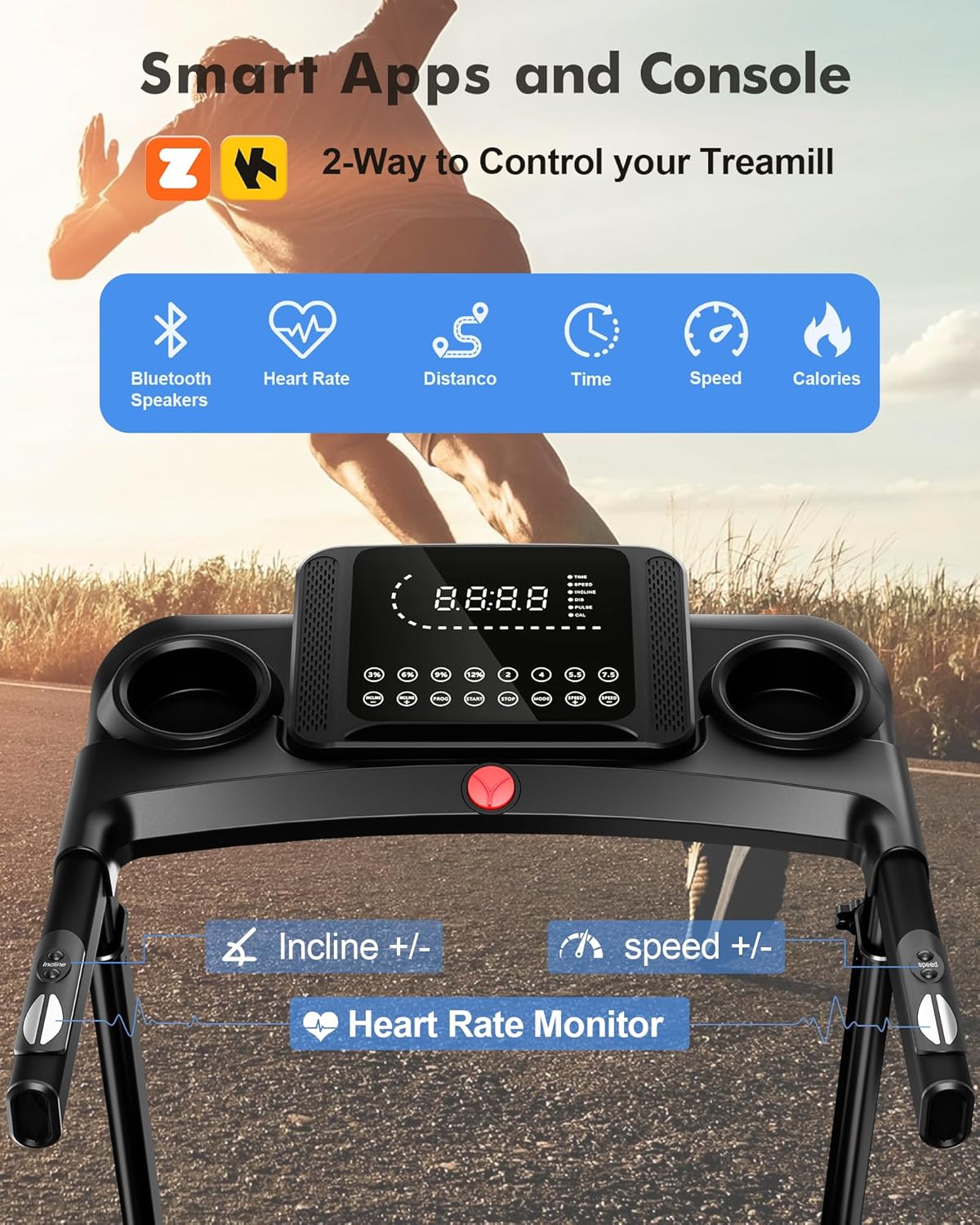
Image: The treadmill's control console, featuring an LED display for workout metrics, quick-access buttons for speed and incline, and integrated cup holders.
- Start/Stop: Press 'Start' to begin your workout and 'Stop' to end it.
- Speed +/-: Adjust the running belt speed incrementally.
- Incline +/-: Adjust the incline level incrementally.
- Quick Speed Buttons: Pre-set speed levels (e.g., 2, 4, 5.5, 7.5 MPH) for quick adjustments.
- Quick Incline Buttons: Pre-set incline levels (e.g., 3%, 6%, 9%, 12%) for quick adjustments.
- Mode: Cycle through different workout programs or display modes.
- PROG: Select from pre-programmed workouts.
Adjusting Incline
The treadmill offers 15 levels of automatic incline to vary your workout intensity.

Image: A visual representation of the treadmill's automatic incline feature, illustrating the range from 0% to 15% slope.
- Use the 'Incline +/-' buttons on the console or the quick incline buttons (3%, 6%, 9%, 12%) to change the incline.
- The incline will adjust automatically to your selected level.
Adjustable Handlebar
The handlebar height can be adjusted to ensure a comfortable and ergonomic workout posture.
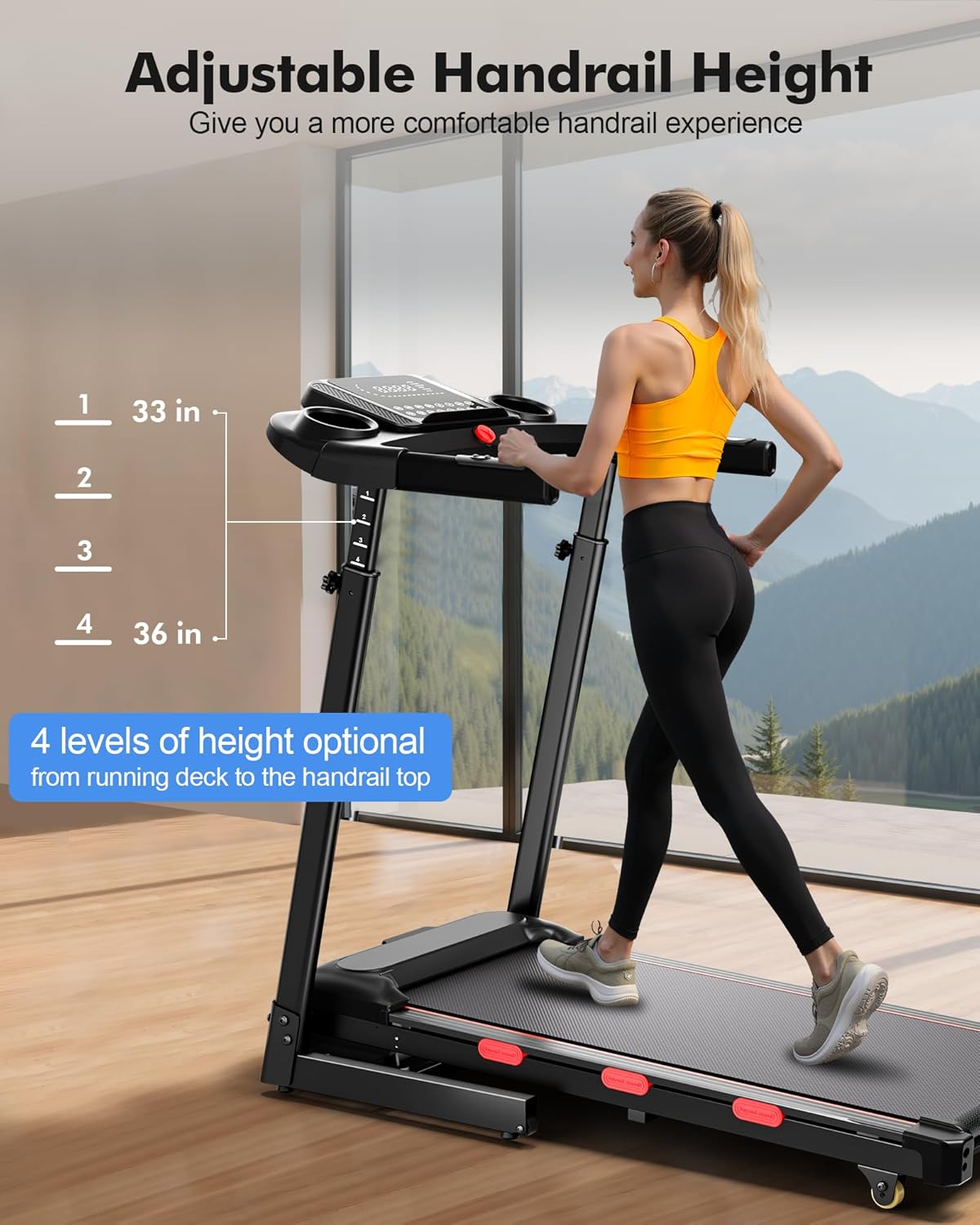
Image: A user demonstrating the 4-level adjustable handrail height, ranging from 33 to 36 inches from the running deck to the handrail top.
- Locate the adjustment knobs on the side of the handlebar risers.
- Loosen the knobs, adjust the handlebar to one of the 4 available height levels, and then securely tighten the knobs.
Using the Safety Key
The safety key is a crucial safety feature. Always attach it before starting your workout.
Video: Walking Pad Treadmill for Home. This short video demonstrates the use of the safety key, showing how it attaches to the console and can instantly stop the treadmill if disengaged.
- Attach the clip of the safety key to your clothing.
- Insert the magnetic end of the safety key into the designated slot on the console. The treadmill will not operate without the safety key in place.
- If you accidentally pull the safety key during your workout, the treadmill will immediately stop.
Folding and Storage
The treadmill features an auto hydraulic folding system for convenient storage.

Image: The treadmill in its folded position, highlighting its compact size and the wheels for easy movement and storage.
- Ensure the treadmill is turned off and unplugged.
- Gently lift the running deck until it locks into the upright position. The hydraulic system will assist in the process.
- To unfold, gently push the release mechanism (often a lever or button near the base of the deck) and slowly lower the deck until it rests flat on the floor.
- Use the integrated wheels to move the folded treadmill to your desired storage location.
5. Maintenance
Regular maintenance ensures the longevity and optimal performance of your treadmill.
- Cleaning: Wipe down the console and other surfaces with a damp cloth after each use. Avoid abrasive cleaners.
- Belt Lubrication: Lubricate the running belt every 3-6 months or after 100-150 hours of use, using silicone lubricant provided or recommended by the manufacturer. Refer to the user manual for specific instructions on how to apply.
- Belt Tension and Alignment: Periodically check the running belt tension and alignment. If the belt slips or drifts to one side, adjust it according to the instructions in the full user manual.
- Motor Cover: Keep the motor cover clean and free of dust to ensure proper ventilation.
6. Troubleshooting
If you encounter any issues with your treadmill, refer to the following common troubleshooting tips. For more complex problems, contact customer support.
| Problem | Possible Cause | Solution |
|---|---|---|
| Treadmill does not start | Power cord unplugged, safety key not in place, circuit breaker tripped. | Ensure power cord is securely plugged in. Insert the safety key. Check and reset the circuit breaker if necessary. |
| Running belt slips | Belt too loose, belt worn out. | Adjust belt tension according to the user manual. If worn, contact customer support for replacement. |
| Unusual noise during operation | Loose parts, lack of lubrication, motor issue. | Check for and tighten any loose bolts. Lubricate the running belt. If noise persists, contact customer support. |
| Incline not adjusting | Incline motor issue, obstruction. | Check for any obstructions under the treadmill. If the issue continues, contact customer support. |
7. Specifications
Detailed technical specifications for the EVKRUN EUA5 Treadmill.
| Feature | Detail |
|---|---|
| Brand | EVKRUN |
| Model Name | EUA5 |
| Color | Black |
| Product Dimensions | 45.3"D x 23"W x 45.3"H |
| Item Weight | 63 Pounds |
| Material | Alloy Steel |
| Maximum Speed | 8.7 Miles per Hour |
| Maximum Horsepower | 3.5 Horsepower |
| Maximum Incline Percentage | 15.0% |
| Maximum Weight Recommendation | 350 Pounds |
| Running Deck Length | 38.6 Inches |
| Running Deck Width | 15.4 Inches |
| Folded Size | 27.1" x 23" x 43.5" |
| Display Type | LED |
| Connectivity Technology | Bluetooth |
| Special Features | Adjustable Handle-Height, Built-in Heart Rate Monitor, Water Bottle Holder |
| Included Components | Treadmill Body, Tool Kit, User Manual, Safety Key |
8. Warranty and Support
Your EVKRUN EUA5 Treadmill comes with a manufacturer's warranty and dedicated customer support.
- Warranty: This product is covered by a 60-day warranty. Please retain your proof of purchase for warranty claims.
- Returns: Enjoy a 30-day easy return policy.
- Customer Support: For any questions, technical assistance, or warranty claims, please contact EVKRUN Direct Store customer service. Refer to your purchase documentation for contact details.