
GIGABYTE GIGABYTE AERO X16 2WHA3USC64DH
Contents
GIGABYTE AERO X16 User Manual
Model: AERO X16 2WHA3USC64DH
Brand: GIGABYTE
Introduction
This manual provides essential information for setting up, operating, maintaining, and troubleshooting your GIGABYTE AERO X16 Copilot+ PC. Please read this manual thoroughly to ensure proper use and to maximize the performance and longevity of your device.

The GIGABYTE AERO X16 Copilot+ PC, a high-performance laptop designed for creators and gamers.
Setup
1. Unboxing and Initial Inspection
Carefully remove all components from the packaging. Ensure the following items are present:
- GIGABYTE AERO X16 Laptop
- Power Adapter
- Power Cord
- User Manual (this document)
2. Connecting the Power Adapter
Connect the power adapter to the DC-in port on the laptop and then plug the power cord into a wall outlet. The laptop can be used while charging.

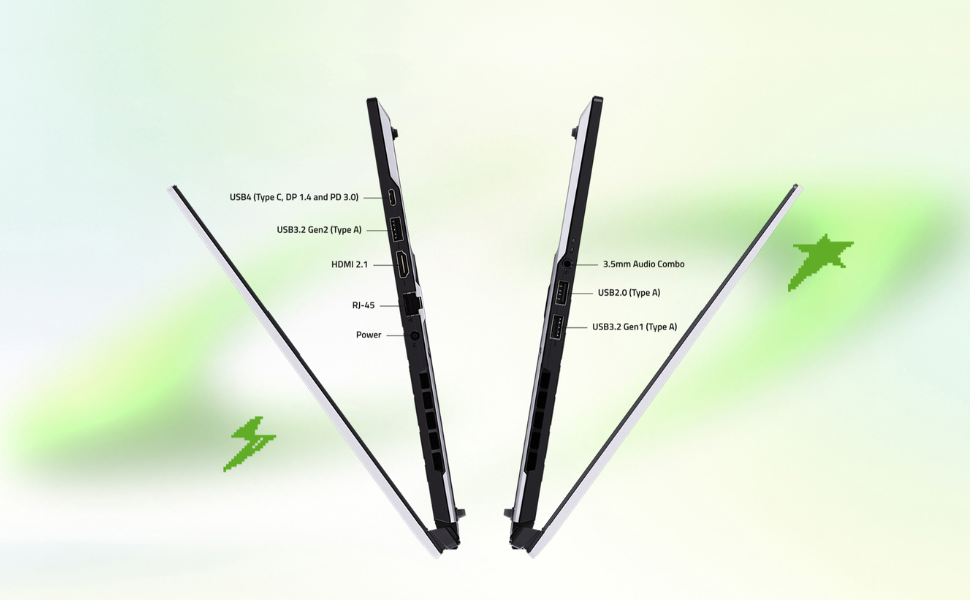
Diagram illustrating the various input/output ports on the GIGABYTE AERO X16 laptop.
3. Initial Boot and Windows Setup
Press the power button to turn on the laptop. Follow the on-screen instructions to complete the Windows 11 Home setup process. This includes setting up your user account, network connection, and privacy settings.
Operating Your GIGABYTE AERO X16
Power On/Off and Sleep Mode
- Power On: Press the power button located on the keyboard deck.
- Power Off: Click the Start button, then Power > Shut down.
- Sleep Mode: Close the lid or click the Start button, then Power > Sleep.
Keyboard and Touchpad Usage
The laptop features a full-sized keyboard with backlighting and a precision touchpad. Refer to the on-screen guides for specific gesture controls for the touchpad.

Top-down view of the GIGABYTE AERO X16 keyboard and large touchpad.
Display Features
Experience stunning visuals on the 16-inch WQXGA (2560x1600) 165Hz IPS display. It boasts 100% sRGB color accuracy, is Pantone Validated, and TÜV Rheinland Certified for eye comfort. The integrated MUX Switch allows for direct GPU output for enhanced gaming performance.
Visual representation of the GIGABYTE AERO X16's display features, including 165Hz refresh rate, 2560x1600 resolution, and Dolby Atmos support.
Audio and Connectivity
The laptop features Dolby Atmos Technology for immersive audio, a built-in microphone, and 2x 2W speakers. For wireless connectivity, it supports Intel Wi-Fi 6E and Bluetooth V5.2.
Performance and GiMATE AI
Powered by the AMD Ryzen 9 AI HX 370 processor and NVIDIA GeForce RTX 5070 Laptop GPU, the AERO X16 delivers exceptional performance for demanding tasks. GIGABYTE GiMATE is an intelligent AI agent that optimizes system operations based on your workflow, enhancing overall efficiency.
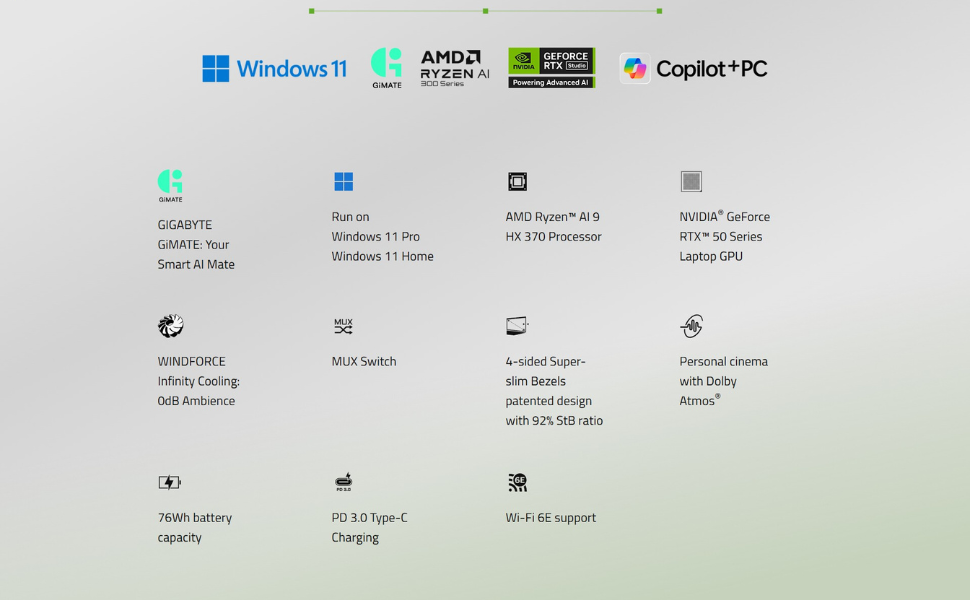
An overview of the GIGABYTE AERO X16's core components, including the AMD Ryzen AI 9 HX 370 processor, NVIDIA GeForce RTX 5070 Laptop GPU, Windows 11 OS, 32GB DDR5 RAM, and 1TB NVMe SSD.
Official Product Video
Official trailer for the GIGABYTE AERO X16, showcasing its design and capabilities.
Maintenance
Cleaning Your Laptop
- Screen: Use a soft, lint-free cloth specifically designed for electronics. Dampen slightly with water or a screen cleaner if necessary.
- Keyboard and Chassis: Use a soft, dry cloth. For stubborn dirt, a slightly dampened cloth with mild soap can be used, ensuring no liquid enters openings.
- Vents: Periodically use compressed air to clear dust from the cooling vents to maintain optimal airflow.
Battery Care
To prolong battery life, avoid extreme temperatures. For long-term storage, charge the battery to about 50% and store the laptop in a cool, dry place. Avoid completely discharging the battery frequently.
Software Updates
Regularly update your Windows operating system, drivers (especially graphics drivers), and GIGABYTE utilities to ensure optimal performance, security, and compatibility.
Troubleshooting
Common Issues and Solutions
- Laptop does not power on: Ensure the power adapter is securely connected to both the laptop and a working power outlet. Try a different outlet.
- Display issues (no image, flickering): Connect an external monitor to verify if the issue is with the laptop's display or the graphics output. Restart the laptop.
- No Wi-Fi or Bluetooth connection: Check if Wi-Fi/Bluetooth is enabled in Windows settings. Restart the laptop and your router/modem. Update wireless drivers.
- Slow performance: Close unnecessary applications. Check for background processes consuming high resources (Task Manager). Ensure sufficient free storage space.
- Overheating: Ensure cooling vents are not obstructed. Use the laptop on a hard, flat surface. Consider cleaning the vents as part of maintenance.
For more complex issues, refer to the GIGABYTE support website or contact customer service.
Specifications
| Feature | Specification |
|---|---|
| Model Name | GIGABYTE AERO X16 2WHA3USC64DH |
| Processor | AMD Ryzen AI 9 HX 370 (5.1 GHz) |
| Graphics | NVIDIA GeForce RTX 5070 Laptop GPU 8GB GDDR7 |
| Display | 16-inch WQXGA (2560x1600) IPS 165Hz, 100% sRGB, Pantone Validated, TÜV Rheinland Certified |
| RAM | 32GB DDR5 5600MHz (2x 16GB, expandable to 64GB) |
| Storage | 1TB Gen4 M.2 SSD (expandable to 4TB) |
| Operating System | Windows 11 Home |
| Wireless Connectivity | Intel Wi-Fi 6E, Bluetooth V5.2 |
| Audio | Dolby Atmos Technology, Built-in Microphone, 2x 2W Speakers |
| Ports | 1x DC-in, 1x RJ-45, 1x HDMI 2.1, 2x Type-A (USB 3.2 Gen1), 1x Type-A (USB 2.0), 1x Type-C USB4 (DisplayPort 1.4/Power Delivery 3.0), 1x 3.5mm Audio Combo Jack |
| Battery | 76Wh (1x 12V battery included) |
| Dimensions (LxWxH) | 13.98 x 0.79 x 9.87 inches |
| Weight | 4.19 pounds (1.9 kg) |
| Color | Lunar White |
Warranty and Support
Warranty Information
Your GIGABYTE AERO X16 comes with a limited warranty. Please refer to the warranty card included in your product packaging or visit the official GIGABYTE website for detailed terms and conditions, including warranty duration and coverage.
Customer Support
For technical assistance, driver downloads, FAQs, or service inquiries, please visit the official GIGABYTE support website. You can typically find support resources by searching for your specific model number (AERO X16 2WHA3USC64DH) on their website.
GIGABYTE Official Website: www.gigabyte.com
Ask a question about this manual
Ask about setup, troubleshooting, compatibility, parts, safety, or missing instructions. Manuals+ will review the question and use this page’s manual context to help answer it.