
Introduction
This manual provides detailed instructions for the safe and proper use of your Omethey 7.0 Cuft Biometric Fingerprint Home Security Safe Box, Model KM-85W. Please read this manual thoroughly before installation and operation to ensure optimal performance and security.
Safety Information
- Keep emergency keys separate from the safe and in a secure location. Do not store them inside the safe.
- Ensure the safe is securely mounted to prevent unauthorized removal.
- Do not store flammable liquids or materials inside the safe.
- Avoid exposing the safe to extreme temperatures or humidity.
- Regularly check battery levels to ensure continuous operation of the electronic lock.
Package Contents
Verify that all items listed below are included in your package:
- 1 x Omethey 7.0 Cuft Biometric Fingerprint Safe
- 4 x Emergency Keys
- 6 x Expansion Screws (for mounting)
- 1 x USB Type-C Cable (for emergency power)
- 4 x Non-slip Pads
- 1 x User Manual (this document)

Figure 1: Safe dimensions and included accessories.
Product Overview
The Omethey 7.0 Cuft Biometric Fingerprint Home Security Safe Box is designed to protect your valuables with advanced security features and convenient access options.
Key Features:
- Design and Capacity: Extra-large 7.0 cubic feet capacity with a double-door design for separate access. External dimensions: 14.17"D x 15.75"W x 33.46"H. Features soft interior lining to protect contents.
- Construction: Constructed from reinforced low carbon alloy steel with a pry-resistant thickened door and 5 solid locking bolts for enhanced security against forced entry, drilling, and prying.
- Access Methods: Biometric fingerprint recognition (up to 30 fingerprints), programmable digital keypad, emergency key, and emergency power via USB Type-C cable.
- Internal Features: Adjustable and removable shelf for flexible storage, metal storage box for smaller items, and a convenient deposit slot for quick insertion of cash or documents without opening the main door.
- User Interface: Backlit keypad for visibility in low light, built-in LED light activates upon opening, and a mute function to silence keypad tones.
- Security Features: Dual alarm system activates after 3 incorrect password attempts or violent vibrations, emitting a 70-decibel sound for 60 seconds.

Figure 2: Front view of the Omethey safe, showcasing its dual-door design and deposit slot.
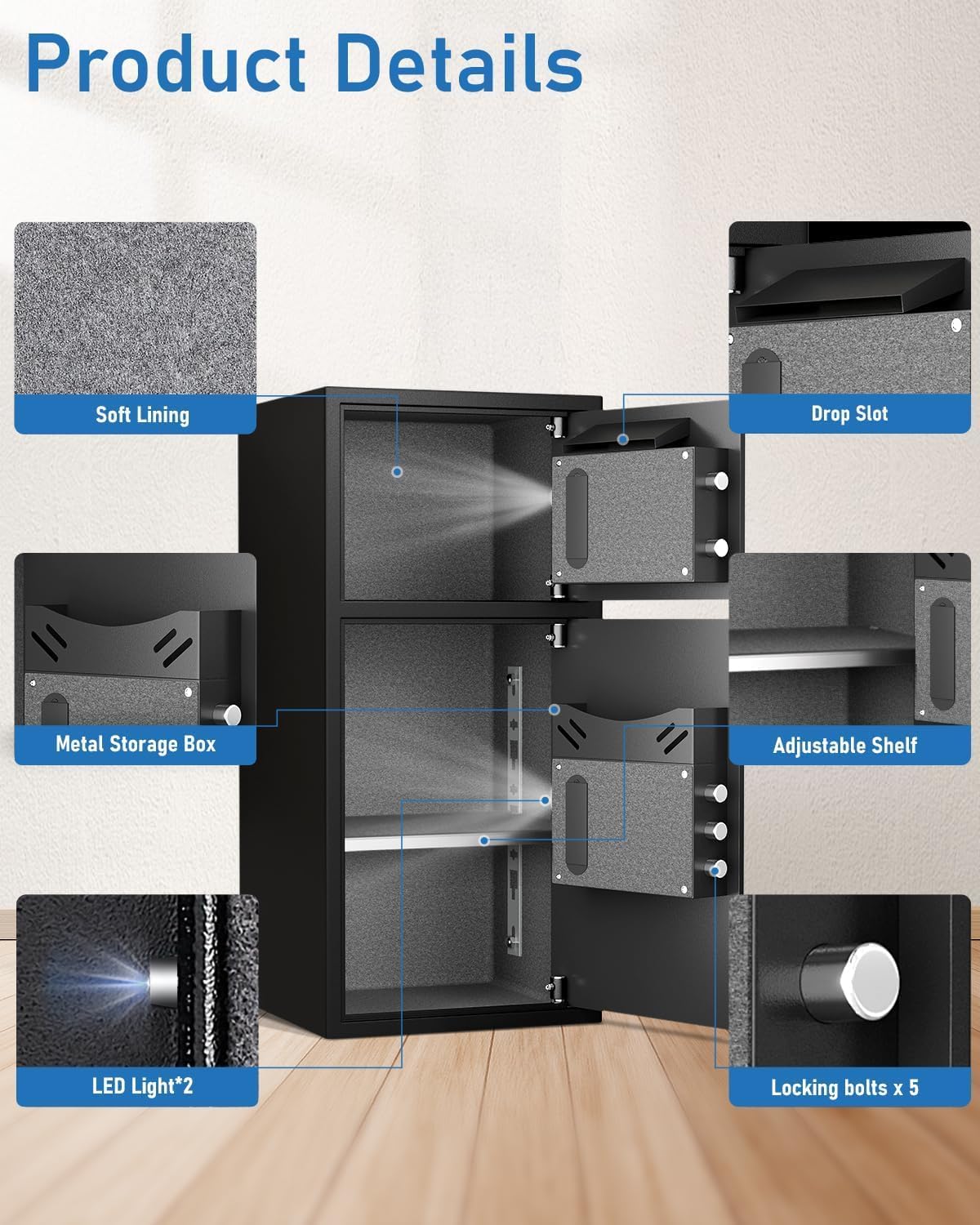
Figure 3: Internal features of the safe, including soft lining, metal storage box, adjustable shelf, LED lights, and locking bolts.

Figure 4: Reinforced solid steel construction for enhanced security.
Setup
1. Unpacking
Carefully remove the safe from its packaging. Inspect the safe for any signs of damage during transit. Retain packaging materials for future transport if needed.
2. Initial Opening
- Locate the emergency keyhole cover, typically found behind the keypad or a small removable panel.
- Insert one of the provided emergency keys into the keyhole.
- Turn the emergency key clockwise while simultaneously turning the safe handle to open the door.
3. Battery Installation
- With the safe door open, locate the battery compartment on the inside of the door.
- Insert 4 AA batteries (not included) into the compartment, ensuring correct polarity (+/-) as indicated.
- Close the battery compartment cover securely.
4. Mounting the Safe
For enhanced security, it is recommended to mount the safe to a floor or wall.
- Choose a suitable, secure location for the safe.
- Position the safe and mark the locations for drilling using the pre-drilled holes on the back and bottom of the safe as templates.
- Drill pilot holes into the chosen surface (floor or wall) according to the marked positions.
- Align the safe with the drilled holes and insert the provided expansion screws.
- Tighten all screws firmly to secure the safe in place.
Operating Instructions
1. Setting the Master Password
- With the safe door open, press the internal reset button (usually a small red button located on the inside of the door).
- Enter a new 3-8 digit password on the keypad.
- Press the '#' button to confirm. The indicator light will flash, confirming the new password is set.
2. Registering Fingerprints
The safe can store up to 30 unique fingerprints.
- With the safe door open, press the internal reset button.
- Place your finger firmly on the fingerprint scanner. The indicator light will flash.
- Lift your finger and place it again on the scanner. Repeat this process until the indicator light confirms successful registration (typically a green light or a series of beeps).
- Repeat for additional fingerprints as desired.
3. Opening the Safe

Figure 5: Four methods to open the safe.
- Using Password: Enter your 3-8 digit password, then press '#'. Turn the handle clockwise within 5 seconds to open the door.
- Using Fingerprint: Place your registered finger on the scanner. If recognized, turn the handle clockwise within 5 seconds to open the door.
- Using Emergency Key: Insert the emergency key into the keyhole, turn it clockwise, and simultaneously turn the handle to open the door.
- Emergency Power (USB Type-C): If the batteries are depleted, connect a USB Type-C power bank (not included) to the port on the keypad. Once powered, you can use either the password or fingerprint method to open the safe.
4. Mute Function
To activate or deactivate the keypad sound (mute function), press '*' then '1' on the keypad.

Figure 6: Mute function and dual alarm system.
5. Using the Deposit Slot
The safe features a convenient deposit slot on the top door. This allows for quick insertion of cash, envelopes, or small documents without needing to open the main safe door.
Maintenance
1. Battery Replacement
Replace the batteries when the low battery indicator light appears on the keypad or if the keypad becomes unresponsive. Always replace all 4 AA batteries simultaneously to ensure consistent power.
2. Cleaning
Wipe the safe exterior with a soft, damp cloth. Avoid using abrasive cleaners or solvents, as these can damage the finish.
3. Key Storage
Always store the emergency keys in a secure, easily accessible location outside of the safe. Never store them inside the safe itself.
Troubleshooting
| Problem | Possible Cause | Solution |
|---|---|---|
| Safe will not open with password/fingerprint. | Low batteries, incorrect password, unregistered fingerprint. | Replace batteries. Ensure correct password entry. Re-register fingerprints. Use emergency key or USB-C emergency power. |
| Alarm activates unexpectedly. | Vibrations, accidental keypad presses, multiple incorrect entries. | Enter correct password to silence the alarm. Avoid placing the safe in areas prone to heavy vibrations. |
| Keypad unresponsive. | Depleted batteries. | Replace batteries. Use USB-C emergency power to open. |
| Door does not close properly. | Obstruction, safe not level. | Ensure no items are blocking the door or locking bolts. Check if the safe is placed on a level surface. |
Specifications
- Brand: Omethey
- Model Number: KM-85W
- External Dimensions: 14.17"D x 15.75"W x 33.46"H
- Capacity: 7.0 Cubic Feet
- Lock Type: Biometric (Fingerprint) and Digital Keypad
- Material: Reinforced Low Carbon Alloy Steel
- Mounting Type: Wall & Floor Mount
- Special Features: Dual Alarm System, Anti-Theft, Combination Lock, Removable Shelf, Sensor Light, Deposit Slot, Mute Function, Backlit Keypad
- Item Weight: 60 Pounds
Warranty and Support
Omethey is committed to providing quality products and customer satisfaction. This product comes with lifetime customer service.
For any questions, technical assistance, or support needs, please contact Omethey customer service. Refer to your purchase documentation or the Omethey official website for specific contact details.

