
1. Introduction
This manual provides essential information for the safe and efficient operation of your GROWNEER 12 Inch Shutter Exhaust Fan with Temperature Humidity Controller. This fan is designed to improve air quality and regulate environmental conditions in various spaces such as greenhouses, garages, and sheds.
The fan features a 1200 CFM airflow capacity, capable of ventilating areas up to 1400 sq. ft. It includes an intelligent remote control for convenient adjustment of temperature, humidity, and fan speed settings.
2. Safety Information
Please read all safety instructions carefully before installation and operation. Failure to follow these instructions may result in electric shock, fire, or serious injury.
- Ensure the power supply matches the fan's voltage requirements (120 Volts AC).
- Disconnect power before installing, cleaning, or performing any maintenance.
- Do not operate the fan with a damaged cord or plug.
- Keep hands, hair, and loose clothing away from moving parts during operation.
- Install the fan in a location where it is protected from direct water exposure, unless specifically designed for such conditions. The fan is designed to resist moisture intrusion, but proper installation is key.
- This appliance is not intended for use by persons (including children) with reduced physical, sensory, or mental capabilities, or lack of experience and knowledge, unless they have been given supervision or instruction concerning use of the appliance by a person responsible for their safety.
3. Package Contents
Verify that all components are present in the package:
- 12 Inch Shutter Exhaust Fan
- Temperature Humidity Controller
- Installation Manual
- Expansion bolts (5 pieces, 4 required + 1 spare)

Figure 3.1: Contents of the GROWNEER 12 Inch Shutter Exhaust Fan package.
4. Specifications
| Feature | Specification |
|---|---|
| Brand | GROWNEER |
| Model Number | AX252303002 |
| Product Dimensions (D x W x H) | 14.96"D x 14.96"W x 7.48"H |
| Voltage | 120 Volts |
| Wattage | 30 watts |
| Air Flow Capacity | 1200 Cubic Feet Per Minute (CFM) |
| Noise Level | 50 Decibels |
| Number of Speeds | 10 |
| Control Method | Remote Control |
| Material | Alloy Steel |
| Indoor/Outdoor Usage | Indoor, Outdoor |

Figure 4.1: Product dimensions and key specifications.
5. Setup and Installation
The GROWNEER Shutter Exhaust Fan is designed for straightforward installation in various locations such as attics, sheds, or walls. Ensure you have the necessary tools and follow local electrical codes.
5.1 Mounting the Fan
- Choose Location: Select a suitable location for the fan, ensuring adequate space for airflow and access for maintenance.
- Prepare Opening: Create an opening in the wall or structure that matches the fan's dimensions.
- Secure Fan: Mount the fan securely using the provided expansion bolts. Ensure the fan is level and firmly attached to prevent vibration and noise.
- Power Connection: Plug the fan into a compatible 120V AC power outlet. The fan comes with a 2-meter long power cord for flexible placement.

Figure 5.1: Example installation and remote control range.
5.2 Pairing the Remote Control
The fan operates wirelessly with the included temperature and humidity controller. Follow these steps to pair the controller with the fan:
- Insert batteries into the remote control (not included).
- Ensure the fan is plugged into a power source.
- Press the power button on the remote control. The fan should respond by turning on. If not, ensure the remote is within the 20-meter operating range and try again.
Note: There is no manual switch on the fan unit itself. All operations are controlled via the wireless remote. If pairing issues persist, ensure batteries are correctly inserted and fully charged, and that there are no significant obstructions between the remote and the fan.
Video 5.1: Demonstration of fan installation and remote control pairing and operation.
6. Operating Instructions
The intelligent remote control allows for precise management of your exhaust fan. Familiarize yourself with the control panel layout:
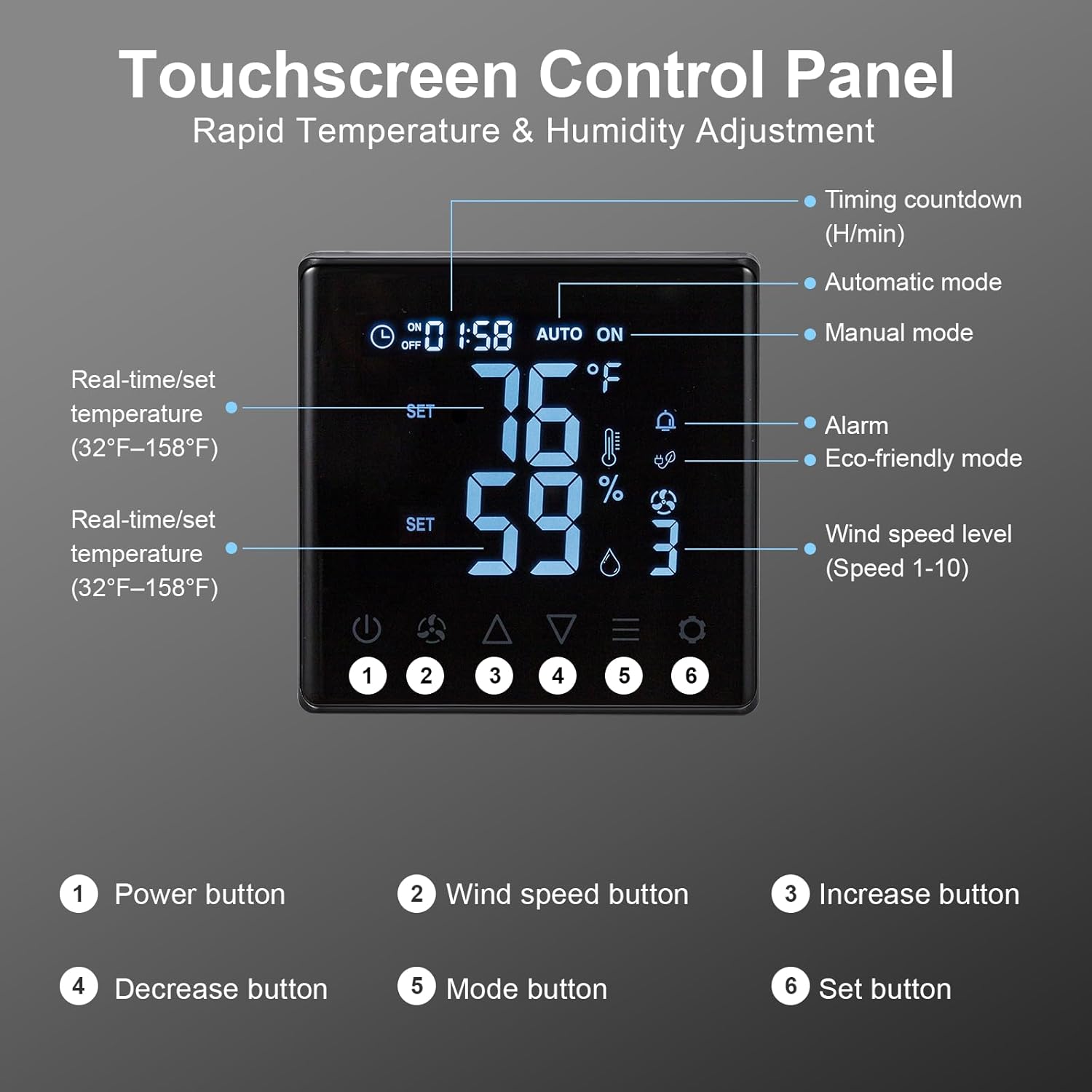
Figure 6.1: Touchscreen Control Panel overview.
- Power Button: Turns the fan ON or OFF.
- Wind Speed Button: Cycles through 10 adjustable fan speeds.
- Increase/Decrease Buttons: Adjust temperature, humidity, or timer settings upwards or downwards.
- Mode Button: Selects between operating modes:
- Manual Mode: Fan operates continuously at the set speed.
- Auto Mode: Fan automatically turns ON/OFF based on set temperature and humidity thresholds.
- Eco-friendly Mode: Optimizes fan operation for energy efficiency based on environmental conditions.
- Set Button: Confirms selected settings for temperature, humidity, or timer.
To set desired temperature and humidity, enter Auto mode, then use the Increase/Decrease buttons to adjust the target values, and the Set button to confirm.

Figure 6.2: Fan operating with 10-level wind control.
7. Maintenance
Regular maintenance ensures optimal performance and longevity of your exhaust fan.
- Cleaning: Periodically clean the fan blades and housing to prevent dust and debris buildup, which can reduce efficiency and increase noise. Always disconnect power before cleaning. Use a soft, damp cloth. Do not use abrasive cleaners.
- Shutter Inspection: Check the automatic gravity shutters for smooth operation. Ensure they open and close freely without obstruction to protect the fan from rain and debris when off.
- Power Cord: Inspect the power cord for any signs of damage. If damaged, contact customer support for replacement.

Figure 7.1: Automatic gravity shutters protecting the fan from elements.
8. Troubleshooting
If you encounter issues with your GROWNEER exhaust fan, refer to the following common problems and solutions:
| Problem | Possible Cause | Solution |
|---|---|---|
| Fan does not turn on. | No power; Remote not paired; Dead remote batteries. | Check power connection. Ensure remote batteries are fresh and correctly inserted. Re-attempt pairing as described in Section 5.2. |
| Remote control not responding. | Out of range; Obstruction; Low/dead batteries. | Move closer to the fan (within 20m). Remove any large obstructions. Replace remote batteries. |
| Low airflow or unusual noise. | Fan blades or shutters obstructed; Dust buildup. | Disconnect power and inspect fan blades and shutters for obstructions. Clean any dust or debris. |
| Automatic mode not activating. | Temperature/humidity settings not met; Sensor issue. | Verify the set temperature and humidity thresholds. Ensure the sensor on the remote is not covered or obstructed. |
9. Warranty and Support
GROWNEER products are manufactured to high-quality standards. For warranty information, technical support, or replacement parts, please contact GROWNEER customer service. Keep your purchase receipt as proof of purchase.
For further assistance, visit the official GROWNEER store: GROWNEER Store on Amazon