
1. Introduction
Thank you for choosing the ANDELI Auto-Darkening Welding Helmet. This manual provides essential information for the safe and effective operation, maintenance, and troubleshooting of your welding helmet. Please read this manual thoroughly before use and retain it for future reference.

Image 1.1: The ANDELI Auto-Darkening Welding Helmet, accompanied by a set of replacement outer and inner lenses, and a pair of 13.7-inch welding gloves.
2. Safety Information
Always prioritize safety when welding. This helmet is designed to protect your eyes and face from harmful radiation, sparks, and spatter during welding operations. Failure to follow safety instructions can result in serious injury.
2.1 General Safety Precautions
- Ensure the helmet is properly assembled and all components are securely in place before each use.
- Do not use the helmet if any part is damaged or appears to be malfunctioning.
- Always wear appropriate personal protective equipment (PPE) in addition to the welding helmet, including welding gloves (provided), protective clothing, and safety footwear.
- This helmet is not suitable for laser welding or overhead welding applications.
- Do not immerse the helmet in water or any other liquid.
- Keep the helmet clean and free from dirt, dust, and moisture.
- Replace scratched or damaged lenses immediately.
- Consult a qualified professional if you are unsure about any aspect of welding safety.
2.2 Eye Protection
- The auto-darkening filter (ADF) protects against harmful UV/IR radiation even in the light state.
- Always verify the helmet's auto-darkening function before welding by performing a test flash.
- Never look directly at a welding arc without proper eye protection.
3. Product Overview
The ANDELI Auto-Darkening Welding Helmet is designed to provide superior protection and visibility for various welding tasks. Key features include:
- 180° Large Viewing Screen: A main viewing area of 3.94" x 3.74" complemented by additional 3.72" x 1.76" side views (DIN4, non-auto-darkening).
- Integrated LED Lights: Four LEDs provide up to 400 lumens for enhanced visibility in low-light conditions.
- True Color View: 1/1/1/2 Optical Clarity for natural color perception.
- UV/IR Protection: Permanent protection up to Shade DIN16.
- Auto-Darkening Function: Four arc sensors with a response time of 1/25000 seconds.
- Interference Suppression: Minimizes false triggers from ambient light.
- Adjustable Shade: Variable shade settings for different welding processes.
- Type-C Charging: Convenient recharging for the helmet's internal battery.
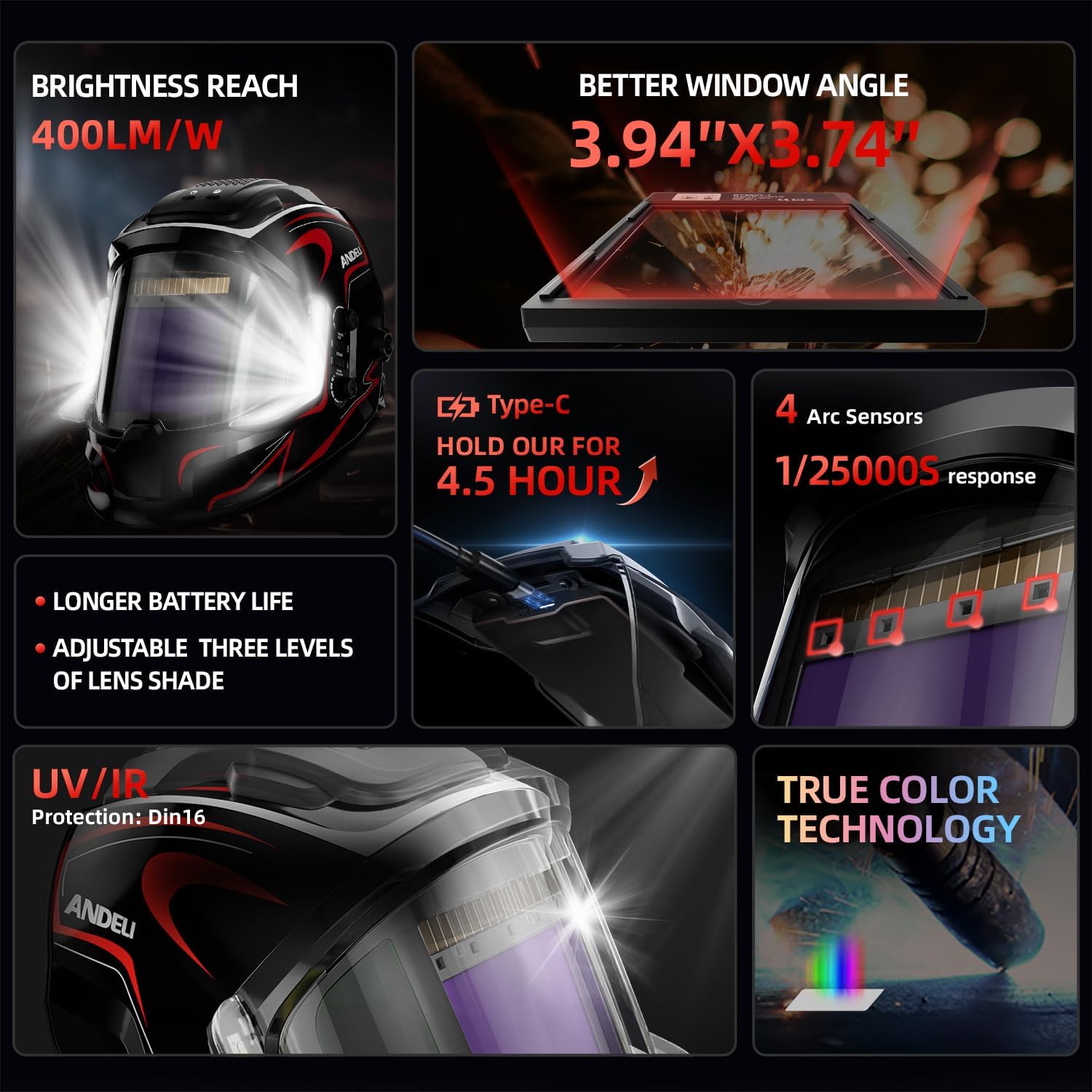
Image 3.1: Visual summary of the ANDELI Welding Helmet's advanced features.
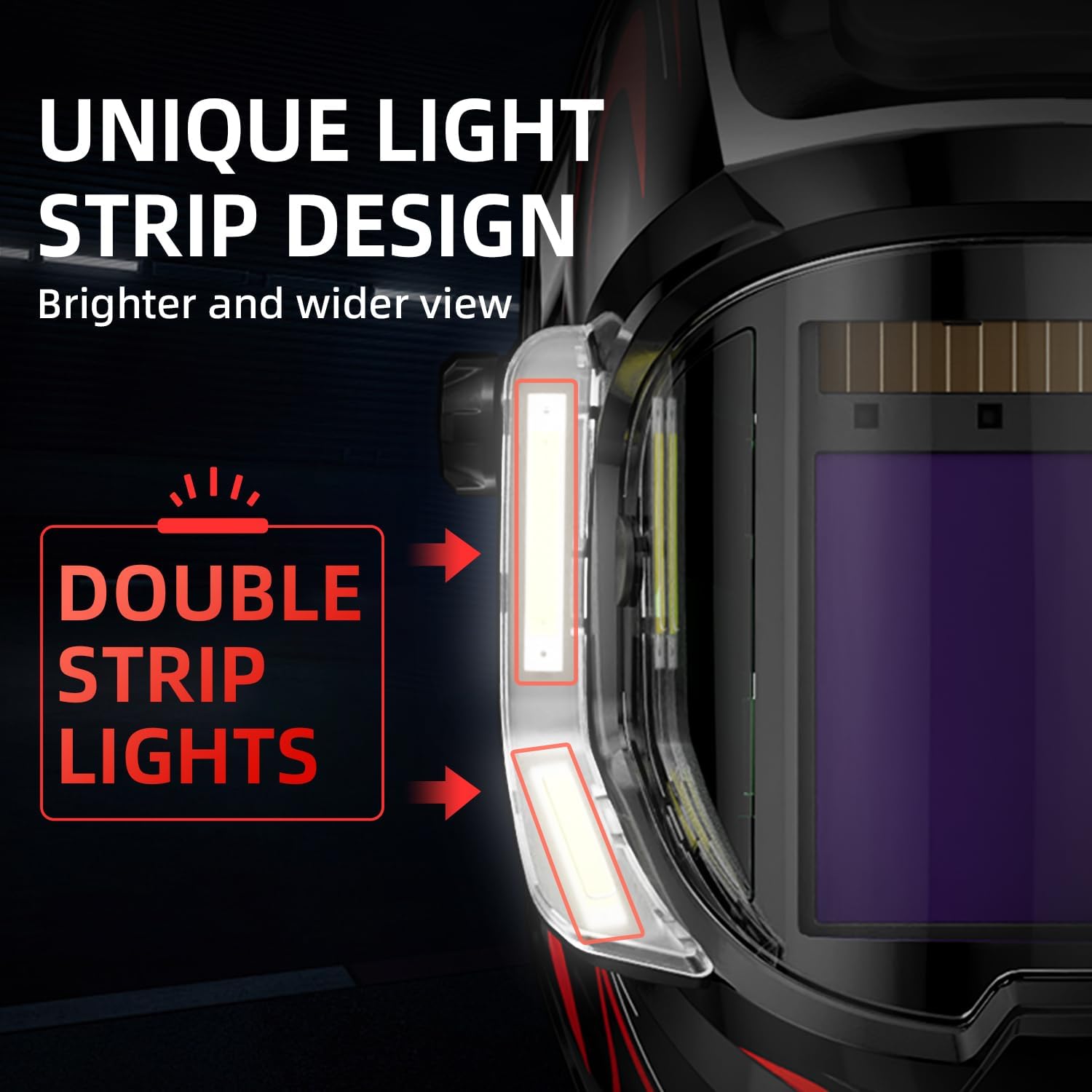
Image 3.2: Detail of the helmet's integrated LED light strips.
4. Setup and Adjustment
4.1 Headgear Adjustment
Adjust the headgear to ensure a comfortable and secure fit. The helmet should sit firmly on your head without being too tight or loose. Use the adjustment knobs to modify the circumference and the top strap to adjust the helmet's height and viewing angle.
4.2 Installing/Replacing Lenses
The helmet comes with replacement outer and inner lenses. Always ensure lenses are clean and free from scratches or damage. Refer to the warning stickers on new lenses to remove protective film before installation.
- Carefully remove the old lens by unclipping or sliding it out of its frame.
- Peel off the protective film from both sides of the new lens.
- Insert the new lens securely into the helmet's lens frame, ensuring it is flush and properly seated.
- Repeat for inner and outer lenses as needed.

Image 4.1: Included replacement lenses and protective film warning labels.
5. Operating Instructions
5.1 Powering On/Off and LED Lights
- Locate the power button on the helmet. Press and hold to turn the helmet on or off.
- The integrated LED lights can be activated independently. Refer to the helmet's controls for specific light activation.
5.2 Auto-Darkening Filter (ADF) Controls
The ADF features external controls for shade, mode, sensitivity, and delay. These controls allow you to optimize the helmet's performance for different welding applications.
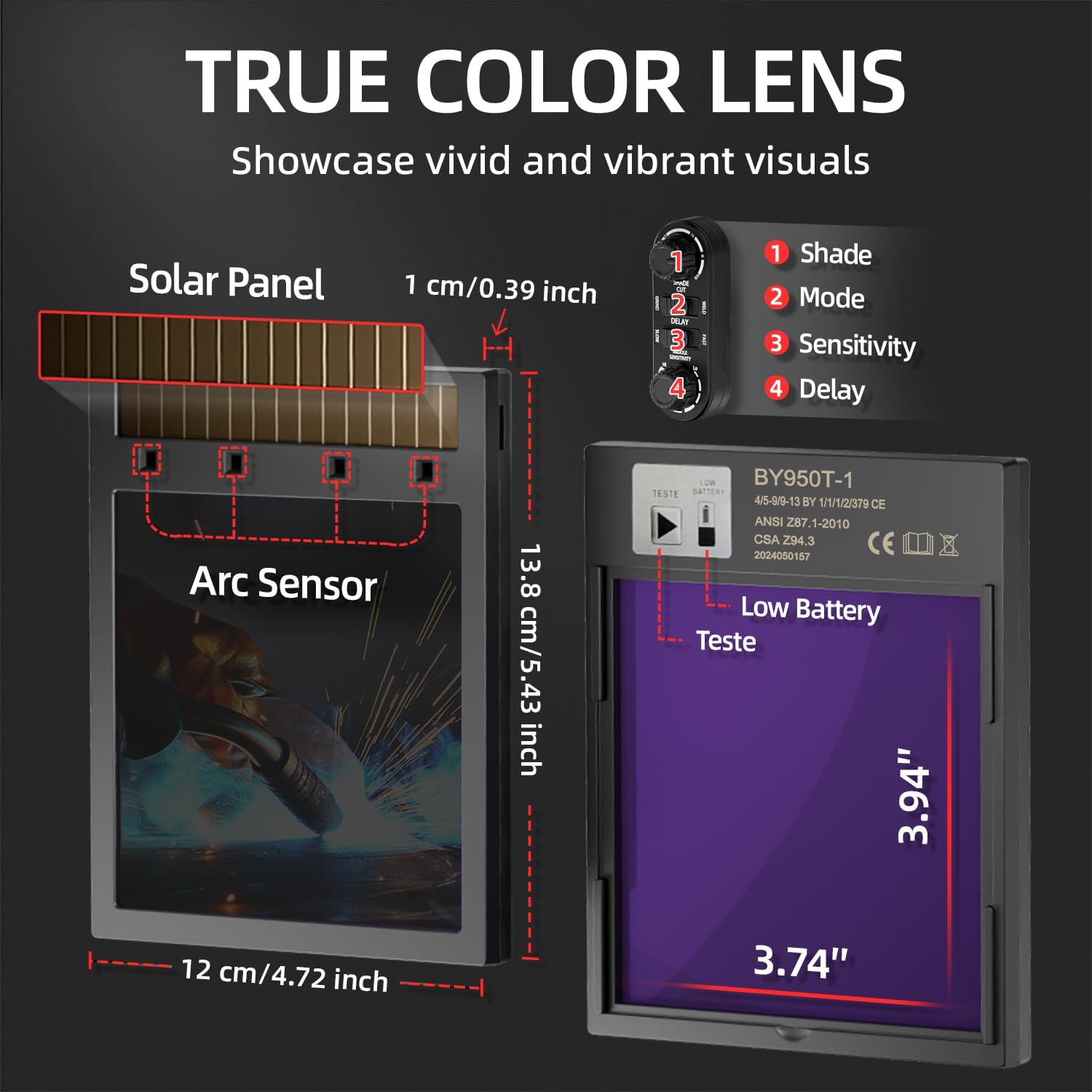
Image 5.1: ADF control layout and dimensions.
- Shade (1): Adjusts the darkness level of the filter. Select a shade appropriate for your welding process and amperage.
- Mode (2): Switches between welding, cutting, and grind modes. Ensure the correct mode is selected to prevent accidental darkening or insufficient protection.
- Sensitivity (3): Controls how sensitive the arc sensors are to the welding arc. Adjust for different ambient light conditions and arc intensity.
- Delay (4): Determines the time the filter remains dark after the arc has ceased. A longer delay is useful for high amperage welding to prevent eye fatigue from residual glow.
5.3 Pre-Weld Check
Before starting any welding task, perform the following checks:
- Ensure the helmet is clean and free from damage.
- Verify the ADF is functioning correctly by briefly exposing it to a bright light source (e.g., a flashlight) or using the "TEST" button if available. The lens should darken and then return to its light state.
- Confirm the selected shade, sensitivity, and delay settings are appropriate for your welding task.
- Ensure the helmet fits comfortably and securely.
6. Maintenance
6.1 Cleaning
- Clean the helmet shell with a mild soap and water solution. Avoid harsh chemicals or abrasive cleaners.
- Wipe the auto-darkening filter and protective lenses with a soft, lint-free cloth. Do not use solvents.
- Keep the arc sensors clean to ensure proper function.
6.2 Lens Replacement
Replace outer and inner protective lenses regularly, especially if they become scratched, pitted, or unclear. Refer to Section 4.2 for replacement instructions.
6.3 Battery Charging
The helmet features a Type-C charging port. Connect a compatible Type-C cable to charge the internal battery. A full charge provides approximately 3 to 6 hours of continuous operation for the LED lights. The auto-darkening function is primarily solar-powered with battery backup.
7. Troubleshooting
| Problem | Possible Cause | Solution |
|---|---|---|
| Helmet does not darken when arc is struck. |
|
|
| Helmet darkens intermittently or falsely. |
|
|
| Poor visibility through the lens. |
|
|
| LED lights not working. |
|
|
8. Specifications
| Feature | Detail |
|---|---|
| Brand | ANDELI |
| Model | B0FDKV5MX3 |
| Main Viewing Area | 3.94" x 3.74" |
| Side View Area | 3.72" x 1.76" (DIN4, non-auto-darkening) |
| Optical Clarity | 1/1/1/2 |
| UV/IR Protection | Up to Shade DIN16 |
| Arc Sensors | 4 |
| Switching Time (Light to Dark) | 1/25000 seconds |
| LED Light Brightness | Up to 400 lumens |
| LED Light Operating Time | 3 to 6 hours (continuous) |
| Charging Port | Type-C |
| Included Accessories | 5 Outer Replacement Lenses, 2 Inner Replacement Lenses, 13.7in Welding Gloves |

Image 8.1: Included 13.7-inch welding gloves.

Image 8.2: Dimensions of the included welding gloves.
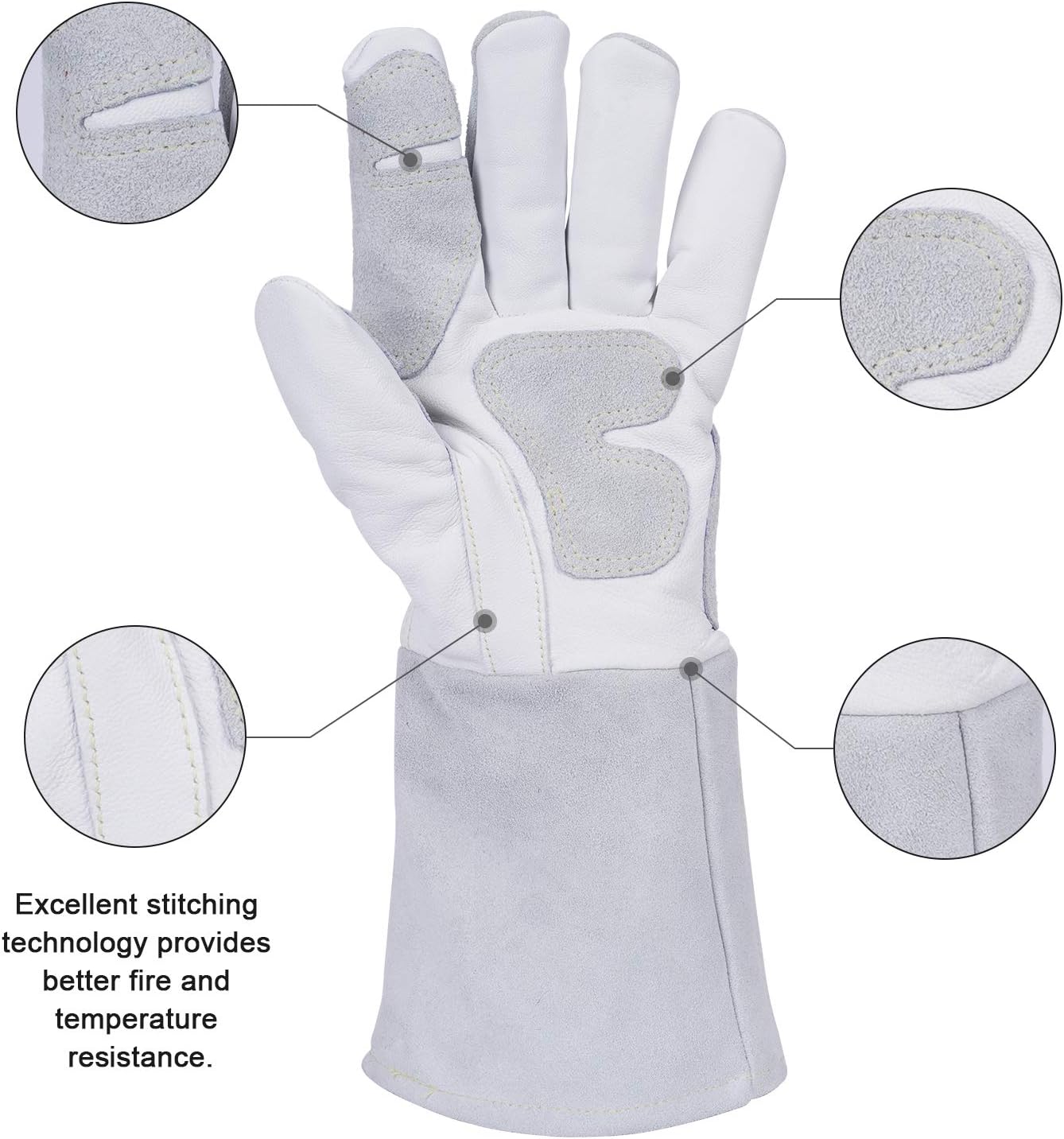
Image 8.3: Detail of the welding glove's construction.
9. Warranty and Support
For warranty information or technical support, please refer to the product packaging or contact ANDELI customer service through their official channels. Keep your purchase receipt as proof of purchase.
