Introduction
Welcome to the user manual for your new Xiaomi Poco F7 Ai 5G smartphone. This guide provides essential information on setting up, operating, maintaining, and troubleshooting your device. Please read this manual thoroughly to ensure optimal performance and longevity of your phone.
The Poco F7 Ai 5G is designed for high performance, featuring a Flagship Snapdragon® 8s Gen 4 processor, a vibrant 6.83-inch 1.5K 120Hz AMOLED display, and a powerful 50MP Sony camera. With its massive 6500mAh battery and 90W HyperCharge, it's built to keep up with your demands.
What's in the Box
Upon opening the package, please verify that all items are present:
- Xiaomi Poco F7 Ai 5G Smartphone
- Manuals (this document and others)
- Phone Case
- USB Cable

Image: Contents of the Xiaomi Poco F7 Ai 5G retail box, showing the smartphone, a protective case, a USB charging cable, and various manuals.
Setup
1. SIM Card Installation
The Poco F7 Ai 5G supports dual SIM cards. To install your SIM card(s):
- Locate the SIM card tray on the side of the device.
- Insert the SIM ejector tool into the small hole next to the tray and push gently until the tray pops out.
- Place your Nano-SIM card(s) into the designated slots on the tray. Ensure the gold contacts face downwards.
- Carefully reinsert the tray into the phone until it clicks into place.
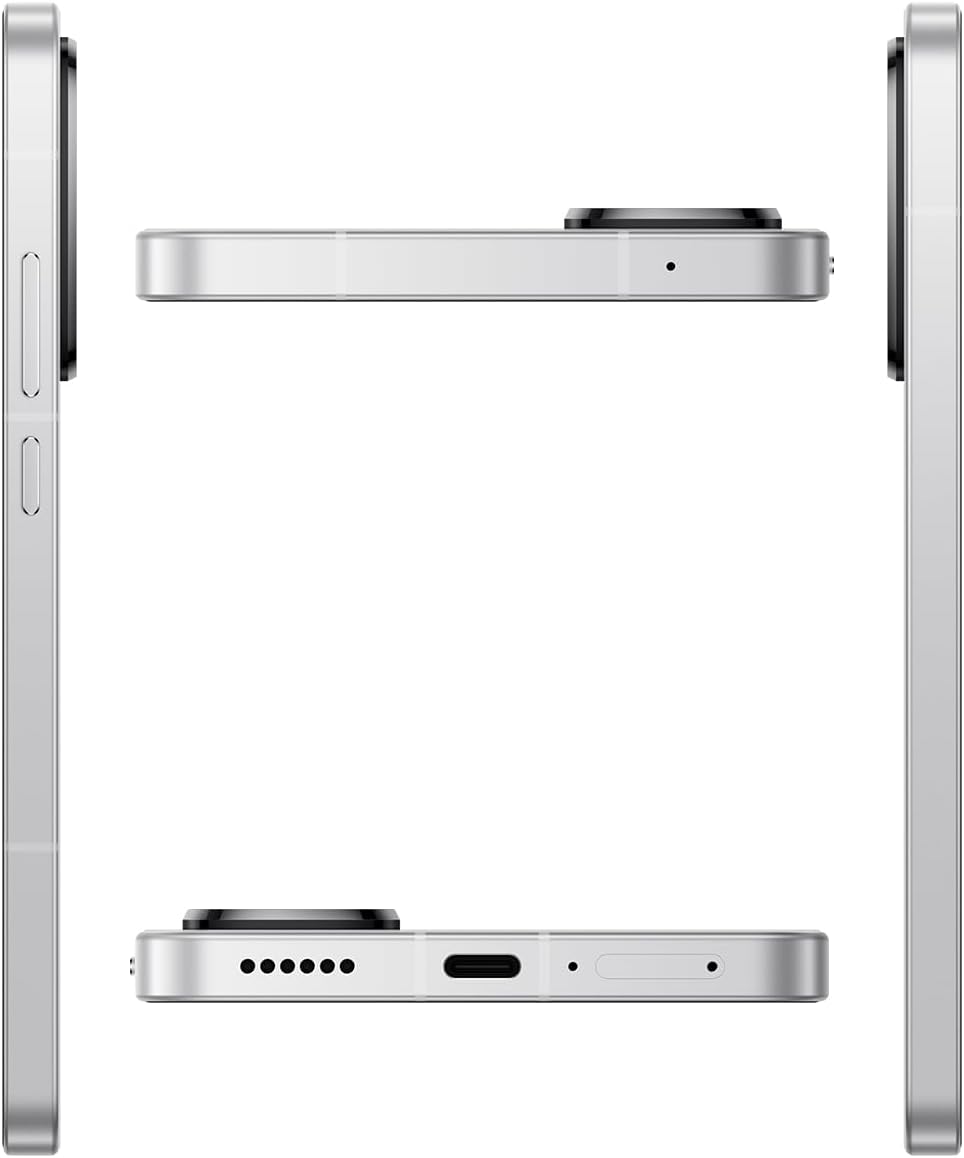
Image: Side profile of the Xiaomi Poco F7 Ai 5G, illustrating the location of the SIM card tray, volume buttons, and power button.
2. Initial Charging and Power On
Before first use, it is recommended to fully charge your device.
- Connect the USB cable to the phone's USB Type-C port and the other end to a compatible power adapter.
- Plug the adapter into a power outlet. The phone supports 90W HyperCharge for rapid charging.
- Once sufficiently charged, press and hold the Power button (located on the side) until the Xiaomi logo appears.
3. Initial Setup Wizard
Follow the on-screen instructions to complete the initial setup, which includes:
- Selecting your language and region.
- Connecting to a Wi-Fi network.
- Signing in to your Google account.
- Setting up screen lock (PIN, pattern, password, fingerprint, or face unlock).
Operating Your Device
Display Features

Image: Front and back view of the Xiaomi Poco F7 Ai 5G, showcasing its immersive display and the rear camera module.
- Screen Size: 6.83 inches with ultra-slim bezels for immersive viewing.
- Resolution: 1.5K (2772x1280) AMOLED display with 447 PPI.
- Refresh Rate: Up to 120Hz for smooth scrolling and gaming.
- Brightness: Typical 700 nits, HBM 1700 nits, Peak 3200 nits.
- Touch Sampling Rate: Up to 480Hz, with 2560Hz instant touch sampling in Game Turbo Mode.
- Color: DCI-P3 color gamut, 68 billion colors, Original Color PRO, Pro HDR display.
- Protection: Corning Gorilla Glass 7i.
- Eye Care: 3840Hz PWM dimming, TÜV Rheinland Low Blue Light, Flicker Free, and Circadian Friendly Certified.
Performance
Powered by the Flagship Snapdragon® 8s Gen 4 Mobile Platform (TSMC 4nm process), the Poco F7 Ai 5G delivers exceptional speed and efficiency.
- CPU: Octa-core processor, up to 3.21GHz.
- GPU: Adreno 825.
- AI Engine: Qualcomm Hexagon NPU.
- Cooling: 6000mm² 3D dual channel IceLoop system for efficient heat dissipation, ensuring optimal performance during intensive tasks like gaming.
- Smart Performance Scheduling: Xiaomi HyperCore intelligently optimizes core and clock speeds for efficiency and improved rendering.
Camera System
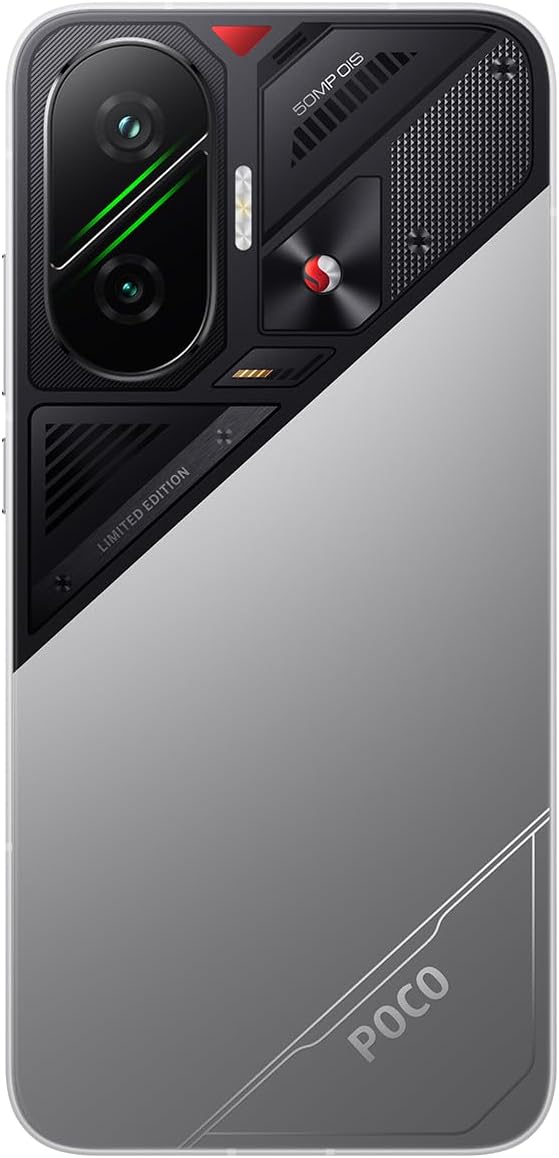
Image: Rear view of the Xiaomi Poco F7 Ai 5G, highlighting the prominent 50MP main camera and other lenses.
- Main Camera: 50MP Sony IMX882 sensor with f/1.5 aperture and Optical Image Stabilization (OIS). Features 1.6µm super pixel (4-in-1).
- Ultra-Wide Camera: 8MP OV08F.
- Front Camera: 20MP.
- Photography Features: Dynamic shot, Motion capture, Documents mode, Motion tracking focus, Portrait mode, Timed burst, Pro mode, 50MP mode, Panorama, Burst shot mode, Long exposure, HDR.
- Video Recording:
- 4K video shooting: 30fps / 60fps
- 1080p video shooting: 30fps / 60fps
- 1080p slow motion: 120fps / 240fps / 960fps
- 720p video shooting: 30fps
- 720p slow motion: 120fps / 240fps / 960fps
- Video Features: Slow motion, Video teleprompter, Time-lapse, ShootSteady, Motion tracking focus.
Battery and Charging
- Capacity: Massive 6500mAh (typ) battery.
- Charging: 90W HyperCharge for rapid power delivery.
- Reverse Charging: Supports up to 22.5W reverse charging via USB Type-C.
Connectivity and Sensors
- Network: Dual SIM, 5G (Sub6G), 4G LTE FDD/TDD, 3G WCDMA, 2G GSM.
- Wireless: Wi-Fi Protocol: 802.11a/b/g/n/ac/ax, Bluetooth 5.4.
- Navigation: GPS (L1+L5), Beidou (B1I+B1C+B2a), Galileo (E1+E5a), GLONASS (G1), QZSS (L1+L5), NavIC (L5).
- Security: In-screen fingerprint sensor, AI Face Unlock.
- Sensors: Proximity sensor, Ambient light sensor, Accelerometer, Electronic compass, IR blaster, Gyroscope, Flicker sensor.
Operating System
The Poco F7 Ai 5G runs on HyperOS 2 based on Android 15, offering a smooth and intuitive user experience with enhanced features and optimizations.
Maintenance
- Cleaning: Use a soft, lint-free cloth to clean the screen and body. Avoid harsh chemicals or abrasive materials.
- Software Updates: Regularly check for and install system updates to ensure your device has the latest features, security patches, and performance improvements.
- Battery Care: To prolong battery life, avoid extreme temperatures. While the phone supports fast charging, occasional slower charging can be beneficial. Avoid completely draining the battery frequently.
- Storage Management: Periodically clear unnecessary files, cache, and uninstall unused applications to maintain optimal performance.
- Water and Dust Resistance: The device features IP68 dust and water resistance. While it offers protection against immersion, it is not waterproof. Avoid intentional submersion or exposure to high-pressure water.
Troubleshooting
If you encounter issues with your device, try the following common troubleshooting steps:
- Device Not Responding: Press and hold the Power button for about 10-15 seconds to force a restart.
- Charging Issues: Ensure the USB cable and adapter are securely connected and undamaged. Try a different outlet or charger.
- Network Connectivity Problems: Check if Airplane Mode is off. Restart the phone. Verify your SIM card is properly inserted and activated. Contact your carrier if issues persist.
- App Crashes/Freezes: Close the app and reopen it. If the problem continues, clear the app's cache and data in Settings, or uninstall and reinstall the app.
- Poor Camera Quality: Ensure the camera lens is clean. Check lighting conditions. Reset camera settings to default.
- Overheating: Close background applications. Reduce screen brightness. Avoid using the phone while charging for extended periods. The IceLoop cooling system helps manage heat, but extreme usage can still cause warmth.
- Factory Reset: As a last resort, you can perform a factory reset. Warning: This will erase all data on your phone. Back up important data before proceeding. Navigate to Settings > System > Reset options > Erase all data (factory reset).
Specifications
| Feature | Detail |
|---|---|
| Model Name | Poco F7 |
| Model Number | 25053PC47G |
| Operating System | HyperOS 2 Android 15 |
| Processor | Flagship Snapdragon 8s Gen 4 (Octa-core, up to 3.21GHz) |
| Display | 6.83-inch 1.5K AMOLED, 120Hz Refresh Rate, 3200 nits Peak Brightness |
| Resolution | 2772 x 1280 |
| RAM | 12 GB |
| Storage | 256 GB |
| Main Camera | 50MP Sony IMX882 with OIS |
| Front Camera | 20MP |
| Battery Capacity | 6500 mAh (typ) |
| Charging | 90W HyperCharge, 22.5W Reverse Charging |
| Connectivity | 5G, Wi-Fi 802.11ax, Bluetooth 5.4, NFC, GPS |
| Dimensions | 7.36 x 3.74 x 2.36 inches (Package) |
| Weight | 1.19 pounds |
| Water & Dust Resistance | IP68 |
| Color | Silver |
Warranty and Support
Your Xiaomi Poco F7 Ai 5G comes with a standard manufacturer's warranty. Please refer to the warranty card included in your product packaging for specific terms and conditions, including coverage period and limitations.
For technical support, service, or further inquiries, please visit the official Xiaomi support website or contact their customer service. You can find more information and resources on the Xiaomi Store on Amazon.


