
1. Introduction
The POWERPLUS POWDPG80510 cordless pruning shears are designed for efficient and comfortable pruning of plant stems and branches up to 30 mm in diameter. This tool is part of the Dual Power series, offering a compact and lightweight solution for garden maintenance. This manual provides essential information for the safe and effective use, setup, and maintenance of your pruning shears.
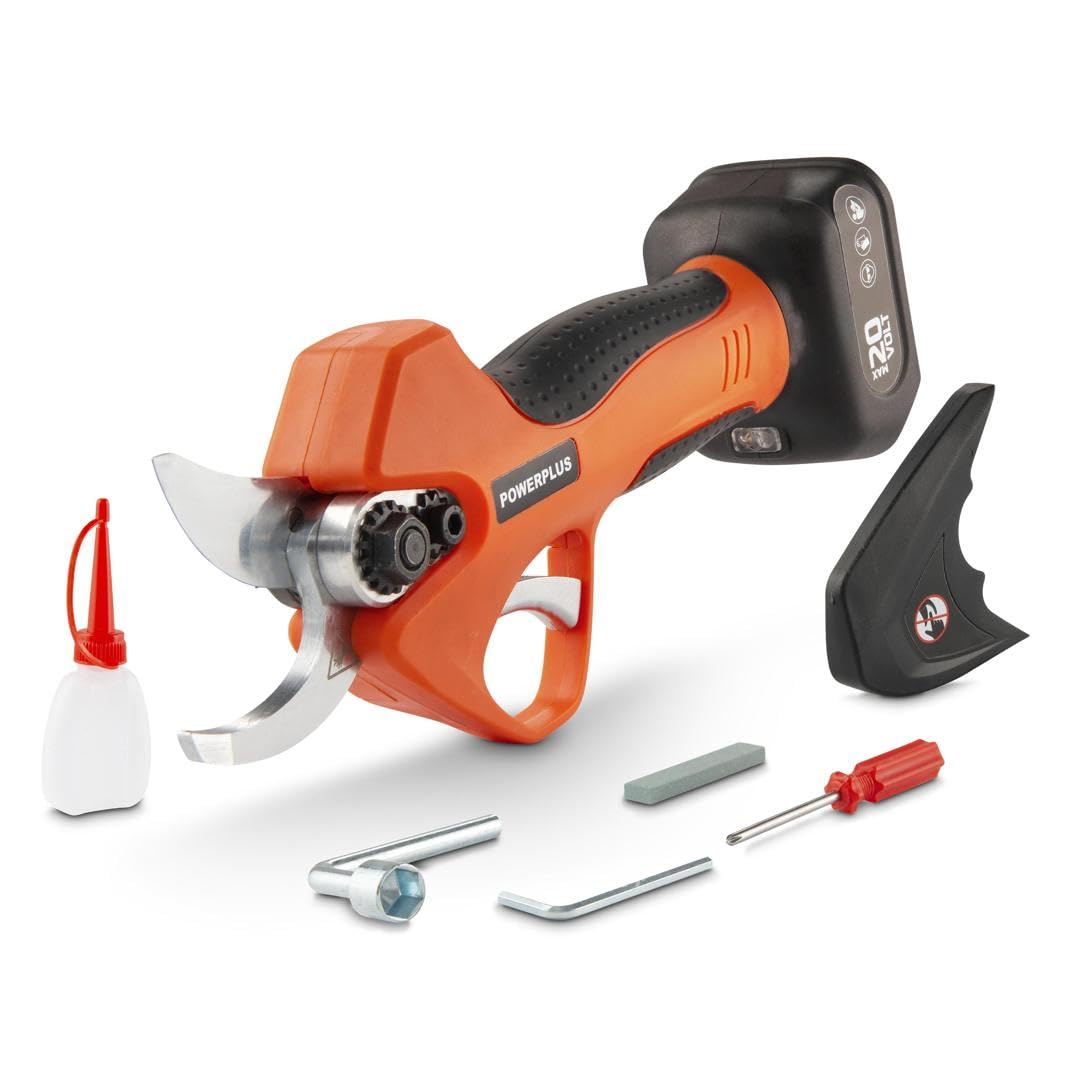
Figure 1: Overview of the POWERPLUS POWDPG80510 Cordless Pruning Shears with a battery attached.
2. Safety Instructions
Always observe basic safety precautions to reduce the risk of injury. Read all instructions carefully before operating the tool.
- Read the Manual: Familiarize yourself with the controls and proper use of the tool.
- Wear Protective Gear: Always wear safety glasses, gloves, and appropriate clothing when operating the pruning shears.
- Keep Hands Clear: Never place hands or fingers near the cutting blades during operation or when the tool is connected to a battery.
- Battery Safety: Use only compatible 20V Dual Power batteries and chargers. Disconnect the battery before making any adjustments, changing accessories, or storing the tool.
- Secure Grip: Maintain a firm grip on the tool during operation.
- Work Area: Ensure your work area is well-lit and free from obstructions. Keep bystanders, especially children, away from the operating area.
- Storage: Store the tool in a dry, secure place, out of reach of children. Always use the blade protector when storing.
3. Package Contents
Carefully unpack the box and ensure all items are present and undamaged. If any parts are missing or damaged, contact your retailer.
- 1x Cordless Pruning Shears (POWDPG80510)
- 1x Blade Protector
- 1x Grinding Stone
- 1x Empty Oil Bottle (10ml)
- 1x Screwdriver
- 1x Hex Key
- 1x L-Key
- 1x Instruction Manual
Note: Battery and charger are not included and must be purchased separately.
4. Product Components
Familiarize yourself with the different parts of your pruning shears for safe and effective operation.

Figure 2: Side view of the pruning shears, highlighting the handle, trigger, and blades.
- Cutting Blades: Sharp blades for precise cutting.
- Trigger Switch: Activates the cutting mechanism.
- On/Off Button: Powers the tool on and off.
- Battery Port: Where the 20V Dual Power battery connects.
- Ergonomic Handle: Designed for comfortable single-hand operation.

Figure 3: The pruning shears with the blade protector installed for safe storage.
5. Setup
5.1 Battery Installation
- Ensure the pruning shears are switched off.
- Align the battery with the battery port on the bottom of the tool.
- Slide the battery into the port until it clicks securely into place.
- To remove the battery, press the release button (if present) and slide the battery out.
5.2 Initial Checks
- Before each use, inspect the blades for any damage or dullness.
- Ensure all screws and fasteners are tight.
- Verify that the safety mechanism operates correctly.
6. Operation
6.1 Activating the Pruning Shears
The pruning shears feature a safety mechanism to prevent accidental activation:
- Press and hold the On/Off button for one second. The tool will enter standby mode.
- Quickly press the trigger switch twice to unlock the blades. The blades will open, indicating the tool is ready for use.
6.2 Pruning Technique
- Position the branch to be cut between the open blades.
- Press the trigger switch to close the blades and make the cut.
- Release the trigger to open the blades for the next cut.
- Avoid forcing the blades through branches thicker than 30 mm.

Figure 4: Proper use of the pruning shears for cutting branches.
6.3 Deactivating the Pruning Shears
To turn off the tool, press and hold the On/Off button until the indicator lights turn off. Always engage the blade protector when not in use.
7. Maintenance
Regular maintenance ensures the longevity and optimal performance of your pruning shears.
7.1 Cleaning
- Disconnect the battery before cleaning.
- Wipe the blades and housing with a clean, damp cloth after each use.
- Remove any sap or debris from the blades to prevent corrosion and ensure smooth operation.
7.2 Blade Sharpening
Dull blades can reduce cutting efficiency and strain the motor. Use the provided grinding stone to sharpen the blades as needed. Follow the original blade angle for best results.
7.3 Lubrication
Apply a few drops of machine oil (not included, use the provided empty bottle for storage) to the pivot points and blades regularly to ensure smooth movement and prevent rust.
7.4 Storage
When not in use, always attach the blade protector to cover the cutting blades. Store the tool in a dry, secure location, away from direct sunlight and extreme temperatures.
8. Troubleshooting
If you encounter issues with your pruning shears, refer to the following common problems and solutions:
| Problem | Possible Cause | Solution |
|---|---|---|
| Tool does not turn on. | Battery not charged or improperly installed. Safety mechanism not disengaged. | Ensure battery is fully charged and correctly inserted. Follow activation steps (Section 6.1). |
| Blades do not cut cleanly. | Blades are dull or dirty. | Clean and sharpen the blades (Section 7.1, 7.2). |
| Blades move slowly or get stuck. | Lack of lubrication. Excessive branch thickness. | Lubricate pivot points (Section 7.3). Do not attempt to cut branches thicker than 30 mm. |
If the problem persists after attempting these solutions, contact customer support.
9. Specifications
| Feature | Specification |
|---|---|
| Model Number | POWDPG80510 |
| Brand | POWERPLUS |
| Voltage | 20V (Battery not included) |
| Motor Type | Brushless |
| Max. Cutting Diameter | 30 mm |
| Product Dimensions | 29 x 8 x 0.1 cm |
| Product Weight | 704 g |
| Material | Nylon |
| Color | Orange |
10. Warranty and Support
This POWERPLUS product is covered by a manufacturer's warranty. Please refer to the warranty card included with your purchase or visit the official POWERPLUS website for detailed warranty terms and conditions.
For technical assistance, spare parts, or any questions regarding your POWDPG80510 pruning shears, please contact POWERPLUS customer support through their official channels. Keep your purchase receipt as proof of purchase for warranty claims.


