
Introduction
Thank you for choosing the Mistral 42" DC Blade Free Fan. This user manual provides essential information for the safe operation, maintenance, and troubleshooting of your new fan. Please read this manual thoroughly before use and retain it for future reference.
Important Safety Instructions
Always follow basic safety precautions when using electrical appliances to reduce the risk of fire, electric shock, and injury to persons.
- Read all instructions before using this appliance.
- Ensure the power supply voltage matches the rating label on the appliance.
- Do not operate any fan with a damaged cord or plug.
- Do not place the fan near heat sources or in direct sunlight.
- Keep children and pets away from the fan during operation.
- Unplug the fan from the power outlet when not in use or before cleaning.
- Do not insert fingers or foreign objects into any openings of the fan.
- This appliance is for household use only.
Package Contents
Please check the contents of your package. If any items are missing or damaged, contact customer support.
- Mistral 42" DC Blade Free Fan Unit
- Remote Control
- AC Adapter
- User Manual (this document)
Setup
1. Assembly
The Mistral 42" DC Blade Free Fan requires simple assembly.
- Carefully remove all components from the packaging.
- Place the fan base on a stable, flat surface.
- Ensure the main fan body is securely seated onto the base.
- Connect the AC adapter to the power input port on the fan, then plug it into a standard electrical outlet.

Figure 1: Front view of the Mistral 42" DC Blade Free Fan.
2. Wi-Fi Setup (Mayer Home App)
To utilize the Wi-Fi features and voice control, download the "Mayer Home App" on your smartphone.
- Download the "Mayer Home App" from your device's app store (iOS or Android).
- Register or log in to your Mayer Home account.
- Follow the in-app instructions to add your Mistral fan. This typically involves putting the fan into pairing mode (refer to the app or fan's display for specific instructions) and connecting it to your home Wi-Fi network.
Operating Instructions
Control Panel and Remote Control
The fan can be operated using the full touch screen control panel on the unit or the included remote control.

Figure 2: Mistral Fan with Remote Control.
Basic Functions:
- Power On/Off: Press the power button on the control panel or remote.
- Fan Speed: Adjust through 12 fan speeds using the '+' and '-' buttons.
- Modes: Cycle through 5 modes: Fresh, Nature, Sleep, Baby, and Smart. Each mode adjusts airflow patterns for different comfort levels.
- Oscillation: Activate left-right oscillation with options for 30, 60, or 120 degrees.
- Timer: Set a pre-set on/off timer for up to 12 hours.
Smart Control (Wi-Fi & Voice)
Once connected to the Mayer Home App, you can control your fan remotely and integrate with voice assistants.
- Mayer Home App: Control all fan functions from your smartphone, including power, speed, modes, oscillation, and timer settings.
- Voice Control: The fan works with Google Home and Amazon Alexa. Link your Mayer Home account to your voice assistant app and use voice commands to operate the fan (e.g., "Hey Google, turn on the fan," "Alexa, set fan speed to 5").
Maintenance
Regular cleaning and maintenance will ensure optimal performance and longevity of your fan.
Cleaning the Fan
- Always unplug the fan from the power outlet before cleaning.
- Use a soft, damp cloth to wipe the exterior surfaces of the fan. Do not use abrasive cleaners or solvents.
- For the Hepa 13 filter located at the sides, gently remove it and clean according to the instructions provided with the filter or by gently vacuuming. Do not wash the filter with water.
- Ensure all parts are completely dry before plugging the fan back in.
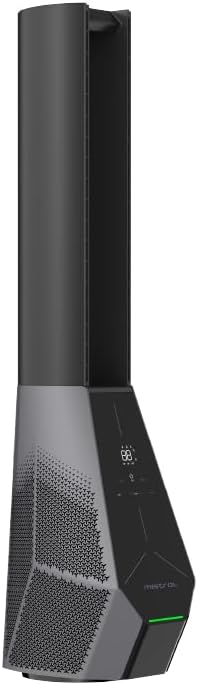
Figure 3: Side view showing the filter location.
Troubleshooting
If you encounter issues with your fan, refer to the following common problems and solutions.
| Problem | Possible Cause | Solution |
|---|---|---|
| Fan does not turn on. | No power supply; Power button not pressed. | Check if the power cord is securely plugged in. Press the power button on the unit or remote. |
| Remote control not working. | Batteries are dead or incorrectly inserted; Obstruction between remote and fan. | Replace batteries. Ensure there is a clear line of sight to the fan's receiver. |
| Wi-Fi connection fails. | Incorrect Wi-Fi password; Fan too far from router; Router issues. | Double-check Wi-Fi password. Move fan closer to router. Restart your Wi-Fi router. Ensure you are connecting to a 2.4GHz network. |
| Fan makes unusual noise. | Obstruction in air intake/outlet; Fan not on a stable surface. | Unplug and check for any foreign objects. Place the fan on a flat, stable surface. |
Specifications
| Feature | Detail |
|---|---|
| Model | MBFAP4236DRW |
| Voltage | 100-240V~ 50/60Hz |
| Wattage | 36W |
| Air Volume | 35 m³ / min |
| Max Air Flow | 15 m / s |
| Product Dimensions (L*W*H) | 237.5 * 300 * 1067 mm |
| Net Weight | 5.4 KGS |
| Motor Type | DC Brushless Motor |
| Control | Full Touch Screen Control Panel, Remote, Wi-Fi (Mayer Home App), Voice Control (Google Home & Amazon Alexa) |
| Filter Type | Hepa 13 Filter |
| Oscillation | 30/60/120 Degree Left-Right |
| Timer | 12 Hours Pre-set On/Off |
Warranty Information
The Mistral 42" DC Blade Free Fan (Model: MBFAP4236DRW) comes with a comprehensive warranty:
- 1 Year general warranty on the appliance.
- An additional 3 Years warranty specifically for the motor only.
Please retain your proof of purchase for warranty claims. The warranty covers manufacturing defects and malfunctions under normal use. It does not cover damage caused by misuse, accidents, unauthorized repairs, or normal wear and tear.
Customer Support
For any inquiries, technical assistance, or warranty claims, please contact Mistral customer support.
Website: www.mistral.com.sg
Email: support@mistral.com.sg
When contacting support, please have your product model number (MBFAP4236DRW) and proof of purchase ready.


