
WLIVE ACHJ005
WLIVE Floating Bed Frame Full Size
Instruction Manual
1. Product Overview
The WLIVE Floating Bed Frame is a full-size metal platform bed designed for modern bedrooms. It features an innovative hidden tripod design that creates a 'floating' visual effect, complemented by integrated LED light strips. The frame also includes a built-in charging station for convenience. It is engineered for sturdy support, quiet operation, and easy assembly, eliminating the need for a box spring.

Image 1: The WLIVE Floating Bed Frame in a bedroom, showcasing its LED lighting and charging station.
2. Safety Information
- Ensure all components are securely fastened before use.
- Do not exceed the maximum weight capacity of 1500 pounds.
- Keep electrical components (LED lights, charging station) away from water or excessive moisture.
- Only use the provided power adapter for the charging station and LED lights.
- Periodically check all screws and connections to ensure they remain tight.
- Keep small parts away from children during assembly to prevent choking hazards.
3. Package Contents
Please verify that all parts are present before beginning assembly. Refer to the detailed assembly guide included in your package for a complete list of components and hardware.
- Bed Frame Sections (Metal Slats, Side Rails, Support Legs)
- Built-in Charging Station (Pre-installed on frame section)
- LED Light Strips with 3M adhesive and Velcro
- Remote Control for LED Lights
- Power Adapter for LED Lights and Charging Station
- Assembly Hardware (Screws, bolts, nuts, washers)
- Assembly Tools (Hex key, wrench)
- Instruction Manual
4. Assembly Instructions
Assembly of the WLIVE Floating Bed Frame is designed to be straightforward. All screw parts are clearly marked, and reserved holes and tools are provided. Please follow the step-by-step instructions in the included detailed assembly guide for optimal results.
- Unpack all components and lay them out on a clean, soft surface to prevent scratches.
- Identify the main frame sections and connect them according to the diagrams in the assembly guide.
- Attach the support legs, ensuring they are securely tightened. The innovative hidden support legs contribute to the floating aesthetic.
- Install the metal slats onto the frame. Ensure each slat is properly seated and secured.
- Attach the mattress stoppers at the corners to prevent mattress sliding.
- Once the frame is fully assembled, carefully move it to its desired location.
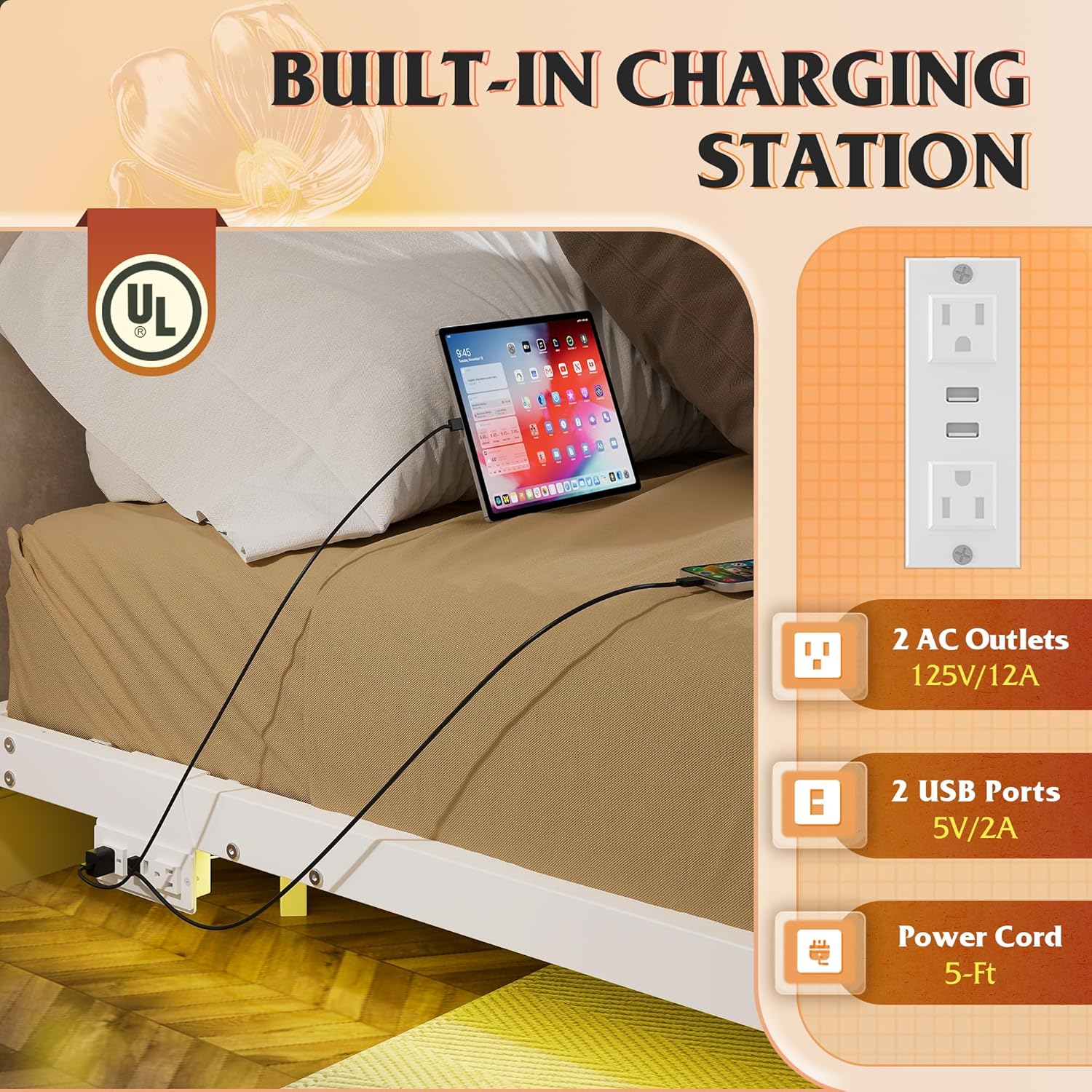
Image 2: Dimensions and weight capacity of the full-size bed frame, highlighting its sturdy construction.

Image 3: Detailed view of key features including sturdy triangle support, mattress stoppers, and anti-slip feet for noise-free operation.

Image 4: Illustration of the innovative hidden support legs design, which creates the floating bed effect and reduces tripping hazards.
5. Setup
5.1 LED Light Installation
The LED light strips come with 3M adhesive for easy attachment to the underside of the bed frame. Additional Velcro is provided to ensure the strips remain securely in place and prevent falling.
- Clean the surface where the LED strips will be applied to ensure proper adhesion.
- Peel off the backing from the 3M adhesive on the LED strips and firmly press them onto the designated areas on the bed frame.
- Use the provided Velcro straps to further secure the LED strips, especially at corners or stress points.
- Connect the LED light strip to the control box and then to the power adapter.
5.2 Charging Station Connection
The built-in charging station is equipped with 2 AC outlets and 2 USB ports, providing convenient power access. It features a 1.5m flexible cable and is UL/ETL certified for electrical safety.
- Locate the power cord extending from the charging station on the bed frame.
- Plug the power cord into a standard wall outlet.

Image 5: The integrated charging station, featuring two AC outlets and two USB ports for convenient device charging.

Image 6: Detail of the Velcro belt system used to secure the LED light strip firmly to the bed frame, preventing detachment.
6. Operating Instructions
6.1 LED Light Operation
The LED lights offer 12 scene modes and over 6000 colors, with adjustable speed and brightness. Control can be done via the included remote control or a dedicated mobile application.
- Remote Control: Use the remote to power on/off, change colors, select scene modes, adjust brightness, and control speed.
- Mobile App: Download the compatible app (refer to the assembly guide for QR code or app name). Connect the app to the LED lights via Bluetooth. The app provides advanced control options, including custom color mixing, music sync mode, and timer functions.
6.2 Charging Station Use
Simply plug your electronic devices into the AC outlets (125V/12A) or USB ports (5V/2A) on the built-in charging station to power or charge them.

Image 7: Overview of the LED light system, illustrating various control modes and the wide spectrum of available colors.
Video 1: An official product video demonstrating the features of the WLIVE Floating Bed Frame, including the LED lights, charging station, hidden support legs, and mattress stoppers.
7. Maintenance
- Cleaning: Wipe the metal frame with a soft, damp cloth. Avoid abrasive cleaners or harsh chemicals that could damage the finish.
- LED Lights: Gently wipe the LED strips with a dry or slightly damp cloth. Do not immerse in water.
- Electrical Components: Ensure the charging station is unplugged before cleaning. Use a dry cloth to wipe the surface.
- Regular Checks: Periodically inspect all bolts and screws to ensure they are tight. Re-tighten if necessary to maintain stability and prevent noise.
8. Troubleshooting
| Problem | Possible Cause | Solution |
|---|---|---|
| LED lights not turning on. | Power adapter unplugged; loose connection; remote battery dead. | Ensure power adapter is securely plugged into outlet and control box. Check all connections. Replace remote battery. |
| Charging station not working. | Power cord unplugged; circuit breaker tripped. | Ensure power cord is securely plugged into wall outlet. Check your home's circuit breaker. |
| Bed frame is noisy or wobbly. | Loose screws or bolts; uneven floor. | Re-tighten all assembly screws and bolts. Ensure the bed is on a level surface; use shims if necessary. |
| Mattress slides on the frame. | Mattress stoppers not installed or loose. | Ensure the four mattress slide stoppers are correctly installed and tightened. |
9. Specifications
- Model Number: ACHJ005
- Product Dimensions (Full Size): 74.8 x 53.94 x 9.13 inches (L x W x H)
- Item Weight: 34.4 pounds
- Material: Metal
- Color: White
- Maximum Weight Capacity: 1500 pounds
- Charging Station: 2 AC Outlets (125V/12A), 2 USB Ports (5V/2A)
- LED Lights: 12 Scene Modes, 6000+ RGB Colors, App/Remote Control
- Special Features: Hidden Support Legs, 4 Mattress Slide Stoppers, Noise-Free Design
10. Warranty and Support
WLIVE is committed to providing excellent customer service. If you encounter any issues or have questions regarding your bed frame, please do not hesitate to contact our professional after-sales team. Refer to your purchase documentation or the WLIVE official website for specific warranty details and contact information.
For further assistance, please visit the WLIVE Store on Amazon.
Ask a question about this manual
Ask about setup, troubleshooting, compatibility, parts, safety, or missing instructions. Manuals+ will review the question and use this page’s manual context to help answer it.