1. Introduction
Thank you for choosing the Hyundai HSB900A2D 9 kg Heat Pump Dryer. This appliance is designed to provide efficient and gentle drying for your laundry. This instruction manual contains important information on the safe installation, operation, and maintenance of your dryer. Please read it thoroughly before using the appliance and keep it for future reference.

Image 1.1: Front view of the Hyundai HSB900A2D Heat Pump Dryer with the door closed.
2. Safety Information
For your safety and to ensure proper operation, please observe the following precautions:
- Read all instructions before using the appliance.
- This appliance is for household use only. Do not use it for commercial purposes.
- Do not dry unwashed items in the tumble dryer.
- Items that have been soiled with substances such as cooking oil, acetone, alcohol, petrol, kerosene, spot removers, turpentine, waxes, and wax removers should be washed in hot water with an extra amount of detergent before being dried in the tumble dryer.
- Do not overload the dryer. Refer to the maximum load capacity (9 kg).
- Ensure the lint filter is clean before each use to prevent fire hazards and maintain drying efficiency.
- The appliance must be connected to a properly grounded electrical outlet.
- Do not install the dryer in an area where it may be exposed to water or extreme temperatures.
- Keep children and pets away from the appliance during operation.
- Always unplug the dryer before cleaning or performing any maintenance.
3. What's in the Box
Upon unpacking, please ensure all items are present and undamaged:
- Hyundai HSB900A2D Heat Pump Dryer
- Instruction Manual (this document)
4. Setup and Installation
4.1. Placement
Place the dryer on a firm, level floor. Ensure there is adequate ventilation around the appliance. Do not install it in a confined space or directly against a wall without proper clearance. The dryer should not be placed on a carpet where the ventilation openings in the base could be obstructed.
4.2. Leveling
Adjust the adjustable feet at the bottom of the dryer to ensure it is perfectly level. A level dryer reduces vibration and noise during operation.
4.3. Electrical Connection
Connect the dryer to a grounded power outlet that meets the specifications listed in the 'Specifications' section. Do not use extension cords or adapters.
4.4. Condensate Drain
As a heat pump dryer, it collects water in a condensate tank. This tank must be emptied after each cycle. Alternatively, you can connect the dryer to a permanent drain using the provided drain hose (if included) to automatically discharge the condensate water.
5. Operating Instructions
5.1. Loading Laundry
Open the dryer door. Load laundry into the drum, ensuring not to exceed the 9 kg maximum capacity. For best results, separate items by fabric type and desired dryness level. Close the door firmly.

Image 5.1: Loading laundry into the 9 kg capacity drum.
5.2. Control Panel Overview
The dryer features a touch control system with an LED display. Familiarize yourself with the buttons and indicators:
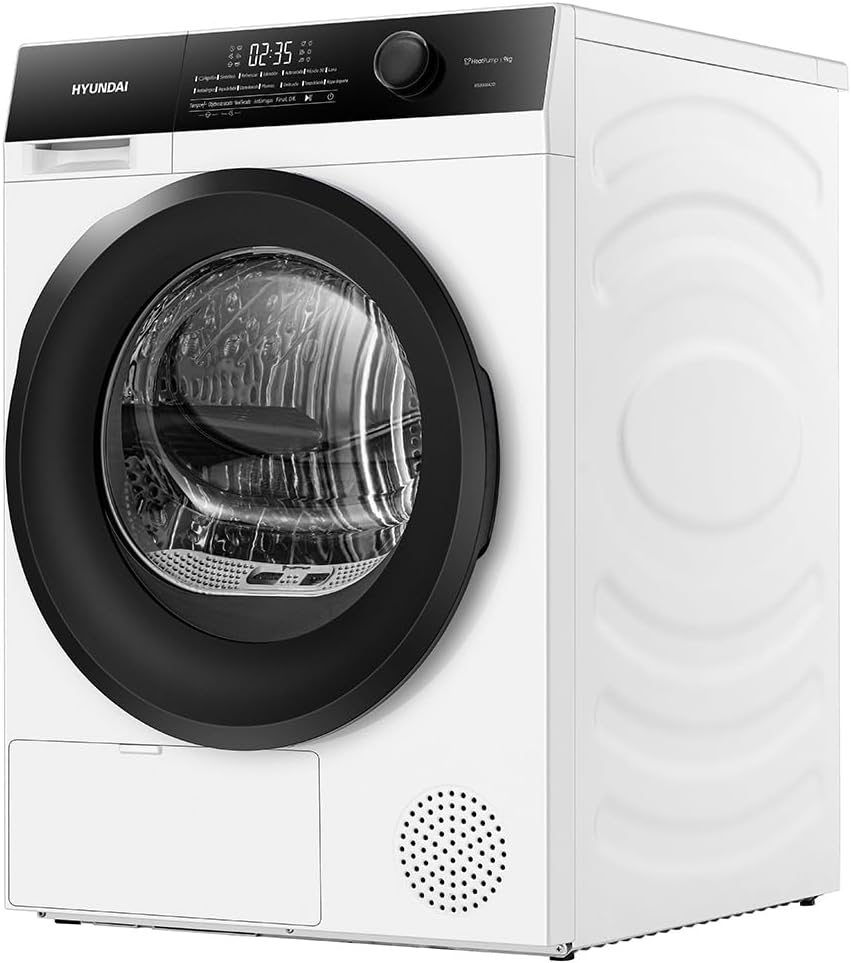
Image 5.2: Detailed view of the LED touch control panel.
- Program Selector Dial: Turn to select the desired drying program.
- LED Display: Shows remaining time, selected options, and error codes.
- Function Buttons: For selecting additional options like Anti-crease, delay start, or dryness level.
- Start/Pause Button: To start or pause the drying cycle.
- Power Button: To turn the dryer on or off.
5.3. Selecting a Program
Turn the program selector dial to choose the appropriate program for your laundry type. The LED display will show the default settings for that program. You can then adjust additional functions using the function buttons.
5.4. Starting the Cycle
Press the Start/Pause button to begin the drying cycle. The display will show the estimated remaining time.
5.5. End of Cycle
Once the cycle is complete, the dryer will signal with an audible alert (if enabled) and the display will indicate 'End'. Open the door and remove your dry laundry. Remember to clean the lint filter and empty the condensate tank after each use.
6. Programs and Functions
The Hyundai HSB900A2D offers 14 programs and various functions to cater to different fabric types and drying needs:
- Cotton: For durable cotton items like towels, sheets, and underwear.
- Synthetics: For synthetic or blended fabrics such as shirts, blouses, and trousers.
- Refresh: A short cycle to air and refresh items without heat.
- Duvet: Specifically designed for drying large items like duvets and blankets.
- Quick Dry 30': A rapid drying cycle for small loads or lightly damp items.
- Wool: Gentle drying for wool items, minimizing shrinkage and damage.
- Anti-Allergy: Provides deep cleaning and allergen removal, ideal for sensitive skin.
- Baby Clothes: Gentle drying for delicate baby garments.
- Extra Dry: For items requiring a higher level of dryness.
- Feathers: Suitable for items with feather filling.
- Delicate: For very delicate fabrics that require low heat and gentle tumbling.
- Timed: Allows you to set a specific drying duration.
- Sportswear: Optimized for drying synthetic sportswear.
- Anti-crease Function: This function helps to reduce wrinkles by periodically tumbling the load after the main drying cycle has finished.

Image 6.1: The Anti-Allergy program provides thorough drying for sensitive items.
7. Maintenance and Cleaning
Regular maintenance ensures optimal performance and extends the lifespan of your dryer.
7.1. Cleaning the Lint Filter
The lint filter should be cleaned after every drying cycle. Pull out the filter, remove any accumulated lint, and rinse it under running water if necessary. Ensure it is completely dry before reinserting.
7.2. Emptying the Condensate Tank
The condensate tank collects water extracted from the laundry. It must be emptied after each drying cycle. Pull out the tank, pour out the water, and reinsert it firmly.
7.3. Cleaning the Condenser
The condenser should be cleaned periodically (e.g., every few months) to maintain drying efficiency. Refer to the specific instructions in your dryer's full manual for accessing and cleaning the condenser unit.
7.4. Cleaning the Exterior
Wipe the exterior of the dryer with a soft, damp cloth. Do not use abrasive cleaners or solvents.
8. Troubleshooting
If you encounter any issues with your dryer, consult the following table before contacting customer service:
| Problem | Possible Cause | Solution |
|---|---|---|
| Dryer does not start | No power supply; Door not closed properly; Program not selected. | Check power plug and circuit breaker; Ensure door is fully latched; Select a program and press Start. |
| Laundry not drying properly | Lint filter clogged; Condensate tank full; Overloaded dryer; Incorrect program selected. | Clean lint filter; Empty condensate tank; Reduce load size; Select appropriate program. |
| Excessive noise/vibration | Dryer not level; Foreign objects in drum; Overloaded. | Adjust leveling feet; Check drum for loose items; Reduce load size. |
| Water leaking | Condensate tank not properly inserted; Drain hose (if connected) loose or blocked. | Ensure condensate tank is fully pushed in; Check drain hose connection and clear any blockages. |
9. Specifications
Key technical specifications for the Hyundai HSB900A2D Heat Pump Dryer:
| Feature | Specification |
|---|---|
| Brand | HYUNDAI |
| Model Name | HSB900A2D |
| Capacity | 9 Kilograms |
| Energy Efficiency Class | A++ |
| Noise Level | 64 dB |
| Dimensions (H x W x D) | 84.5 x 59.5 x 68.5 cm |
| Product Weight | 50 Kilograms |
| Color | White |
| Material | Stainless Steel, Plastic |
| Door Orientation | Left |
| Number of Programs | 14 |

Image 9.1: Energy label indicating A++ efficiency and other specifications.
10. Warranty and Support
10.1. Warranty Information
Your Hyundai HSB900A2D Heat Pump Dryer comes with a manufacturer's warranty. Please refer to the warranty card included with your purchase for specific terms, conditions, and duration of the warranty. Keep your proof of purchase for any warranty claims.
10.2. Customer Support
If you require technical assistance, spare parts, or have any questions not covered in this manual, please contact Hyundai customer service. Contact details can typically be found on the manufacturer's website or on your warranty documentation.


