
1. Introduction
Thank you for choosing the Korfile 47-Inch Pink L-Shaped Gaming Desk. This manual provides detailed instructions for assembly, operation, maintenance, and troubleshooting to ensure you get the most out of your new gaming desk. Please read all instructions carefully before assembly and use.
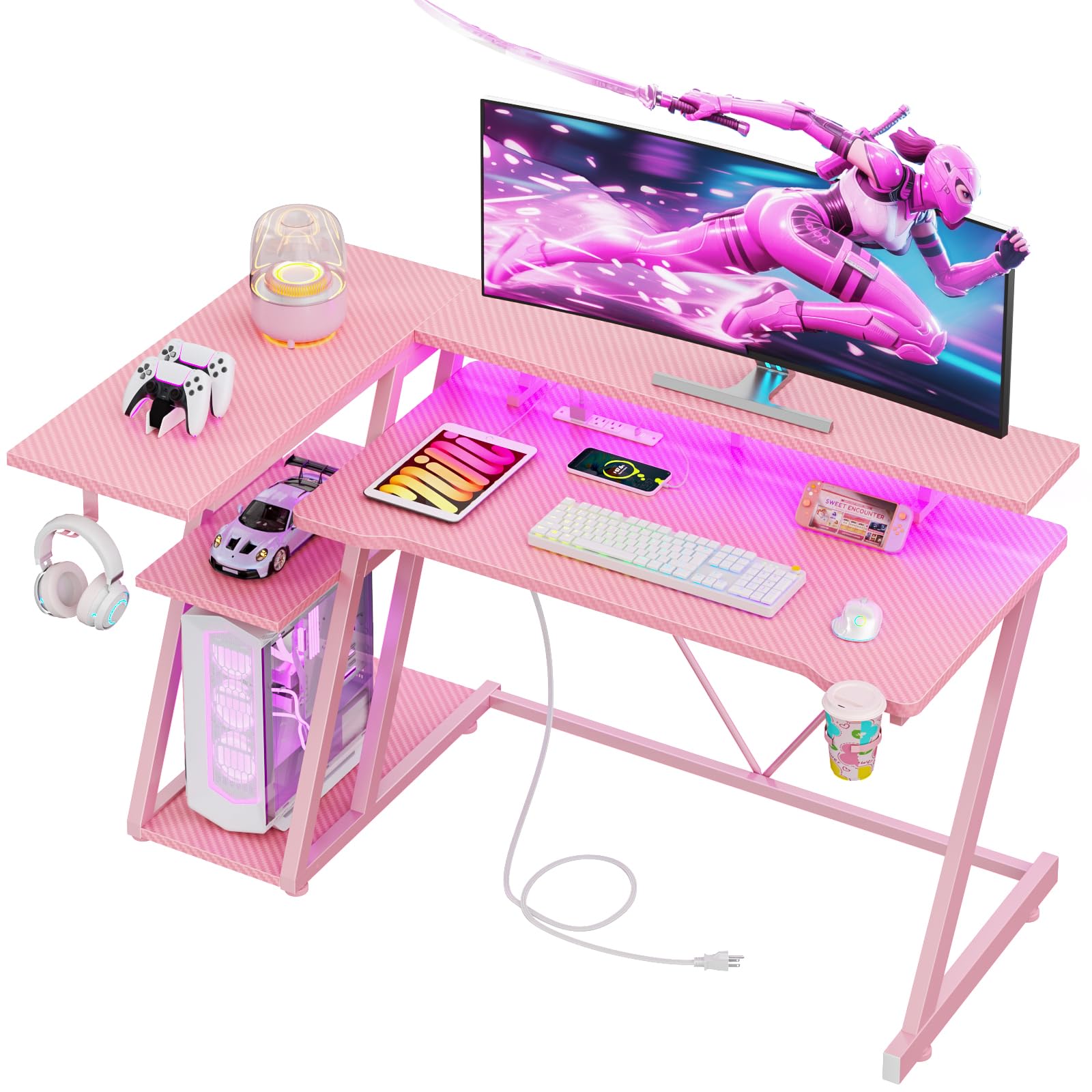
Figure 1: Korfile 47-Inch Pink L-Shaped Gaming Desk
2. Safety Information
Always prioritize safety during assembly and use. Failure to follow these instructions may result in injury or damage to the product.
- Assemble the desk on a flat, stable surface to prevent wobbling.
- Ensure all screws and fasteners are securely tightened before using the desk.
- Do not exceed the maximum weight capacity of 220 lbs (100 kg) for the desk legs.
- Keep the desk away from direct heat sources and open flames.
- Avoid placing heavy objects on the edges of the desk to prevent tipping.
- Keep children and pets away from the assembly area.
- If any parts are damaged, scratched, or missing, contact customer support immediately.
3. Package Contents
Before beginning assembly, verify that all components are present and undamaged. Refer to the parts list provided in your packaging. The package should include:
- Desk panels (main desktop, L-shaped extension, monitor stand, storage shelves)
- Metal frame components (Z-shaped legs, support bars)
- Hardware kit (screws, adjustable leg pads, Allen wrench)
- Power strip with AC outlets and USB ports
- RGB LED light strip with remote control
- Headphone hook and cup holder
- Decorative stickers
4. Assembly Instructions
Follow these steps carefully for proper assembly. It is recommended to have two people for assembly.
- Step 1: Assemble the Main Desk Frame
Attach the adjustable leg pads to the bottom of the Z-shaped leg frames. Secure the horizontal support bars between the main desk frames. - Step 2: Attach Side Storage Shelves
Assemble the side storage shelves to the designated frame. Ensure all connections are tight. - Step 3: Secure the Main Desktop
Place the main desktop panel onto the assembled frame and secure it with the provided screws. - Step 4: Install the L-Shaped Extension
Attach the L-shaped extension panel to the main desktop and the side storage frame. - Step 5: Mount the Monitor Stand
Secure the monitor stand to the main desktop using the appropriate hardware. - Step 6: Install Accessories
Attach the headphone hook and cup holder to the desired locations on the desk frame. - Step 7: Install Power Strip and LED Lights
Place the power strip in its designated slot on the monitor stand. Adhere the LED light strip to the underside of the monitor stand using the double-sided tape. Connect the LED lights and power strip to a power source. - Step 8: Apply Decorative Stickers
Personalize your desk by applying the decorative stickers to the Z-shaped legs as desired.
Video 1: Korfile Gaming Desk Assembly and Features Overview. This video demonstrates the assembly process and highlights key features of the desk.
5. Features & Functions
- Carbon Fiber Texture: The desktop is made from MDF with a carbon fiber textured finish, providing a smooth, scratch-resistant, and easy-to-clean surface.
- Reversible Design: The L-shaped configuration can be assembled with the side storage on either the left or right to fit various room layouts. Two desks can also be combined to form a U-shaped setup.
- RGB LED Lights: An integrated LED light strip with APP control enhances your gaming atmosphere with multiple color options and dynamic modes.
- Built-in Power Outlets: Equipped with 3 AC sockets and 2 USB charging ports, allowing convenient power access for multiple devices directly on the desk.
- Multi-functional Storage: Includes a cup holder, headphone hook, and a long monitor stand designed to accommodate two 24-inch monitors or one large monitor, optimizing desk space and promoting ergonomic viewing angles.
- Sturdy and Strong Frame: Double Z-shaped legs provide enhanced stability. Adjustable leg pads ensure the desk remains level on uneven floors.

Figure 2: Desk Dimensions

Figure 3: Reversible Layout Options

Figure 4: RGB LED Lights with App Control

Figure 5: Built-in Power Strip
6. Operating Instructions
6.1. LED Light Operation
- Connect the LED light strip to the power source.
- Use the included remote control to change colors, adjust brightness, and select dynamic lighting modes.
- For advanced control, scan the QR code on the back of the LED light switch to download the control APP on your smartphone.
6.2. Using Power Outlets
- Plug the desk's main power cord into a wall outlet.
- Utilize the 3 AC outlets for monitors, computers, or other electronics.
- Use the 2 USB charging ports to charge mobile phones, tablets, or other USB-powered devices.
7. Maintenance & Care
To maintain the appearance and longevity of your Korfile Gaming Desk, follow these care instructions:
- Regularly wipe the desk surfaces with a damp cloth to remove dust and spills.
- For stubborn marks, use a mild, non-abrasive cleaner.
- Immediately wipe away any liquid spills to prevent damage to the carbon fiber texture.
- Avoid using harsh chemicals or abrasive cleaning tools that could scratch the surface.
- Periodically check all screws and connections to ensure they remain tight.
8. Troubleshooting
If you encounter any issues with your Korfile Gaming Desk, refer to the following common solutions:
- Desk is wobbly: Check that all screws are tightened. Adjust the leg pads on the bottom of the desk to stabilize it on uneven surfaces.
- LED lights not working: Ensure the LED strip is properly connected to its power source and the wall outlet. Check the remote control battery. If using the app, ensure Bluetooth connection is active.
- Power outlets not functioning: Verify the desk's main power cord is securely plugged into a working wall outlet. Check for any tripped circuit breakers.
- Missing or damaged parts: Do not attempt to force assembly with incorrect or missing parts. Contact Korfile customer support for replacements.
If the problem persists, please contact Korfile customer support for further assistance.
9. Specifications
| Feature | Detail |
|---|---|
| Brand | Korfile |
| Model Number | DDHK-GD-001V1-CL-47-1-CFP |
| Product Dimensions | 25.6"D x 47"W x 34.6"H |
| Color | Carbon Fiber Pink |
| Material | Engineered Wood (Top), Metal (Base) |
| Weight Capacity | Up to 220 lbs |
| Special Features | Built-In USB Outlet, Monitor Stand, Reversible Design, LED Lights, Cup Holder, Headphone Hook |
| Assembly Required | Yes (All tools included) |
10. Warranty & Support
Korfile stands behind the quality of its products. For warranty information, product support, or to report any issues, please contact Korfile customer service through the retailer where the product was purchased. Please have your model number and purchase date available when contacting support.