
Introduction
The BSIDE SH9 is a versatile 2-in-1 device combining a high-resolution thermal imaging camera with a full-featured digital multimeter. Designed for comprehensive fault detection and analysis, it is suitable for various applications in electrical engineering, mechanical construction, automotive, and industrial maintenance.
Package Contents
Verify that all items listed below are present in your package:
- 1 x BSIDE SH9 Thermal Camera Multimeter
- 1 x Test Leads (Red and Black)
- 1 x Storage Bag
- 1 x Charging Cable (USB)
- 1 x User Manual

Image: The BSIDE SH9 Thermal Camera Multimeter shown with its included test leads, USB charging cable, and storage bag.
Key Features
Thermal Imaging Capabilities:
- 480 x 320 infrared thermal image resolution.
- 25 Hz frame rate for smooth real-time viewing.
- Temperature range: -20 ℃ to 1300 ℃ (-4 ℉ to 2372 ℉).
- 15 selectable thermal color palettes.
- Adjustable emissivity and temperature alarm thresholds.
Digital Multimeter Functions:
- 20,000 counts digital multimeter for high precision measurements.
- Measures AC/DC Voltage, Resistance, Capacitance, Diode, and Continuity.
- Supports AC current measurement up to 2000A with a flexible current clamp (sold separately).
- Graphic mode to display measured value ripple over time.
Display and Interface:
- 3.98-inch visual touchscreen with full viewing angle.
- High/low/average temperature display on thermal images.
- Adjustable backlight, time, and date settings.
Additional Features:
- 2500 mAh rechargeable Li-ion battery.
- Data storage for up to 30,000 thermal images.
- Data transfer to PC for analysis.
- Multi-language support: Chinese, English, Japanese, German, Spanish, French, Italian.

Image: The BSIDE SH9 device simultaneously displaying a thermal image on the right and multimeter readings with a waveform graph on the left, illustrating its dual functionality.
Setup
1. Charging the Battery
Before first use, fully charge the device. Connect the provided USB charging cable to the device's charging port and to a standard USB power adapter (not included) or a computer's USB port. The charging indicator will show the charging status.
2. Initial Power On
Press and hold the power button (usually located on the side or top) until the screen illuminates. The device will boot up and display the main interface.
3. Language and Basic Settings
Upon first power-on or after a factory reset, you may be prompted to select a language. Navigate through the settings menu (typically accessed via the touchscreen or a dedicated button) to configure:
- Language: Select your preferred language (e.g., English).
- Date and Time: Set the current date and time for accurate data logging.
- Temperature Unit: Choose between Celsius (℃), Fahrenheit (℉), or Kelvin (K).
- Auto-Off Time: Adjust the duration after which the device automatically powers off due to inactivity to conserve battery.
- Emissivity: Adjust this setting based on the material being measured for accurate thermal readings. Refer to a standard emissivity table for common materials.
Operating Instructions
1. Navigating the Interface
The SH9 features a 3.98-inch touchscreen for direct interaction and a 'WHEEL' button (or similar) for menu navigation and selection. Familiarize yourself with the on-screen icons and menus.

Image: A hand interacting with the 3.98-inch touchscreen of the BSIDE SH9, demonstrating its touch-enabled interface for control and data input.
2. Thermal Camera Mode
To enter thermal camera mode, select the thermal imaging icon from the main menu. The screen will display a real-time thermal image.
- Taking Thermal Images: Press the designated button (often a trigger or a specific on-screen icon) to capture a thermal image. Images are saved to the internal memory.
- Palette Selection: The SH9 offers 15 color palettes to visualize temperature differences. Tap the palette icon on the screen to cycle through options like White Heat, Black Heat, Rainbow, Iron Red, etc.

Image: The BSIDE SH9 screen showcasing 15 different thermal color palettes, each offering a unique way to visualize temperature variations in an infrared image.
- Temperature Alarms: Set high and low temperature thresholds. The device will visually or audibly alert you if temperatures exceed or fall below these limits.
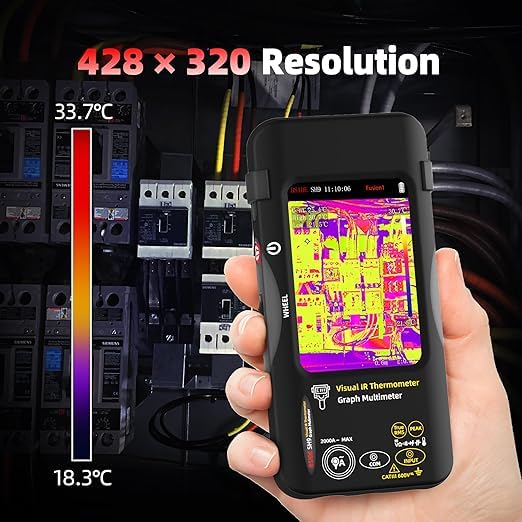
Image: The BSIDE SH9 displaying a thermal image of an electrical panel, highlighting its 480x320 resolution for detailed temperature mapping.
3. Multimeter Mode
To switch to multimeter mode, select the multimeter icon. Connect the test leads to the appropriate input jacks on the device and to the circuit or component you wish to measure.
- Measuring Voltage (DC/AC): Select the DCV or ACV function. Insert the red test lead into the 'VΩmA' jack and the black test lead into the 'COM' jack. Apply the probes to the test points.
- Measuring Resistance: Select the Resistance (Ω) function. Connect the test leads as for voltage. Ensure the circuit is de-energized before measuring resistance.
- Measuring Capacitance: Select the Capacitance function. Connect the test leads to the capacitor terminals. Ensure the capacitor is discharged before measurement.
- Continuity and Diode Test: Select the Continuity/Diode function. For continuity, the device will beep if a low resistance path is detected. For diode test, it will display the forward voltage drop.
- AC Current with Flexible Clamp: For measuring AC current up to 2000A, connect a compatible flexible current clamp (not included) to the device and select the AC current function.
- Graphic Mode: In multimeter mode, you can activate a graphic display to observe the fluctuation of measured values (voltage, resistance, etc.) over time. This is useful for analyzing trends or intermittent issues.
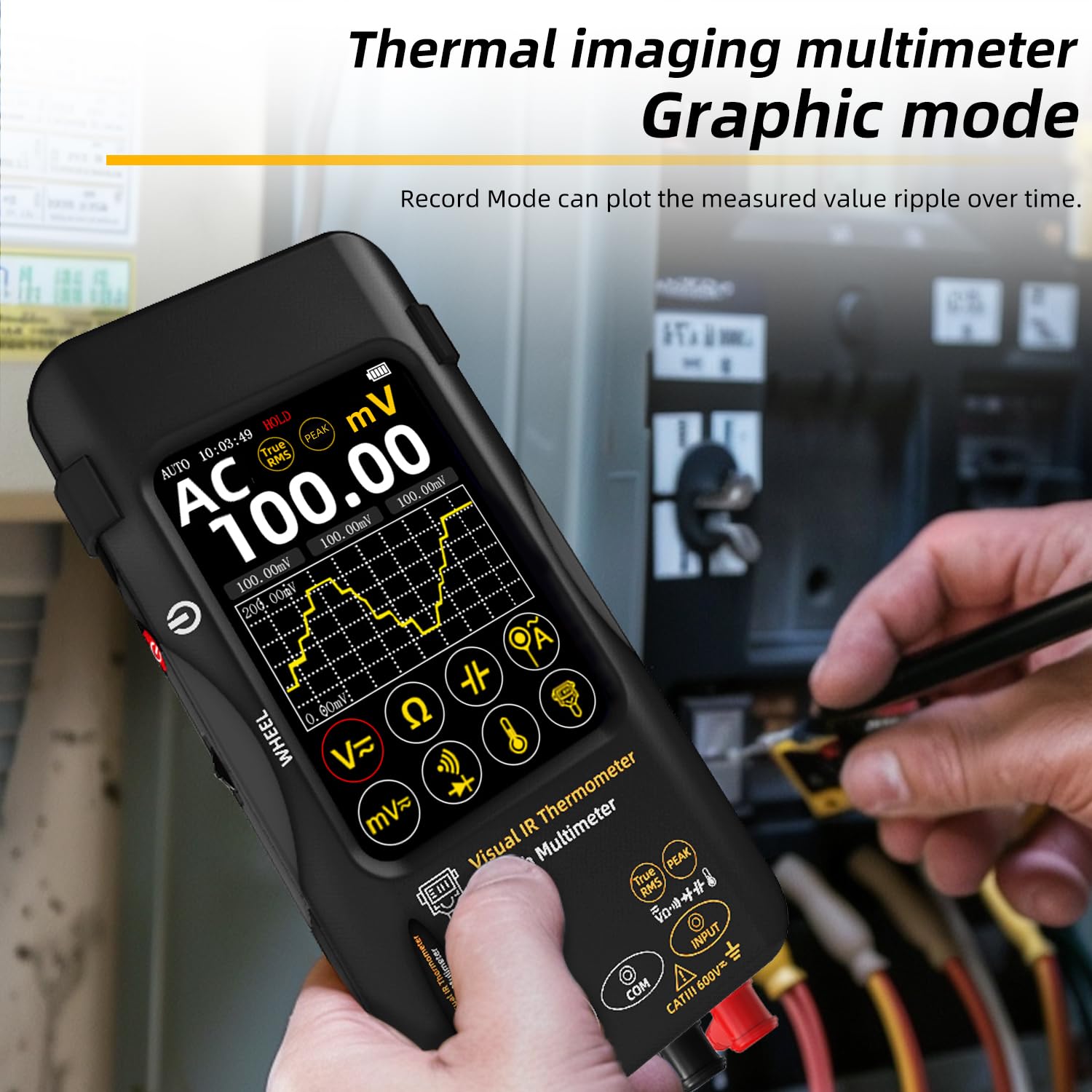
Image: The BSIDE SH9 in multimeter graphic mode, displaying a waveform graph of a measured value over time, useful for analyzing electrical signals.
4. Data Management
The device allows you to save screenshots of both thermal and multimeter interfaces. These images and data can be transferred to a PC for further analysis and reporting.
- Saving Data: After capturing an image or measurement, follow the on-screen prompts to save the data. The device has internal memory for up to 30,000 images.
- Exporting Data: Connect the SH9 to a computer using the provided USB cable. The device should appear as a removable storage device. You can then copy the saved images and data files to your computer.
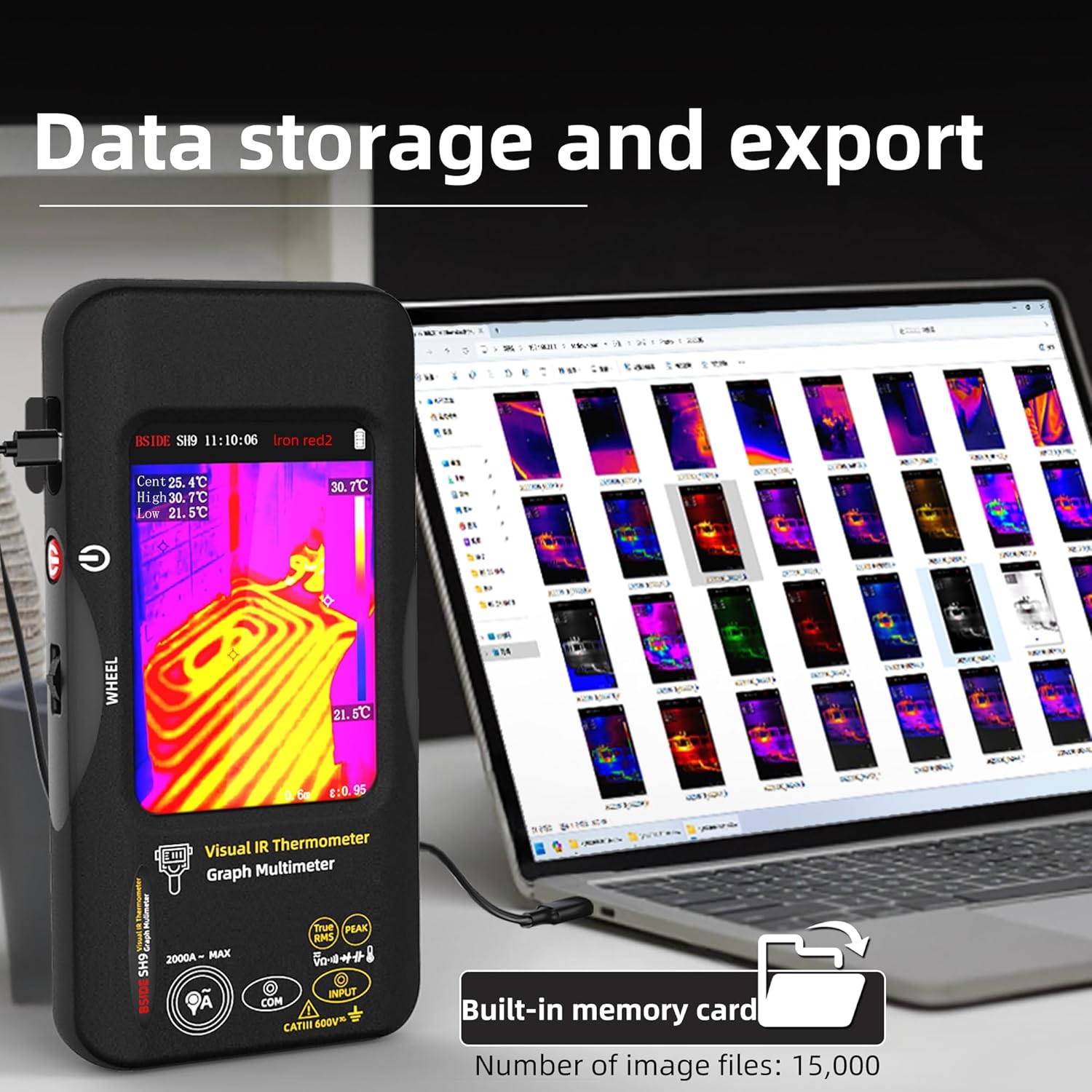
Image: The BSIDE SH9 connected to a laptop via USB, demonstrating its capability for data storage and export of thermal images to a personal computer for analysis.
Applications
The BSIDE SH9 is suitable for a wide range of detection and diagnostic tasks:
- Electrical system inspection (e.g., circuit breakers, distribution cabinets).
- Mechanical equipment inspection (e.g., motor detection, bearing overheating).
- Building diagnostics (e.g., floor heating detection, insulation issues).
- Automotive diagnostics.
- Pipeline inspection.
- HVAC system analysis.

Image: The BSIDE SH9 being used to detect floor heating patterns, illustrating its application in building diagnostics for clear thermal visualization.

Image: A collage showing the BSIDE SH9 in various application scenarios, including automobile engine inspection, distribution cabinet inspection, motor detection, pipeline inspection, electric power detection, and air conditioning outlet inspection.
Maintenance
1. Cleaning
Regularly clean the device's exterior with a soft, dry cloth. For stubborn dirt, a slightly damp cloth can be used. Do not use abrasive cleaners, solvents, or harsh chemicals, as these can damage the casing or screen. Ensure the thermal lens and screen are kept clean for optimal performance.
2. Battery Care
The device is powered by a rechargeable Li-ion battery. To prolong battery life:
- Avoid fully discharging the battery frequently.
- Charge the device regularly, even if not in use for extended periods (e.g., once every 3 months).
- Store the device in a cool, dry place when not in use.
Troubleshooting
If you encounter issues with your BSIDE SH9, consider the following common troubleshooting steps:
- Device not turning on: Ensure the battery is charged. Connect the charging cable and try again.
- Inaccurate thermal readings: Check the emissivity setting. Ensure the lens is clean and free from obstructions.
- Multimeter readings are unstable or incorrect: Check the test leads for damage or loose connections. Ensure the correct measurement function is selected.
- Screen unresponsive: Try restarting the device. If the issue persists, contact customer support.
- Cannot transfer data to PC: Ensure the USB cable is properly connected. Check if the device is recognized by your computer. Try a different USB port or cable.
For persistent problems, refer to the manufacturer's support resources or contact their customer service.
Specifications
Thermal Camera Mode:
- Thermal Image Resolution: 480 × 320
- Sensor Type: Vanadium Oxide (VOx) Microbolometer
- Response Band: 8-14 μm
- Noise Equivalent Temperature Difference (NETD): ≤ 60 mk (@ 25 ℃, F#1.0)
- Spatial Resolution (IFOV): 8.89 mrad
- Frame Rate: 25 Hz
- Image Lens Focal Length: 1.35 mm
- Temperature Measurement Resolution: 0.1 °C
- Temperature Measurement Focal Distance: 0.3 m to 3 m (adjustable)
- Temperature Range: -20 ℃ ~ 1300 ℃ (-4 ℉ ~ 2372 ℉)
- Temperature Measurement Units: Celsius, Fahrenheit, Kelvin
- Color Palettes: 15 types (White Heat, Black Heat, Fusion 1, Rainbow, Fusion 2, Iron Red 1, Iron Red 2, Sepia, Color 1, Color 2, Ice and Fire, Rain, Green Heat, Red Heat, Deep Blue)
- Image Memory: 30,000 images
Multimeter Mode:
| Measurement | Range | Resolution | Accuracy |
|---|---|---|---|
| DC Voltage (V) | 20.000V / 200.00V / 1000V | 0.0001V / 0.01V / 0.1V | ±(0.05% + 3) / ±(0.5% + 3) |
| DC Voltage (mV) | 20.000mV / 200.00mV | 0.001mV / 0.01mV | ±(0.1% + 3) |
| AC Voltage (V) | 20.000V / 200.00V / 750V | 0.0001V / 0.01V / 0.1V | ±(0.5% + 3) |
| AC Voltage (mV) | 20.000mV / 200.00mV | 0.001mV / 0.01mV | ±(0.5% + 3) |
| Resistance (Ω) | 200.00Ω / 20.000kΩ / 200.00kΩ / 20.000MΩ / 200.00MΩ | 0.01Ω / 0.0001kΩ / 0.01kΩ / 0.0001MΩ / 0.01MΩ | ±(0.5% + 3) / ±(0.2% + 3) / ±(1.0% + 3) / ±(5.0% + 5) |
| Capacitance (F) | 999.99nF / 9.999μF / 999.99μF / 99.999mF | 0.01nF / 0.001μF / 0.01μF / 0.001mF | ±(5.0% + 5) / ±(2.0% + 5) / ±(5.0% + 10) |
| AC Current (Flexible Clamp) | 200.0A / 2000A | 0.1A / 1A | |
| Temperature | (-20~1300)℃ / (-4~2372)℉ | 1℃ / 1℉ | ±(2.0% + 5) |
| Diode Test | Yes | ||
| Continuity Test | Yes | ||
General:
- Dimensions: 169 x 81 x 26.8 mm
- Weight: 271 g
- Battery: 1 Lithium-ion (2500 mAh)
Warranty and Support
For warranty information, technical support, or service inquiries, please refer to the documentation provided with your purchase or contact the seller/manufacturer directly. Keep your proof of purchase for warranty claims.


