
Introduction
The Radtel RT-910B is a versatile 5W multi-band handheld radio designed for amateur radio enthusiasts. It supports UHF, VHF, AM, and FM frequencies, offering extensive communication capabilities. Key features include 960 programmable channels, Type-C charging, spectrum scanning, and a clear color display. This manual provides detailed instructions for setting up, operating, and maintaining your RT-910B radio.
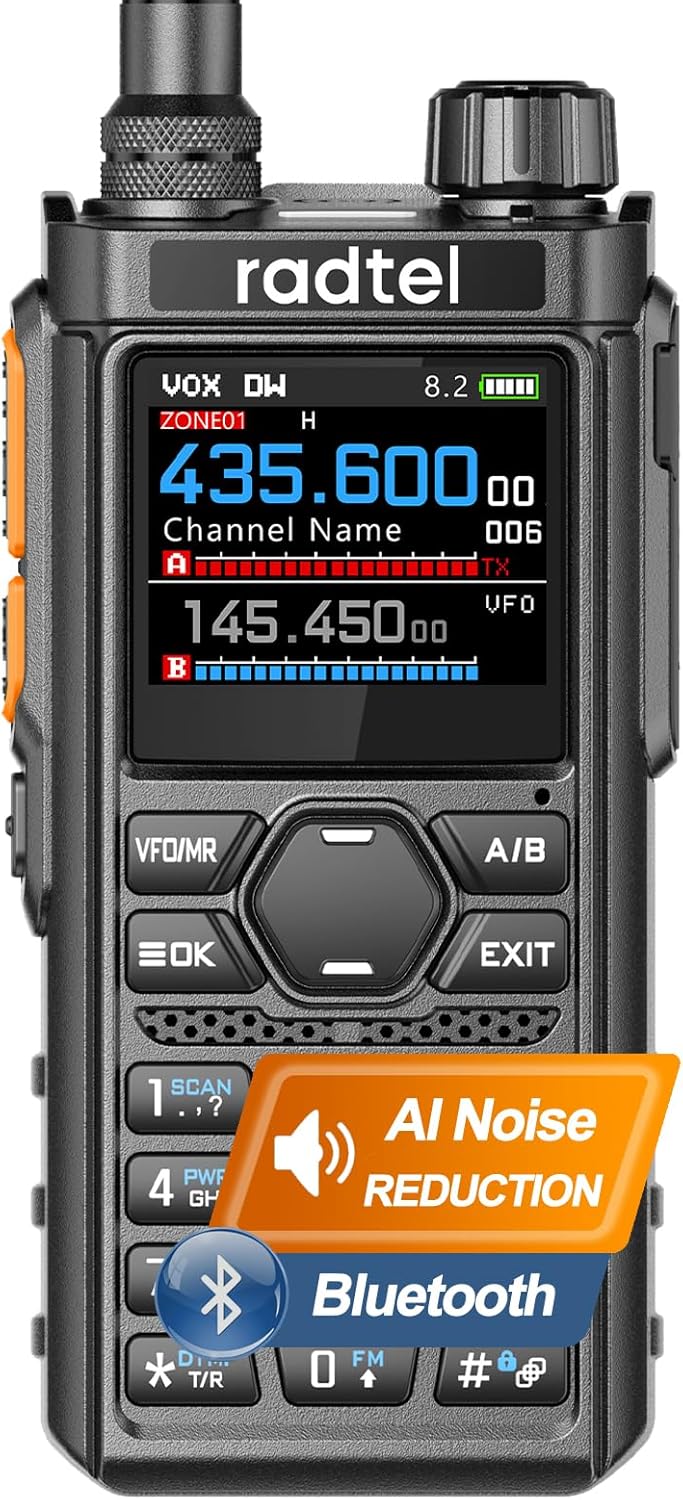
Figure 1: Radtel RT-910B Multi-Band Ham Radio
What's in the Box
Upon opening your Radtel RT-910B package, please ensure all the following items are present:
- 1x RT-910 Main unit
- 1x 2200mAh Li-ion Battery
- 1x Dual band antenna
- 1x Belt Clip
- 1x Type C charging Cable
- 1x Power supply with USB port
- 1x English User Manual
Setup
Battery Installation
To install the battery, align the battery pack with the grooves on the back of the radio and slide it upwards until it clicks securely into place. Ensure the battery is fully seated to maintain proper contact.

Figure 2: Battery compartment and battery for Radtel RT-910B
Antenna Attachment
Carefully screw the dual-band antenna onto the antenna connector at the top of the radio. Turn clockwise until it is finger-tight. Do not overtighten.
Charging the Radio
The RT-910B supports convenient Type-C charging. Connect the provided Type-C charging cable to the radio's Type-C port and the other end to a USB power source (e.g., wall adapter, power bank, PC USB port). The charging indicator on the radio will show the charging status.

Figure 3: USB Type-C Charging and Programming options
Firmware Update
To update the firmware of your RT-910B radio, follow the steps outlined in the video below. This process typically involves connecting the radio to a computer using a programming cable and using specific software.
Video 1: How to update the firmware of the Radtel RT-910B. This video demonstrates the step-by-step process for updating the radio's firmware using a programming cable and computer software.
Operating Instructions
Power On/Off and Volume
To power on the radio, rotate the top knob clockwise. Continue rotating to adjust the volume. To power off, rotate the knob counter-clockwise until it clicks.
Channel Grouping & One-Key Copy
The RT-910B allows for quick organization of presets and synchronization of settings across multiple units using the one-key copy function. Refer to the manual's specific section for detailed steps on grouping channels and utilizing the one-key copy feature.

Figure 4: Demonstrates the One-Click Copy Frequency function for quick search, match, and connect operations between two or more interphones.
VOX Hands-Free Operation
The Voice-Operated Exchange (VOX) function enables voice-activated transmission, allowing you to communicate without pressing the Push-To-Talk (PTT) button. This is particularly useful in situations where hands-free operation is required, such as driving or operating machinery. Activate VOX through the radio's menu settings.

Figure 5: Illustration of the VOX function, freeing your hands for activities like driving or operating machines.
Frequency Bands and Power Settings
The RT-910B operates across multiple frequency bands, including 144-148MHz and 420-450MHz for transmit/receive, and broader receive ranges for 50-59MHz, 65-108MHz (FM broadcast), 108-136MHz (AM aviation), 136-260MHz, 260-299MHz, and 300-520MHz. It offers switchable high, medium, and low power output settings up to 5W to optimize communication range and battery life.

Figure 6: Demonstrates the High/Medium/Low Power Switchable feature and typical communication ranges in different environments.
960 Programmable Channels
The radio supports 960 programmable channels, organized into 64 independent zones with 15 independent channels each. This allows for extensive customization and organization of your communication frequencies for various applications.

Figure 7: Highlights the 960 programmable channels and their applicability in various settings like shopping malls, hotels, workshops, construction sites, office buildings, and for radio amateurs.
Spectrum Scan
The spectrum scan feature allows the radio to automatically scan a range of frequencies to detect active signals. This is useful for finding clear channels or monitoring activity within a specific band. Consult the radio's menu for instructions on initiating and customizing spectrum scans.
NOAA Weather Alerts
The RT-910B can receive NOAA weather alerts, providing timely information on severe weather conditions. Enable this feature in the radio's settings to stay informed about local weather advisories.
Channel Naming
You can assign custom names to each saved channel for easier identification. Use the '#' key to switch input methods (e.g., letters, numbers, symbols) when entering channel names.

Figure 8: Explains the Channel Naming feature, allowing custom names for saved channels using the '#' key for input methods.
Frequency Step
This setting determines how much the frequency increases or decreases when using the UP/DOWN keys in VFO mode or during scanning. Adjust this setting in the radio's menu to suit your scanning or tuning preferences.

Figure 9: Illustrates the Frequency Step setting, which controls frequency increments/decrements during VFO mode or scanning.
Bluetooth Connectivity
The Bluetooth version of the RT-910B allows for wireless connectivity with compatible devices. Refer to the radio's Bluetooth menu for pairing instructions and available functions.
Video 2: RT-910/RT-910B Ham Radio overview. This video provides a general demonstration of the radio's features and functions, including its multi-band capabilities and user interface.
Maintenance
To ensure the longevity and optimal performance of your Radtel RT-910B, regular maintenance is recommended:
- Cleaning: Use a soft, damp cloth to clean the radio's exterior. Avoid using harsh chemicals or abrasive cleaners.
- Battery Care: Store the battery in a cool, dry place when not in use. Avoid fully discharging the battery frequently to prolong its lifespan.
- Storage: If storing the radio for an extended period, remove the battery and store both components separately in a dry environment.
- Antenna: Ensure the antenna connection remains clean and secure.
Troubleshooting
This section addresses common issues you might encounter with your RT-910B radio. If the problem persists, please contact customer support.
| Problem | Possible Cause | Solution |
|---|---|---|
| Radio does not power on | Low or dead battery; Incorrect battery installation | Charge the battery; Reinstall the battery correctly |
| Poor reception or transmission | Antenna not properly attached; Obstructions; Out of range; Low power setting | Check antenna connection; Move to an open area; Ensure within range; Increase power setting |
| No audio from speaker | Volume too low; Headset connected; Speaker damaged | Increase volume; Disconnect headset; Contact support for repair |
| Cannot change frequency/channel | Keypad locked; In memory mode | Unlock keypad; Switch to VFO mode |
Specifications
| Feature | Detail |
|---|---|
| Model Number | RT-910B |
| Item Weight | 2.2 pounds |
| Product Dimensions | 1.57 x 2 x 10.62 inches |
| Batteries | 1 9V battery required (included) |
| Number of Channels | 1024 |
| Special Features | Type-C Charging, AM/FM Reception, Spectrum Scan, Bluetooth |
| Frequency Range | 144-148Mhz / 420-450Mhz (TX/RX), 50-59Mhz (RX), 65-108Mhz (FM RX), 108-136Mhz (AM RX), 136-260Mhz (TX/RX), 260-299Mhz (RX), 300-520Mhz (TX/RX) |
| Talking Range Maximum | 6 Kilometer |
| Tuner Technology | UHF/VHF |
| Voltage | 7.4 Volts |
| Water Resistance Level | Not Water Resistant |
| Manufacturer | Xiamen Radtel Electronics Co.,Ltd |
| First Available Date | June 17, 2025 |
Warranty and Support
Warranty Information
The Radtel RT-910B comes with a 1-Year Warranty from the date of purchase. This warranty covers manufacturing defects and malfunctions under normal use. Please retain your proof of purchase for warranty claims.
Customer Support
For technical assistance, troubleshooting beyond this manual, or warranty inquiries, please contact Radtel Direct customer support. You can find contact information on the official Radtel website or through your purchase platform.


