
1. Introduction
Thank you for purchasing the Greadio Boombox CD Player and Portable Shortwave Radio. This product combines a versatile home entertainment system with a robust emergency radio, offering a wide range of audio playback options and critical weather alerts. Please read this manual carefully to ensure proper use and to maximize the product's lifespan.
2. Product Features Overview
The Greadio Boombox CD Player and Portable Shortwave Radio system offers a comprehensive set of features:
- Boombox CD Player: CD/CD-R/CD-RW playback, Bluetooth 5.1 (Transmitter & Receiver), FM Radio, AUX-in, USB/TF card playback, Alarm Clock with dual settings, White Noise machine (8 sounds), Dimmable LCD, Remote Control, 5000mAh rechargeable battery.
- Portable Shortwave Radio: AM/FM/SW/NOAA Weather Radio, Bluetooth 5.4, USB drive, TF card, SOS siren, LED Flashlight, Compass, 14800mWh Charger Pack (power bank), IPX3 waterproof, Hand crank/Solar/Type-C charging options.

An infographic illustrating the 12 key features of the Greadio CD Player Boombox, including CD Player, Bluetooth 5.1, Stereo Sound, Alarm Clock, Remote Control, White Noise, Rechargeable 5000mAh battery, FM Radio, USB, TF Card, AUX-In, and Dimmer.
3. Getting Started
3.1 Package Contents
- Greadio Boombox CD Player
- Greadio Portable Shortwave Radio
- Remote Control
- USB Charging Cable (Type-C)
- AUX Cable
- User Manual
3.2 Charging the Devices
Both the Boombox CD Player and the Portable Shortwave Radio have built-in rechargeable batteries. It is recommended to fully charge them before first use.
Boombox CD Player (5000mAh)
- Connect the provided USB Type-C cable to the charging port on the Boombox and to a standard USB power adapter (not included) or a computer USB port.
- The battery indicator on the LCD screen will show charging status. A full charge typically takes several hours.
Portable Shortwave Radio (4000mAh)
This unit offers multiple charging methods:
- Type-C Charging: Connect the USB Type-C cable to the radio's charging port and a USB power source.
- Hand Crank: Rotate the hand crank on the back of the radio clockwise or counter-clockwise for manual charging. Crank for at least 1-3 minutes to gain sufficient power for basic operation.
- Solar Charging: Place the radio with the solar panel facing direct sunlight. This method is primarily for maintaining battery charge or for emergency trickle charging.

This image illustrates the versatile charging options for the Greadio Portable Radio, including Type-C USB charging, manual hand crank, and solar panel charging, along with its built-in 4000mAh rechargeable battery.
3.3 Initial Power On & Time Setting (Boombox CD Player)
- Press the POWER button to turn on the device.
- To set the time, press and hold the TIME SET button. Use the PREV/NEXT buttons to adjust hours and minutes, and press TIME SET again to confirm each setting.
4. Operating Instructions
4.1 CD Player Operation
- Open the CD compartment lid.
- Carefully place a CD (CD/CD-R/CD-RW) onto the spindle with the label side facing up.
- Close the CD compartment lid. The player will automatically detect the disc.
- Press the PLAY/PAUSE button to start or pause playback.
- Use the PREV/NEXT buttons to skip tracks. Press and hold to fast forward/rewind.
- Press the MODE button to cycle through playback modes (Repeat One, Repeat All, Shuffle).
4.2 Bluetooth Connectivity (Boombox CD Player)
The Boombox CD Player supports both Bluetooth Receiver and Transmitter modes.
Bluetooth Receiver Mode (Connect to Phone/Tablet)
- Press the FUNC button until "BT" appears on the display. The Bluetooth indicator will flash, indicating pairing mode.
- On your mobile device, enable Bluetooth and search for "Greadio Boombox". Select it to pair.
- Once connected, the Bluetooth indicator will stop flashing. You can now stream audio from your device to the Boombox.
Bluetooth Transmitter Mode (Stream to Headphones/Speakers)
- Ensure the Boombox is playing audio (e.g., CD, USB, TF card).
- Press and hold the BT button on the Boombox. The Bluetooth indicator will flash rapidly.
- Put your Bluetooth headphones or speaker into pairing mode.
- The Boombox will automatically search for and connect to nearby Bluetooth audio devices. Once connected, audio will transmit to the external device.
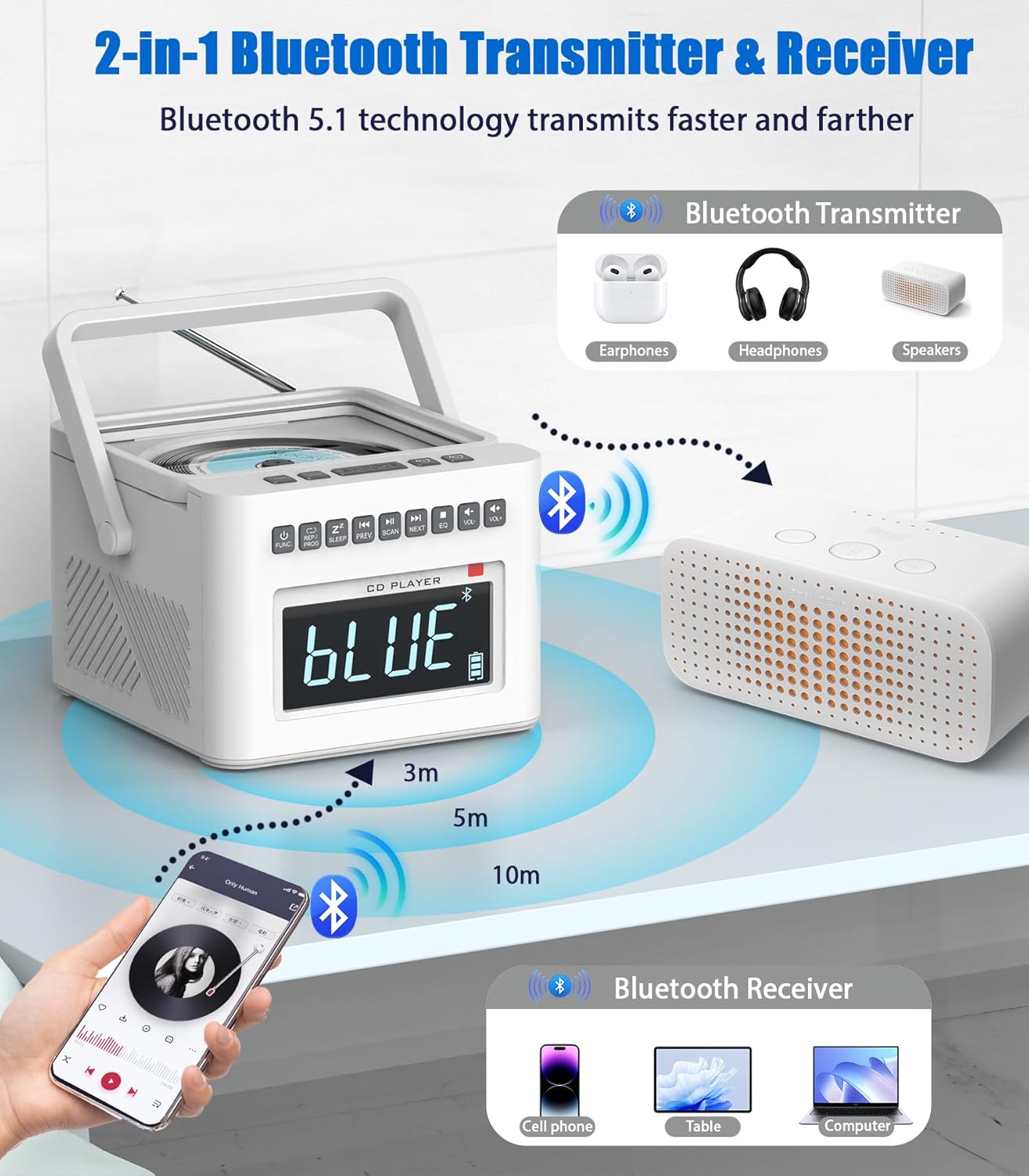
This visual explains the Bluetooth 5.1 capabilities of the Greadio CD Player Boombox, showing it can act as both a receiver (connecting to phones/tablets) and a transmitter (streaming to headphones/speakers).
4.3 Radio Functions (Both Units)
FM Radio (Boombox CD Player)
- Press the FUNC button until "FM" appears on the display.
- Press the SCAN button to auto-scan and save available FM stations.
- Use the PREV/NEXT buttons to navigate through saved stations.
AM/FM/SW/NOAA Weather Radio (Portable Shortwave Radio)
- Extend the telescopic antenna for better reception.
- Use the BAND button to switch between AM, FM, SW, and WB (Weather Band) modes.
- Rotate the tuning knob to manually tune to desired frequencies.
- For NOAA Weather Radio, select the WB band and tune to your local NOAA weather broadcast frequency (e.g., 162.400 MHz, 162.425 MHz, etc.).

An image of the Greadio Portable Radio unit, highlighting its multi-band radio capabilities including AM, FM, Shortwave (SW), and NOAA Weather Band frequencies, emphasizing its utility for emergency preparedness.
4.4 Alarm Clock & White Noise (Boombox CD Player)
Setting Alarms
- Press the ALARM 1 or ALARM 2 button to select an alarm.
- Press and hold the selected alarm button to enter alarm setting mode.
- Use the PREV/NEXT buttons to adjust the hour and minute, pressing the alarm button to confirm each step.
- Select your desired alarm source (CD, Radio, White Noise, USB, TF Card).
- Press the alarm button again to save and activate the alarm.
- To snooze, press the SNOOZE button when the alarm sounds.
White Noise Function
- Press the WHITE NOISE button to activate the white noise function.
- Use the PREV/NEXT buttons to cycle through the 8 available soothing sounds (e.g., white noise, thunder, birds chirping, rain, summer nights, streams, lullabies).
- To set a sleep timer, press the SLEEP button repeatedly to select a duration (e.g., 15, 30, 60, 90 minutes). The device will automatically turn off after the set time.
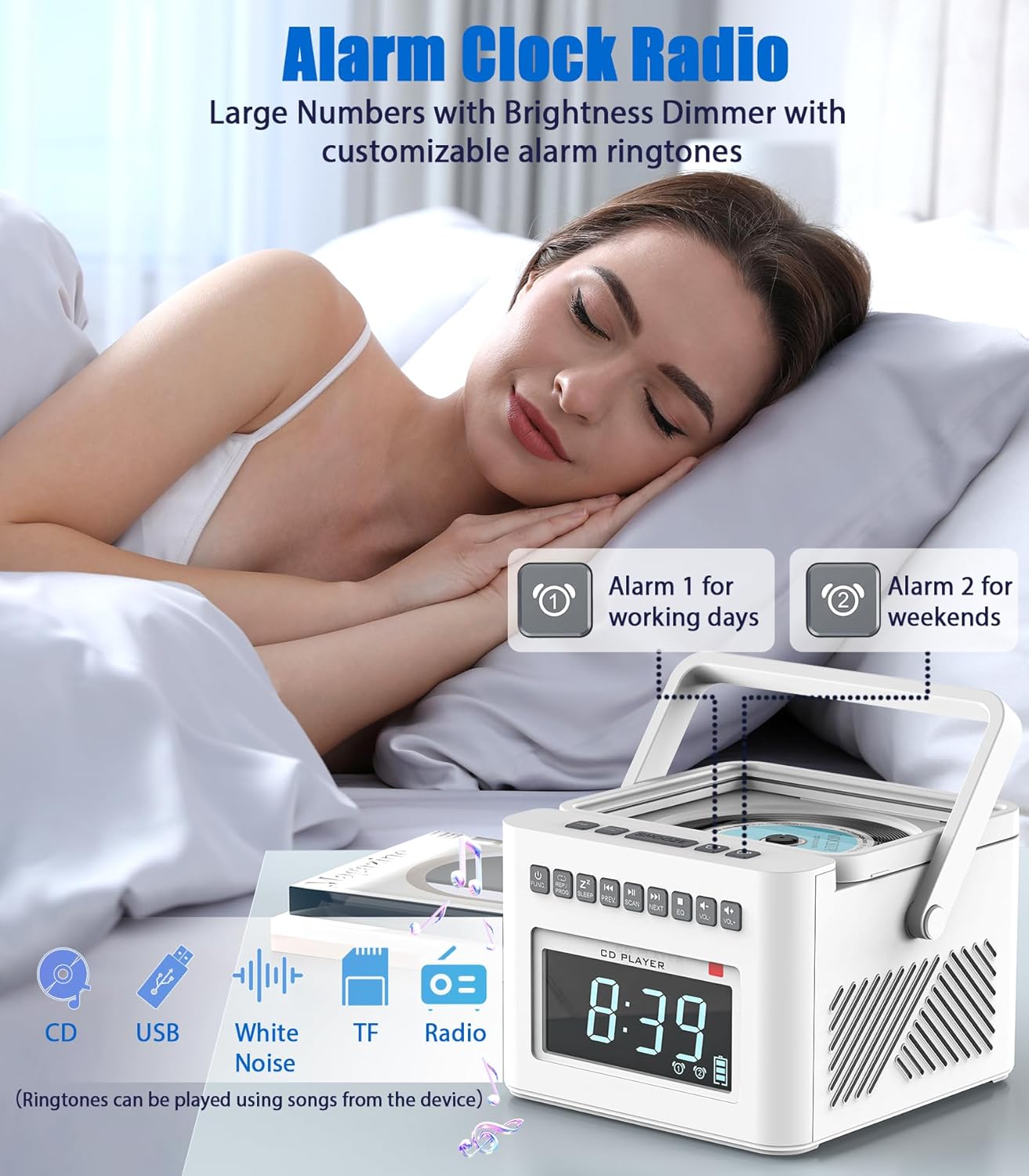
This image shows the Greadio CD Player Boombox acting as an alarm clock on a bedside table, with a large dimmable LCD display showing the time. It highlights the dual alarm feature and customizable ringtone options.

An image showcasing the Greadio CD Player Boombox's white noise function, depicting various natural sounds like lullabies, water stream, cricket, thunder rain, and rainstorm. It also emphasizes the 5000mAh rechargeable battery.
4.5 USB/TF Card Playback (Both Units)
- Insert a USB flash drive or TF (Micro SD) card into the respective slot.
- The device will automatically switch to USB/TF mode or you may need to press the FUNC button (Boombox) or MODE button (Radio) to select the correct input.
- Use the playback controls (Play/Pause, Prev/Next) to manage your audio files.
4.6 Portable Radio Emergency Features
- SOS Siren: Press the SOS button to activate a loud emergency siren and flashing light. Press again to deactivate.
- LED Flashlight: Press the LIGHT button to turn on the built-in LED flashlight. Press again to turn off.
- Power Bank Function: Connect your mobile device to the USB output port on the radio to use its internal battery (14800mWh) to charge your phone or other small electronics.

A composite image detailing additional features of the Greadio Portable Radio: a built-in LED flashlight, an SOS alarm function, an integrated compass/volume knob, and a USB output port for charging other devices.

This image shows the Greadio Portable Radio on a bedside table, suggesting its role in emergency preparedness, particularly for weather events like tornadoes, by providing NOAA weather alerts and a flashlight.
4.7 Remote Control Usage (Boombox CD Player)
The included remote control allows for convenient operation of the Boombox CD Player from a distance.
- Ensure the remote has batteries installed (typically 2x AAA, not included).
- Point the remote directly at the Boombox's front panel.
- Functions include Power, Volume Up/Down, Play/Pause, Skip Tracks, Mode selection, Alarm settings, and White Noise control.
5. Maintenance and Care
- Cleaning: Use a soft, dry cloth to clean the exterior surfaces. Do not use abrasive cleaners or solvents. For the CD lens, use a specialized CD lens cleaner.
- Storage: Store the devices in a cool, dry place away from direct sunlight and extreme temperatures.
- Battery Longevity: To prolong battery life, avoid fully discharging the batteries frequently. If storing for extended periods, charge the batteries to about 50% every few months.
- Water Resistance (Portable Radio): The Portable Shortwave Radio is IPX3 waterproof, meaning it is protected against spraying water. Do not submerge it in water.
6. Troubleshooting
| Problem | Possible Cause | Solution |
|---|---|---|
| Device does not power on. | Battery is depleted. | Charge the device using the appropriate charging method. |
| No sound from speakers. | Volume is too low or muted. Incorrect input mode. | Increase volume. Press FUNC/MODE button to select correct source (CD, BT, FM, etc.). |
| CD not playing. | CD inserted incorrectly or disc is scratched/dirty. | Ensure CD is clean and inserted correctly. Try another CD. |
| Bluetooth pairing fails. | Device is too far. Not in pairing mode. | Ensure devices are within 32ft (10m). Put both devices in pairing mode. Forget previous pairings on your phone/tablet. |
| Poor radio reception. | Antenna not extended. Weak signal area. | Fully extend the telescopic antenna. Reposition the device for better signal. |
| Remote control not working. | Batteries are dead or inserted incorrectly. Obstruction between remote and unit. | Replace remote batteries. Ensure clear line of sight to the Boombox. |
7. Technical Specifications
- Model: B0FDG7Y3Y1
- Brand: Greadio
- Boombox CD Player:
- CD Formats: CD, CD-R, CD-RW
- Bluetooth Version: 5.1 (Transmitter & Receiver)
- Battery: 5000mAh Lithium-ion
- Playback Time: BT-11H, TF-10H, USB-10H, CD-5H, FM-4.5H
- Alarm Settings: Dual Alarms, 9-minute Snooze
- White Noise Sounds: 8 digitally recorded effects
- Portable Shortwave Radio:
- Radio Bands: AM, FM, Shortwave (SW), NOAA Weather Band (WB)
- Bluetooth Version: 5.4
- Battery: 4000mAh (14800mWh) Rechargeable
- Charging Methods: Type-C, Hand Crank, Solar
- Waterproof Rating: IPX3
- Additional Features: SOS Siren, LED Flashlight, Compass, USB Output (Power Bank)
8. Warranty and Support
Greadio products are designed for reliability and performance. For warranty information or technical support, please refer to the contact details provided on the product packaging or visit the official Greadio website. Keep your purchase receipt as proof of purchase for any warranty claims.