
1. Setup and Initial Use
1.1 Package Contents
Please verify that all items are present in the package:
- 1 x Yanmis Automatic Card Shuffler Dealer Machine
- 1 x USB Charging Cable
1.2 Charging the Device
The card shuffler is equipped with a built-in 2500mAh Lithium-ion battery. Before first use, or when the battery is low, charge the device using the provided USB charging cable.
- Locate the Type-C charging port on the device.
- Connect the USB charging cable to the device and a suitable USB power adapter (not included).
- Allow the device to charge fully. A full charge can support approximately 400 deals of 54 cards.

Image: The card shuffler showing its Type-C charging port with a charging cable connected, indicating low power consumption and long battery life.
1.3 Device Overview

Image: A black Yanmis Automatic Card Shuffler Dealer Machine, showcasing its compact, octagonal design and the red power button on the top surface.
2. Operating Instructions
2.1 Powering On/Off
To power on the device, press and hold the red power button located on the top surface until the device activates. To power off, press and hold the same button.
2.2 Game Settings Configuration
The device allows for customizable game settings to suit various card games and player numbers.
- Press and hold the OK key for more than 2 seconds. A buzzer will sound, indicating entry into the configuration mode.
- Once in configuration mode, press the OK button to cycle through the following settings: bottom board first or last, bottom card, number of players, number of cards, clockwise or counterclockwise dealing direction, continuous game, and other settings.
- Adjust the numerical value for each setting by pressing the + or - buttons.
- If the number of players is set to 3, options for pivoting handling and rotating dealing will become available after setting the number of continuous games.
- To confirm your settings and exit configuration mode, press and hold the OK key for more than 2 seconds. If the numerical values stop flashing, the confirmation is successful.
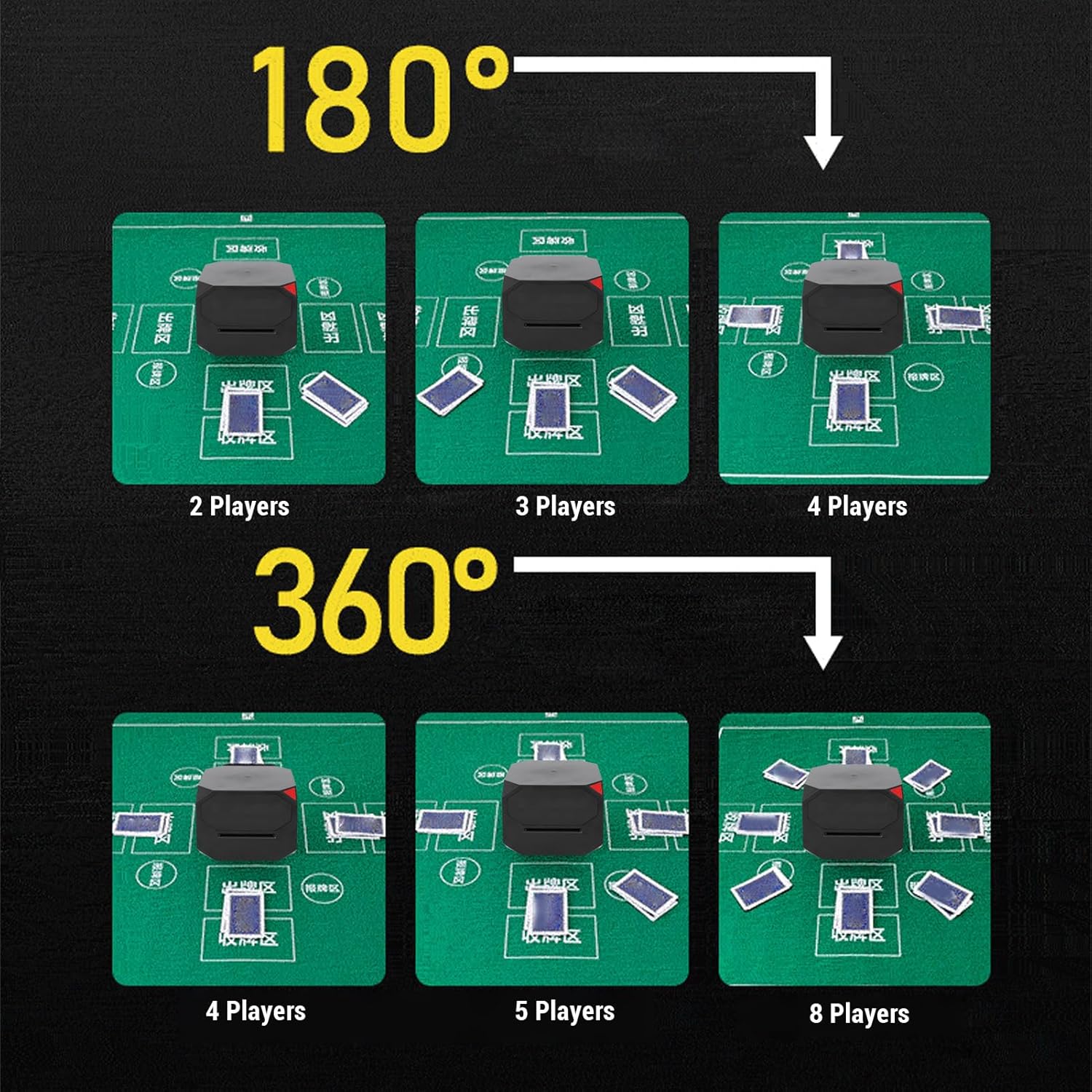
Image: A visual representation of the step-by-step instructions for configuring game settings on the card shuffler.
2.3 Card Loading and Dealing
The shuffler supports up to two decks of standard playing cards (108 cards total).

Image: The card shuffler positioned on a blue game mat, demonstrating its ability to handle and deal up to two decks of cards simultaneously.
2.4 Dealing Functions
The device offers several dealing functionalities:
- Deal Key / Pause Key: Press the right key to initiate directional dealing immediately. Press the right key again during dealing to pause the operation.
- Random Deal / Designated Deal: A short press of the key will initiate a random deal. The 'bit' value will roll in the middle, and after it stops, cards will be dealt randomly to one of the numerical positions based on the current total number of bits.
- Card Counting Function: Press and hold the - key to quickly access the card counting function.
- Quick Single Card Function: Press the + or - key to deal a single card.

Image: A graphic illustrating the various dealing functions with their respective icons and brief descriptions.
2.5 Dealing Angles and Player Positions
The shuffler can deal cards in 180-degree or 360-degree rotations, accommodating up to 8 players.

Image: The card shuffler demonstrating its 'Swing Dealer' capability, distributing cards in a circular pattern around the device.

Image: Two diagrams illustrating the card shuffler's dealing capabilities: one showing a 180-degree dealing angle and the other a 360-degree dealing angle.

Image: A comprehensive diagram illustrating various player positions (from 2 to 8 players) and how cards are dealt in clockwise or counterclockwise directions around the shuffler.

Image: Visual examples of card dealing layouts for different player counts (2, 3, 4 players for 180-degree dealing; 4, 5, 8 players for 360-degree dealing) on green game mats.
3. Maintenance
3.1 Cleaning
The Yanmis Automatic Card Shuffler Dealer Machine is equipped with an adaptive self-cleaning sensor. This feature helps prevent dust accumulation from affecting performance. For external cleaning, wipe the device with a soft, dry cloth. Do not use abrasive cleaners or immerse the device in water.
3.2 Battery Care
To prolong battery life, avoid fully discharging the battery frequently. Recharge the device when the battery indicator shows low power. Store the device in a cool, dry place when not in use for extended periods.
4. Troubleshooting
If you encounter issues with your Yanmis Automatic Card Shuffler Dealer Machine, please refer to the following common problems and solutions:
- Device does not power on: Ensure the device is fully charged. Connect it to the charging cable and allow it to charge for at least 30 minutes before attempting to power it on again.
- Cards are not dealing correctly or jamming:
- Check that the cards are properly aligned in the input tray.
- Ensure that the cards are not bent, damaged, or excessively worn.
- Verify that you are using standard-sized playing cards within the maximum supported width of 65mm.
- Clean any visible dust or debris from the card path.
- Settings are not saving: Ensure you press and hold the OK key for more than 2 seconds to confirm and exit the configuration mode after making changes. The numerical values should stop flashing to indicate successful confirmation.
If the problem persists, please contact customer support for further assistance.
5. Specifications
| Feature | Detail |
|---|---|
| Item Type | Automatic Card Shuffler Dealer |
| Material | ABS |
| Battery Type | Lithium-ion Battery (Built-in) |
| Battery Capacity | 2500mAh |
| Product Size (L x W x H) | Approx. 123 x 123 x 95 mm (4.8 x 4.8 x 3.7 inches) |
| Maximum Card Width Support | 65 mm (2.6 inches) |
| Color | Black |
| Manufacturer | Yanmis |
| Package Dimensions | 17 x 16 x 12 cm |
| Package Weight | 877 g |
6. Warranty and Support
6.1 Warranty Information
Specific warranty details for this product are not provided in the available information. Please refer to the retailer or manufacturer's official website for the most current warranty policy.
6.2 Customer Support
For technical assistance, troubleshooting beyond this manual, or inquiries regarding your product, please contact Yanmis customer support through their official channels or the retailer from whom you purchased the device.