
Sanorum G62
Sanorum Health Fitness Tracker G62 User Manual
Model: G62
1. Introduction
The Sanorum G62 Health Fitness Tracker is a versatile smart watch designed to support your active lifestyle and health monitoring. It features a long-lasting battery, comprehensive activity tracking, and health monitoring functions including heart rate, blood pressure, and SpO2. This manual provides essential information for setting up, operating, and maintaining your device.

Image 1.1: Sanorum G62 Health Fitness Tracker with included bands.
2. Package Contents
Please verify that all items are present in your package:
- Sanorum G62 Smart Watch (1 unit)
- Instruction Manual (1 unit)
- Charging Cable (1 unit)
3. Setup
3.1 Charging the Device
Before initial use, fully charge your Sanorum G62. Connect the provided charging cable to the charging port on the back of the watch and to a standard USB power adapter (not included). A full charge typically takes approximately 2.5 hours. The device features a 1000mAh battery, providing up to 30 days of typical use or 100 days on standby.
3.2 App Installation and Pairing
- Download the Companion App: Search for the official Sanorum companion app in your smartphone's app store (Apple App Store for iOS, Google Play Store for Android). The device is compatible with iOS 9.0+ and Android 6.0+ smartphones.
- Create an Account: Follow the on-screen instructions within the app to create a user account.
- Enable Bluetooth: Ensure Bluetooth is enabled on your smartphone.
- Pair the Device: Open the app, navigate to the device pairing section, and select your Sanorum G62 from the list of available devices. Confirm the pairing request on both your smartphone and the watch.
4. Operating Instructions
4.1 Basic Navigation
- Touch Screen: Swipe left, right, up, or down to navigate through menus and features. Tap to select an option.
- Side Button: Typically used to return to the home screen, wake the device, or access the main menu. Refer to the in-app guide for specific button functionalities.
4.2 Call Functionality
The Sanorum G62 allows you to answer and make calls directly from your wrist when connected to your smartphone via Bluetooth. Ensure the call function is enabled in the companion app.
- Answering Calls: When a call comes in, tap the green icon on the watch screen.
- Making Calls: Access the dialer or contact list through the watch interface to initiate a call.
4.3 Health Monitoring
The device monitors various health metrics. These measurements are for reference only and should not be used for medical diagnosis or treatment.
- Heart Rate: Measures your heart rate throughout the day.
- Blood Pressure: Provides estimated blood pressure readings.
- SpO2 (Blood Oxygen): Monitors your blood oxygen saturation levels.
- Sleep Tracking: Analyzes your sleep patterns, including deep sleep, light sleep, and wake times.
4.4 Activity Tracking
The Sanorum G62 supports over 120 sport modes and tracks key activity metrics:
- 120+ Sport Modes: Select your activity to get specific tracking data.
- Calorie Tracking: Estimates calories burned based on activity.
- Step Tracking: Counts your daily steps.
- Distance Tracking: Measures the distance covered during activities.
4.5 Water Resistance
The device features a 5ATM water resistance rating, meaning it can withstand pressures equivalent to a depth of 50 meters. It is suitable for swimming and showering but not for diving or high-pressure water activities.
5. Maintenance
- Cleaning: Regularly clean the watch and bands with a soft, dry cloth. If necessary, use a slightly damp cloth and mild soap, then rinse and dry thoroughly.
- Storage: Store the device in a cool, dry place away from direct sunlight and extreme temperatures.
- Battery Care: To prolong battery life, avoid fully discharging the battery frequently. Charge the device when the battery level is low.
6. Troubleshooting
- Device Not Turning On: Ensure the device is fully charged. Connect it to the charger for at least 30 minutes.
- Cannot Pair with Smartphone:
- Ensure Bluetooth is enabled on your phone.
- Make sure the watch is within Bluetooth range of your phone.
- Restart both your phone and the watch.
- Check if the companion app is updated to the latest version.
- Inaccurate Health Readings:
- Ensure the watch is worn snugly on your wrist, approximately one finger's width above the wrist bone.
- Avoid excessive movement during measurement.
- Clean the sensor on the back of the watch.
- Short Battery Life:
- Reduce screen brightness.
- Disable unnecessary notifications.
- Limit continuous health monitoring if not required.
7. Specifications
| Feature | Detail |
|---|---|
| Model Number | G62 |
| Brand | Sanorum |
| Battery Capacity | 1000 mAh |
| Battery Life | Up to 30 days (typical use), 100 days (standby) |
| Charging Time | Approx. 2.5 hours |
| Operating System Compatibility | iOS 9.0+, Android 6.0+ |
| Connectivity | Bluetooth |
| Water Resistance | 5ATM |
| Special Features | 120+ Sport Modes, Calorie Tracking, Step Tracking, Distance Tracking, Heart Rate Monitor, Blood Pressure Monitor, SpO2 Monitor, Sleep Monitor, Answer/Make Call |
| Memory Storage Capacity | 128 MB |
| Item Weight | 5 ounces |
| Package Dimensions | 10.94 x 3.58 x 0.87 inches |
8. Warranty and Support
Sanorum is committed to providing excellent customer service and product support.
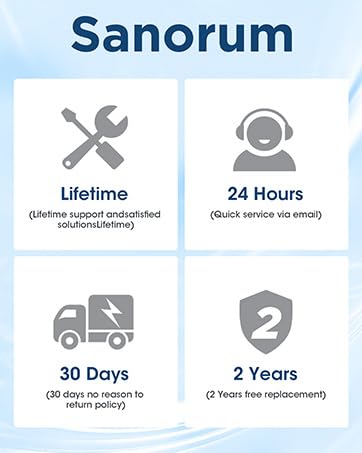
Image 8.1: Sanorum Customer Support Details.
- Lifetime Support: Access to lifetime support for your Sanorum G62.
- 24-Hour Service: Quick service available via email for any inquiries.
- 30-Day Return Policy: Enjoy a 30-day no-reason return policy.
- 2-Year Free Replacement: Benefit from a 2-year free replacement policy for eligible issues.
For further assistance, please refer to the contact information provided with your purchase or visit the official Sanorum website.
Ask a question about this manual
Ask about setup, troubleshooting, compatibility, parts, safety, or missing instructions. Manuals+ will review the question and use this page’s manual context to help answer it.