Introduction
Thank you for choosing the TOPBLASTERBOX H11 GPS Drone. This manual provides essential information for the safe and efficient operation, maintenance, and troubleshooting of your new drone. Please read this manual thoroughly before first use and retain it for future reference.

Image: The TOPBLASTERBOX H11 GPS Drone with its integrated LCD screen controller.
The H11 drone is designed for both beginners and experienced pilots, featuring a 4K camera, GPS-assisted flight, and a controller with a built-in LCD screen for real-time FPV (First Person View) transmission. Its foldable design ensures portability, and at under 250g, it typically does not require FAA registration.
1. Setup
1.1 Unboxing and Components
Carefully unpack all items from the box. Verify that all components are present:

Image: All components included in the H11 drone package, including the drone, controller, batteries, and accessories.
- H11 GPS Drone
- Remote Controller (with integrated screen)
- 2 x Batteries
- USB Charging Cable
- Spare Propellers (8 pieces)
- Screwdriver
- Portable Bag
- User Manual
1.2 Battery Charging
Before first flight, fully charge both the drone batteries and the remote controller. Use the provided USB charging cable.

Image: The remote controller being charged via its TPC port. A full charge provides approximately 120 minutes of continuous use.
- Connect the USB charging cable to a suitable USB power adapter (not included).
- Connect the other end to the drone battery or the remote controller.
- Charging indicators will show the charging status. Ensure they are fully charged before use.
1.3 Propeller Installation
Attach the propellers to the drone arms. Ensure correct propeller type (A or B) matches the corresponding motor. Use the provided screwdriver to secure them.
1.4 Drone and Controller Power On/Pairing
- Place the drone on a flat, level surface.
- Press and hold the power button on the drone until the indicator lights turn on.
- Power on the remote controller.
- The drone and controller should automatically pair. Refer to the controller's screen for pairing status.
2. Operating Instructions
2.1 Pre-Flight Checklist
- Ensure all batteries (drone and controller) are fully charged.
- Check that propellers are securely attached and undamaged.
- Select an open, clear area for flight, away from obstacles, people, and restricted airspace.
- Verify GPS signal acquisition before takeoff for stable flight and intelligent features.
2.2 Basic Flight Controls
The H11 drone features one-key takeoff and landing for ease of use.
Video: Demonstration of the H11 Drone's one-key takeoff and landing functionality, showcasing its stable hover capabilities.
- One-Key Takeoff: Press the dedicated takeoff button on the controller. The drone will automatically ascend and hover at a safe altitude.
- One-Key Landing: Press the dedicated landing button. The drone will automatically descend and land.
- Manual Control: Use the joysticks on the controller to control altitude, direction, and rotation.
- Stable Hover: The GPS and Optical Flow system ensures stable hovering, making it ideal for beginners.

Image: The H11 drone maintaining a stable hover, illustrating its GPS and Optical Flow positioning system.
2.3 Intelligent Flight Modes
The H11 drone offers several intelligent flight modes for enhanced user experience and cinematic footage.
- Follow Me Mode: The drone will automatically follow the controller, capturing your movements.

Image: The H11 drone utilizing Follow Me Mode, tracking a person walking through a mountainous landscape.
- Orbit Mode (Point of Interest): The drone will circle around a designated point, maintaining a consistent distance and altitude.

Image: The H11 drone executing a Circle Flight, orbiting a person in a natural setting.
- GPS Auto Return: The drone will automatically return to its takeoff point in case of low battery, signal loss, or manual activation.

Image: The H11 drone illustrating its GPS Auto Return Home function, showing its path back to the takeoff point.
2.4 Camera Operation and FPV
The H11 drone is equipped with a 4K camera and 5GHz FPV transmission.
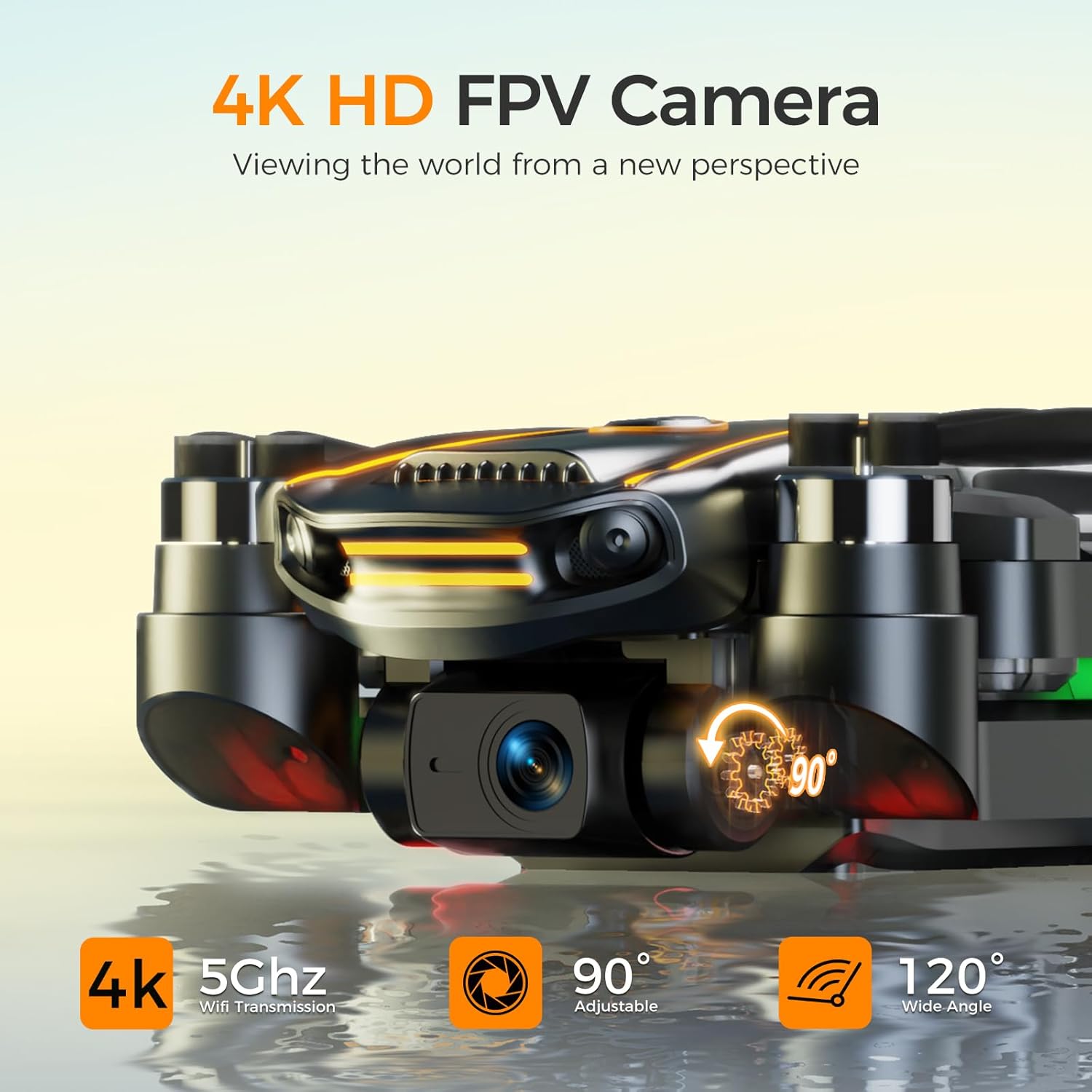
Image: Close-up view of the H11 drone's 4K HD FPV camera, highlighting its 90-degree adjustable angle and 120-degree wide-angle lens.
- 4K Camera: Capture high-resolution photos and videos. The camera has a 117° wide-angle lens and is 90° adjustable.
- 5GHz FPV Transmission: View real-time video feed directly on the controller's LCD screen.

Image: A user viewing real-time photos and videos on the remote controller's integrated screen while the drone is in flight.
2.5 Speed Modes
The drone offers multiple speed modes to suit different skill levels and flight conditions. Refer to the controller manual for switching between modes.
3. Maintenance
3.1 Cleaning
- Use a soft, dry cloth to clean the drone body and camera lens.
- Avoid using harsh chemicals or solvents.
3.2 Propeller Replacement
If propellers are damaged, replace them immediately using the provided spare propellers and screwdriver. Ensure correct orientation (A/B).
3.3 Battery Care
- Do not overcharge or over-discharge batteries.
- Store batteries in a cool, dry place away from direct sunlight.
- If not used for extended periods, charge batteries to approximately 50-60% capacity.
3.4 Storage
The H11 drone's foldable design and included portable bag make storage and transport convenient.
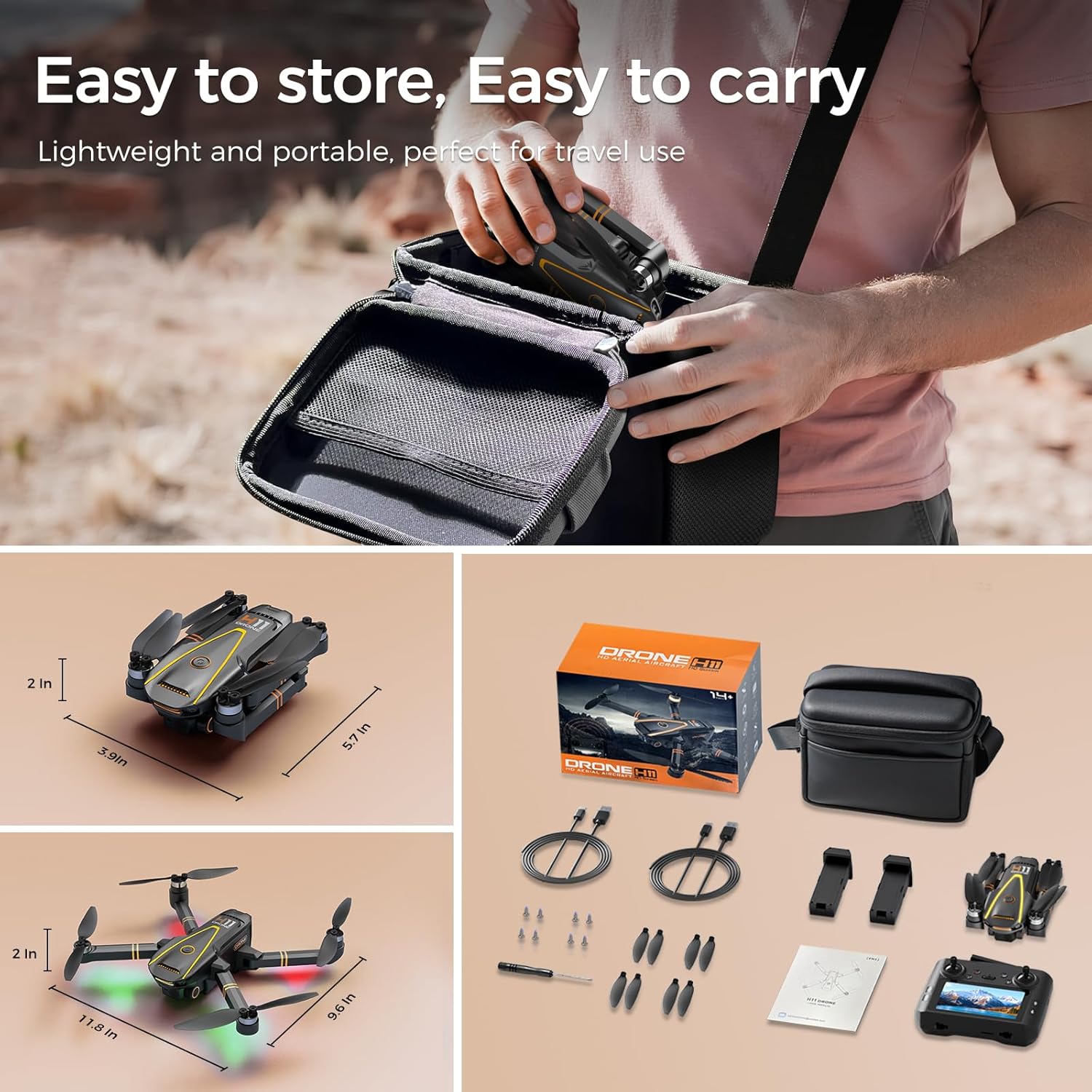
Image: The H11 drone in its compact, folded state, being placed into its portable carrying bag, alongside its dimensions.
- Fold the drone arms carefully.
- Store the drone and all accessories in the portable bag to protect them from damage.
4. Troubleshooting
| Problem | Possible Cause | Solution |
|---|---|---|
| Drone does not power on | Low battery; Incorrect battery installation | Charge drone battery; Reinstall battery correctly |
| Drone does not respond to controller | Not paired; Out of range; Low controller battery | Re-pair drone and controller; Fly within range; Charge controller battery |
| Unstable flight/Drifting | No GPS signal; Calibration needed; Damaged propellers | Fly in open area with clear sky; Perform gyroscope calibration; Replace damaged propellers |
| Poor camera image/No FPV | Weak 5GHz signal; Camera lens dirty; SD card issue | Ensure drone is within FPV range; Clean lens; Check/format SD card |
| GPS Auto Return not working | Insufficient GPS satellites; Takeoff point not recorded | Ensure strong GPS signal (at least 7 satellites); Allow drone to record home point after takeoff |
5. Specifications
| Feature | Detail |
|---|---|
| Brand | TOPBLASTERBOX |
| Model Name | H11 |
| Item Weight | 210 Grams (7.4 ounces) |
| Video Capture Resolution | 4K |
| Effective Still Resolution | 8.0 Megapixels |
| Special Features | GPS Auto Return, Follow Me, First Person View (FPV), HD Screen on Controller, 4K Camera |
| Connectivity Technology | USB, 5G Wireless Communication |
| Control Type | Remote Control |
| Battery Capacity | 2200 Milliamp Hours (Li-Po) |
| Skill Level | All |
| Product Dimensions | 1"L x 1"W x 1"H (folded dimensions may vary) |

Image: Illustration of the drone's brushless motors, emphasizing high speed, wind resistance, and long life.
6. Warranty and Support
6.1 Product Warranty
The TOPBLASTERBOX H11 GPS Drone comes with a standard manufacturer's warranty covering defects in materials and workmanship. Please refer to the warranty card included in your package or contact customer support for specific terms and conditions. This warranty does not cover damage caused by misuse, accidents, unauthorized modifications, or normal wear and tear.
6.2 Customer Support
For technical assistance, troubleshooting, or warranty claims, please contact TOPBLASTERBOX customer support through the retailer's platform or the contact information provided in your product packaging. Our support team is available to help you with any questions or issues you may encounter.


