
1. Setup
1.1 Unpacking and Parts Check
Carefully remove all components from the packaging. Verify that all parts are present and undamaged. Refer to the assembly video for a visual guide to included accessories.
1.2 Assembly Instructions
For a comprehensive visual guide to assembly, please refer to the official installation video below. Follow the steps precisely to ensure correct and safe assembly.
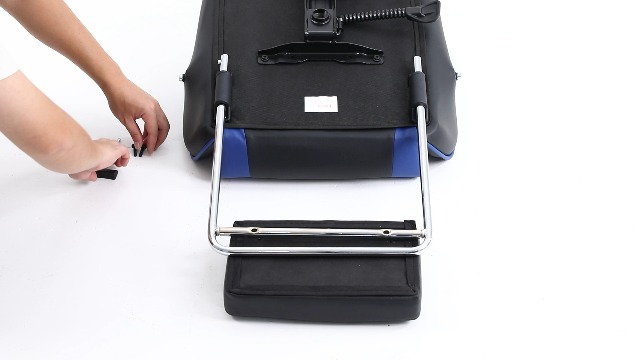
Video: Accessories display & installation steps. This video provides a detailed walkthrough of the chair's assembly process, including identifying parts and step-by-step installation.
- Assemble the Base: Attach the five legs to the central hub using the provided screws (R*10, M8*10mm) and tighten securely. Insert the casters into the leg ends.
- Install the Gas Lift: Place the gas lift cylinder into the center hole of the assembled base.
- Attach the Mechanism to the Seat: Secure the seat mechanism to the underside of the seat cushion using the specified screws (P*4, M8*25mm). Ensure it is oriented correctly.
- Attach Armrests: Secure the armrests to the seat cushion using the designated screws (O*6, M8*25mm).
- Attach Footrest: Assemble the footrest frame and cushion, then attach it to the underside of the seat using the specified screws (D*1, M5*10mm and O*6, M8*25mm).
- Connect Seat to Backrest: Align the backrest with the seat and secure it using the appropriate screws (Q*8, M8*20mm).
- Attach Backrest to Mechanism: Secure the backrest to the seat mechanism using the specified screws (S*4, M8*40mm).
- Install Headrest and Lumbar Pillow: Attach the headrest and lumbar support pillow using their integrated straps and buckles.
2. Operating Instructions
Your Sweetcrispy Gaming Chair offers multiple adjustments for personalized comfort.
2.1 Adjusting Chair Height
To adjust the chair's height, locate the lever on the right side beneath the seat. While seated, pull the lever up to lower the chair. To raise the chair, stand up slightly and pull the lever up. Release the lever at your desired height.
2.2 Reclining the Backrest
The backrest can be reclined from 90° (focused position) to 135° (relaxed position). Use the recline lever on the left side of the chair to adjust the angle. Lean back to your desired position and release the lever to lock it.
2.3 Using the Footrest
The chair features a retractable footrest for added comfort. Pull the footrest out from under the seat when desired, and push it back in when not in use. Ensure the footrest is fully extended and stable before placing your feet on it.
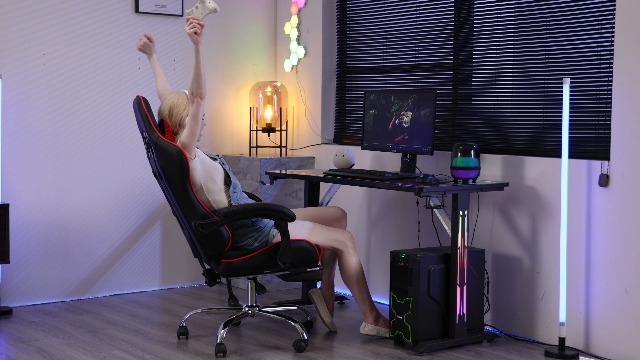
Video: Sweetcrispy Video game chair with footrest. This video demonstrates the use of the chair's footrest and reclining function.
2.4 Adjusting Lumbar Support and Headrest
The chair includes a removable headrest and an adjustable lumbar support pillow. The lumbar pillow can be slid up or down to adapt to your sitting position, providing optimal support for your lower back.

Image: Ergonomic Design. This image illustrates the ergonomic support points of the chair, including head, shoulder, waist, hip, and leg areas, and shows the angle adjusting lever.

Image: Upgraded Linkage Armrest. This image highlights the design of the fixed armrests, providing strong support from wrist to elbow.
3. Maintenance
3.1 Cleaning Instructions
- Wipe clean with a damp cloth.
- Avoid using harsh chemicals or abrasive cleaners, as these can damage the PU leather.
- For stubborn stains, use a mild soap solution and wipe dry immediately.
3.2 General Maintenance
- Periodically check all screws and bolts to ensure they are tight. Retighten if necessary.
- Inspect the casters for any debris or hair that might hinder smooth rolling. Clean as needed.
- Avoid exposing the chair to direct sunlight or extreme temperatures for prolonged periods to prevent material degradation.
4. Troubleshooting
| Issue | Possible Cause | Solution |
|---|---|---|
| Chair is unstable or wobbly | Loose screws or uneven assembly. | Check and tighten all assembly screws. Ensure the chair is on a flat, even surface. |
| Difficulty adjusting height | Gas lift malfunction or lever obstruction. | Ensure the height adjustment lever is not obstructed. If the issue persists, the gas lift may need replacement. |
| Casters not rolling smoothly | Debris in casters or damaged casters. | Remove any hair or debris from the casters. If damaged, replace the casters. |
| Backrest does not recline or lock | Recline mechanism obstruction or damage. | Check for any obstructions around the recline mechanism. Ensure the lever is fully engaged. If damaged, contact support. |
5. Specifications
| Feature | Detail |
|---|---|
| Brand | Sweetcrispy |
| Model Name | Sweetcrispy Computer Video Game Chair |
| Model Number | PKWT2-DJY-H2su |
| Color | Pink White |
| Product Dimensions | 26.8"D x 25.4"W x 52.4"H |
| Maximum Weight Recommendation | 275 Pounds |
| Material | Alloy Steel, Faux Leather, Sponge |
| Special Features | Adjustable Height, Ergonomic, Foot Rest, Reclining, Rolling |
| Back Style | Soft back |
| Arm Style | Fixed armrest |
| Furniture Base Movement | Swivel |
| Reclining Position Count | 2 (90° to 135°) |
| Item Weight | 37.6 pounds |

Image: Product Dimensions. This diagram provides detailed measurements and the maximum weight capacity of the chair.
6. Important Safety Information
- Do not exceed the maximum weight limit of 275 pounds.
- Always follow the assembly instructions carefully to ensure safe use of the chair.
- Ensure all bolts and screws are securely tightened before each use.
- Avoid sudden movements or excessive force when reclining or adjusting the chair to prevent tipping or injury.
- Keep children and pets away from the chair during assembly and adjustment.
- Do not stand on the chair.
7. Warranty and Support
For information regarding the product warranty, please refer to the documentation provided with your purchase or contact the retailer directly. For any questions, technical assistance, or to report issues, please contact Sweetcrispy customer service through your purchase platform or the official Sweetcrispy website.