1. Introduction
Thank you for choosing the Ladped LP60 Electric Scooter. This manual provides essential information for the safe operation, assembly, maintenance, and troubleshooting of your new electric scooter. Please read this manual thoroughly before your first ride to ensure optimal performance and safety.
The Ladped LP60 is designed for adult use, featuring an 8.5-inch wheel, a powerful 350W motor (700W peak), and a robust aluminum alloy frame. It offers a maximum speed of 25-30 KM/H and a range of 25-35 KM, with a load capacity of up to 120 kg (265 lbs).
2. Safety Information
WARNING: Riding an electric scooter carries inherent risks. Always wear a helmet and appropriate protective gear. Familiarize yourself with local laws and regulations regarding electric scooter use.
- Always wear a helmet, knee pads, and elbow pads.
- Do not ride in wet conditions, heavy rain, or through puddles deeper than 2 cm. The scooter has an IP65 rating, meaning it is protected against dust and low-pressure water jets, but it is not fully waterproof.
- Avoid riding on uneven surfaces, steep inclines, or slippery roads.
- Maintain a safe distance from other vehicles and pedestrians.
- Do not allow children under 16 years old to ride the scooter.
- Do not exceed the maximum load capacity of 120 kg (265 lbs).
- Perform a pre-ride check: ensure brakes are functional, tires are in good condition, and all parts are securely fastened.
- Do not perform stunts or sudden maneuvers.
- Charge the battery only with the provided charger.
3. Package Contents
Please check the contents of your package carefully. If any items are missing or damaged, contact customer support.
- Ladped LP60 Electric Scooter
- Power Adapter/Charger
- User Manual (this document)
- Assembly Tools (if required for minor assembly)
4. Setup and Assembly
The Ladped LP60 Electric Scooter comes partially assembled. Follow these steps to prepare your scooter for its first ride.
4.1 Unfolding the Scooter
- Place the scooter on a flat surface.
- Locate the folding mechanism near the base of the steering column.
- Release the locking latch and carefully lift the steering column until it clicks into place.
- Secure the safety lock to prevent accidental folding.
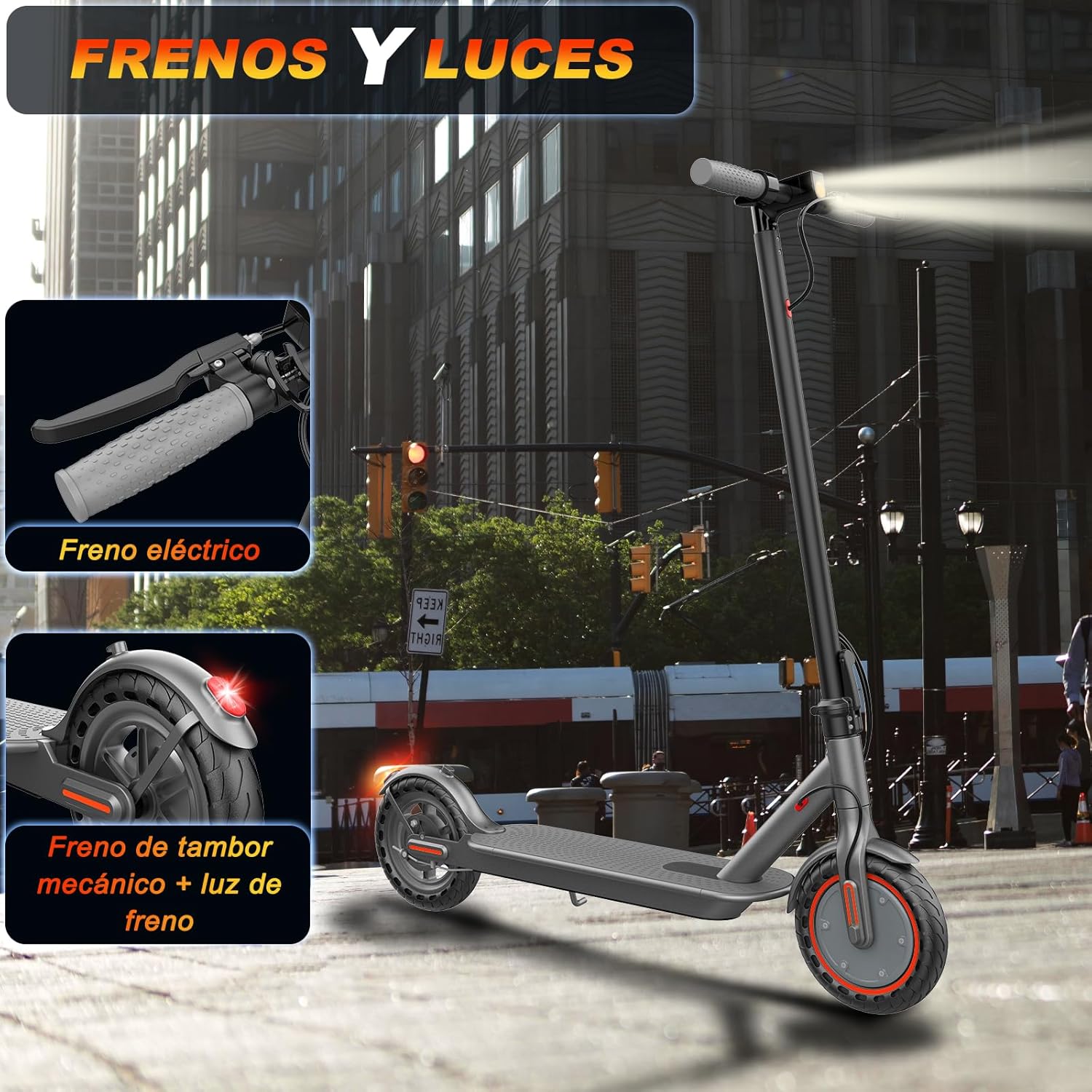
Figure 4.1: The Ladped LP60 scooter is designed for easy folding and transport, making it convenient to carry and store in compact spaces like a car trunk.
4.2 Handlebar Attachment (if applicable)
If the handlebars are not pre-attached, align them with the steering column and secure them using the provided screws and tools. Ensure they are tightened firmly.
4.3 Initial Charging
Before first use, fully charge the scooter's battery. Connect the charger to the charging port on the scooter and then to a power outlet. The charging indicator on the charger will change color (e.g., red to green) when fully charged. Initial charging may take approximately 5 hours.

Figure 4.2: The scooter is equipped with a 187.2 WH lithium battery, offering a range of approximately 15 miles (25 KM) and requiring about 5 hours for a full charge.
4.4 App Connection (Optional)
Download the official Ladped app from your smartphone's app store (compatible with iPhone and Android). Follow the in-app instructions to pair your scooter via Bluetooth. The app allows for features such as locking the scooter, customizing speed settings, and controlling cruise control.

Figure 4.3: The Ladped app provides control over various scooter functions, including speed modes, cruise control, and monitoring battery status.
5. Operating Instructions
5.1 Power On/Off
Press and hold the power button on the display to turn the scooter on or off.
5.2 Riding the Scooter
- Place one foot firmly on the deck and push off with the other foot to gain initial momentum.
- Once moving, gently press the accelerator lever to engage the motor.
- Place your other foot on the deck.
- To slow down, release the accelerator. To brake, use the brake lever on the handlebar.
5.3 Speed Modes
The scooter features multiple speed modes, which can typically be cycled through by pressing the power button briefly while the scooter is on. Refer to the LCD display for the current speed mode indicator.

Figure 5.1: The intelligent LCD display provides real-time information on speed, battery level, and active riding modes, including 3-speed settings and cruise control.
5.4 Cruise Control
To activate cruise control, maintain a constant speed for approximately 8 seconds. The scooter will emit a beep, and the cruise control icon will appear on the display. To deactivate, press the accelerator or brake lever.
5.5 Braking System
The Ladped LP60 is equipped with an electric brake and a mechanical drum brake (rear brake) for reliable stopping power. Always use both brakes for optimal safety, especially at higher speeds.

Figure 5.2: The scooter features both an electric brake and a mechanical drum brake with an integrated brake light for enhanced safety and visibility.
5.6 Lights
The scooter includes a front LED headlight and a rear brake light. Ensure these are functional before riding, especially in low-light conditions.
6. Maintenance
Regular maintenance ensures the longevity and safe operation of your Ladped LP60 Electric Scooter.
6.1 Battery Care
- Charge the battery regularly, even if the scooter is not in use for extended periods (at least once every 30 days).
- Do not overcharge or completely drain the battery.
- Store the scooter in a cool, dry place away from direct sunlight and extreme temperatures.
6.2 Tire Inspection
The scooter uses solid honeycomb tires, which are puncture-proof and require minimal maintenance. However, regularly inspect them for wear, cracks, or embedded debris. Replace tires if significant wear is observed.

Figure 6.1: The 8.5-inch solid anti-slip tires provide durability and reduce maintenance needs by eliminating punctures.
6.3 Cleaning
Wipe the scooter with a damp cloth. Do not use high-pressure water jets or corrosive cleaning agents. Ensure the charging port cover is securely closed before cleaning.
6.4 Brake Adjustment
Periodically check the brake levers and cables for proper tension and responsiveness. If the brakes feel loose or ineffective, have them adjusted by a qualified technician.
7. Troubleshooting
This section addresses common issues you might encounter with your Ladped LP60 Electric Scooter.
| Problem | Possible Cause | Solution |
|---|---|---|
| Scooter does not power on. | Low battery; loose connections; faulty power button. | Charge the battery fully. Check all visible connections. If issue persists, contact support. |
| Motor not engaging. | Scooter not pushed off; accelerator fault; motor issue. | Ensure you push off to gain initial speed before pressing the accelerator. Check app settings. Contact support if problem continues. |
| Reduced range or speed. | Low battery charge; heavy load; riding uphill; cold weather. | Ensure battery is fully charged. Reduce load. Avoid steep inclines. Battery performance can be affected by temperature. |
| Brakes feel weak. | Brake cable loose; worn brake pads. | Inspect brake cables and adjust tension. If brake pads are worn, they may need replacement by a technician. |
8. Specifications
| Feature | Detail |
|---|---|
| Model | LP60 |
| Motor Power | 350W (Peak 700W) Brushless Motor |
| Max Speed | 25-30 KM/H (16 MPH) |
| Range | 25-35 KM (15 Miles) |
| Battery | 187.2 WH, 5.2 Ah Lithium Battery |
| Charging Time | Approx. 5 hours |
| Wheel Size | 8.5 inches (Solid Honeycomb Tires) |
| Max Load Capacity | 120 kg (265 lbs) |
| Frame Material | Aluminum Alloy |
| Braking System | Electric Brake + Rear Mechanical Drum Brake |
| Dimensions (Unfolded) | 107 x 42 x 110 cm (42 x 16.5 x 43.3 inches) |
| Weight | 11 kg (24.2 lbs) |
| Water Resistance | IP65 |
| Special Features | Foldable design, App control, Cruise control, LED headlight, Rear brake light |

Figure 8.1: The scooter features a 350W brushless motor, capable of reaching speeds up to 16 MPH and climbing inclines of up to 20 degrees.

Figure 8.2: The scooter supports a maximum load of 264 lbs (120 kg) and has an IP65 water resistance rating, offering protection against dust and splashes.
Figure 8.3: Key dimensions of the scooter include an unfolded height of 44 inches and a length of 42 inches. When folded, its height is reduced to 18 inches for easy storage.
9. Warranty and Support
For warranty information, please refer to the documentation provided at the time of purchase or contact your retailer. Ladped offers extended protection plans through Assurant, available for 2 or 3 years, covering manufacturer defects.
For technical support or service inquiries, please contact Ladped customer service through their official website or the contact information provided with your purchase.


