
1. Introduction
The WHYFONE Heavy Duty Full Motion TV Wall Mount (Model WF9492) is designed to securely hold large LCD, LED, OLED, and QLED televisions ranging from 60 to 120 inches. This mount supports a maximum VESA pattern of 900mm x 600mm and a maximum weight capacity of 299 lbs (136 kg). Its robust construction and full motion capabilities provide optimal viewing flexibility and ensure the safety of your valuable television.

Figure 1: Overall view of the WHYFONE Heavy Duty Full Motion TV Wall Mount.
2. Safety Information
Please read all instructions carefully before installation and use. Failure to follow these instructions may result in serious personal injury, property damage, or voiding of your warranty.
- Weight Capacity: Do not exceed the maximum weight capacity of 299 lbs (136 kg). This mount is designed for TVs between 60-120 inches.
- Wall Type: This mount is designed for installation on 16", 18", or 24" wood stud walls, concrete walls, or brick walls. DO NOT mount on drywall alone.
- Installation: Two people are required for safe installation. Ensure all screws are tightened securely.
- VESA Compatibility: Verify your TV's VESA pattern is within the supported range of 200x100mm to 900x600mm.
- Cable Management: Use the provided cable ties to manage cables and prevent snagging or damage.

Figure 2: Illustration showing compatible wall types (wood stud, concrete, brick) and a warning against drywall-only installation.
3. Package Contents
Before beginning installation, ensure all parts are present and undamaged. Refer to the detailed instruction guide included in the package for a complete list and visual identification of components.
- 1x Arm Assembly
- 1x Wall Plate
- 2x TV Brackets
- 1x Bubble Level
- 5x Cable Ties
- 2x End Caps
- Complete Hardware Kit (various screws, washers, anchors for different wall types)
- Detailed Instruction Manual
- Drilling Template

Figure 3: The main components of the TV wall mount laid out, showing the arm assembly, wall plate, and TV brackets.
4. Specifications
| Feature | Detail |
|---|---|
| Brand | WHYFONE |
| Model Number | WF9492 |
| Compatible TV Sizes | 60 - 120 inches |
| Maximum Weight Capacity | 299 lbs (136 kg) |
| VESA Compatibility | Min: 200x100mm, Max: 900x600mm |
| Arm Extension | Up to 43 inches (1095mm) |
| Sliding Range | 16.4 inches (416.6mm) |
| Tilt Angle | +5° (up) to -12° (down) |
| Swivel Angle | Up to 90° left or right (depending on TV size) |
| Level Adjustment | ±3° |
| Material | Alloy Steel |
| Color | Black |
| Wall Compatibility | 16", 18", 24" Wood Studs, Concrete, Brick |

Figure 4: VESA compatibility and TV size range.

Figure 5: Technical drawing illustrating the dimensions and adjustable angles of the mount.
5. Setup & Installation
Installation is designed to be straightforward with the included detailed manual and drilling template. It is recommended that two people perform the installation, which typically takes under 30 minutes.
5.1. Pre-Installation Checks
- Verify your wall type is compatible (wood stud, concrete, or brick).
- Confirm your TV's VESA pattern and weight are within the mount's specifications.
- Gather necessary tools as listed in the instruction manual.
5.2. Mounting the Wall Plate
- Use the provided drilling template to mark the desired mounting location on your wall.
- Drill pilot holes according to the template and your wall type.
- Secure the wall plate to the wall using the appropriate hardware. Ensure it is level using the included bubble level.
5.3. Attaching TV Brackets to TV
- Attach the two TV brackets to the back of your television using the correct screws and spacers from the hardware kit, matching your TV's VESA pattern.
- Ensure the brackets are securely fastened and evenly spaced.
5.4. Hanging the TV
- With assistance, carefully lift the television and hook the TV brackets onto the arm assembly's mounting plate.
- Secure the TV to the mount using the safety screws or locking mechanisms as described in the manual.

Video 1: Demonstration of the TV mount's load-bearing capability, supporting 75 kg. This illustrates the mount's robust construction.
6. Operation
The WHYFONE Full Motion TV Wall Mount offers extensive adjustability for optimal viewing from various positions.
6.1. Arm Extension
The mount features an extra-long arm that extends up to 43 inches (1095mm) from the wall. This allows you to pull the TV forward for closer viewing or push it back to save space when not in use. This feature is particularly useful in large rooms or commercial settings to ensure a broader view.

Figure 6: The mount's arm fully extended, demonstrating its reach.

Video 2: Demonstration of the 43-inch extension of the dual-arm TV wall mount.
6.2. Sliding Adjustment
The wall plate allows for a 16.4-inch (416.6mm) sliding range. This enables you to shift the mounted TV horizontally along the wall, ensuring perfect centering even after initial installation, without the need for re-drilling.
Figure 7: The sliding feature of the wall plate for horizontal TV adjustment.
6.3. Tilt, Swivel, and Level
- Tilt: Adjust the TV from +5° (upward) to -12° (downward) to reduce glare or find a comfortable viewing angle.
- Swivel: The mount allows for up to 90° swivel left or right, providing flexibility to view the screen from different areas of a room.
- Level: A micro-leveling adjustment of ±3° ensures your TV is perfectly horizontal after installation.
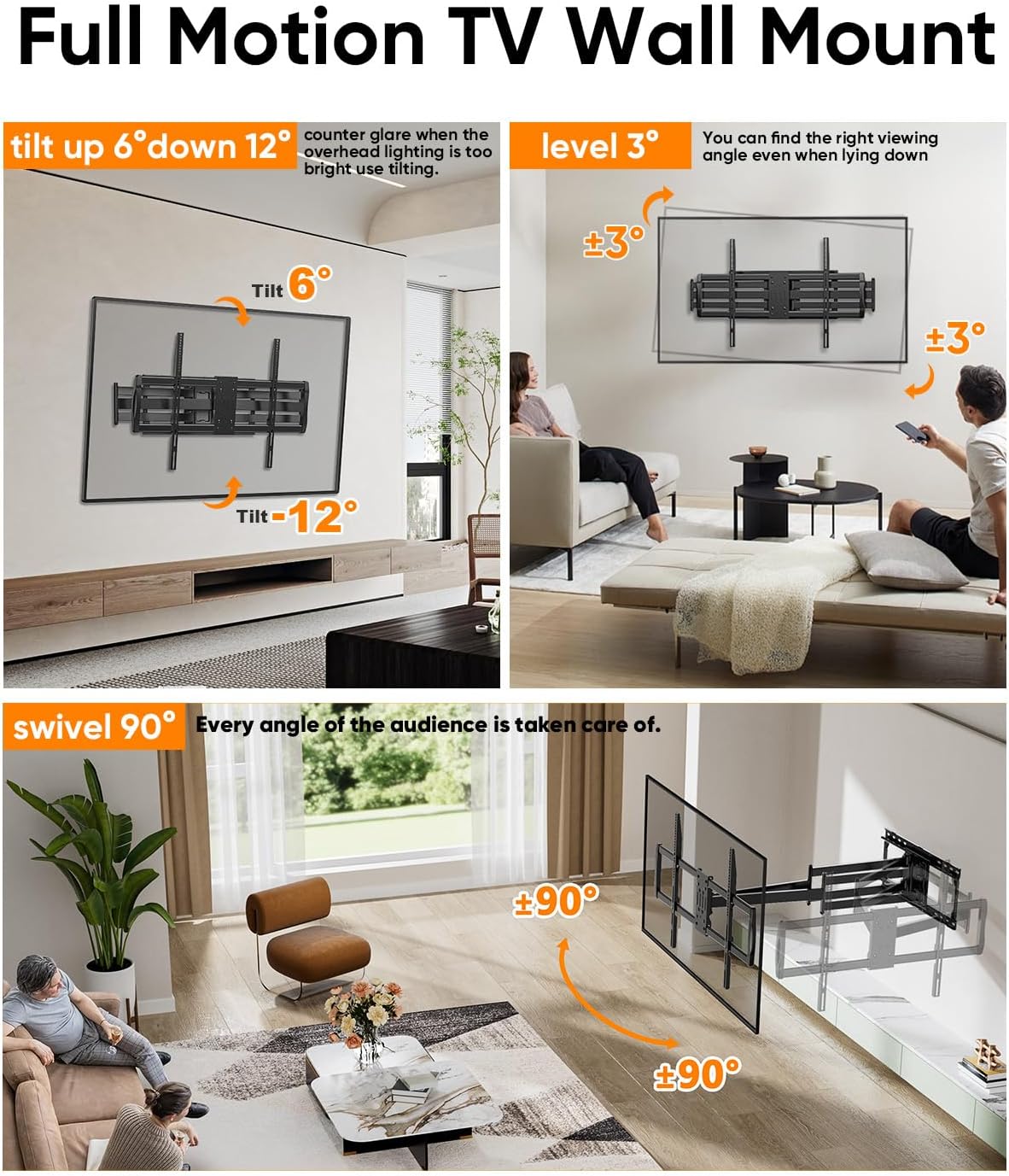
Figure 8: Visual guide to the tilt, swivel, and level adjustments.
7. Maintenance
To ensure the longevity and optimal performance of your WHYFONE TV Wall Mount, follow these maintenance guidelines:
- Regular Inspection: Periodically check all mounting screws and connections to ensure they remain tight and secure.
- Cleaning: Wipe the mount with a soft, dry cloth to remove dust. For stubborn dirt, a slightly damp cloth can be used, followed by drying. Avoid abrasive cleaners or solvents.
- Outdoor Use: The mount features an electrostatic spray finish and has passed a 48-hour salt spray test, making it suitable for covered outdoor installations. However, regular inspection for any signs of wear or corrosion is still recommended in outdoor environments.

Figure 9: The mount's salt spray test, highlighting its weather resistance.
8. Troubleshooting
If you encounter any issues during installation or operation, please refer to the following common solutions:
- TV not level: Use the micro-leveling adjustment feature (±3°) to fine-tune the TV's horizontal position.
- Mount feels loose: Re-check all wall mounting bolts and TV bracket screws to ensure they are securely tightened. Do not overtighten.
- Difficulty moving the arm: The mount is designed to be sturdy. If movement is too stiff, ensure no cables are snagged and that the joints are free of obstructions. Avoid excessive force.
- TV not centered: Utilize the 16.4-inch sliding range of the wall plate to adjust the TV's horizontal position without re-drilling.
For further assistance, please contact WHYFONE customer service.
9. Warranty & Support
WHYFONE provides a lifetime warranty for this product. Our professional customer service team is available to assist you with any installation queries or product-related questions.
If you encounter any problems or require support, please do not hesitate to contact us. We are committed to ensuring your satisfaction.