
1. Introduction
The Onherm T200 is an advanced OBD2 car diagnostic scan tool designed to assist in identifying and resolving vehicle issues. This device provides professional diagnostic functions to help users understand the cause of the 'Check Engine' light, perform various system tests, and access real-time vehicle data. It is a self-powered tool, drawing power directly from your vehicle's OBD2 port, eliminating the need for external batteries or chargers.
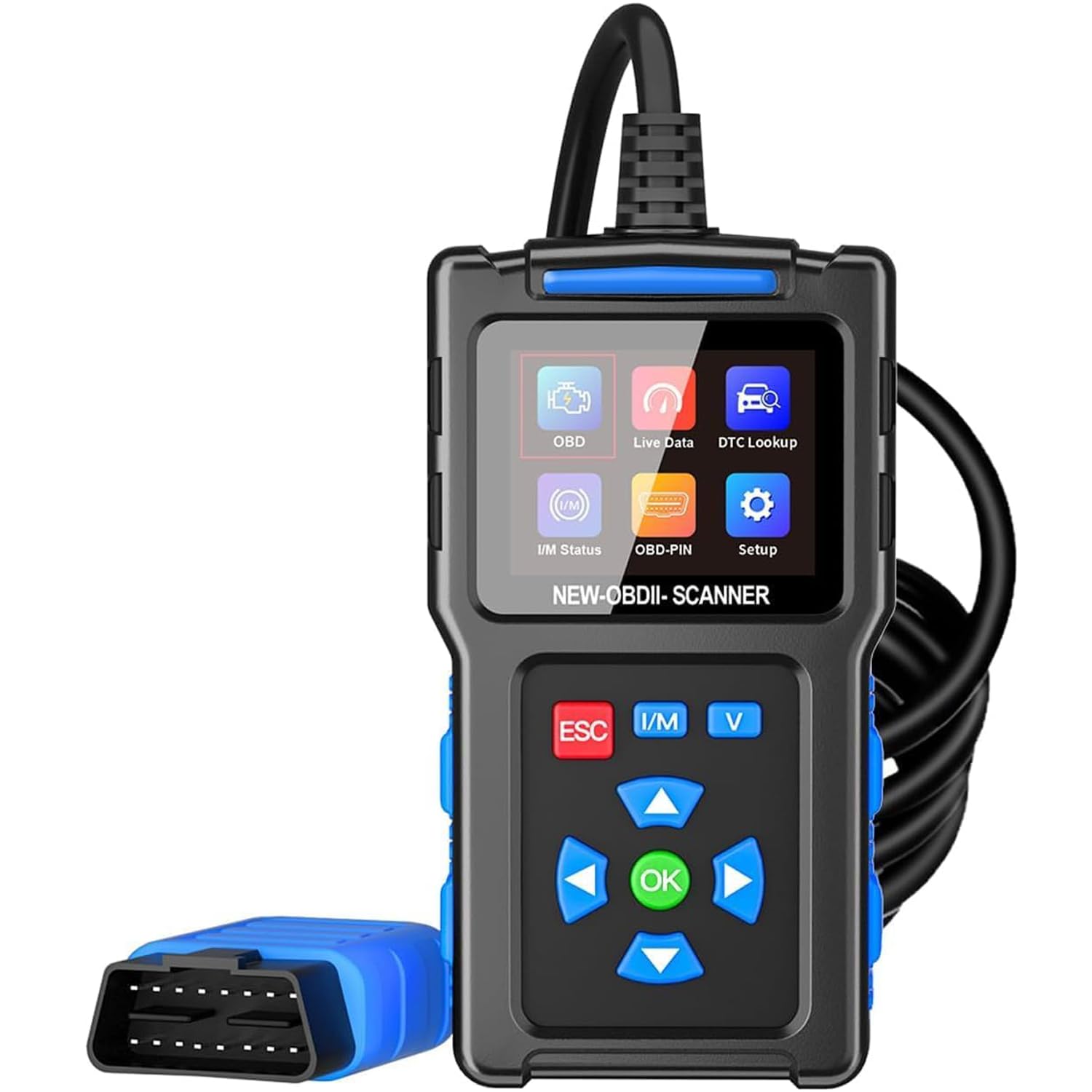
Figure 1: The Onherm T200 OBD2 Car Diagnostic Scan Tool. This image shows the compact design of the diagnostic tool with its screen and cable.
2. Setup
2.1 Locating the OBD2 Port
The OBD2 port is typically located under the dashboard on the driver's side of the vehicle. Refer to your vehicle's owner's manual for the exact location if you cannot find it.
2.2 Connecting the Device
- Ensure the vehicle's ignition is in the OFF position.
- Plug the Onherm T200's diagnostic cable firmly into the vehicle's OBD2 port.
- Turn the vehicle's ignition to the ON position (do not start the engine unless instructed by a specific test). The device will power on automatically.
3. Operating Instructions
3.1 Navigating the Menu
The T200 features a 2.4-inch color screen and intuitive shortcut keys for easy navigation. Use the UP/DOWN arrows to scroll through menu options and the ENTER button to select. The BACK button returns to the previous screen.
3.2 Reading Diagnostic Trouble Codes (DTCs)
- From the main menu, select "Read Codes".
- The tool will scan the vehicle's systems and display any stored or pending DTCs.
- Each code will be accompanied by a definition from the built-in 35,901 DTC database, providing insight into the potential issue.
3.3 Clearing Diagnostic Trouble Codes (DTCs)
Important Note: DTCs should only be cleared after the underlying vehicle problem has been diagnosed and repaired. Clearing codes without addressing the fault will likely result in the 'Check Engine' light reappearing.
- From the main menu, select "Clear Codes".
- Confirm your action when prompted.
- The tool will clear the stored codes and turn off the 'Check Engine' light.
3.4 Viewing Live Data Stream
Select "Live Data" from the main menu to view real-time sensor data, such as engine RPM, vehicle speed, oxygen sensor readings, and more. This data can be displayed as numerical values or as a real-time graph (RT curve).
4. Advanced Diagnostic Functions
- I/M Readiness Test: Quickly check if your vehicle is ready for an emissions test. This function provides a snapshot of the status of the emission-related monitoring systems.
- O2 Sensor Test: Monitor and test the functionality of the oxygen sensors, which are crucial for fuel efficiency and emissions control.
- EVAP System Test: Perform a leak test on the Evaporative Emission Control System (EVAP) to detect fuel vapor leaks.
- Battery Voltage Test: Access real-time car battery voltage information to assess its health.
- DTC Lookup: Utilize the integrated 35,901 DTC database to get detailed definitions of trouble codes without needing external resources.
5. Vehicle Compatibility
The Onherm T200 OBD2 diagnostic tool offers wide compatibility:
- Supports approximately 97% of OBD2 compliant vehicles.
- Works with most American vehicles manufactured after 1996.
- Compatible with European vehicles manufactured after 2002.
- Compatible with Asian vehicles manufactured after 2008.
- Supports OBDII protocols including J1850 PWM, J1850 VPW, ISO9141, KWP2000, and CAN (9 OBDII protocols).
- Supports 13 languages: English, French, German, Dutch, Spanish, Portuguese, Polish, Russian, Japanese, Turkish, and Indonesian.
5.1 Compatibility Limitations
Please be aware of the following limitations:
- The device cannot identify non-open manufacturer-specific data.
- It cannot read specific vehicle protocols for systems such as ABS (Anti-lock Braking System), SAS (Steering Angle Sensor), ESP (Electronic Stability Program), EPS (Electric Power Steering), TPMS (Tire Pressure Monitoring System), transmission, DPF (Diesel Particulate Filter), oil reset, EPB (Electronic Parking Brake) pad replacement, and throttle position.
- Not compatible with diesel or hybrid vehicles.
6. Troubleshooting
6.1 Device Not Powering On
- Ensure the OBD2 cable is securely connected to the vehicle's OBD2 port.
- Verify the vehicle's ignition is in the ON position.
- Check the vehicle's fuse for the OBD2 port (consult your vehicle's manual).
6.2 Cannot Connect to Vehicle ECU
- Confirm your vehicle is OBD2 compliant (generally 1996 and newer for American vehicles, 2002 for European, 2008 for Asian).
- Ensure the ignition is ON and the engine is off (unless performing specific tests).
- Try connecting to a different OBD2 compliant vehicle to rule out a device issue.
6.3 'Check Engine' Light Returns After Clearing Codes
This indicates that the underlying fault causing the code has not been resolved. The Onherm T200 can clear codes, but it does not fix the problem. You must diagnose and repair the vehicle's issue before clearing codes for the light to remain off.
7. Specifications
| Model | T200 |
| Brand | Onherm |
| Product Dimensions | 14 x 7.5 x 3 cm |
| Item Weight | 330 grams |
| Display | 2.4-inch Color Screen |
| Cable Length | 90 cm |
| Power Source | Directly from Vehicle OBD2 Port (12V) |
| Supported Protocols | J1850 PWM, J1850 VPW, ISO9141, KWP2000, CAN |
| Supported Languages | 13 languages including English, French, German, Spanish, etc. |
8. Safety Information
- Always operate the vehicle diagnostic tool in a well-ventilated area.
- Do not wear loose clothing or jewelry when working near the engine.
- Keep the tool away from moisture, oil, and grease.
- Ensure the vehicle is safely parked with the parking brake engaged before connecting or disconnecting the tool.
- Avoid touching hot engine components.
9. Warranty and Support
For warranty information, technical support, or service inquiries regarding your Onherm T200 diagnostic tool, please refer to the documentation included in your product packaging or visit the official Onherm website. Keep your purchase receipt as proof of purchase for warranty claims.