
Introduction
Thank you for purchasing the Marvel Legends Series X-Men '97 Cyclops Premium Roleplay Visor. This 1:1 scale reproduction is inspired by Cyclops' iconic Ruby Quartz Visor from Marvel Studios' X-Men '97 animated series. Designed for collectors and enthusiasts aged 14 and up, this visor features a premium design, detailed sculpt, and light-up effects to enhance your roleplay or display experience.
Please read this instruction manual thoroughly before use to ensure proper setup, operation, and maintenance of your visor.
Safety Information
WARNING: Small parts may be generated. Not for children under 3 years.
This product is intended for ages 14 and up. Adult supervision is recommended for younger users within the age range. Keep all components away from small children to prevent choking hazards. Do not look directly into the LED lights for extended periods.
What's in the Box
Your Marvel Legends Cyclops Premium Roleplay Visor package includes the following components:
- 1 x Cyclops Premium Roleplay Visor
- 1 x Removable Display Support Piece
- 1 x Colored Lens Insert
- 1 x Swapable Nose Piece

Image: All components of the Cyclops visor set laid out, including the visor, red lens inserts, a red display stand, and a yellow nose piece.
Setup
1. Battery Installation
The visor requires 2 AAA batteries (not included) to power the light-up effect. Locate the battery compartment, typically on the inside of one of the ear pieces. Open the compartment, insert the batteries according to the polarity indicators (+/-), and close the compartment securely.
2. Adjusting for Wear
To ensure a comfortable and proper fit when wearing the visor:
- The visor features spring-loaded ear pieces that adjust to fit various head sizes. Gently pull the ear pieces apart to place the visor on your head.
- Utilize the swapable nose piece to customize the fit around your nose. Select the nose piece that provides the most comfortable and secure fit.

Image: Hands adjusting a yellow nose piece on the inside of the Cyclops visor for a customized fit.

Image: Hands demonstrating the adjustment of the swapable nose piece on the Cyclops visor.

Image: A man holding the Cyclops visor, illustrating the spring-loaded ear pieces designed for a proper fit.
3. Setting up for Display
For displaying your visor on a desk or shelf, use the provided removable display support and colored lens insert:
- Insert the colored lens insert into the visor's lens slot.
- Attach the removable display support piece to the designated slot on the visor's interior. This piece allows the visor to stand upright for exhibition.

Image: Hands inserting the red colored lens piece with an X-Men logo into the Cyclops visor for display.
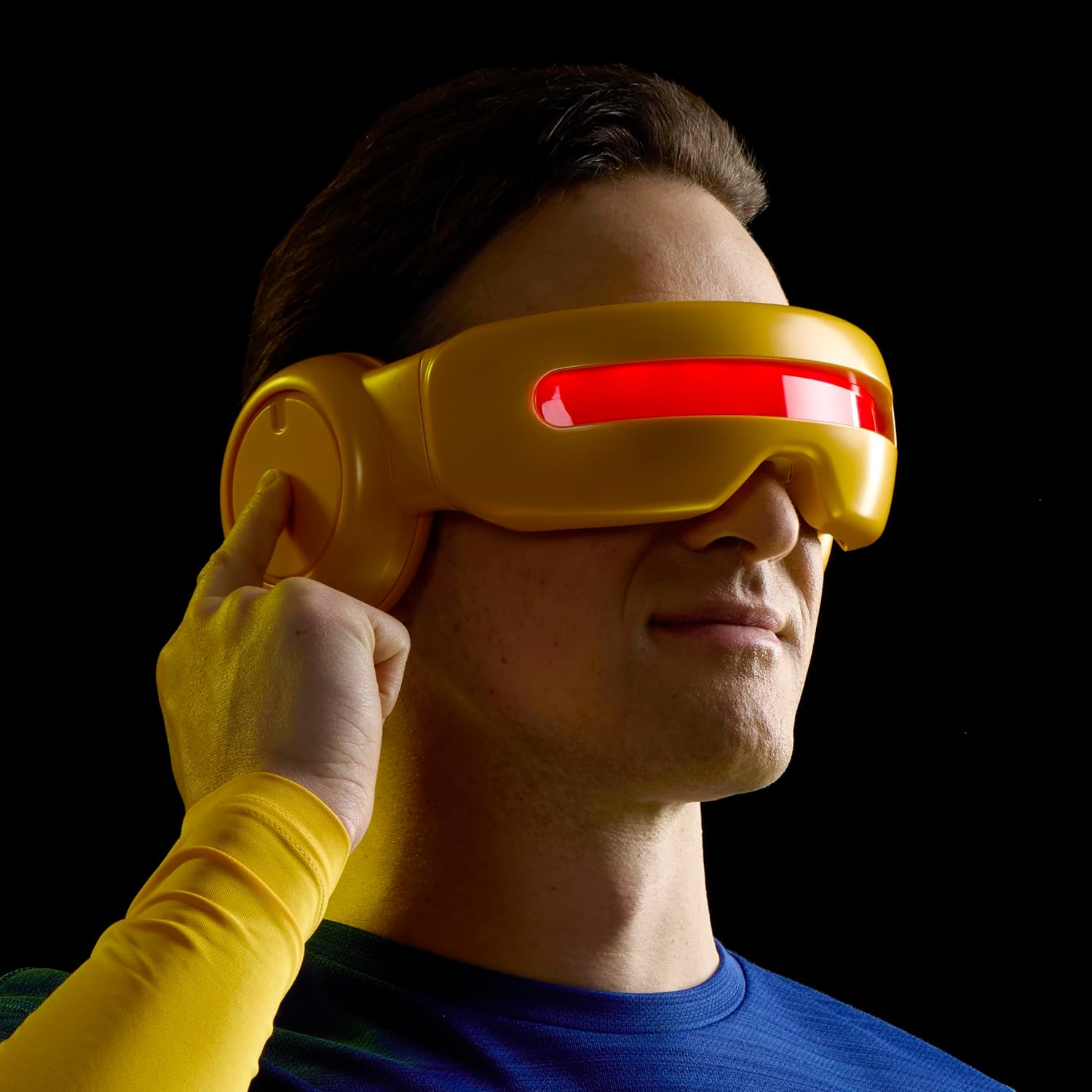
Image: Hands inserting the red display stand into the Cyclops visor, preparing it for exhibition.
Operating Instructions
Once batteries are installed, you can activate the visor's light-up effect:
- Activating the Optic Blast Effect: Push the button located on the side dial of the visor. This will activate the LED light, illuminating the clear tinted lens to simulate Cyclops' optic blast.
- Adjusting Beam Width: Double-tap the button to decrease the simulated beam width.
- Automatic Shut-off: The LED lights will automatically time out after 2 minutes of inactivity to conserve battery life.

Image: A man wearing the Cyclops visor, pressing the side button to activate the red light-up effect.
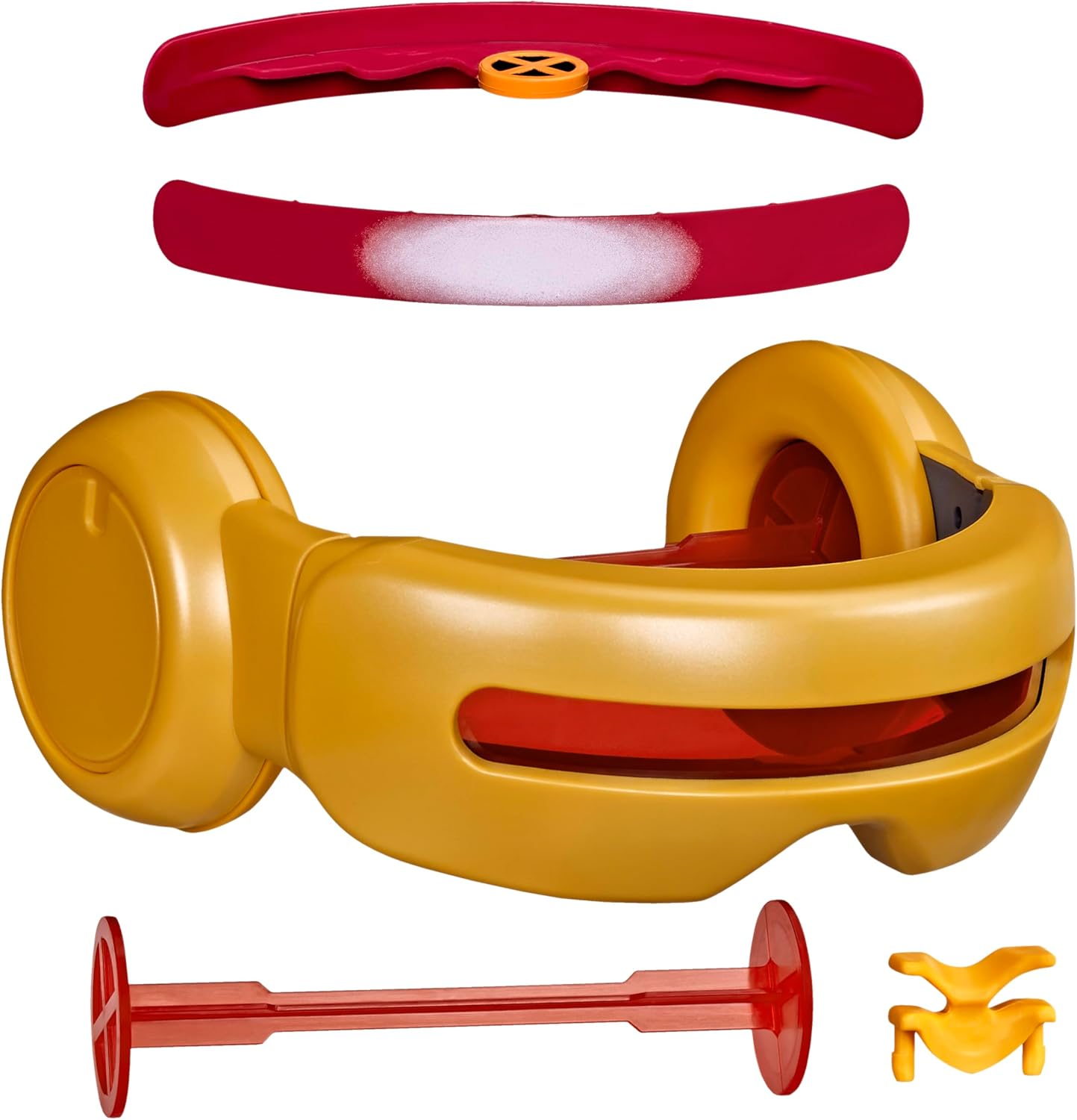
Image: Side view of a man wearing the Cyclops visor, demonstrating the action of pressing the side button.

Image: Side view of a man wearing the Cyclops visor with the red light-up effect actively illuminated.

Image: Front view of a man wearing the Cyclops visor with the red light-up effect active, arms crossed.

Image: The Cyclops visor viewed from the side, clearly showing the activated red light-up effect.
Maintenance
To keep your Cyclops Visor in optimal condition:
- Cleaning: Wipe the visor with a soft, dry cloth. For stubborn marks, a slightly damp cloth can be used, followed by immediate drying. Avoid abrasive cleaners or solvents.
- Storage: Store the visor in a cool, dry place away from direct sunlight and extreme temperatures. If storing for an extended period, remove the batteries to prevent leakage.
- Handling: Handle the visor with care to prevent scratches or damage to the lens and electronic components.
Troubleshooting
If you encounter issues with your Cyclops Visor, refer to the following common solutions:
- Lights Not Activating:
- Ensure batteries are correctly installed with the correct polarity.
- Replace old batteries with fresh AAA batteries.
- Check if the battery compartment is securely closed.
- Inconsistent Light Effect:
- This may indicate low battery power. Replace batteries.
- Ensure the button is being pressed firmly and consistently.
- Visor Does Not Fit Comfortably:
- Adjust the spring-loaded ear pieces.
- Try using the alternative swapable nose piece for a better fit.
If problems persist, please contact customer support.
Specifications
| Feature | Detail |
|---|---|
| Brand Name | Marvel |
| Model Number | G20635S0 |
| Manufacturer Part Number | G2063 |
| Item Type Name | Roleplay Toy |
| Scale | 1:1 Scale (Full-size) |
| Material Type | Plastic |
| Color | Multicolor (Yellow and Red) |
| Power Source | 2 x AAA Batteries (not included) |
| Age Range Description | 14+ Years |
| Included Components | Visor, Display Support, Colored Lens Insert, Swapable Nose Piece |
| Item Dimensions (LxWxH) | 4.02 x 10 x 10 inches |
Warranty and Support
This product is manufactured by Hasbro. For warranty information or customer support, please refer to the contact details provided on the product packaging or visit the official Hasbro website. Please retain your proof of purchase for any warranty claims.


