
JIUYEE RIC PRO
Contents
JIUYEE RIC PRO Rechargeable Hearing Aids User Manual
Model: RIC PRO
Introduction
Thank you for choosing JIUYEE RIC PRO Rechargeable Hearing Aids. This manual provides essential information for the safe and effective use of your new hearing aids. Please read it thoroughly before use and keep it for future reference.
Safety Information
- Consult a medical professional before using hearing aids if you experience sudden hearing loss, ear discharge, or pain.
- Keep hearing aids and small parts out of reach of children and pets to prevent choking hazards.
- Do not expose hearing aids to extreme temperatures, moisture, or direct sunlight.
- Use only JIUYEE approved charging accessories.
- Remove hearing aids before showering, swimming, or using hairspray/perfume.
Package Contents
- JIUYEE RIC PRO Hearing Aids (Left and Right)
- Portable Charging Case
- USB-C Charging Cable
- Multiple Sizes of Ear Domes (S, M, L)
- Cleaning Brush
- Wax Guards
- User Manual
Product Overview
The JIUYEE RIC PRO hearing aids feature a Receiver-In-Canal (RIC) design, offering a discreet and comfortable fit. They integrate advanced AI sound processing and Bluetooth connectivity for an enhanced listening experience.

Image: JIUYEE RIC PRO Hearing Aids and their portable charging case. The hearing aids are green with a sleek design, and the charging case is dark green with an orange interior.

Image: Diagram illustrating key features of the JIUYEE RIC PRO hearing aids, including standalone digital hearing system, portable charging, adaptive digital noise & howling suppression, smart control via JIUYEE APP, youth-oriented sleek design, and undetectable comfort-fit wearable.
Setup
1. Charging the Hearing Aids
Before first use, fully charge your hearing aids and the charging case.
- Place the hearing aids into their respective slots in the charging case.
- Connect the USB-C charging cable to the charging case and a power source.
- The indicator light on the case will show charging status. A full charge provides up to 20 hours of use, with a 15-minute quick charge offering up to 6 hours.

Image: A hand holding a smartphone displaying the JIUYEE app with battery levels, next to the dark green charging case. Text highlights "15-Minute Charge for Up to 6 Hours of Use".
2. Inserting and Fitting
Select the ear dome size that provides a comfortable and secure fit in your ear canal. The RIC design places the receiver directly in your ear for optimal sound delivery.
- Gently place the hearing aid behind your ear.
- Carefully insert the ear dome into your ear canal until it feels snug and comfortable.
- Ensure the thin wire connecting the main unit to the ear dome is not twisted.

Image: A man smiling and touching his ear, wearing a JIUYEE RIC PRO hearing aid. Icons indicate Smart Bluetooth Lossless Connection, iOS & Android Compatible, and Easy-Switch Modes.
3. JIUYEE Smart App Connection and Personalization
The JIUYEE Smart App (available on iOS & Android) allows for personalized sound adjustments and hearing tests.
- Download the "JIUYEE Smart" app from your device's app store.
- Open the charging case and take out the hearing aids to activate pairing mode.
- Enable Bluetooth on your smartphone and search for "JIUYEE" to connect.
- Follow the in-app instructions to perform a hearing test. This test will create a personalized sound profile tailored to your hearing needs.
- The app will guide you through adjusting frequencies and loudness levels for each ear.
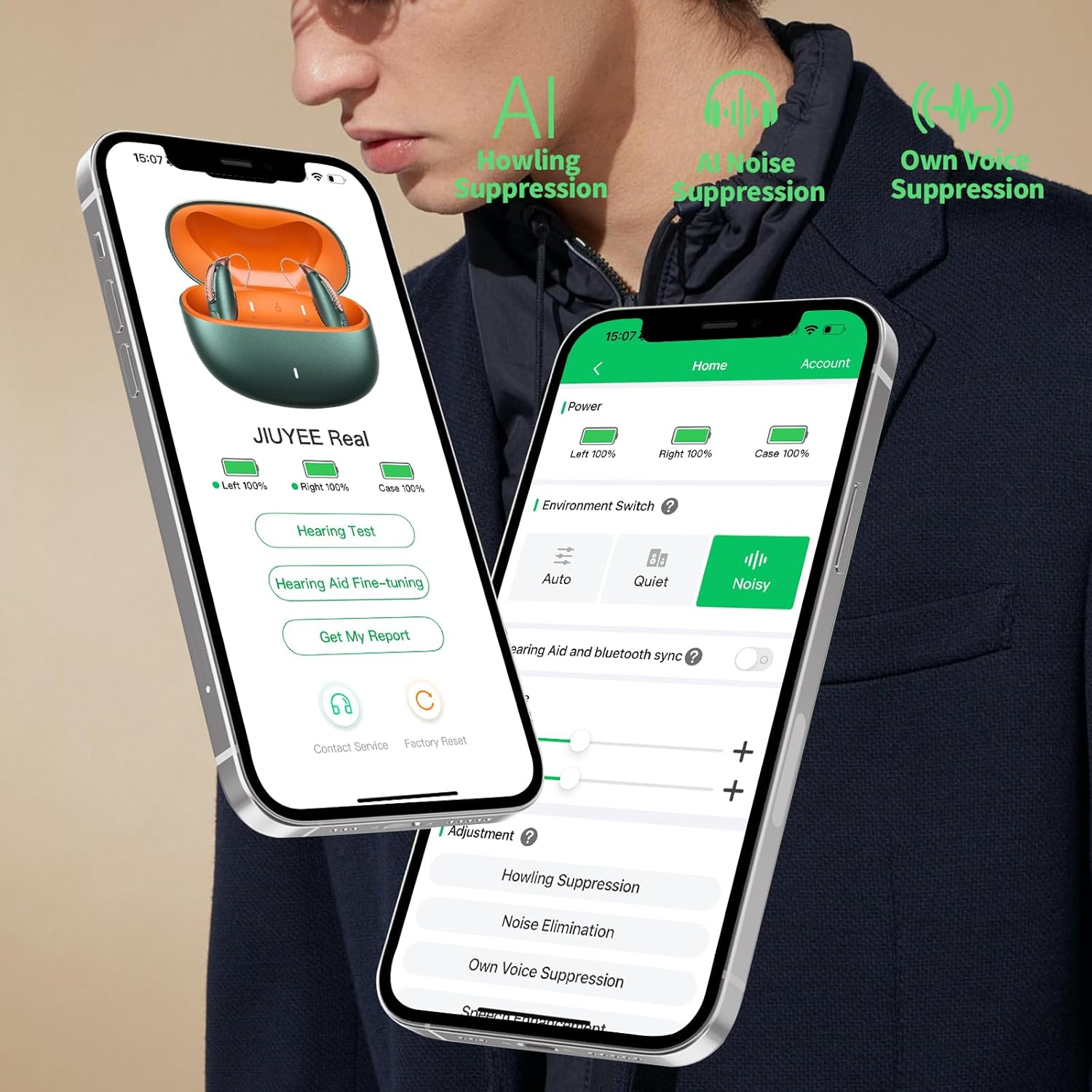
Image: Two smartphones displaying the JIUYEE Smart App interface, showing battery status, hearing test options, environment switch (Auto, Quiet, Noisy), and adjustment sliders for howling suppression, noise elimination, and own voice suppression.
Video: This video demonstrates the JIUYEE RIC PRO hearing aids' features, including anti-feedback, AI adaptive noise reduction, AI environment adaptation, and the intelligent app self-fitting process. It shows how the app guides users through a hearing test to personalize settings.
Operating Instructions
1. Power On/Off
- To power on, simply remove the hearing aids from the charging case.
- To power off, place the hearing aids back into the charging case.
2. Adjusting Volume and Modes
All adjustments are made via the JIUYEE Smart App:
- Volume Control: Use the sliders in the app to adjust the volume for each ear independently.
- Sound Modes: Switch between preset programs (e.g., Auto, Quiet, Noisy) or customize your own sound profiles for different environments.
- AI Noise Reduction: The intelligent AI noise reduction automatically filters distractions, enhancing speech clarity.

Image: Three people smiling and looking at a smartphone in a cafe setting. Text indicates "24 dB Noise Reduction for a Crystal-Clear Listening Experience" and "Block distractions and focus on what truly matters".
3. Bluetooth Streaming
Your JIUYEE RIC PRO hearing aids support Bluetooth streaming for calls, music, podcasts, and videos.
- Ensure your hearing aids are connected to your smartphone via Bluetooth.
- Audio from your phone will automatically stream to your hearing aids.
- For calls, speak normally; the hearing aids will pick up your voice.
Video: This video highlights the AI APP CONTROL features of the JIUYEE hearing aids, demonstrating how users can adjust settings and manage their listening experience through the smartphone application.

Image: A collage showing individuals using JIUYEE RIC PRO hearing aids in different settings: watching TV at home, connecting with family, commuting, and during a video conference, emphasizing enhanced voice frequencies and clarity.
Maintenance
1. Cleaning
Regular cleaning ensures optimal performance and longevity.
- Use the provided cleaning brush to gently remove earwax or debris from the ear domes and sound outlets daily.
- Wipe the main unit with a soft, dry cloth. Do not use water or cleaning solutions directly on the hearing aids.
2. Replacing Wax Guards
Wax guards protect the receiver from earwax buildup. Replace them as needed, typically every few weeks or when sound quality diminishes.
- Use the wax guard removal tool to extract the old wax guard.
- Insert a new wax guard firmly into the receiver opening.
3. Battery Care and Storage
- Store hearing aids in their charging case when not in use to protect them and keep them charged.
- For long-term storage, ensure the charging case is fully charged and store it in a cool, dry place.
Troubleshooting
| Problem | Possible Cause | Solution |
|---|---|---|
| No sound or weak sound | Low battery; clogged ear dome/wax guard; incorrect volume setting. | Charge hearing aids; clean/replace ear dome/wax guard; adjust volume via app. |
| Whistling or feedback sound | Improper fit; earwax buildup; hand/object near ear. | Re-insert for a snug fit; clean ear canal; ensure nothing obstructs the ear. |
| Bluetooth connectivity issues | Hearing aids not in pairing mode; phone Bluetooth off; interference. | Ensure hearing aids are out of case; check phone Bluetooth settings; move closer to phone. |
| App not responding | App glitch; phone OS issue. | Close and restart the app; restart your smartphone. |
Specifications
- Model: RIC PRO
- Manufacturer: JIUYEE
- Sound Processing: Upgraded 64-Channel Processing Chip with JoyVoice™ Exclusive Sound Algorithm
- Noise Reduction: AI Noise Reduction (up to 24 dB)
- Gain: Up to 52.5 dB boost
- Connectivity: Bluetooth (for streaming calls, music, podcasts, videos)
- App Control: JIUYEE Smart App (iOS & Android compatible)
- Battery Life: Up to 20 hours (full charge), 6 hours (15-min quick charge) with portable charging case
- Design: Featherlight RIC (Receiver-In-Canal)
- Fit: Multiple dome sizes included for custom fit

Image: A detailed diagram showcasing the "64-CHANNEL DIGITAL WDRC PROCESSOR" with text explaining "Precision Hearing Compensation, Crystal Clear Output" and "Fine-tunes sound at multiple frequency bands to match your hearing profile. Tailored hearing, as natural as it should be."
Warranty and Support
JIUYEE provides a limited warranty for its products. For detailed warranty information, please refer to the warranty card included in your package or visit the official JIUYEE website.
For technical support, troubleshooting assistance, or any product-related inquiries, please contact JIUYEE customer service through the following channels:
- Email: [Insert Customer Service Email Here]
- Phone: [Insert Customer Service Phone Number Here]
- Website: www.jiuyee.com
Please have your product model and purchase date ready when contacting support.
Ask a question about this manual
Ask about setup, troubleshooting, compatibility, parts, safety, or missing instructions. Manuals+ will review the question and use this page’s manual context to help answer it.