1. Important Safety Instructions
Please read all instructions carefully before assembling and using your jonpony Power Lift Recliner Chair. Retain this manual for future reference.
- Ensure all components are present and undamaged before assembly.
- Do not operate the chair if any parts are missing or damaged.
- Keep children and pets away from the chair's moving parts.
- Do not allow children to play on or around the chair.
- Maximum weight capacity: 350 lbs (158 kg). Do not exceed this limit.
- Ensure the power cord is not pinched or damaged.
- Unplug the chair from the power outlet before cleaning or maintenance.
- Use only the provided power adapter.
- Avoid placing the chair near heat sources or in direct sunlight for prolonged periods.
- Do not use the USB ports for high-power devices; they are intended for low-power devices like smartphones or tablets.
2. Package Contents
Verify that all components are included in your package. If any parts are missing or damaged, please contact customer service.
- Backrest
- Seat Base with Armrests
- Power Adapter
- Remote Control
- Assembly Hardware (bolts, washers, etc.)
- Instruction Manual (this document)
3. Assembly Instructions
Assembly typically involves connecting the backrest to the seat base and connecting the power supply. A detailed paper instruction manual is included in the box for specific steps.
- Unpack Components: Carefully remove all parts from the packaging. Place them on a soft, clean surface to prevent scratches.
- Attach Backrest: Align the metal brackets on the backrest with the corresponding slots on the seat base. Slide the backrest down firmly until it locks into place. You may hear a click.
- Connect Wires: Locate the electrical wires extending from the backrest and the seat base. Connect them securely, ensuring the connectors are fully engaged.
- Connect Power Adapter: Plug the power adapter into the chair's power input port, then plug the adapter into a wall outlet.
- Test Functions: Use the remote control to test the lift, recline, massage, and heat functions to ensure proper operation.

Image: The fully assembled jonpony Oversized Power Lift Recliner Chair in brown fabric.

Image: Close-up details of the recliner, highlighting the two side pockets, two front pockets, comfortable back cushioning, and the adjustable footrest.
4. Operating Instructions
Your jonpony Power Lift Recliner Chair is equipped with multiple functions for comfort and convenience, controlled by the included remote.
4.1. Power Lift and Recline Function
The power lift and recline functions allow for smooth adjustment of the chair's position, assisting users in standing up or reclining for relaxation.
- To Recline: Press and hold the "Recline" button on the remote control. The chair will smoothly move backward, and the footrest will extend. Release the button when you reach your desired angle (up to 160°).
- To Lift/Stand Up: Press and hold the "Lift" button on the remote control. The chair will gently tilt forward and lift, assisting you to a standing position. Release the button when you are ready to stand.
- To Return to Upright Position: Press and hold the "Upright" button (or the opposite of recline) to bring the chair back to its standard sitting position.

Image: Visual representation of the chair's adjustable positions, including 45° (Stand up), 90° (Read), 120° (Go online), 130° (Watch TV), and 160° (Have a napping).
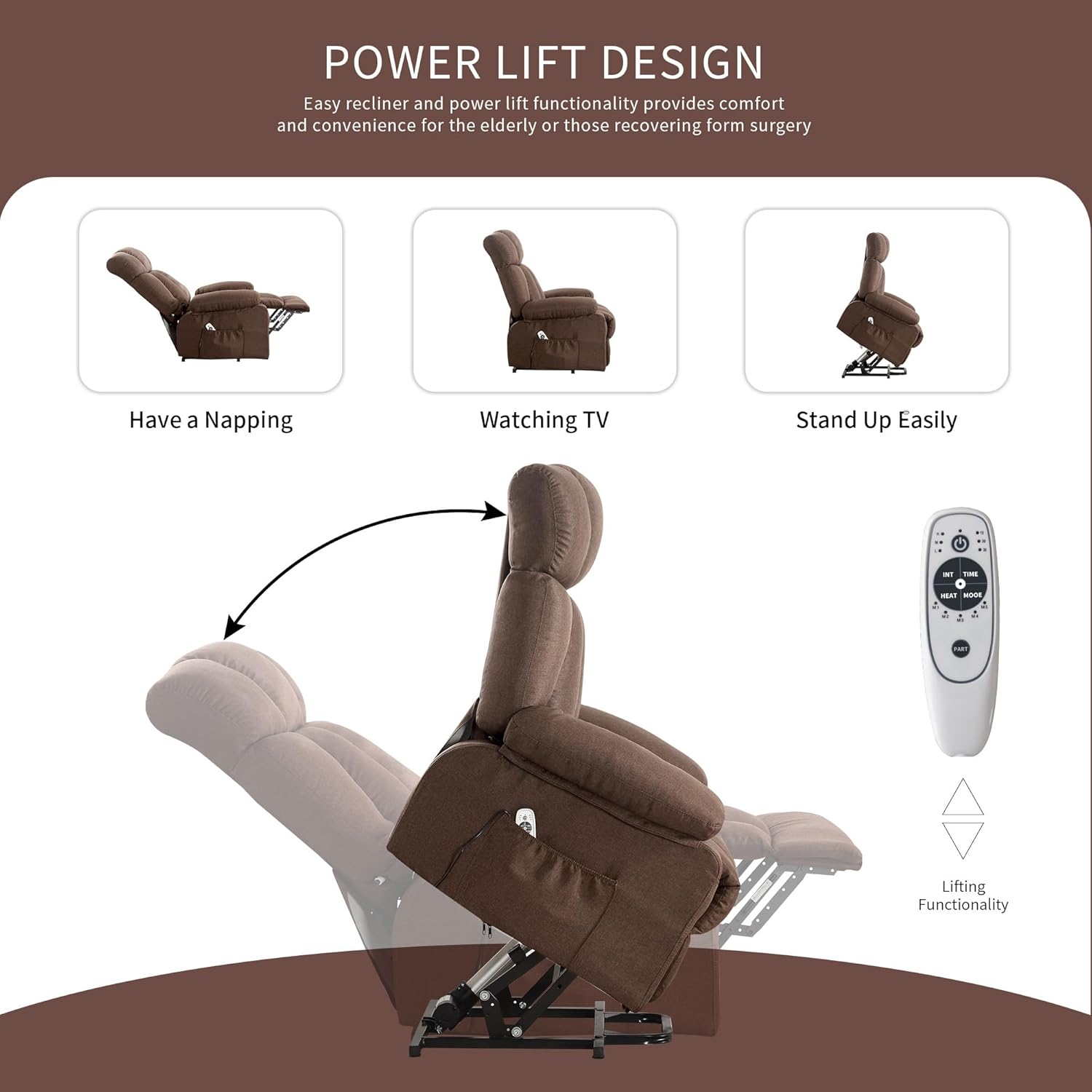
Image: Illustration of the power lift design, showing the chair transitioning from a reclined position to an upright and then a lifted position to assist standing.
4.2. Vibration Massage and Heating Function
The chair features 8 vibration massage points and a lumbar heating function for enhanced comfort.
- Activate Massage: Press the "Massage" button on the remote. Cycle through 5 massage modes and 2 vibration intensities.
- Select Massage Area: The 8 massage points are distributed across the calves, thighs, waist, and shoulders. Use the remote to select specific areas or a full-body massage.
- Activate Heat: Press the "Heat" button on the remote to activate the lumbar heating function. This can be used independently or in conjunction with the massage.
- Set Timer: Use the "Timer" button to set a duration for the massage and heat functions.
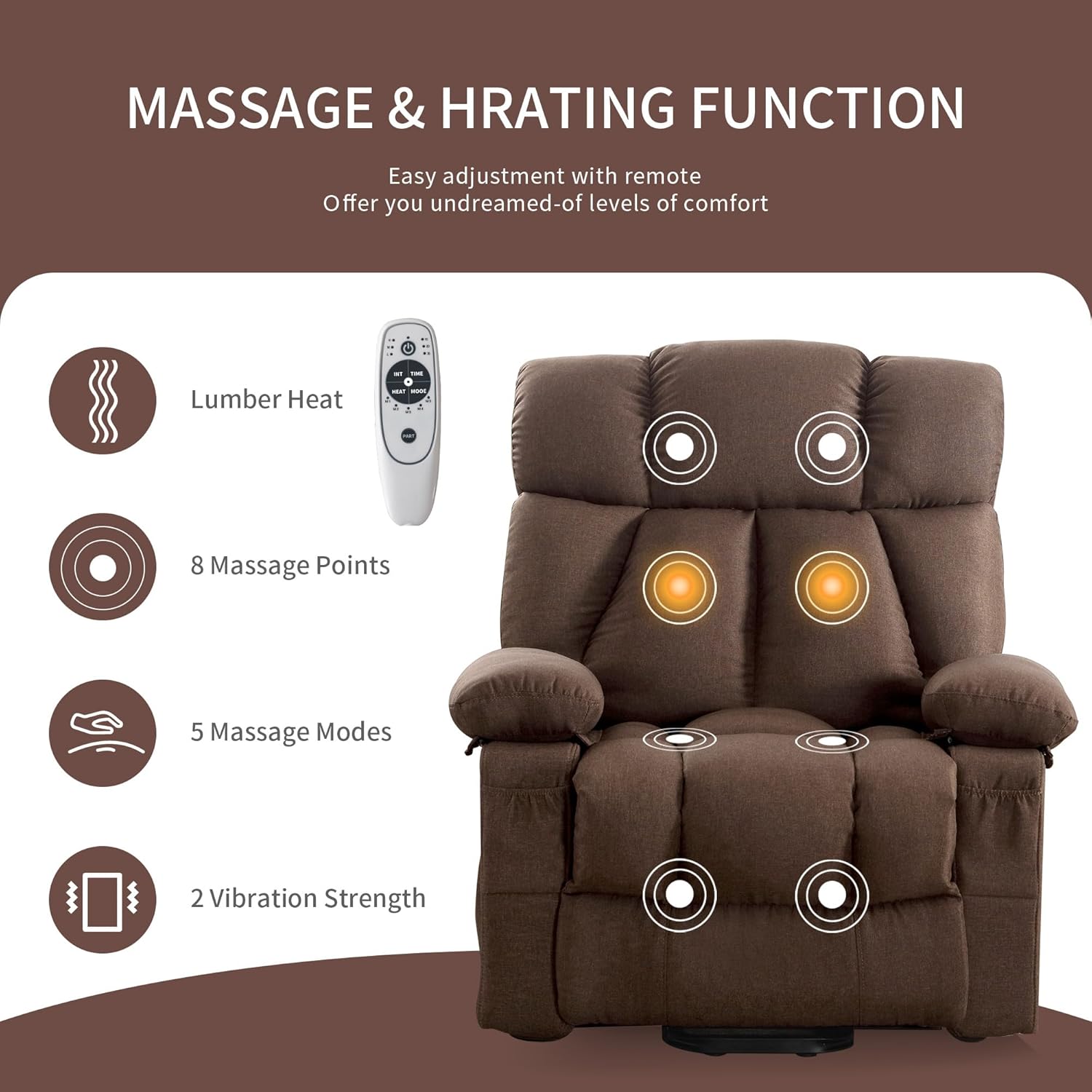
Image: Diagram illustrating the massage and heating functions, showing the remote control and the 8 massage points on the chair, with a highlighted lumbar heat area.

Image: Close-up of the remote control conveniently stored in one of the chair's side pockets.
4.3. USB Charging Port
A USB charging port is located on the side of the chair for convenient charging of low-power electronic devices.
- Locate the USB port on the side of the chair.
- Plug your device's USB charging cable into the port.
- Note: This port is designed for low-power devices such as smartphones and tablets. Do not attempt to charge high-power devices.
5. Maintenance and Care
Proper care will extend the life and appearance of your recliner chair.
- Cleaning Fabric: For general cleaning, use a soft cloth dampened with mild soap and water. Test on an inconspicuous area first. Do not use harsh chemicals or abrasive cleaners.
- Spills: Blot spills immediately with a clean, dry cloth. Do not rub.
- Vacuuming: Regularly vacuum the chair using a soft brush attachment to remove dust and debris.
- Moving Parts: Periodically check all bolts and connections to ensure they are tight. Do not lubricate moving parts unless specifically instructed by customer support.
- Power Cord: Inspect the power cord and adapter regularly for any signs of damage. If damaged, discontinue use and contact customer service for a replacement.
6. Troubleshooting
If you encounter any issues with your recliner, refer to the following common problems and solutions.
| Problem | Possible Cause | Solution |
|---|---|---|
| Chair does not power on. |
|
|
| Lift/Recline function is not smooth or stops. |
|
|
| Massage or Heat function not working. |
|
|
If the problem persists after attempting these solutions, please contact jonpony customer service for further assistance.
7. Product Specifications
| Feature | Specification |
|---|---|
| Brand | jonpony |
| Model | Oversized Power Lift Recliner Chair |
| ASIN | B0FDB65SFR |
| Color | Brown |
| Product Dimensions (D x W x H) | 35.4"D x 35.8"W x 41.3"H |
| Maximum Weight Capacity | 350 lbs (158 kg) |
| Reclining Angle | Up to 160° |
| Massage Points | 8 (Calves, Thighs, Waist, Shoulders) |
| Massage Modes | 5 |
| Vibration Intensity | 2 levels |
| Heating Function | Lumbar heat |
| Upholstery Material | Fabric |
| Fill Material | Sponge |
| Frame Material | Alloy Steel, Wood |
| Special Features | Power Lift, Massage, Heat, USB Charge Port, 4 Side Pockets |

Image: Detailed diagram displaying the dimensions of the recliner chair, including height (41.3"), width (35.8"), depth (35.4"), seat height (19.3"), and full recline length (62.2").
8. Warranty and Support
jonpony provides comprehensive support for your product.
- Warranty: The reclining chair comes with 12 months of free replacement parts.
- Customer Service: Our customer service team is available to provide assistance within 24 hours.
- Contact: For warranty claims, technical support, or any questions, please refer to the contact information provided in your purchase documentation or visit the official jonpony website.


