Introduction
This manual provides comprehensive instructions for the safe and efficient operation of your OMIZN-M6 Global Walkie Talkie. Please read this manual thoroughly before using the device to ensure optimal performance and longevity.
The OMIZN-M6 is a Push-to-Talk over Cellular (PoC) two-way radio designed for nationwide and cross-border communication. It features AES256 encryption for secure conversations, a high-capacity 6000mAh battery, and advanced noise cancellation technology for clear audio.
FCC ID: 2BK6D-G6S

Two OMIZN-M6 Global Walkie Talkies, showcasing their compact design and the included SIM cards for network connectivity.
Package Contents
Verify that all items listed below are included in your package:
An illustration detailing the components included with the OMIZN-M6 walkie-talkie: the radio unit, antenna, Type-C cable, 6000mAh battery, lanyard, back clip, and charging adapter.
- OMIZN-M6 Walkie Talkie Unit
- Antenna
- 6000mAh Lithium Battery
- Type-C Charging Cable
- Charging Adapter
- Back Clip
- Lanyard
- Pre-installed SIM Card (with first-year data service)
Product Overview
Controls and Indicators

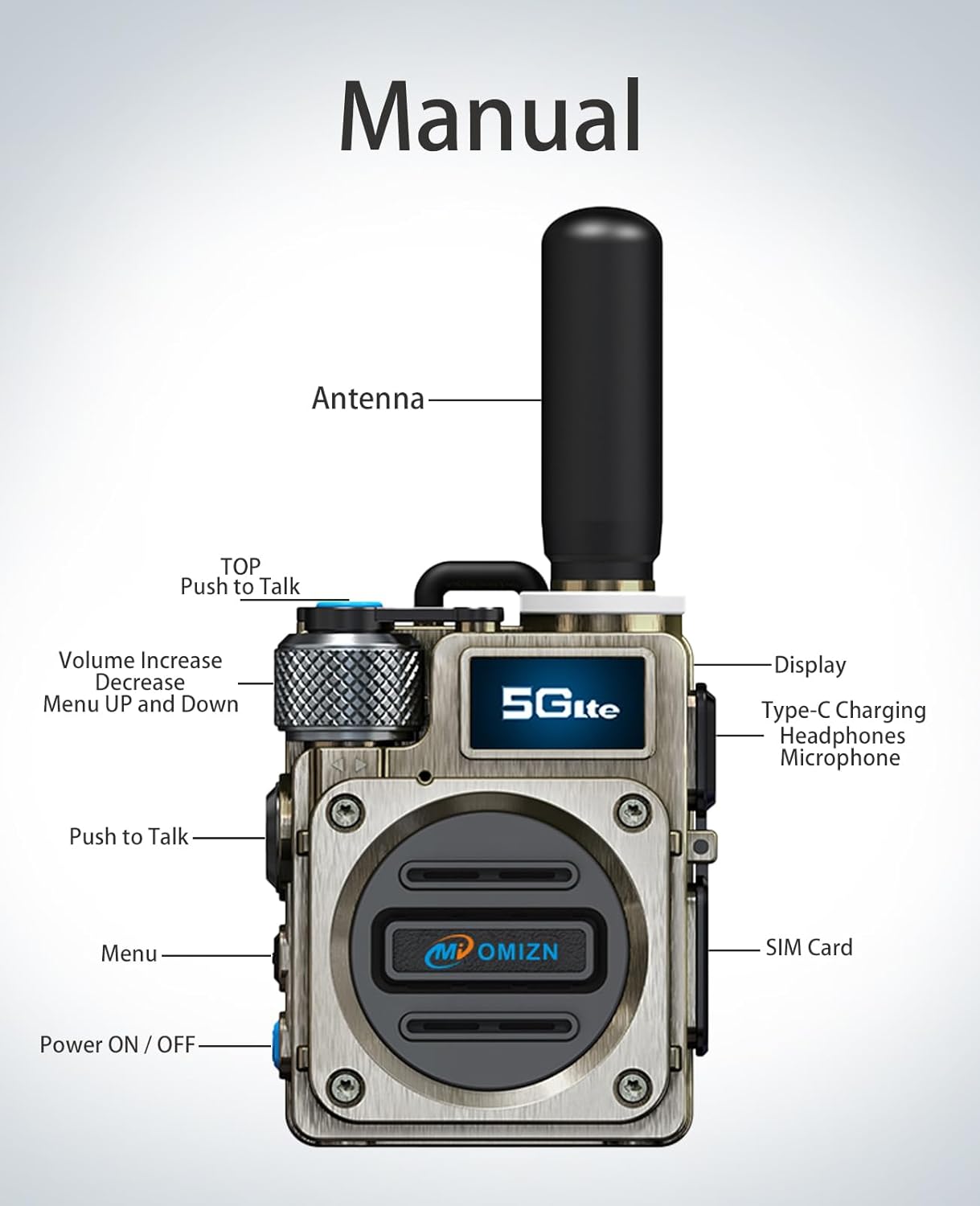
A diagram illustrating the various parts and controls of the OMIZN-M6 walkie-talkie, including the antenna, display, Push-to-Talk buttons, volume/menu knob, power button, SIM card slot, and charging port.
- Antenna: For signal transmission and reception.
- TOP Push to Talk (PTT) Button: Activates voice transmission.
- Volume Increase/Decrease & Menu Up/Down Knob: Rotates to adjust volume or navigate menu options. Press to select.
- Display: Shows signal strength, battery status, group, and user information.
- Type-C Charging Port/Headphones/Microphone Port: Used for charging the device and connecting compatible accessories.
- Push to Talk (PTT) Button: Main button for voice transmission.
- Menu Button: Accesses the device's menu settings.
- Power ON/OFF Button: Press and hold to power the device on or off.
- SIM Card Slot: Insert the provided SIM card here for network connectivity.
Key Features
- Push-to-Talk over Cellular (PoC): Enables instant nationwide communication across the U.S. with low latency. Supports cross-border two-way communication.
- Pre-installed SIM Card: Includes first-year data service. Supports use in up to 172 countries.
- High-Capacity Battery: 6000mAh battery provides up to 48 hours of continuous use or 168 hours standby. Features USB-C fast charging and power-saving modes.
- 256-bit AES Encryption: Secures communications, protecting against unauthorized listening.
- Intelligent Noise Cancellation: Equipped with an anti-magnetic speaker and advanced digital error-correction technology for clear communication in noisy environments.
- Shock-Resistant Casing: Zinc alloy body designed for durability.
Setup
1. SIM Card Installation
The OMIZN-M6 comes with a pre-installed SIM card. If you need to replace or re-insert the SIM card:
- Power off the device.
- Locate the SIM card slot on the side of the radio.
- Carefully open the SIM card slot cover.
- Insert the Micro SIM card into the slot with the gold contacts facing down, ensuring it is correctly oriented.
- Close the SIM card slot cover securely to maintain dust and water resistance.
2. Battery Installation and Charging
The 6000mAh battery is typically pre-installed. To charge the device:
- Connect the Type-C charging cable to the charging port on the side of the radio.
- Connect the other end of the cable to the charging adapter, then plug the adapter into a power outlet.
- The display will indicate charging status. A full charge typically takes several hours.
- For optimal battery life, fully charge the device before first use.
3. Initial Power On
- Press and hold the Power ON/OFF button until the device powers on and the display illuminates.
- The radio will connect to the network. This may take a few moments.
- Once connected, the display will show network signal strength, battery status, and current group/user information.
Operating Instructions
1. Basic Communication (Push-to-Talk)
- Ensure the radio is powered on and connected to the network.
- Select your desired communication group using the Menu button and Volume/Menu knob.
- To transmit, press and hold either the TOP Push-to-Talk (PTT) button or the side PTT button. Speak clearly into the microphone.
- Release the PTT button to listen for a response.
- The display will indicate when you are transmitting or receiving.
2. Adjusting Volume
Rotate the Volume Increase/Decrease knob clockwise to increase volume and counter-clockwise to decrease volume.
3. Menu Navigation
- Press the Menu button to access the main menu.
- Rotate the Volume/Menu knob to scroll through menu options.
- Press the Volume/Menu knob to select an option.
- Use the Menu button again to exit the menu or go back to the previous screen.
4. International Roaming
The included SIM card supports use in up to 172 countries. For international roaming, contact OMIZN support in advance to ensure service activation and compatibility in your destination country.
Maintenance
1. Cleaning
Wipe the radio's exterior with a soft, damp cloth. Do not use harsh chemicals or abrasive cleaners. Ensure all port covers are securely closed before cleaning to prevent water ingress.
2. Battery Care
To prolong battery life, avoid fully discharging the battery frequently. Store the device in a cool, dry place when not in use for extended periods. Do not expose the battery to extreme temperatures.
3. Storage
When storing the device for a long time, ensure it is powered off and the battery is partially charged (around 50%). Store in a dry environment away from direct sunlight and extreme temperatures.
Troubleshooting
Common Issues and Solutions
| Problem | Possible Cause | Solution |
|---|---|---|
| Device does not power on. | Battery is depleted or not properly installed. | Charge the battery. Ensure the battery is correctly seated. |
| No network signal. | Out of network coverage area; SIM card issue. | Move to an area with better cellular coverage. Check SIM card installation. Contact OMIZN support if the issue persists. |
| Cannot transmit or receive. | Incorrect group selected; PTT button not pressed correctly. | Verify you are in the correct communication group. Ensure the PTT button is pressed firmly during transmission and released to receive. |
| Poor audio quality/Noise. | Weak signal; environmental interference. | Move to an area with stronger signal. Ensure microphone and speaker are clear of obstructions. |
| Battery drains quickly. | High usage; background network activity. | Reduce screen brightness. Enable power-saving modes. Ensure no unnecessary background processes are running. |
Specifications

A detailed table outlining the technical specifications of the OMIZN-M6, including supported frequency bands, voltage, charging current, transmission power, dimensions, weight, color, operating system, SIM card type, operating/storage temperature ranges, receiver sensitivity, audio output power, battery capacity, charging method, platform, and working/standby times.
| Feature | Detail |
|---|---|
| Model | OMIZN-M6 |
| FCC ID | 2BK6D-G6S |
| Brand | OMIZN |
| Product Dimensions | 1.53"D x 2.28"W x 2.71"H (3.89 x 5.79 x 6.88 cm) |
| Weight | 0.27 kg |
| Color | Silver |
| Battery Capacity | 6000mAh Lithium Battery |
| Charging Method | Type-C Charging |
| Charging Current | 1A |
| Voltage | 3.7V |
| Operating System | Rtos |
| SIM Card Type | Micro SIM Card |
| Supported Frequency Bands (LTE-FDD) | B1, B2, B3, B4, B5, B7, B8, B20, B28, B34 |
| Supported Frequency Bands (LTE-TDD) | B38, B39, B40, B41 |
| Frequency Range (MHz) | 824-849MHz, 1710-1755MHz, 1850-1910MHz, 2496-2690MHz, 2500-2570MHz, 2570-2620MHz |
| Maximum Transmission Power | 23 dBm |
| Receiver Sensitivity | -106 dBm |
| Audio Output Power | 1.3W @ 10% THD |
| Platform | XIN POC |
| Working Time | Up to 48 hours |
| Standby Time | Up to 168 hours |
| Operating Temperature Range | -20°C to 55°C |
| Storage Temperature Range | -40°C to 85°C |
| Headset | Optional |
Warranty and Support
For warranty information, technical support, or service inquiries, please contact OMIZN customer support through the official channels provided at the point of purchase or on the OMIZN website.
Please retain your proof of purchase for warranty claims.