Product Overview
The OMIZN-M6 Global Walkie Talkie is a Push-to-Talk over Cellular (PoC) two-way radio designed for nationwide communication with unlimited range. It features a pre-installed SIM card for global connectivity, a high-capacity 6000mAh battery, AES256 encryption for secure communications, and intelligent noise cancellation for clear audio in various environments.

Image: Three OMIZN-M6 walkie talkies, showcasing their compact design and included SIM cards, ready for global communication.
This device is built with a durable zinc alloy body, providing shock-resistant and crush-proof performance. It supports 4G LTE bands compatible with major US carriers and offers cross-border communication capabilities.

Image: An OMIZN-M6 walkie talkie held in a hand, superimposed over a world map, illustrating its worldwide communication capabilities across over 170 countries.
Package Contents
Before proceeding with setup, please verify that all components are present in your package:
- OMIZN-M6 Walkie Talkie Unit(s)
- Antenna
- 6000mAh Lithium Battery
- Type-C Charging Cable
- Charging Adapter
- Lanyard
- Back Clip
- Pre-installed SIM Card (with first-year data service)

Image: A visual representation of all items included in the OMIZN-M6 package, such as the radio unit, antenna, battery, charging cable, adapter, lanyard, and back clip.
Setup Guide
1. Battery Installation and Charging
- Ensure the device is powered off.
- Locate the battery compartment on the rear of the walkie talkie.
- Insert the 6000mAh lithium battery, ensuring the contacts align correctly.
- Close the battery compartment cover securely.
- Connect the Type-C charging cable to the device's charging port and the charging adapter. Plug the adapter into a power outlet.
- The device will indicate charging status. A full charge typically takes several hours.
2. SIM Card Insertion
The OMIZN-M6 comes with a pre-installed SIM card. If you need to access or replace the SIM card:
- Locate the SIM card slot, typically on the side of the device.
- Carefully open the SIM card slot cover.
- Insert or remove the Micro SIM card as needed, ensuring correct orientation.
- Close the SIM card slot cover firmly to ensure dust and water resistance.
3. Antenna Attachment
- Screw the antenna clockwise onto the antenna port at the top of the walkie talkie until it is finger-tight. Do not overtighten.
4. Initial Power On
- Press and hold the Power ON/OFF button (located on the side) until the display screen illuminates.
- The device will boot up and attempt to connect to the network.
Operating Instructions
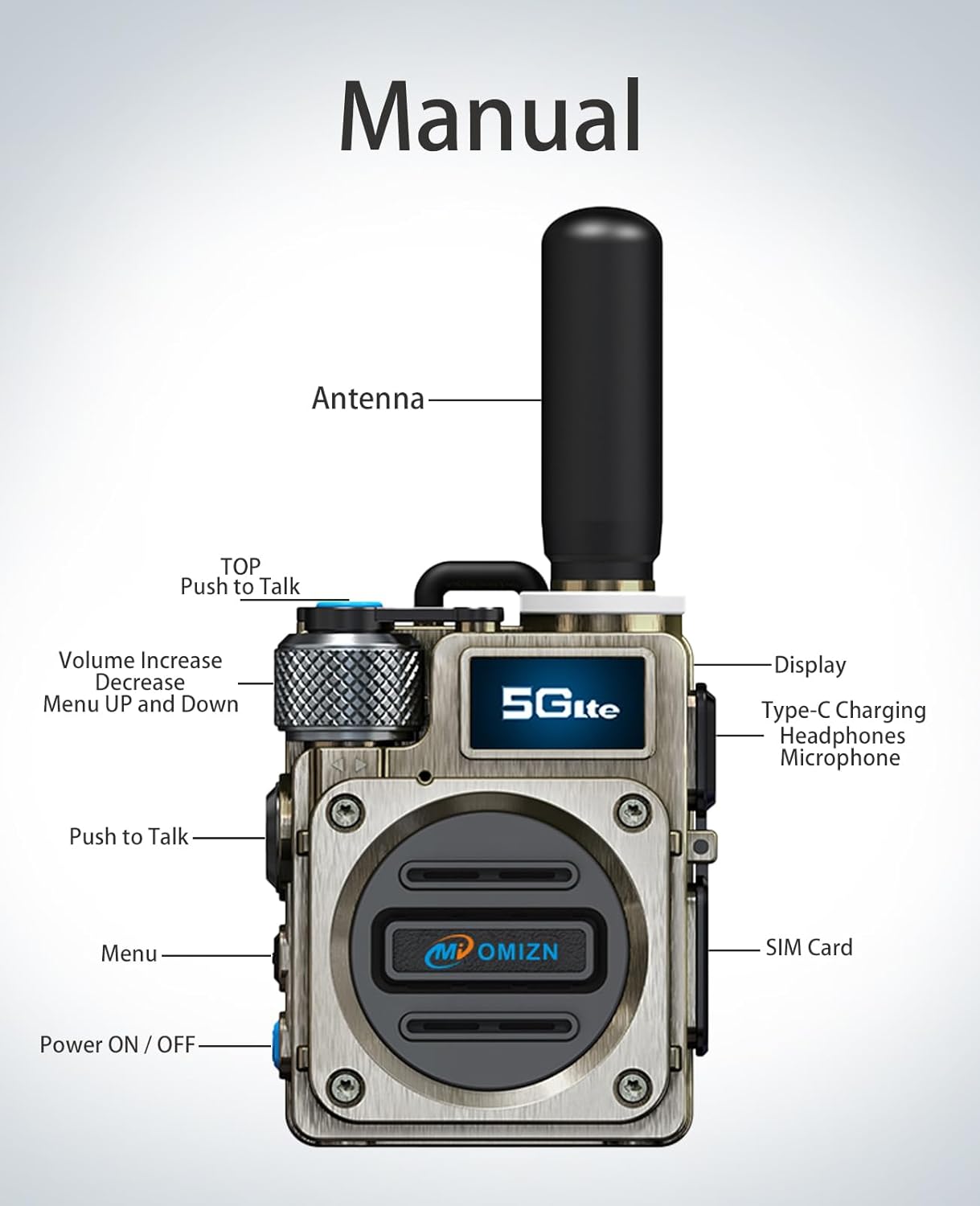
Image: A detailed diagram labeling the antenna, Push-to-Talk (PTT) buttons, volume knob, display, Type-C charging port, headphone jack, microphone, menu button, power button, and SIM card slot on the OMIZN-M6.
1. Power On/Off
- To power on, press and hold the Power ON/OFF button until the screen lights up.
- To power off, press and hold the Power ON/OFF button until the device shuts down.
2. Adjusting Volume
- Rotate the Volume Increase/Decrease knob (located at the top-left) clockwise to increase volume and counter-clockwise to decrease volume.
3. Push-to-Talk (PoC) Communication
- To transmit, press and hold the Push to Talk button (large button on the side). Speak clearly into the microphone.
- Release the Push to Talk button to listen for incoming transmissions.
- The OMIZN-M6 supports instant nationwide communication with ultra-low latency.
4. Menu Navigation
- Press the Menu button to access the device's settings and options.
- Use the Volume Increase/Decrease knob to scroll through menu options.
- Press the Push to Talk button (or a designated selection button if available) to confirm a selection.
5. Secure Communication (AES256 Encryption)
The OMIZN-M6 features 256-bit AES encryption to safeguard your communications. This ensures private conversations and protection against eavesdropping.

Image: A visual representation of the OMIZN-M6 radio with a robotic hand, emphasizing its AES 256 encryption capabilities for secure and private communications.
6. Noise Cancellation
Equipped with an anti-magnetic speaker and advanced voice-encoding digital error-correction technology, the OMIZN-M6 provides clear communication even in noisy environments and low-signal areas.

Image: An exploded view of the OMIZN-M6's speaker components, illustrating its magnetic-proof and dust-proof design for clear sound quality.
Maintenance
1. Cleaning the Device
- Use a soft, damp cloth to wipe the exterior of the walkie talkie.
- Do not use harsh chemicals, solvents, or abrasive cleaners.
- Ensure all port covers (Type-C, SIM card) are securely closed to maintain dust and water resistance.
2. Battery Care
- Avoid fully discharging the battery frequently.
- Charge the battery regularly, even if the device is not in use, to maintain battery health.
- Store the device and battery in a cool, dry place when not in use for extended periods.
3. Storage
- When storing the device for a long time, remove the battery if possible.
- Keep the device away from extreme temperatures, direct sunlight, and high humidity.
Troubleshooting
| Problem | Possible Cause | Solution |
|---|---|---|
| Device does not power on. | Battery is low or depleted; Battery not installed correctly. | Charge the battery fully; Reinstall the battery, ensuring proper contact. |
| Cannot transmit or receive. | No network signal; SIM card issue; Incorrect group selection. | Move to an area with better network coverage; Check SIM card installation; Verify you are in the correct communication group. |
| Audio is unclear or distorted. | Low signal strength; Speaker/microphone obstruction; Volume too low/high. | Move to an area with better signal; Check for debris on speaker/microphone; Adjust volume. |
| Battery drains quickly. | High usage; Background applications; Battery aging. | Reduce screen brightness; Close unnecessary applications; Consider replacing battery if significantly degraded. |
| Device is unresponsive. | Software glitch. | Perform a soft reset by holding the power button until it restarts, or remove and reinsert the battery. |
Specifications
| Feature | Detail |
|---|---|
| Model Number | OMIZN-HJ-M6-3Set |
| Dimensions (L x W x H) | 1.53"D x 2.28"W x 2.71"H (3.89 x 5.79 x 6.88 cm) |
| Weight | Approximately 0.27 kg |
| Battery Capacity | 6000mAh Lithium Battery |
| Working/Standby Time | Up to 48 hours continuous use / 168 hours standby |
| Charging Interface | Type-C |
| Network Connectivity | 4G LTE Full Network Connectivity (PoC) |
| Supported LTE Bands (FDD) | B1, B2, B3, B4, B5, B7, B8, B20, B28, B34 |
| Supported LTE Bands (TDD) | B38, B39, B40, B41 |
| Encryption | AES256 |
| Noise Reduction | Intelligent Noise Cancellation |
| Operating System | Rtos |
| SIM Card Type | Micro SIM Card |
| Operating Temperature Range | -20°C to 55°C |
| Storage Temperature Range | -40°C to 85°C |
| FCC ID | 2BK6D-G6S |

Image: Technical specifications detailing the FCC ID and comprehensive list of 4G LTE bands supported by the OMIZN-M6, ensuring broad compatibility.
Warranty and Support
The OMIZN-M6 Global Walkie Talkie comes with a pre-installed SIM card that includes the first year of data service with no hidden fees. After the first year, renewal is available for $30/year. This SIM card supports use in up to 172 countries. For international roaming, it is recommended to contact OMIZN support in advance.
For warranty information, technical support, or service inquiries, please contact OMIZN customer service. Refer to the official OMIZN website or your purchase documentation for specific contact details and warranty terms.
While specific warranty details are not provided here, OMIZN offers various protection plans for extended coverage, which can be purchased separately.
Important Safety Information
- Do not attempt to disassemble or modify the device.
- Keep the device away from water and moisture unless specifically designed for immersion.
- Use only OMIZN-approved accessories and charging equipment.
- Avoid exposing the device to extreme temperatures or direct sunlight for prolonged periods.
- Dispose of batteries and electronic components responsibly according to local regulations.
Video Resources
No official product videos from the seller were found in the provided data. Please refer to the manufacturer's official website or authorized channels for any available video tutorials or demonstrations.


