
Introduction
The BOXPUT BPR3S is a versatile remote control designed for Android-based smart devices. It combines Bluetooth connectivity with infrared learning capabilities, allowing control of multiple devices. Key features include voice input, a numeric keypad, and a comfortable design for extended use.

This image shows the BOXPUT BPR3S remote control being held, with a television in the background, highlighting its wireless transmission capabilities and dual Bluetooth/infrared functionality.
Setup
1. Battery Installation
The remote control requires two AAA batteries (not included). Open the battery compartment cover on the back of the remote and insert the batteries, ensuring correct polarity.
Note: Batteries are not included and must be purchased separately.
2. Bluetooth Pairing
To connect the BPR3S remote control via Bluetooth:
- Ensure your device's Bluetooth is enabled.
- Press and hold the "OK" button and the "Back" button simultaneously on the remote until the indicator light starts flashing.
- On your device, search for new Bluetooth devices and select "BPR3S" to pair.
- Once paired, the indicator light will stop flashing.

This image illustrates the three steps for Bluetooth pairing: searching for devices, connecting to the BPR3S remote, and successful pairing.
3. Infrared (IR) Learning Function
The BPR3S remote can learn infrared signals from your existing remote control, allowing it to control other devices like your TV. It supports learning for up to four blue buttons.
- Place the BPR3S remote and your original remote control facing each other, 3-5 cm apart.
- Press and hold the desired blue button on the BPR3S remote for approximately 3 seconds until the indicator light flashes slowly.
- Press the corresponding button on your original remote control. The indicator light on the BPR3S remote will flash rapidly, then stay solid, indicating successful learning.
- Repeat the process for other buttons you wish to program.
- To reset IR learning for a button, press and hold the "Delete" and "Back" buttons simultaneously until the indicator light flashes.

This diagram shows how to position the remotes and the indicator light behavior during the IR learning process.
Operating Instructions
1. Button Functions
The BPR3S remote control features various buttons for different functions:

This image provides a detailed layout of the BPR3S remote control, labeling each button for its specific function, including Power, Mute, Navigation, OK, Menu, Volume, Mouse toggle, Number keys, and Back.
- Power Button: Turns the device on or off.
- Mute Button: Mutes or unmutes the audio.
- Navigation Pad (Up, Down, Left, Right): Navigates through menus and content.
- OK Button: Confirms selections.
- Menu Button: Accesses device menus.
- Volume Up/Down: Adjusts audio volume.
- Mouse Toggle Button: Activates/deactivates the air mouse function.
- Number Keys (0-9): For direct input or channel selection.
- Back Button: Returns to the previous screen or menu.
- Home Button: Returns to the home screen.
2. Voice Input Function
The BPR3S remote supports advanced voice recognition technology. When connected via Bluetooth, you can use voice commands to quickly find content, change channels, or interact with your device.
- Press the dedicated Voice button (often indicated by a microphone icon).
- Speak your command clearly into the remote.
- The device will process your command.

This image demonstrates the voice recognition feature, showing examples of commands like "Change to channel 5" or "Adjust volume to 12".
3. Air Mouse Function (Gyroscope)
The remote features a 6-axis gyroscope for precise air mouse control. This allows you to move a cursor on your screen by simply moving the remote in the air.
- Press the Mouse Toggle button to activate the air mouse.
- Move the remote in the air to control the cursor on your screen.
- Press the OK button to click.
- Press the Mouse Toggle button again to deactivate the air mouse and return to button navigation.

This illustration highlights the comfortable and precise click feedback of the remote's buttons, which is beneficial for air mouse interactions.
Maintenance
To ensure the longevity and optimal performance of your BOXPUT BPR3S remote control, follow these maintenance guidelines:
- Cleaning: Wipe the remote with a soft, dry cloth. Avoid using liquid cleaners or abrasive materials.
- Battery Replacement: Replace batteries when the remote's performance degrades or the indicator light signals low power. Always use new AAA batteries and dispose of old batteries responsibly.
- Storage: Store the remote in a cool, dry place away from direct sunlight and extreme temperatures.
- Avoid Drops: Protect the remote from drops and impacts, which can damage internal components.
Troubleshooting
Common Issues and Solutions
| Problem | Possible Cause | Solution |
|---|---|---|
| Remote not responding | Low or dead batteries, remote out of range, device not powered on. | Replace batteries. Ensure remote is within 10 meters of the device. Check if the device is powered on. |
| Bluetooth pairing fails | Incorrect pairing procedure, device Bluetooth off, interference. | Repeat pairing steps (hold OK + Back). Ensure device Bluetooth is on. Move closer to the device and away from other wireless devices. |
| IR learning not working | Remotes too far apart, incorrect button press, incompatible original remote. | Ensure remotes are 3-5 cm apart. Press and hold buttons correctly. Some original remotes may use non-standard IR signals. |
| Voice input not working | Not connected via Bluetooth, microphone blocked, device does not support voice input. | Ensure Bluetooth is connected. Check if the microphone on the remote is clear. Verify your device supports voice input via Bluetooth remotes. |
| Air mouse cursor erratic | Interference, sudden movements, low battery. | Ensure a clear line of sight. Try recalibrating by placing the remote on a flat surface for a few seconds. Replace batteries. |
Incompatible Devices
The BOXPUT BPR3S remote control is not compatible with the following devices:
- Fire Stick
- DVB Boxes
- ROKU Boxes
- MAG Boxes
- Apple Boxes
- Some LG and Samsung TVs
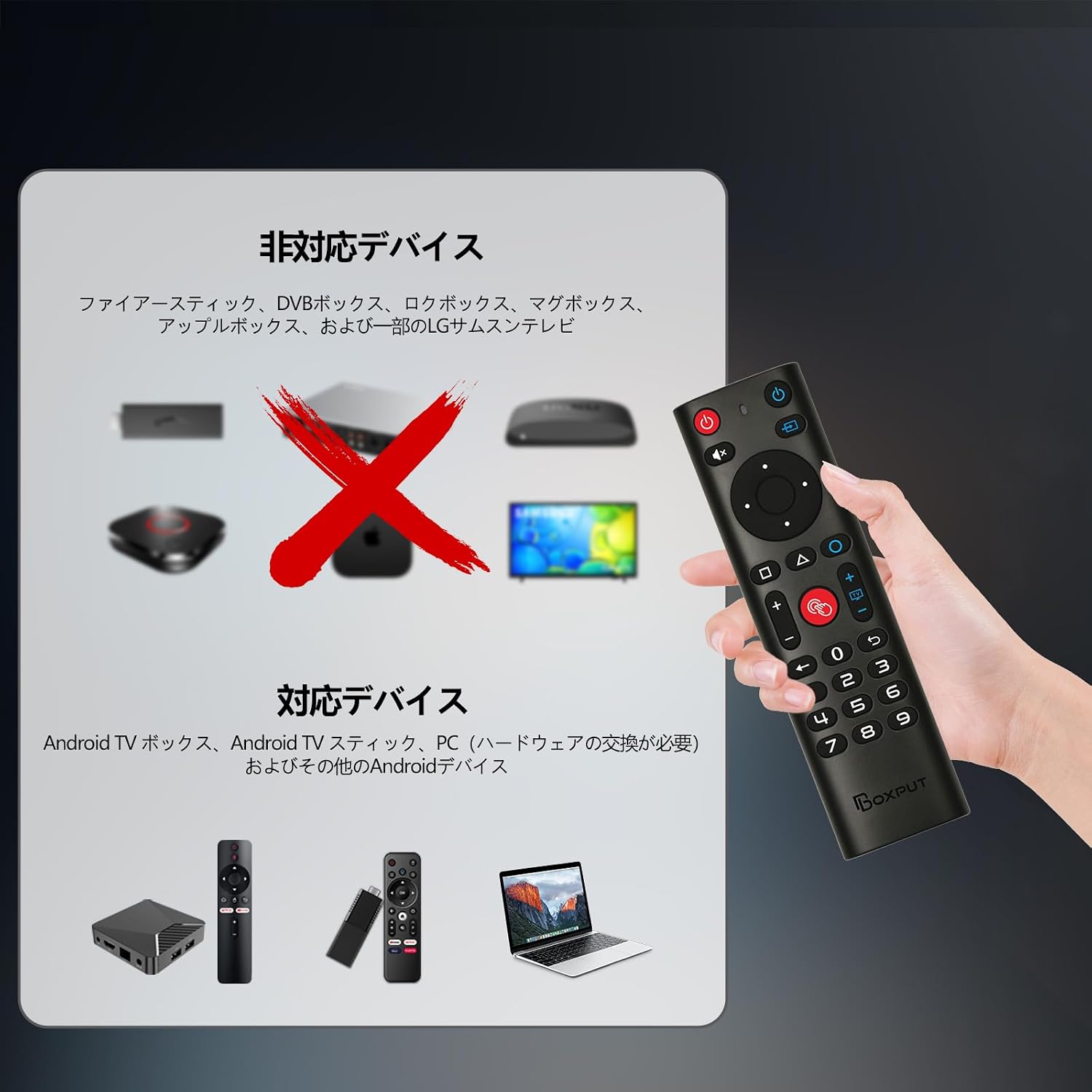
This image visually lists devices that are not compatible with the BPR3S remote, such as Fire Stick and Apple TV, and also lists compatible devices like Android TV boxes and PCs.
Specifications
| Feature | Detail |
|---|---|
| Brand | BOXPUT |
| Model | BPR3S |
| Connectivity Technology | Bluetooth, Infrared (IR) |
| Special Features | Universal, Voice Search, IR Learning, 6-axis Gyroscope (Air Mouse) |
| Maximum Number of Supported Devices | 2 (via IR learning) |
| Compatible Devices | Smart TVs, Computers, Smart Projectors, TV Boxes, Set-top Boxes, Streaming Devices, TV Sticks |
| Number of Buttons | 4 (for IR learning) + standard remote buttons |
| Maximum Range | 10 meters (Bluetooth) |
| Battery Type | AAA (x2) |
| Item Dimensions (L x W x H) | 185mm x 47mm x 20mm |
| Country of Origin | China |

This image provides a visual representation of the remote control's dimensions, indicating its length and width.
Warranty Information
This product comes with a manufacturer's warranty. Please refer to the warranty details provided with your purchase or contact customer support for more information regarding warranty coverage and claims.
Support
Thank you for choosing BOXPUT. If you have any questions or encounter issues with your BPR3S remote control, please contact our customer support. We are committed to providing prompt assistance and effective solutions.
Contact Information:
Please refer to the seller's contact information on the platform where you purchased the product for direct support.