Introduction
This manual provides essential information for the safe and efficient operation of your TROTEC Electric Towel Warmer TWH 300 S. Please read these instructions carefully before installation and use, and keep them for future reference. The TWH 300 S is designed to provide warmth and dry towels in bathrooms or guest toilets, featuring a modern design, silent operation, and smart control options.
Safety Instructions
Important: Always follow basic safety precautions when using electrical appliances to reduce the risk of fire, electric shock, and injury.
- Ensure the power supply voltage matches the rating label on the appliance.
- Do not operate the towel warmer with a damaged cord or plug.
- This appliance is rated IPX4 for splash protection, making it suitable for bathroom use. However, do not immerse it in water or expose it to direct water jets.
- Installation must be performed by a qualified electrician in accordance with local wiring regulations, especially in bathrooms.
- Do not cover the towel warmer while it is operating, as this can lead to overheating.
- Keep children and pets away from the appliance during operation. The surface can become hot.
- Do not use the appliance for purposes other than drying towels or heating the room.
- Always unplug the appliance before cleaning or maintenance.
- The appliance contains a closed water-glycol system; do not attempt to open or refill it.
Package Contents
Verify that all components are present and undamaged upon unpacking.
- TROTEC Electric Towel Warmer TWH 300 S unit
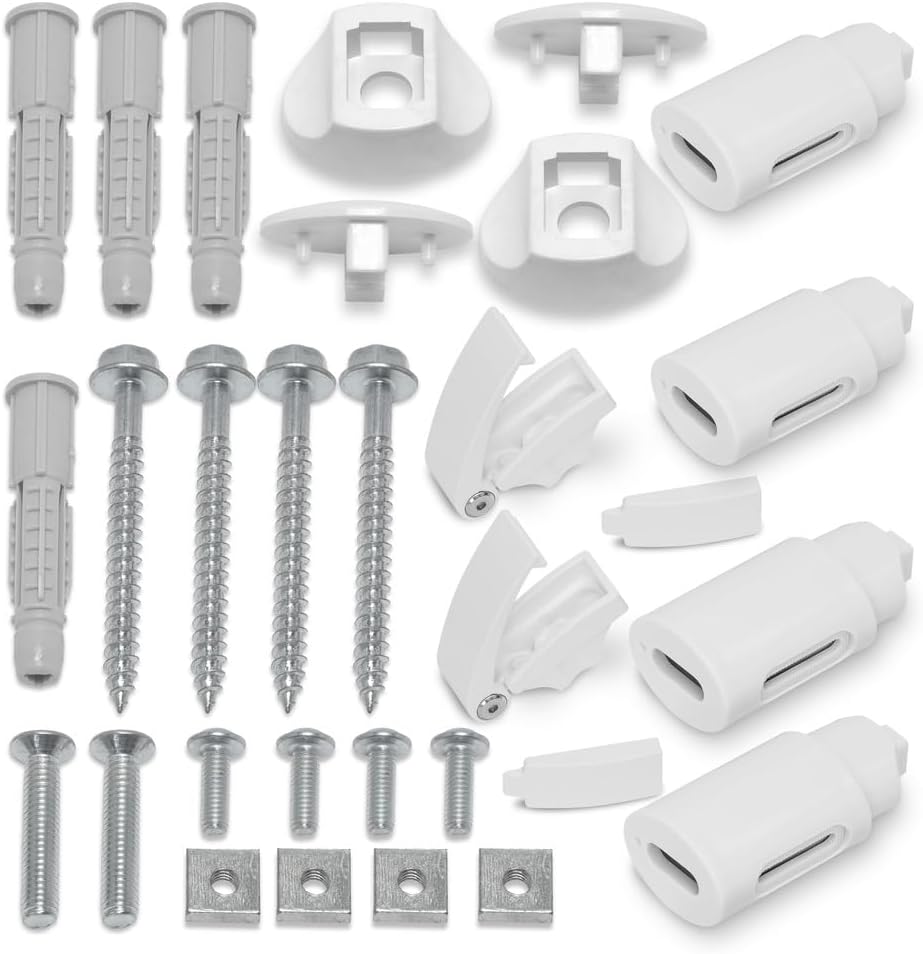
- Wall mounting bracket set (screws, anchors, mounting plates)
- User Manual
Setup and Installation
The TROTEC TWH 300 S is designed for wall mounting. Ensure the chosen location is suitable for an electrical appliance in a bathroom environment and allows for proper air circulation.
- Choose Location: Select a wall location that is within reach of a power outlet but not directly above a bathtub or shower. Ensure sufficient clearance around the unit.
- Mark Drilling Points: Use the provided mounting template (if included) or measure the distances between the mounting points on the back of the unit. Mark the drilling points on the wall.

Image: Product Dimensions. This image illustrates the physical dimensions of the TROTEC TWH 300 S Electric Towel Warmer, showing a height of 515 mm, a width of 500 mm, and a depth of 124 mm. The power cord length is also indicated as 1500 mm. - Drill Holes: Drill holes at the marked points using an appropriate drill bit for your wall type. Insert the wall anchors.
- Attach Brackets: Secure the mounting brackets to the wall using the provided screws.
- Mount Towel Warmer: Carefully align the towel warmer with the wall brackets and secure it in place. Ensure it is firmly attached and level.
- Connect Power: Plug the power cord into a suitable electrical outlet.
For detailed electrical installation, consult a qualified electrician.
Operating Instructions
The TWH 300 S features a modern touch control panel and can also be controlled via the Trotec Assistant app.

Touch Control Panel
- Power Button (⏻): Press to turn the unit ON or OFF.
- Mode Selection (☀): Cycle through different operating modes (e.g., Comfort, Eco, Anti-frost).
- Temperature Adjustment (+ / -): Increase or decrease the desired room temperature.
- Timer (⏱): Set programmed heating times. Refer to the full manual for detailed timer programming.
- Wi-Fi Indicator (🚩): Indicates Wi-Fi connection status for app control.
Trotec Assistant App Control
For advanced control and smart features, download the Trotec Assistant app from your device's app store.
- Download and install the Trotec Assistant app.
- Follow the in-app instructions to connect your TWH 300 S to your home Wi-Fi network.
- Once connected, you can remotely set temperature, program heating schedules, and monitor the device.
Special Features
- Window Opening Identification: The device can detect open windows and automatically reduce heating to save energy.
- Frost Protection Function: Automatically activates heating to prevent freezing in cold environments.
Maintenance
Regular cleaning ensures optimal performance and extends the lifespan of your towel warmer.
- Cleaning: Before cleaning, ensure the appliance is unplugged and completely cool. Wipe the exterior surfaces with a soft, damp cloth. Do not use abrasive cleaners, solvents, or harsh chemicals.
- Inspection: Periodically check the power cord and plug for any signs of damage. If damage is found, discontinue use and contact customer support.
- The internal water-glycol system is sealed and maintenance-free. Do not attempt to open or service it.
Troubleshooting
If you encounter issues with your TROTEC TWH 300 S, refer to the following common problems and solutions:
| Problem | Possible Cause | Solution |
|---|---|---|
| Unit does not turn on. | No power supply; power button not pressed. | Check if the plug is securely in the outlet. Press the power button on the control panel or via the app. Check circuit breaker. |
| Towel warmer is not heating. | Temperature setting too low; mode not active; window opening detected. | Increase the temperature setting. Ensure the correct operating mode is selected. Close any open windows or disable the window opening detection feature temporarily. |
| Wi-Fi connection issues. | Incorrect Wi-Fi password; out of range; router issues. | Ensure correct Wi-Fi password. Move the unit closer to the router or check router status. Restart the unit and attempt to reconnect via the app. |
| Uneven heating. | Normal operation for some designs; air trapped in system (unlikely for sealed unit). | The TWH 300 S uses a closed water-glycol system designed for even heat distribution. If uneven heating persists, contact customer support. |
Specifications
- Model: TWH 300 S
- Brand: TROTEC
- Power: 300 Watts
- Protection Class: IPX4 (Splash-proof)
- Dimensions (L x W x H): 50 x 12.4 x 51.5 cm
- Weight: 6 kg
- Material: Metal
- Heating Technology: Closed water-glycol system
- Control: Touch control panel, Trotec Assistant app (Wi-Fi)
- Features: Timer, Eco mode, Window opening identification, Frost protection
Warranty and Support
TROTEC products are manufactured to high-quality standards. For information regarding warranty terms and conditions, please refer to the warranty card included with your product or visit the official TROTEC website.
For technical support, spare parts, or service inquiries, please contact TROTEC customer service:
- Website: www.trotec.com
- Refer to the product packaging or official website for regional contact details.


