
1. Introduction
The elecci K100 Mini Drone is a compact and portable quadcopter designed for aerial photography and flight. It features a 720P HD camera, a brushless motor for performance, and an integrated screen controller for real-time footage and control. The drone includes two rechargeable batteries for extended flight time and incorporates features such as Optical Flow Localization for stable hovering and all-round protection for the flight paddles.

Image: The elecci K100 Mini Drone with its screen remote control, highlighting paddle protection and optical flow hover capabilities.
2. What's in the Box
Verify that all components are present in the package:
- K100 Mini Drone
- Screen Controller
- Rechargeable Batteries (2 included)
- Camera
- SD Card
- Handbag
- USB Charging Cable (not explicitly listed but implied for batteries)
- Spare Propellers (not explicitly listed but common)
3. Safety Guidelines
Adhere to the following safety guidelines to ensure safe operation and prevent damage or injury:
- Operate the drone in open, unobstructed areas, away from people, animals, and obstacles.
- Maintain a safe distance from power lines, buildings, and water bodies.
- Do not fly in strong winds or adverse weather conditions.
- Ensure the drone batteries and controller batteries are fully charged before each flight.
- Keep fingers and loose clothing away from rotating propellers.
- Supervise children during drone operation.
- The drone features blade protection covers for enhanced safety during flight.

Image: Close-up view of the drone's blade protection covers, designed to enhance safety during operation.
4. Setup
4.1 Charging Batteries
- Connect the drone's Lithium Ion battery to the provided USB charging cable.
- Connect the USB cable to a suitable USB power source (e.g., computer, USB wall adapter).
- Charge the controller's battery using its dedicated charging port and cable.
- Charging indicators will typically turn off or change color when fully charged.
4.2 Propeller Installation
Ensure propellers are securely attached to their respective motors. The drone comes with all-round protection for the flight paddles, which should be in place before flight.
4.3 Inserting SD Card
Locate the SD card slot on the drone. Insert the provided SD card (SDHC compatible) with the contacts facing the correct direction until it clicks into place. This card stores captured photos and videos.
4.4 Pairing Drone and Controller
- Place the drone on a flat, level surface.
- Power on the drone.
- Power on the screen controller.
- The drone and controller will automatically attempt to pair via Bluetooth. Follow any on-screen prompts or indicator light sequences to confirm successful pairing.
5. Operating Instructions
5.1 Pre-Flight Checks
- Verify batteries are fully charged.
- Ensure propellers are undamaged and securely attached.
- Check that the SD card is inserted correctly.
- Confirm the drone and controller are paired.
- Perform a compass calibration if required by the environment or after transport (refer to the controller's menu).
5.2 Take-off and Landing
The K100 drone features a One Key Take Off/Landing function:
- One Key Take Off: Press the designated button on the controller, and the drone will automatically ascend to a stable hovering altitude.
- One Key Landing: Press the designated button, and the drone will slowly descend and land automatically.
5.3 Basic Flight Controls
Use the joysticks on the screen controller to maneuver the drone:
- Left Joystick: Controls altitude (up/down) and rotation (yaw left/right).
- Right Joystick: Controls forward/backward movement (pitch) and left/right movement (roll).
- The integrated screen provides a live feed from the drone's camera, aiding in navigation.

Image: The elecci K100 Mini Drone and its screen controller, illustrating features like optical flow hover, LCD screen, protective frame, and 180-degree manual adjustment.
5.4 Special Features
- Optical Flow Localization: This technology assists in stable hovering, especially indoors or at low altitudes.
- 360 Degree Flip: Execute aerial stunts with a single button press.
- Auto Follow: The drone can be set to follow a designated subject.
- One Button Return: Initiates the drone's return to its take-off point.
- Waypoint Fly: Program a flight path for automated navigation.
- Active Obstacle Avoidance: Helps the drone detect and avoid obstacles during flight.

Image: The elecci K100 Mini Drone held in a hand, showcasing its colorful lights, HD camera, and optical flow positioning capabilities.
5.5 Camera Operation
The K100 drone is equipped with a 720P HD camera:
- Video Capture: Records video in MP4 format at 720p resolution.
- Photo Capture: Captures images in JPEG format.
- Camera Adjustment: The camera supports 180-degree manual adjustment for upward, downward, and flat shooting angles.
- Zoom and Wide Angle: Features a 5x zoom lens and 120-degree wide-angle shooting.
- Use the dedicated buttons on the controller to initiate photo and video recording.
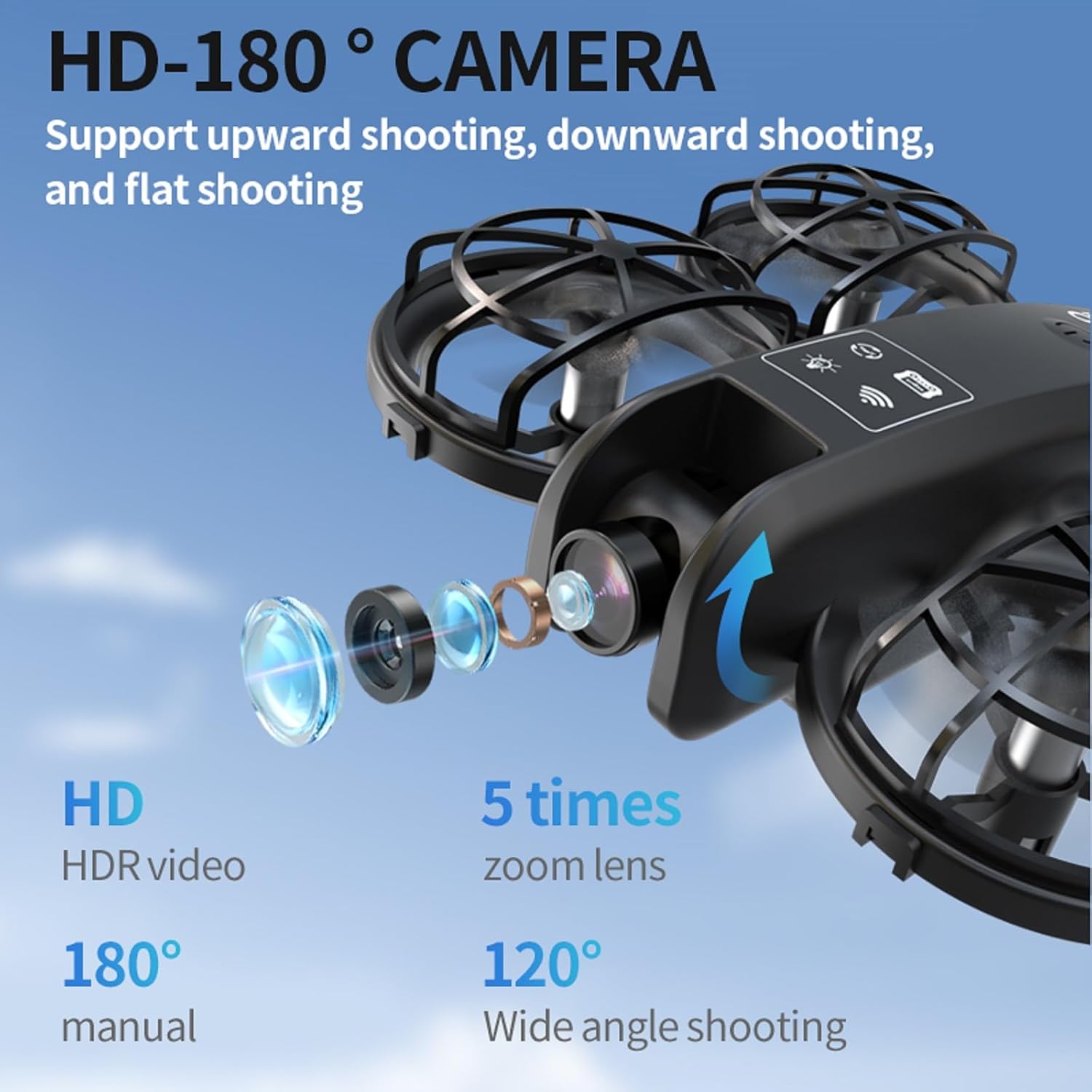
Image: Detailed view of the drone's HD 180-degree adjustable camera, highlighting its capabilities for various shooting angles, 5x zoom, and 120-degree wide-angle.
6. Maintenance
6.1 Cleaning
Regularly clean the drone body, propellers, and camera lens with a soft, dry cloth. Avoid using liquids or solvents.
6.2 Propeller Replacement
If propellers become damaged, replace them with genuine elecci K100 spare parts. Ensure correct orientation (A and B propellers) during installation.
6.3 Battery Care
- Store batteries in a cool, dry place.
- Do not overcharge or over-discharge batteries.
- If storing for extended periods, charge batteries to approximately 50% capacity.
7. Troubleshooting
7.1 Drone Drifts During Flight
- Ensure the drone is placed on a flat, level surface before take-off.
- Perform a gyroscope calibration. Refer to the controller's menu or the full user manual for specific calibration steps.
- Avoid flying in windy conditions, as even slight drafts can affect stability.
- Check for any bent or damaged propellers that might cause imbalance.
7.2 No Connection to Controller
- Ensure both the drone and controller are powered on and fully charged.
- Repeat the pairing process as described in Section 4.4.
- Move closer to the drone to ensure you are within the Bluetooth range.
7.3 Poor Camera Feed Quality
- Ensure the camera lens is clean and free of smudges.
- Check for strong Wi-Fi interference in the area, as the drone uses Wi-Fi for image transmission.
- Ensure the SD card is properly inserted and not full.
8. Specifications
| Feature | Specification |
|---|---|
| Brand | elecci |
| Model Name | K100 |
| Item Weight | 6.4 ounces |
| Item Dimensions (L x W x H) | 3.2"L x 1.9"W x 5"H |
| Video Capture Resolution | 720p |
| Video Capture Format | MP4 |
| Supported Image Format | JPEG |
| Connectivity Technology | Bluetooth, Wi-Fi |
| Control Type | Remote Control (Screen Controller) |
| Battery Cell Composition | Lithium Ion |
| Optical Sensor Technology | CMOS, Optical Flow |
| Special Features | 360 Degree Flip, Auto Follow, One Button Return, One Key Rotation, Optical Flow Localization, Active Obstacle Avoidance |
| Skill Level | Beginner |
9. Warranty and Support
For warranty information, technical support, or service inquiries, please contact the manufacturer, elecci, or the seller directly. Retain your proof of purchase for warranty claims.