1. Introduction
The Voacle RG Slide is a retro handheld game console designed for portable gaming and multimedia entertainment. Featuring a unique slide-out design, a 4.7-inch LTPS in-cell touch screen, and powered by an Unisoc T820 processor with Android 13, it offers a versatile platform for various games and applications. This manual provides essential information for setting up, operating, and maintaining your device.

Image 1.1: The Voacle RG Slide Retro Handheld Game Console.
2. What's in the Box
Please check the contents of your package to ensure all items are present:
- 1 x RG Slide Game Console
- 1 x USB Cable (Type-C)
- 1 x Joystick Cap (set of 4)
- 1 x Screen Protector (set of 2)
- 1 x User Manual
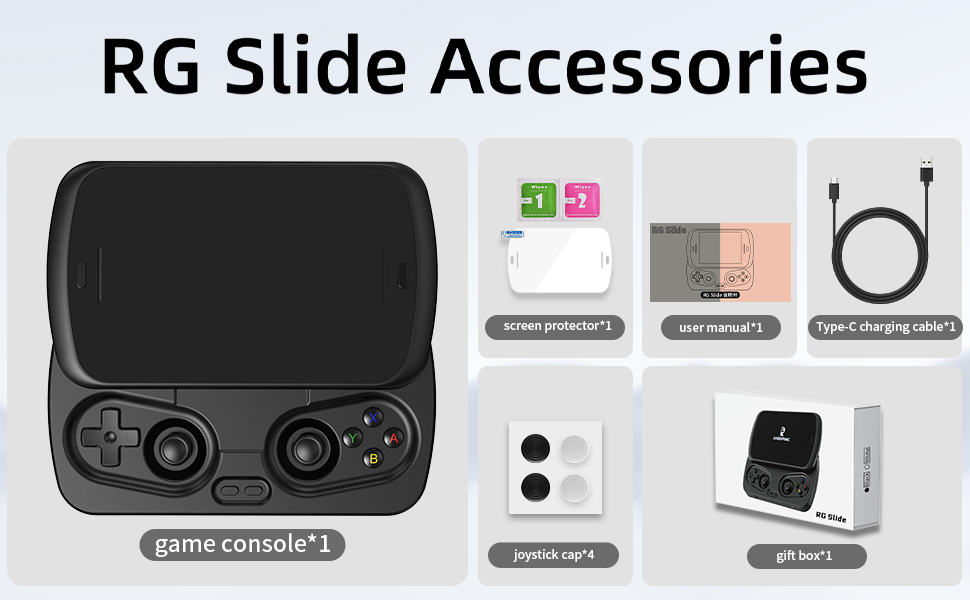
Image 2.1: Package Contents of the RG Slide.
3. Product Overview
3.1. Design and Controls
The RG Slide features an exclusive automatic spring slide rail design. Pushing the screen upwards reveals the game controls, including a D-Pad, ABXY buttons, capacitive joysticks, and function keys. The device also includes shoulder buttons (L1, L2, R1, R2), a return key, volume/power key, and an indicator light.

Image 3.1: RG Slide Control Layout and Ports.
3.2. Key Features
- Display: 4.7-inch LTPS In-Cell multi-touch display with OCA full lamination, 1280*960 resolution, and up to 120Hz refresh rate.
- Processor: Unisoc T820 (6nm EUV 5G SOC chip) with Quad-core Mali-G57 GPU (850Mhz).
- Memory & Storage: 8GB LPDDR4X RAM, 128GB UFS2.2 internal storage, expandable via TF card up to 2TB.
- Operating System: Android 13.
- Connectivity: 5G Wi-Fi (802.11a/b/g/n/ac) and Bluetooth 5.0.
- Battery: 5000mAh Polymer Lithium battery, offering up to 6 hours of gameplay. Supports fast charging via USB Type-C.
- Audio: High-fidelity stereo speakers and 3.5mm headphone jack.
- Other Features: Six-axis gyroscope, vibration motor, RGB joystick light control, active heat dissipation with high-speed fan and heat pipes, USB Type-C with 1080p display port output, FOTA wireless upgrades.

Image 3.2: Detailed view of the 4.7-inch LTPS In-Cell Display.
4. Getting Started
4.1. Charging the Device
Before first use, fully charge your RG Slide console. Connect the included USB Type-C cable to the charging port on the device and plug the other end into a compatible USB power adapter (not included). The indicator light will show charging status. A full charge typically takes approximately 3 hours.
4.2. Powering On/Off
- To Power On: Press and hold the power key (integrated with the volume key) until the screen illuminates.
- To Power Off: Press and hold the power key, then select the 'Power Off' option from the menu that appears on the screen. A short press will put the device into sleep mode.
4.3. Initial System Setup
Upon first power-on, you will be guided through the Android 13 initial setup process. Follow the on-screen prompts to select your language, connect to a Wi-Fi network, and configure basic settings.
4.4. Connecting to Wi-Fi
To access online features, game downloads, and system updates, connect your device to a Wi-Fi network:
- Slide up the screen to reveal controls.
- Navigate to Settings > Network & Internet > Wi-Fi.
- Toggle Wi-Fi On.
- Select your desired network from the list and enter the password if prompted.
4.5. Game Installation
Important Note: The RG Slide does not come with preloaded games. Users are required to download and install relevant games and emulators independently. You can utilize the Android 13 operating system to access various app stores or transfer game files via the TF card slot.
5. Operating Instructions
5.1. Navigation and Controls
Use the capacitive joysticks and D-Pad for precise movement and selection. The ABXY buttons are standard action buttons. The touch screen allows for intuitive navigation within the Android interface.
5.2. Gaming Modes
The RG Slide supports multiple entertainment modes:
- Handheld Mode: Play directly on the device's screen using the integrated controls.
- Screen Casting: Connect the console to a TV or monitor via the USB Type-C port (supports 1080p display port output) to enjoy games on a larger screen.
- Online Multiplayer: Utilize 5G Wi-Fi for online multiplayer games.
- Streaming: Stream AAA games to the handheld.

Image 5.1: Multiple Entertainment Modes.
5.3. AI Assistant Functions
The integrated AI Assistant offers several features to enhance your gaming and productivity:
- One-click Game Guide Retrieval: Quickly access game guides.
- Real-time Translation: Translate text during gameplay or general use.
- Intelligent Dialogue: Engage in smart conversations.
- Text-to-Image Generation: Create images from text prompts.
- Image Processing: Enhance or modify images.

Image 5.2: ANBERNIC Self-Developed AI Assistant Features.
5.4. Tablet Mode
When the sliding cover is closed, the RG Slide transforms into a compact Android tablet. This allows for activities such as watching videos, live streaming, reading, social media, and light office work.

Image 5.3: RG Slide in Tablet Mode.
5.5. FOTA Wireless Upgrades
The device supports Firmware Over-The-Air (FOTA) wireless upgrades. Ensure your device is connected to Wi-Fi to receive and install the latest system updates, which can improve performance and add new features.
6. Care and Maintenance
6.1. Cleaning the Device
Use a soft, dry, lint-free cloth to clean the screen and exterior of the console. Avoid using harsh chemicals, abrasive cleaners, or excessive moisture, as these can damage the device.
6.2. Battery Management
- To prolong battery life, avoid fully discharging the battery frequently.
- Store the device in a cool, dry place when not in use for extended periods.
- Use only the provided USB cable or a certified compatible charger for charging.
6.3. Storage Expansion
The device supports TF card expansion up to 2TB. Insert the TF card into the designated slot to expand your storage for games, media, and other files. Ensure the card is inserted correctly to avoid damage.
6.4. Heat Management
The RG Slide is equipped with a high-speed fan and heat pipes for active heat dissipation. Ensure that the ventilation openings are not obstructed during use to maintain optimal performance and prevent overheating.
7. Troubleshooting
- Device not powering on: Ensure the battery is charged. Connect the charger and try again. If the issue persists, perform a hard reset by holding the power button for 10-15 seconds.
- Wi-Fi connectivity issues: Check your router and network settings. Ensure the Wi-Fi password is correct. Try restarting both the console and your router.
- Games running slowly or freezing: Close background applications. Ensure sufficient storage space is available. For demanding games, adjust in-game graphics settings to lower levels.
- Screen unresponsive: If the touch screen is unresponsive, try restarting the device. If only parts of the screen are affected, ensure it is clean and free of debris.
- Controls not responding: Ensure the screen is fully slid up and the controls are properly engaged. Restart the device.
For persistent issues not covered here, please refer to the manufacturer's official support channels or website.
8. Technical Specifications
| Feature | Specification |
|---|---|
| Model | RG Slide |
| Screen Size | 4.7 Inches |
| Display Type | LTPS In-Cell LCD, Multi-touch, OCA full lamination |
| Resolution | 1280*960 |
| Refresh Rate | Up to 120Hz |
| Processor | Unisoc T820 (6nm EUV 5G SOC chip) |
| GPU | Quad-core Mali-G57 (850Mhz) |
| RAM | 8GB LPDDR4X |
| Internal Storage | 128GB UFS2.2 |
| Expandable Storage | TF card up to 2TB |
| Operating System | Android 13 |
| Wi-Fi | 5G (802.11a/b/g/n/ac) |
| Bluetooth | 5.0 |
| Battery | 5000mAh Lithium-Ion |
| Battery Life | Up to 6 hours (gaming) |
| Charging Port | USB Type-C (supports fast charging) |
| Video Output | USB Type-C (1080p Display Port output) |
| Audio | High-fidelity stereo speakers, 3.5mm headphone jack |
| Dimensions | 5 x 4 x 1 inches |
| Weight | 0.4 Kilograms (14.1 ounces) |
| Material | Plastic |
9. Warranty Information
Voacle products typically come with a limited manufacturer's warranty. Please refer to the warranty card included with your product or visit the official Voacle website for detailed information regarding warranty terms, conditions, and duration. Keep your proof of purchase for warranty claims.
10. Customer Support
For technical assistance, product inquiries, or support, please visit the official Voacle website or contact their customer service department. Contact information can usually be found on the product packaging or the manufacturer's website.