1. Introduction
Thank you for choosing the SOBERNA Tikland S71S Smartwatch. This manual provides essential information for setting up, operating, and maintaining your device. Please read it carefully to ensure optimal performance and longevity of your smartwatch.
Package Contents
- SOBERNA Tikland S71S Smartwatch (with metal strap)
- Charging Cable
- User Manual
- (Optional) Additional Silicone Strap
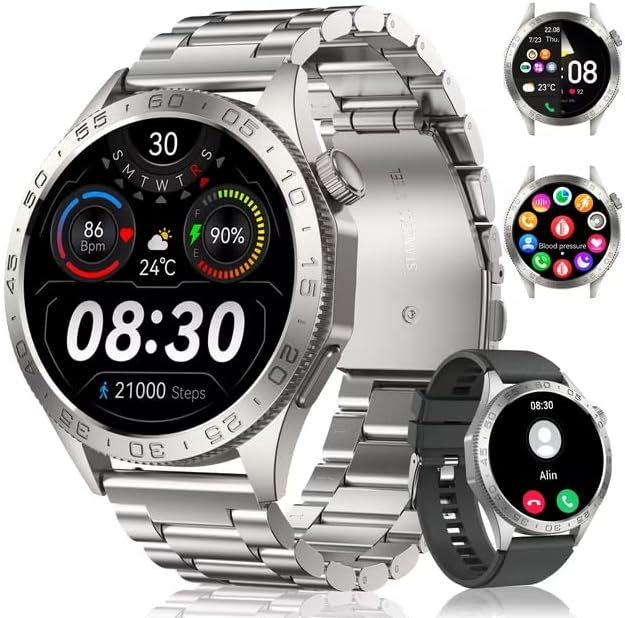
Image 1.1: The SOBERNA Tikland S71S Smartwatch, featuring a silver metal strap and a round AMOLED display. The display shows time, date, heart rate, steps, and weather. An additional black silicone strap is also visible.
2. Safety Information
- Do not attempt to disassemble or modify the smartwatch.
- Keep the device away from extreme temperatures and direct sunlight.
- Avoid exposing the smartwatch to strong impacts or drops.
- Use only the provided charging cable.
- Consult a medical professional before starting any new exercise regimen, especially if you have pre-existing health conditions. The smartwatch is not a medical device.
- Ensure the watch is dry before charging to prevent electrical hazards.
3. Setup
3.1 Charging the Smartwatch
Before first use, fully charge your smartwatch. Connect the magnetic charging cable to the charging points on the back of the watch and plug the USB end into a standard USB power adapter (5V/1A recommended).
- A full charge typically takes approximately 2 hours.
- The battery icon on the screen will indicate charging status.
3.2 Power On/Off
- Power On: Press and hold the side button for a few seconds until the screen lights up.
- Power Off: Press and hold the side button, then select the "Power Off" option on the screen.
3.3 App Installation and Pairing
- Download the App: Scan the QR code in the manual or on the watch screen (if available) or search for the companion app (e.g., "FitCloudPro" or similar, as common for these watches) in the Apple App Store or Google Play Store.
- Register/Log In: Open the app and follow the on-screen instructions to create an account or log in.
- Pairing:
- Ensure Bluetooth is enabled on your smartphone.
- Open the app, navigate to the "Device" or "My Watch" section, and select "Add Device".
- The app will search for available devices. Select "S71S-Tikland" or a similar name from the list.
- Confirm the pairing request on both your phone and the smartwatch.
Once paired, the watch will synchronize time and data with your smartphone.
4. Operating the Smartwatch
4.1 Basic Navigation
- Touch Screen: Swipe left/right, up/down to navigate through menus and features. Tap to select.
- Side Button: Press to return to the main watch face or to access the app menu. Long press for power options.
4.2 Call Functions (Bluetooth Calling)
The SOBERNA Tikland S71S supports Bluetooth calling, allowing you to answer and dial calls directly from your wrist when connected to your smartphone.
- Enable Call Audio: Ensure that the watch is connected for both data and call audio in your phone's Bluetooth settings. Sometimes this requires pairing the watch twice or enabling a specific setting within the companion app.
- Dialing: Access the dial pad or contact list on the watch to make calls.
- Answering/Rejecting: When a call comes in, tap the green icon to answer or the red icon to reject on the watch screen.
4.3 Fitness Tracking
The smartwatch tracks various fitness metrics:
- Steps: Counts daily steps taken.
- Distance: Estimates distance covered based on steps.
- Calories: Estimates calories burned.
- Heart Rate: Monitors heart rate throughout the day or on demand.
- Sleep Monitoring: Tracks sleep patterns (deep sleep, light sleep, awake time).
- Blood Oxygen (SpO2): Measures blood oxygen levels.
- Blood Pressure: Provides an estimate of blood pressure. Note: This feature is for reference only and should not be used for medical diagnosis.
View detailed data and trends in the companion app.
4.4 Sports Modes
With 100 sports modes, the watch can track specific activities. Select your desired sport from the watch's menu to record duration, calories, heart rate, and other relevant metrics.
- GPS Tracking: For outdoor activities like running or cycling, the watch uses your smartphone's GPS to map your route and track distance more accurately. Ensure your phone is with you and GPS is enabled.
4.5 Notifications
Receive notifications for calls, messages, and app alerts directly on your smartwatch. Configure which app notifications you want to receive through the companion app settings.
4.6 Watch Faces
Customize your watch face from a selection of pre-installed options or download more through the companion app to personalize your device.
5. Maintenance
5.1 Cleaning
- Wipe the watch screen and body with a soft, lint-free cloth.
- For stubborn dirt, slightly dampen the cloth with water. Do not use harsh chemicals or abrasive materials.
- Clean the charging contacts regularly to ensure proper charging.
5.2 Water Resistance (5ATM)
The SOBERNA Tikland S71S Smartwatch is 5ATM waterproof, meaning it can withstand pressures equivalent to a depth of 50 meters. This makes it suitable for showering, swimming in shallow water, and everyday use.
- Do not use the watch in hot water, saunas, or steam rooms, as steam can penetrate the seals.
- Avoid exposing the watch to high-velocity water, such as diving or high-pressure washing.
- After exposure to saltwater, rinse the watch with fresh water and dry it thoroughly.
6. Troubleshooting
- Watch not turning on: Ensure the watch is fully charged. Connect it to the charger for at least 30 minutes.
- Unable to pair with smartphone:
- Ensure Bluetooth is enabled on your phone and the watch.
- Make sure the watch is within range of your phone.
- Restart both the watch and your phone.
- Try unpairing and re-pairing the device through the app.
- Inaccurate fitness data:
- Ensure the watch is worn snugly on your wrist, about one finger's width above the wrist bone.
- Update your personal information (height, weight, age) in the companion app for better accuracy.
- Notifications not received:
- Check app notification settings on your phone and in the companion app.
- Ensure the watch is connected via Bluetooth.
- Disable any power-saving modes on your phone that might restrict app background activity.
7. Specifications
| Feature | Detail |
|---|---|
| Model Name | S71S-Tikland |
| Display | 1.43'' AMOLED |
| Water Resistance | 5ATM |
| Connectivity | Bluetooth |
| Battery Type | Lithium Ion (Rechargeable) |
| Operating System | Android Wear 2.9 (as per product data, typically a proprietary OS) |
| GPS | Via Smartphone |
| Compatibility | Android, iOS |
| Special Features | Activity Tracker, 100 Sports Modes, Call Answering/Dialing |
8. Warranty and Support
For warranty information, technical support, or service inquiries, please refer to the warranty card included in your product packaging or visit the official SOBERNA website. You may also contact your retailer for assistance.
Keep your purchase receipt as proof of purchase for warranty claims.