
1. Product Overview
The Bushnell Prime Low Glow Trail Camera is designed for reliable outdoor surveillance and wildlife monitoring. It offers straightforward setup and an easy-to-navigate menu, delivering high-quality images and videos. Equipped with 36 low glow LEDs, it provides consistent illumination for clear nighttime captures, ensuring excellent performance in various conditions.
Key Features:
- 24MP Image Quality: Captures crystal clear images with high resolution.
- 1080p HD Video: Records smooth video at 30 frames per second with audio.
- 80 ft Night Range: Utilizes 36 low glow LEDs for effective nighttime monitoring.
- Fast 0.3s Trigger Speed: Ensures quick capture of moving subjects.
- 1s Recovery Rate: Allows for rapid consecutive captures.
- Easy-to-Read LCD Screen: Simplifies menu navigation and setup.
- Programmable Settings: Customize trigger interval, multi-image mode, video length/resolution, and adjustable PIR.
- Date, Time, and Temperature Stamp: Provides essential data on every image.
- Solar Panel Adaptable: Compatible with external solar panels for extended power.
- Durable Construction: Designed for outdoor use with an IP54 international protection rating.
2. Setup Guide
Battery Installation
The Bushnell Prime Trail Camera requires 6 AA batteries (not included). To install, open the camera housing and locate the removable battery tray. Insert the batteries according to the polarity indicators (+/-) inside the tray. Once all batteries are correctly inserted, slide the tray back into the camera until it clicks securely into place.

Image: Hand inserting batteries into the removable battery tray.
SD Card Insertion
This camera supports SD cards up to 32GB (not included). With the camera powered off, locate the SD card slot, typically near the battery compartment or on the side. Insert the SD card with the metal contacts facing down until it clicks into place. Ensure the card is fully seated to prevent data loss.
Mounting the Camera
The Bushnell Prime Trail Camera can be mounted using the included premium nylon strap or by utilizing the 1/4-20 socket for compatibility with deluxe tree brackets (sold separately). When using the strap, thread it through the designated slots on the back of the camera and secure it around a tree or post using the steel buckle. Ensure the camera is stable and pointed towards the desired monitoring area.

Image: Bushnell Prime Trail Camera securely mounted on a tree.

Image: The premium nylon strap and steel buckle provided for mounting.
3. Operating Instructions
Basic Operation and Menu Navigation
The camera features an easy-to-read LCD screen and 5-way buttons for intuitive setup and navigation. Power on the camera using the ON/OFF switch. Use the directional buttons to navigate through the menu options and the OK button to confirm selections. The LCD screen displays current settings, battery level, and image/video count.
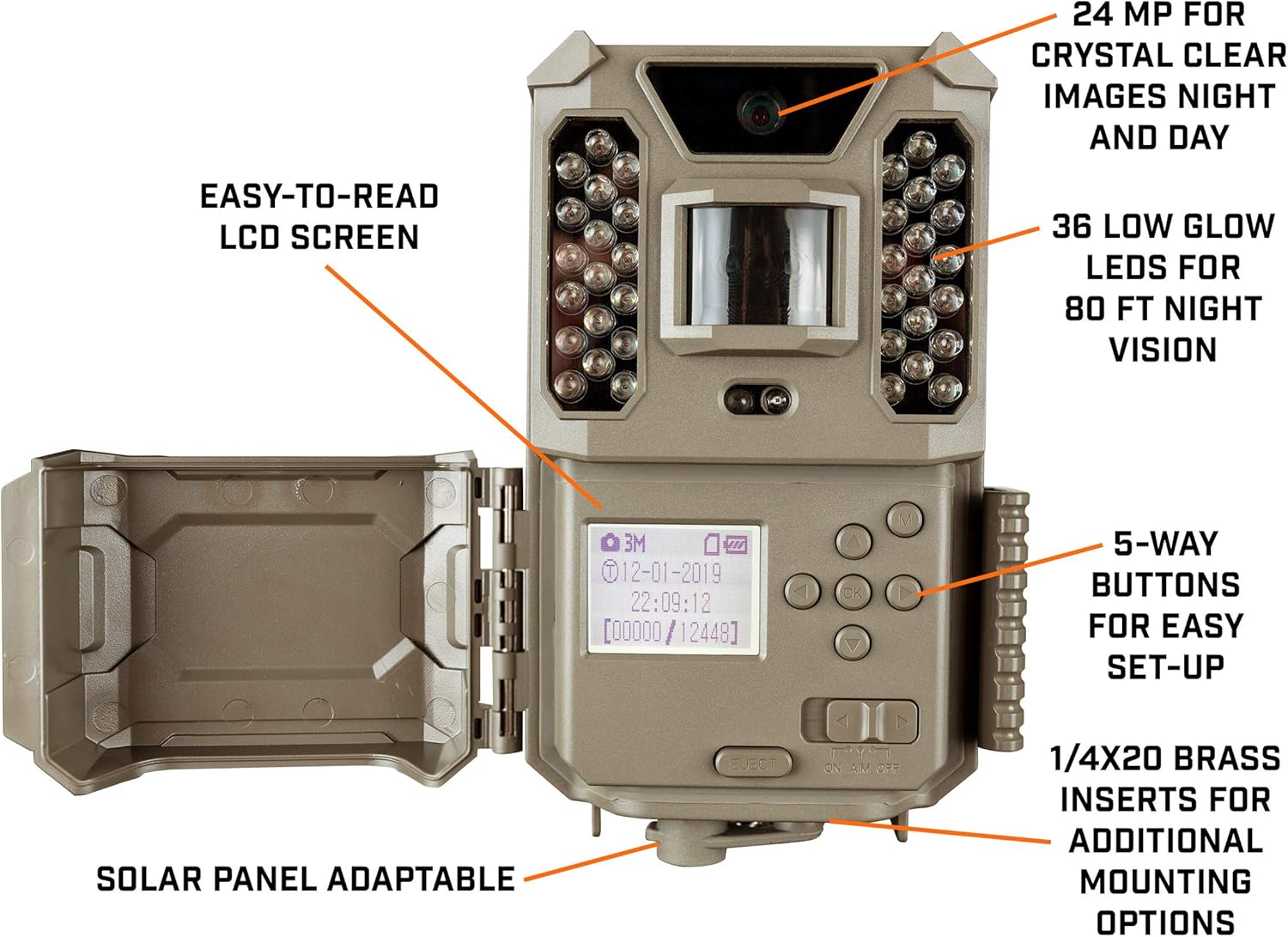
Image: Detailed view of the camera's LCD screen and control buttons.
Setting Up Modes
The Bushnell Prime camera offers various programmable settings to optimize its performance for your specific needs:
- Field Scan Mode: Records time-lapse sequences and expands camera coverage.
- 2x Time Lapse w/ Live Trigger: Combines time-lapse photography with motion-triggered captures.
- Programmable Settings: Adjust trigger interval, multi-image mode (number of photos per trigger), video length, video resolution, and adjustable Passive Infrared (PIR) sensitivity to control motion detection.
Image and Video Capture
The camera captures high-resolution 24MP still images and 1080p HD video at 30 frames per second with audio. The 36 low glow LEDs provide an 80-foot night range, ensuring clear captures even in low-light conditions. Each image and video is stamped with the date, time, and temperature for detailed record-keeping.

Image: Examples of 24MP images and 1080p video with audio captured by the camera.
Product Demonstration Video
Watch this official product video for a visual guide on the Bushnell Prime Trail Camera's features and capabilities.

Video: Bushnell PRIME 24MB Trail Camera overview, demonstrating its features and performance.
4. Maintenance
General Care
- Keep the camera lens and PIR sensor clean using a soft, lint-free cloth. Avoid abrasive materials.
- Ensure the camera housing is securely closed to maintain its IP54 weather resistance.
- Store the camera in a cool, dry place when not in use, away from direct sunlight and extreme temperatures.
Battery and SD Card Management
- Replace all 6 AA batteries simultaneously with new, high-quality alkaline batteries when the battery indicator shows low power.
- Regularly check the SD card for available space. Format the SD card periodically (after backing up important data) to maintain optimal performance and prevent corruption.
5. Troubleshooting
| Problem | Possible Cause | Solution |
|---|---|---|
| Camera not powering on | Dead or incorrectly inserted batteries; faulty battery tray. | Ensure batteries are new and inserted with correct polarity. Try a different set of batteries. Check battery tray for damage. |
| No images/videos captured | SD card full or corrupted; incorrect settings; PIR sensor obstructed or sensitivity too low. | Format or replace SD card. Check camera settings (mode, trigger interval). Clear any obstructions from the PIR sensor and adjust sensitivity. |
| Poor image/video quality | Dirty lens; low light conditions; incorrect resolution settings. | Clean the camera lens. Ensure sufficient lighting or adjust night vision settings. Verify image/video resolution is set to maximum (24MP/1080p). |
| Short battery life | Frequent triggers; cold weather; low-quality batteries. | Reduce trigger interval or PIR sensitivity. Use high-quality alkaline batteries. Consider a solar panel accessory for extended use. |
6. Technical Specifications
| Specification | Detail |
|---|---|
| Effective Still Resolution | 24 MP |
| Video Capture Resolution | 1080p @ 30 fps |
| Night Range | 80 feet (with 36 Low Glow LEDs) |
| Trigger Speed | 0.3 seconds |
| Recovery Rate | 1 second |
| Power Source | 6 AA Batteries (not included) |
| Flash Memory Type | SD (up to 32GB) |
| Connectivity Technology | Wireless (Wi-Fi) |
| Mounting Type | Tree Mount (Strap, 1/4-20 socket) |
| International Protection Rating | IP54 |
| Item Dimensions (L x W x H) | 2.75 x 4 x 6.5 inches |
| Item Weight | 1 pound (454 Grams) |
| Model Number | 119932C |
| UPC | 029757006370 |
7. Warranty and Support
Bushnell Ironclad Warranty
Bushnell products are engineered to deliver to your expectation and manufactured to withstand the rigors of the outdoors for the lifetime of the product. In the event that your product fails you, Bushnell will stand behind it and repair it at no cost to you. If they can't repair it, they will replace it with a product of equal or better value. No receipt is required, and the warranty is fully transferable.
Image: Bushnell's Lifetime Ironclad Warranty statement.
Additional Protection Plans
Optional 2-Year and 3-Year Protection Plans may be available for purchase to provide extended coverage beyond the manufacturer's warranty. Please refer to your retailer for details on these plans.
Customer Support
For technical assistance, troubleshooting, or warranty claims, please visit the official Bushnell website or contact their customer support directly. You can find contact information and FAQs on their support page.