
DUSONLAP E6
DUSONLAP E6 Open Ear Earbuds User Manual
Model: E6 | Brand: DUSONLAP
1. Introduction
Thank you for choosing the DUSONLAP E6 Open Ear Earbuds. These wireless headphones are designed to provide a comfortable listening experience while keeping you aware of your surroundings. Featuring Bluetooth 5.4 for stable connectivity, HiFi stereo sound, ENC call noise reduction, and IPX7 waterproofing, the E6 earbuds are ideal for daily use, sports, and commuting.
This manual will guide you through the setup, operation, and maintenance of your new earbuds to ensure optimal performance and longevity.
2. Package Contents
Please check the box for the following items:
- Open-ear headphones (Left & Right) x 2
- Quick charging case x 1
- USB-C fast charging cable x 1
- User Manual x 1

Figure 2.1: Package Contents
3. Product Overview
3.1 Earbud Components
The DUSONLAP E6 earbuds feature an ergonomic ear hook design for secure and comfortable wear. Each earbud contains a 14mm large driver unit for high-fidelity audio and a built-in microphone for clear calls.

Figure 3.1: Earbud Internal Structure
3.2 Charging Case
The compact charging case not only protects your earbuds but also provides extended battery life. It features a digital display to show the remaining battery percentage of the case and the charging status of each earbud.

Figure 3.2: Earbuds in Charging Case
4. Setup
4.1 Charging the Earbuds and Case
Before first use, fully charge the earbuds and the charging case.
- Place the earbuds into the charging case. Ensure the charging contacts align.
- Connect the USB-C charging cable to the charging port on the case and the other end to a USB power adapter (not included).
- The digital display on the case will show the charging progress. A full charge takes approximately 1.5 hours.
The earbuds offer up to 8 hours of playtime on a single charge, and the charging case provides an additional 24 hours, totaling up to 32 hours of use.

Figure 4.1: Charging the Earbuds and Case
4.2 Bluetooth Pairing
The earbuds utilize Bluetooth 5.4 for quick and stable connections.
- Open the charging case. The earbuds will automatically power on and enter pairing mode. The indicator light on the earbuds will flash.
- On your device (smartphone, tablet, laptop), enable Bluetooth.
- Search for "E6" in the list of available Bluetooth devices and select it to connect.
- Once connected, the earbud indicator lights will turn off, and your device will confirm the connection.
The earbuds will automatically reconnect to the last paired device when taken out of the case, if Bluetooth is enabled on the device.
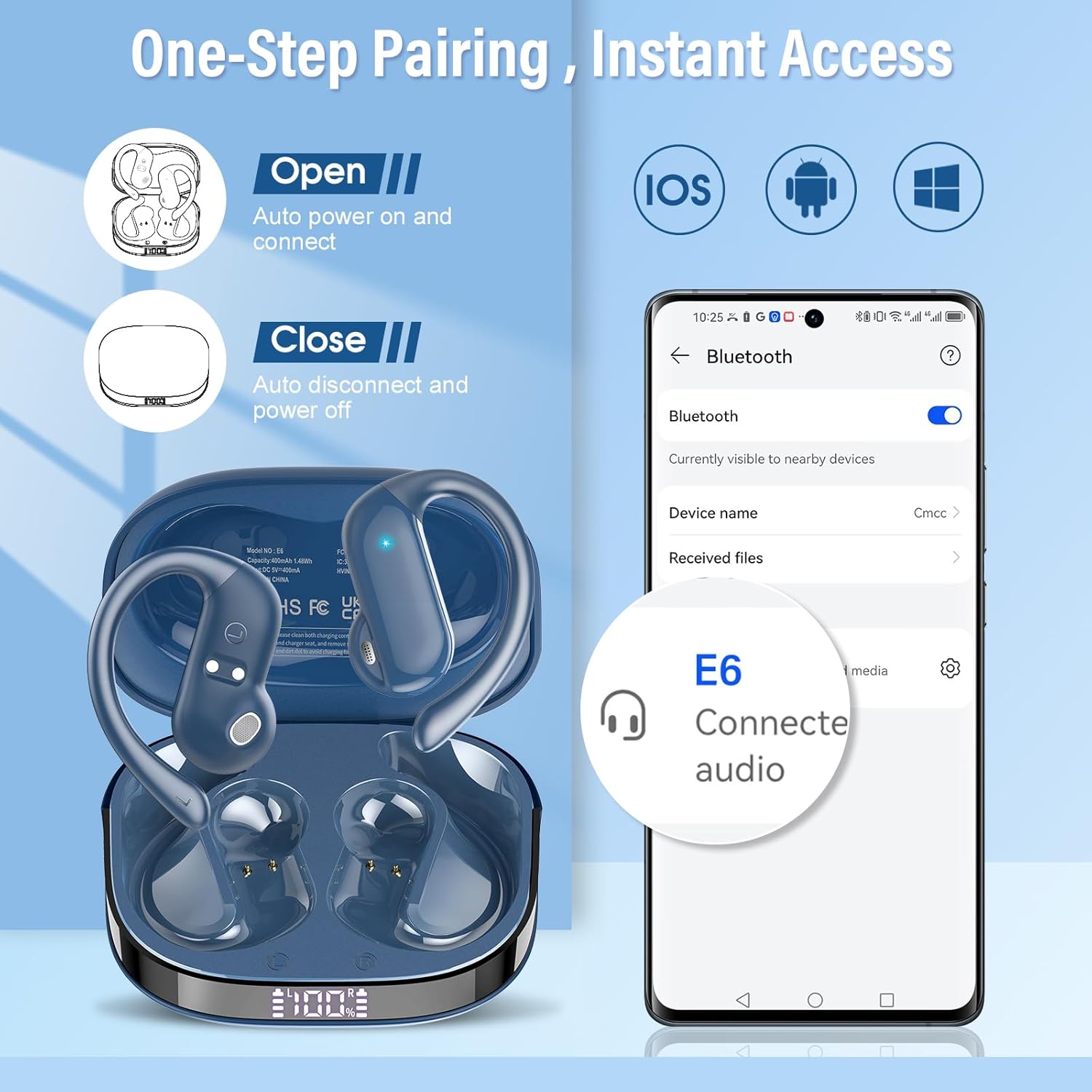
Figure 4.2: Bluetooth Pairing Process
5. Operating Instructions
5.1 Wearing the Earbuds
The E6 earbuds are designed for an open-ear fit, resting comfortably on your ear without inserting into the ear canal.
- Simply remove the headphones from the case.
- Hang the headphones on your ear bone for a perfect fit.
- Turn the earphones and slide it behind the ear.
- Adjust the ear hook, wear, and pull down the ear hook for a secure fit.

Figure 5.1: How to Wear the Earbuds
5.2 Touch Controls
The earbuds feature intuitive touch controls on the outer surface of each earbud.
| Action | Left Earbud | Right Earbud |
|---|---|---|
| Play/Pause | Double Tap | Double Tap |
| Volume Up | Single Tap | N/A |
| Volume Down | N/A | Single Tap |
| Next Track | Press and Hold (2s) | N/A |
| Previous Track | N/A | Press and Hold (2s) |
| Answer/End Call | Double Tap | Double Tap |
| Reject Call | Press and Hold (2s) | Press and Hold (2s) |
| Activate Voice Assistant | Triple Tap | Triple Tap |

Figure 5.2: Earbud Touch Controls
5.3 Calling Functions
The built-in ENC microphone technology helps isolate your voice and filter out background noise for clear calls, even in noisy environments.
- Answer/End Call: Double tap either earbud.
- Reject Call: Press and hold either earbud for 2 seconds.
5.4 Music Playback
Enjoy rich, immersive HiFi stereo sound with the customized 14mm large driver units.
- Play/Pause: Double tap either earbud.
- Volume Control: Single tap the left earbud for Volume Up, single tap the right earbud for Volume Down.
- Next Track: Press and hold the left earbud for 2 seconds.
- Previous Track: Press and hold the right earbud for 2 seconds.
6. Maintenance
6.1 Cleaning
Regular cleaning helps maintain the performance and hygiene of your earbuds.
- Wipe the earbuds and charging case with a soft, dry, lint-free cloth.
- Do not use abrasive cleaners, solvents, or aerosol sprays.
- Ensure the charging contacts on both the earbuds and the case are clean and dry to prevent charging issues.
6.2 Storage
When not in use, store the earbuds in their charging case to protect them from dust and damage.
- Store in a cool, dry place, away from extreme temperatures and direct sunlight.
6.3 Water Resistance (IPX7)
The DUSONLAP E6 earbuds are IPX7 rated, meaning they are protected against temporary immersion in water (up to 1 meter for 30 minutes). This makes them resistant to sweat, rain, and splashes.
- Do not intentionally submerge the earbuds in water for extended periods or use them for swimming.
- Ensure the earbuds are completely dry before placing them back into the charging case to prevent damage to the charging contacts.

Figure 6.1: IPX7 Water Resistance
7. Troubleshooting
If you encounter any issues with your DUSONLAP E6 earbuds, please refer to the following common problems and solutions:
| Problem | Possible Cause | Solution |
|---|---|---|
| Earbuds not pairing | Bluetooth off on device; earbuds not in pairing mode; interference. | Ensure Bluetooth is on. Place earbuds in case, close, then open to re-enter pairing mode. Move away from other wireless devices. |
| Only one earbud working | Earbuds not properly connected to each other; low battery. | Place both earbuds back in the case, close the lid, wait a few seconds, then open again. Ensure both earbuds are charged. |
| No sound or low volume | Volume too low on device/earbuds; earbuds not connected; dirty sound outlet. | Increase volume on both device and earbuds. Reconnect earbuds. Clean the earbud sound outlet gently. |
| Charging issues | Dirty charging contacts; faulty cable/adapter. | Clean charging contacts on earbuds and case. Try a different USB-C cable and power adapter. |
| Connection unstable | Distance from device; interference. | Keep earbuds within 15 meters of your device. Avoid strong electromagnetic interference. |
If the issue persists after trying these steps, please contact customer support.
8. Specifications
| Feature | Specification |
|---|---|
| Model Name | E6 |
| Connectivity Technology | Wireless (Bluetooth 5.4) |
| Ear Placement | Open-Ear / On Ear |
| Driver Size | 14mm |
| Playtime (Single Charge) | Up to 8 hours |
| Total Playtime (with Case) | Up to 32 hours |
| Charging Time | Approx. 1.5 hours (earbuds & case) |
| Water Resistance Level | IPX7 |
| Control Type | Touch Control |
| Microphone | Built-in with ENC Noise Reduction |
| Compatible Devices | iOS, Android, Windows devices with Bluetooth |
| Item Weight | 4.2 ounces |
| Package Dimensions | 3.74 x 3.43 x 1.34 inches |
9. Warranty and Support
DUSONLAP E6 Open Ear Earbuds come with a two-year warranty from the date of purchase. This warranty covers manufacturing defects and workmanship under normal use.
For customer service, technical support, or warranty claims, please contact DUSONLAP customer service through the retailer where you purchased the product or visit the official DUSONLAP website for contact information.
Please retain your proof of purchase for warranty validation.
Ask a question about this manual
Ask about setup, troubleshooting, compatibility, parts, safety, or missing instructions. Manuals+ will review the question and use this page’s manual context to help answer it.