
Introduction
This manual provides instructions for the Attwood Tsunami MK2 800 GPH Replacement Cartridge, designed for use with Attwood Tsunami Mk1 (46 series) and Mk2 (56 series) Bilge and Aerator pumps. This cartridge is engineered to eliminate air locks and ensure efficient operation of your bilge pump system. It is compatible with 12V and 24V systems.
Safety Information
- Always disconnect power to the pump system before attempting any installation, removal, or maintenance. Failure to do so may result in electrical shock or injury.
- Ensure all electrical connections are watertight and properly insulated to prevent corrosion and short circuits.
- Refer to your boat's specific wiring diagrams and safety procedures for proper electrical system handling.
- Wear appropriate personal protective equipment, such as gloves and eye protection, during installation and maintenance.
Setup and Installation
The Attwood Tsunami MK2 replacement cartridge is designed for easy, cartridge-style replacement, allowing for quick servicing without needing to replace the entire pump housing.
- Disconnect Power: Ensure all power to the bilge pump system is disconnected at the battery or main switch.
- Remove Old Cartridge: Twist the existing cartridge counter-clockwise and pull it upwards to remove it from the pump housing.
- Inspect and Clean Housing: Examine the pump housing for any debris, sediment, or blockages. Clean the housing thoroughly to ensure optimal performance of the new cartridge.
- Prepare New Cartridge: Apply a thin layer of marine-grade grease to the rubber seals on the base of the new Attwood Tsunami MK2 800 GPH replacement cartridge. This helps create a watertight seal and prevents the cartridge from seizing in the housing over time.
- Install New Cartridge: Align the tabs on the new cartridge with the slots in the pump housing. Push the cartridge down firmly and twist clockwise until it locks securely into place.
- Reconnect Power and Test: Reconnect power to the bilge pump system. Activate the pump manually or allow the float switch to engage to verify proper operation and check for any leaks.

Image 1: Attwood Tsunami MK2 800 GPH Replacement Cartridge. This image shows the top view of the cartridge, displaying its specifications and branding.
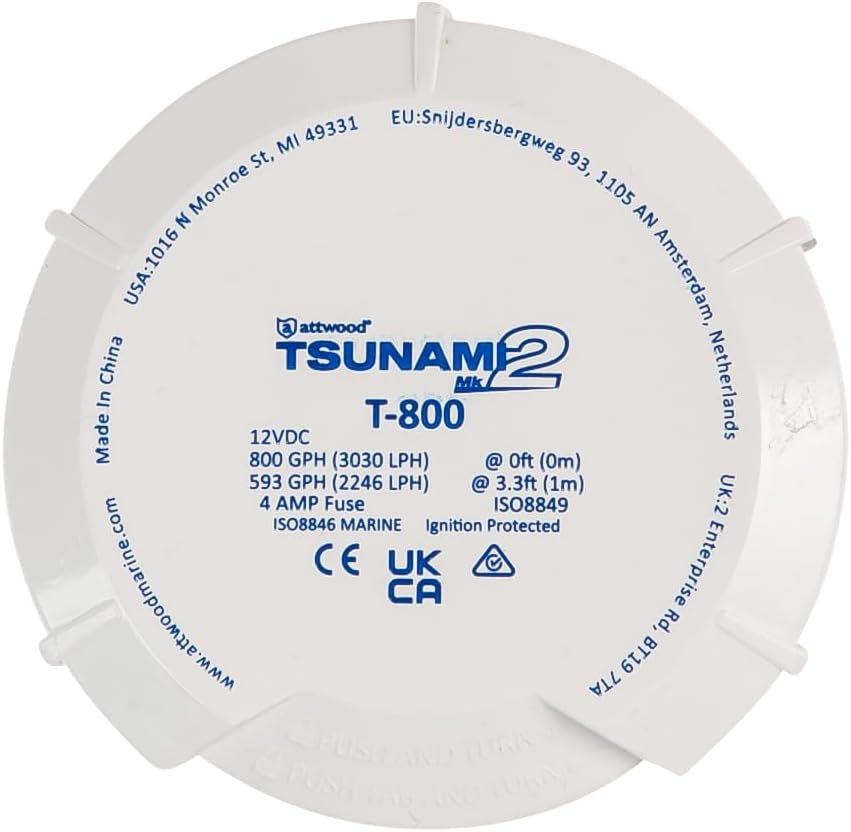
Image 2: Impeller of the Attwood Tsunami MK2 800 GPH Replacement Cartridge. This image highlights the impeller design, crucial for water movement.
Operation
Once installed, the Attwood Tsunami MK2 800 GPH replacement cartridge operates as an integral part of your existing Tsunami bilge or aerator pump system. Ensure the pump is connected to a reliable 12V or 24V power source as specified by your boat's electrical system.
The pump will activate automatically when the water level reaches the float switch, or it can be manually operated via a switch on your boat's control panel, depending on your system configuration.
Maintenance
- Regular Inspection: Periodically inspect the pump intake and impeller for any debris such as grass, weeds, fishing line, or other foreign objects. These can clog the impeller, reduce flow, and potentially damage the motor.
- Cleaning: If debris is present, disconnect power, remove the cartridge, and carefully clean the impeller and pump housing. Use fresh water to rinse away any accumulated grime.
- Electrical Connections: Check all electrical connections for signs of corrosion, fraying, or damage. Clean corroded terminals and replace any damaged wiring to ensure reliable operation.
- Seal Integrity: Ensure the cartridge seals remain pliable and free of cracks. Reapply marine grease if necessary during reinstallation.
Troubleshooting
- Pump Not Running:
- Verify that power is supplied to the pump. Check the battery connections and the main power switch.
- Inspect the fuse (4A for 12V systems) and replace if blown.
- Ensure all electrical connections are secure and free of corrosion.
- Check the float switch for obstructions or malfunction.
- Reduced Water Flow:
- Disconnect power and remove the cartridge. Inspect the pump intake and impeller for any clogs or debris. Clean thoroughly.
- Verify that the pump is receiving adequate voltage. Low voltage can reduce pump performance.
- Unusual Noise:
- Disconnect power and check for any foreign objects caught in the impeller.
- Ensure the cartridge is fully seated and locked into the pump housing.
Specifications
| Feature | Specification |
|---|---|
| Model Number | 5622-6 |
| Flow Rate (0ft head) | 800 GPH (3030 LPH) |
| Flow Rate (3.3ft head) | 593 GPH (2246 LPH) |
| Voltage Compatibility | 12V / 24V |
| Fuse Size (12V) | 4A |
| Wire Length | 29 inches |
| Material | ABS Plastic |
| Item Weight | 9.6 ounces |
| UPC | 022697024237 |
Warranty and Support
Manufacturer Warranty: Please contact Attwood if you experience any issues within 30 days of receipt of this product.
For further assistance, technical support, or to inquire about warranty claims beyond the initial period, please refer to the official Attwood website or contact their customer service department directly. Keep your purchase receipt as proof of purchase.


