
1. Important Safety Instructions
Please read all instructions carefully before operating the appliance and retain them for future reference. Failure to follow these instructions may result in electric shock, fire, or serious injury.
- Ensure the power supply voltage matches the rating label on the cooler.
- Always unplug the cooler from the power outlet before cleaning, servicing, or when not in use.
- Do not operate the cooler with a damaged cord or plug. If the cord or plug is damaged, contact authorized service personnel.
- Do not insert fingers or any objects into the air outlet or inlet grille.
- Place the cooler on a stable, level surface to prevent tipping.
- Do not use the cooler near water, such as in bathrooms or laundries, or where it may come into contact with water.
- Keep the cooler away from curtains, drapes, or any objects that may obstruct airflow.
- This appliance is not intended for use by persons (including children) with reduced physical, sensory, or mental capabilities, or lack of experience and knowledge, unless they have been given supervision or instruction concerning use of the appliance by a person responsible for their safety.
- Do not attempt to repair or modify the cooler yourself. All servicing should be performed by qualified personnel.
2. Product Overview
The Bajaj Shield Series Chisel 50 is a 70-liter desert air cooler designed to provide efficient and healthy cooling for large rooms. It features a robust motor and pump, anti-bacterial honeycomb pads, and multiple convenience features.
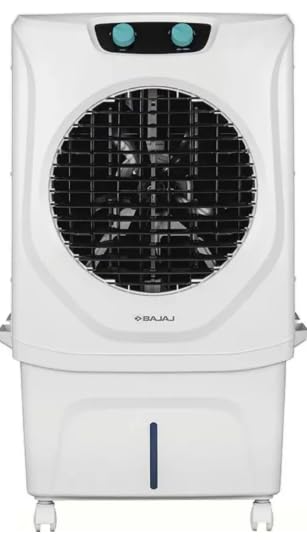
Figure 1: Front view of the Bajaj Shield Series Chisel 50 Air Cooler, showcasing its white casing, front grille, control knobs, and water level indicator.
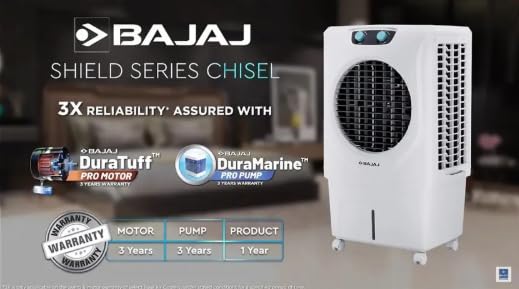
Figure 2: Image highlighting key features of the Bajaj Shield Series Chisel 50 Air Cooler, including DuraTuff PRO Motor and DuraMarine PRO Pump with their respective 3-year warranties.
Key Features:
- DuraTuff PRO Motor & DuraMarine PRO Pump: Engineered for durability and long-lasting performance.
- Anti-Bacterial Honeycomb Pads: Provides efficient and hygienic cooling by preventing bacterial growth.
- Turbo Fan & Powerful Air Throw: Delivers cool air effectively up to 80 feet (24 meters).
- 3-Speed Control & 4-Way Air Deflection: Allows for customizable airflow and even distribution of cool air.
- Inverter Compatible: Ensures uninterrupted cooling even during power outages.
- Easy Mobility: Equipped with castor wheels for convenient movement.
- Ice Chamber: For enhanced cooling performance.
3. Setup and Installation
3.1 Unpacking
- Carefully remove the cooler from its packaging.
- Remove all packing materials, tapes, and protective films.
- Check for any damage during transit. If any damage is found, do not operate the unit and contact customer service.
- Ensure all included components, such as the user manual, are present.
3.2 Positioning the Cooler
- Place the cooler on a firm, level surface to ensure stability and proper water distribution.
- Position the cooler near an open window or door to allow for proper ventilation and to draw in fresh air. This enhances cooling efficiency.
- Ensure there is adequate space around the cooler (at least 20 cm) for unobstructed air intake and exhaust.
- Keep the cooler away from direct sunlight to prevent overheating and improve cooling performance.
3.3 Filling the Water Tank
- Ensure the cooler is unplugged from the power outlet.
- Locate the water inlet opening, usually at the top or side of the cooler.
- Slowly pour clean, fresh water into the tank.
- Monitor the water level indicator on the front of the cooler. Do not fill above the 'MAX' mark to prevent spillage.
- For enhanced cooling, you can add ice cubes or ice packs into the dedicated ice chamber.
4. Operating Instructions
4.1 Control Panel Overview
The Bajaj Shield Series Chisel 50 features intuitive rotary knobs for easy control:
- Fan Speed Knob: Controls the fan speed (Low, Medium, High).
- Cooling/Pump Knob: Activates or deactivates the water pump for cooling.
- Swing Knob: Controls the oscillation of the vertical louvers for wider air distribution.
4.2 Powering On/Off
- After filling the water tank, plug the cooler into a suitable power outlet.
- Turn the Fan Speed knob to your desired setting (Low, Medium, or High) to switch on the fan.
- To turn off, set the Fan Speed knob to the 'OFF' position.
4.3 Adjusting Fan Speed
Rotate the Fan Speed knob to select between 'Low', 'Medium', and 'High' fan speeds according to your comfort level.
4.4 Activating Cooling (Pump)
To activate the cooling function, ensure the water tank is filled, then turn the Cooling/Pump knob to the 'ON' position. The water pump will start circulating water over the honeycomb pads, providing evaporative cooling.
4.5 Using the Swing Function
To enable automatic oscillation of the vertical louvers, turn the Swing knob to the 'ON' position. This distributes cool air more widely across the room. To stop oscillation, turn the Swing knob to 'OFF'.
4.6 Using the Ice Chamber
For an extra boost of cooling, open the ice chamber lid (usually located at the top) and place ice cubes or ice packs inside. Close the lid securely. This will cool the water circulating through the pads, resulting in colder air output.
5. Maintenance
Regular maintenance ensures optimal performance and longevity of your air cooler. Always unplug the cooler before performing any maintenance.
5.1 Cleaning the Exterior
- Wipe the exterior surfaces with a soft, damp cloth.
- Do not use abrasive cleaners, waxes, or solvents as they may damage the finish.
- Ensure no water enters the control panel or motor area.
5.2 Cleaning the Water Tank
- Drain any remaining water from the tank using the drain plug (if available) or by tilting the unit carefully.
- Clean the inside of the water tank with a soft brush or cloth and mild soap solution.
- Rinse thoroughly with clean water to remove any soap residue.
- Clean the water pump filter (if accessible) to prevent blockages.
- Perform this cleaning regularly, especially if the cooler is used frequently or if water becomes stagnant.
5.3 Cleaning/Replacing Honeycomb Pads
- Carefully remove the honeycomb pads from their housing (refer to the cooler's design for specific removal instructions).
- Rinse the pads under running water to remove dust, dirt, and mineral deposits. For stubborn deposits, soak them in a mild descaling solution (e.g., vinegar and water) for a short period, then rinse thoroughly.
- Allow the pads to air dry completely before reinserting them.
- Replace honeycomb pads if they are severely clogged, damaged, or show signs of mold growth, typically every 1-2 years depending on usage and water quality.
5.4 Seasonal Storage
- Before storing the cooler for an extended period, drain all water from the tank and clean it thoroughly.
- Clean the honeycomb pads and allow them to dry completely.
- Ensure the entire unit is dry to prevent mold and mildew growth.
- Cover the cooler with a dust-proof cover or plastic sheet and store it in a cool, dry place.
6. Troubleshooting
Before contacting customer service, please refer to the following troubleshooting guide for common issues.
| Problem | Possible Cause | Solution |
|---|---|---|
| Cooler does not turn on | No power supply Power cord not properly plugged in Main switch off | Check power outlet Ensure plug is firmly inserted Turn on the main switch |
| No cooling effect | Water tank empty Pump not working Honeycomb pads clogged Poor ventilation | Fill water tank Check pump connection, clean pump filter Clean honeycomb pads Ensure proper air circulation in the room |
| Weak airflow | Fan speed set too low Air inlet/outlet blocked Dust accumulation on fan blades | Increase fan speed Clear any obstructions Clean fan blades (unplug first) |
| Unusual noise | Cooler not on a level surface Foreign object in fan Pump noise (normal if water level is low) | Place on a stable, level surface Unplug and check for obstructions Fill water tank |
| Water leakage | Overfilling the water tank Drain plug not secured Damaged water pipe/pump | Do not fill above 'MAX' level Ensure drain plug is tightly closed Contact customer service |
7. Specifications
| Feature | Value |
|---|---|
| Brand | Bajaj |
| Model Name | Shield Series Chisel 50 |
| Model Number | 480138 |
| Capacity | 70 Liters |
| Power Source | Corded Electric |
| Voltage | 230 Volts |
| Item Weight | 14.4 Kilograms |
| Material | Plastic |
| Air Throw Distance | Up to 80 feet (24 meters) |
| Included Components | User Manual |
8. Warranty and Support
8.1 Warranty Information
This Bajaj Shield Series Chisel 50 Air Cooler comes with the following warranty:
- DuraTuff PRO Motor & DuraMarine PRO Pump: 3-year manufacturer warranty.
- Overall Product: 1-year manufacturer warranty.
Please retain your purchase receipt as proof of purchase for warranty claims. The warranty covers manufacturing defects under normal use conditions. It does not cover damage caused by misuse, accidents, unauthorized repairs, or normal wear and tear.
8.2 Customer Support
For any queries, service requests, or warranty claims, please contact Bajaj customer support. You can find contact details on the official Bajaj website or through the retailer from whom you purchased the product.
Manufacturer: M/s Bhurji Super-tek industries ltd.,
Packer Contact Information: M/S. BAJAJ ELECTRICALS LIMITED, 45/47 VEER NARIMAN ROAD, MUMBAI-400001, MAHARASHTRA

